
Graduation Photo Enhancement
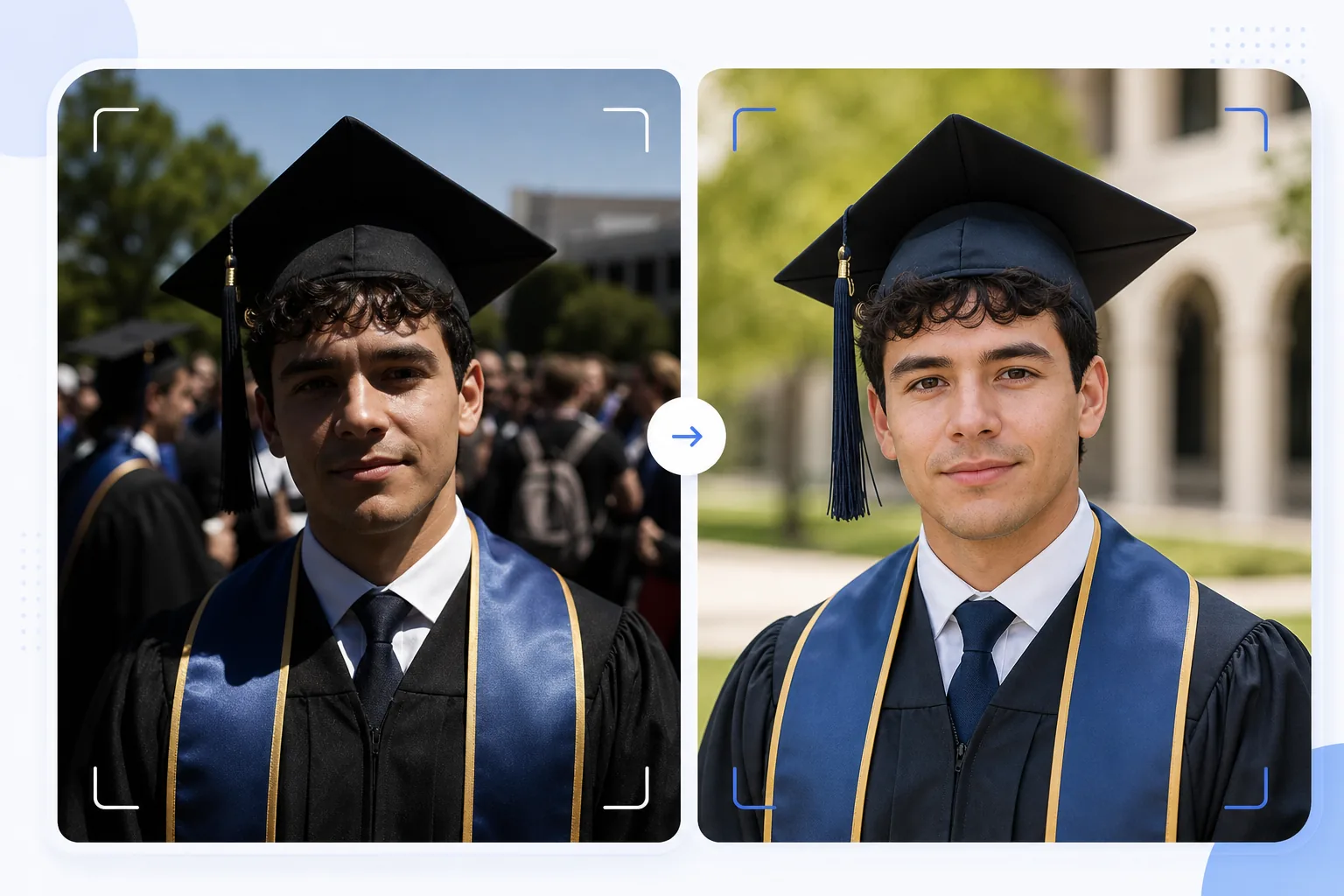
Turn candid graduation snapshots into frame-worthy portraits. This template corrects the harsh outdoor lighting common at graduation ceremonies, removes photobombers and crowd clutter from behind the graduate, enhances cap and gown colors, and sharpens the image for printing at large sizes for walls and mantels.
Try this template freePersonal template preview
What this template does
Transforms quick graduation day snapshots into polished portraits suitable for framing, announcements, and social media sharing. Graduation ceremonies are shot in challenging conditions — harsh midday sun creates raccoon-eye shadows under the cap brim, crowd backgrounds are chaotic, and gown colors appear washed out in direct sunlight. AI Enhance corrects the exposure to fill in under-cap shadows, restores rich color to gowns and stoles, and sharpens facial detail that gets soft in rushed crowd shots. Magic Eraser removes photobombers, crowd members visible behind the graduate, distracting signage, and other ceremony clutter to isolate the graduate against a cleaner backdrop.
Template settings
| Shadow recovery | Under-cap shadow fill (brightens face without blowing highlights) |
| Gown color enhancement | Fabric color restoration for black, navy, cardinal, and gold gowns |
| Skin smoothing | Light blemish reduction while preserving natural skin texture |
| Background cleanup | Remove photobombers and crowd members behind the graduate |
| Output resolution | 5000px long edge (print-ready at 300 DPI up to 16×12 inches) |
| Sharpening | Portrait-optimized sharpening (face detail + gown fabric texture) |
How to use this template
Upload your graduation photo
Upload any graduation ceremony photo — posed portrait, walking-across-the-stage shot, cap toss, or candid celebration moment. The template handles photos from smartphones and DSLRs taken in any lighting condition from bright outdoor sun to dim indoor auditoriums.
Fix lighting and color
AI Enhance corrects the harsh shadows cast by the mortarboard cap, which typically darken the graduate's eyes and upper face. Gown and stole colors are restored to their true rich tones — black gowns regain depth instead of looking dark gray, and honor stoles show their full color saturation.
Remove distractions
Magic Eraser removes crowd members, other graduates, folding chairs, and signage visible behind the subject. The AI reconstructs the background with a clean version of the venue — grass, building facade, or curtain — creating a portrait-like composition from a crowd scene.
Export for print and sharing
Download at 5000px long edge for framed prints up to 16×12 inches at 300 DPI, or at 2000px for social media and digital announcements. The color profile is set to sRGB for screen display or Adobe RGB for professional printing.
Pro tips for best results
- ✓If you can plan ahead, take the formal portrait just after the ceremony in a shaded area rather than in direct sun. Shade eliminates the harsh cap shadows that are the most challenging issue to correct. The template can fix sun shadows, but shade produces the most natural result.
- ✓Capture both a traditional posed portrait and a candid celebration moment (hugging family, tossing the cap). The template enhances both styles, and having a polished version of each gives you options for framed prints versus social media posts.
- ✓For group shots with family, position the graduate slightly forward of the group. This creates natural depth separation that helps Magic Eraser isolate and remove background distractions without affecting the family members.
Common questions
Can this fix blurry graduation photos?
+
AI Enhance can sharpen photos with mild softness from slight hand shake or autofocus missing slightly. However, significantly blurry photos from heavy motion blur (like a walking-across-stage shot taken from a distance) cannot be fully recovered — the template enhances detail but cannot create sharpness that was never captured.
What about indoor ceremony photos?
+
Indoor graduation photos with auditorium lighting (warm yellow or mixed fluorescent) are corrected for color temperature. The template adjusts white balance so skin tones look natural and gown colors appear true. Low-light noise from high ISO settings is reduced while preserving facial detail.
Can I remove the background entirely?
+
Yes. You can use the background cleanup to remove all background elements and replace with a solid color or gradient for a studio-portrait look. This works well when the original ceremony background is too cluttered for selective removal.
Frame-worthy graduation portraits from ceremony snapshots
Upload your graduation day photos and get print-ready, enhanced portraits with clean backgrounds and vivid cap-and-gown colors.
Try it freeRelated templates
More personal templates for your workflow.
Create compliant ID photos for visas, driver's licenses, and national IDs with proper background color, head sizing, and facial expression requirements.
Enhance concert and event photos with low-light noise reduction, stage lighting color correction, crowd distraction removal, and detail recovery from dark venue shots.
Create beautiful newborn announcement card photos with soft backgrounds, gentle color grading, hospital clutter removal, and print-ready dimensions for mailing.
Prepare family and portrait photos for holiday greeting cards with festive backgrounds, warm color grading, snow effects, and standard card dimensions for printing.
Restore and enhance memorial tribute photos with gentle retouching, background simplification, warm respectful color grading, and print-ready dimensions for services.
Transform shelter and rescue pet photos with background replacement, lighting correction, and fur detail enhancement to help animals find homes faster.