
Newborn Announcement Card
Turn hospital and first-day photos into beautiful announcement card images. This template removes hospital background clutter, applies a soft warm color grade, isolates the newborn against clean or pastel backgrounds, and outputs print-ready images at standard card dimensions for physical mailing and digital sharing.
Try this template freePersonal template preview
What this template does
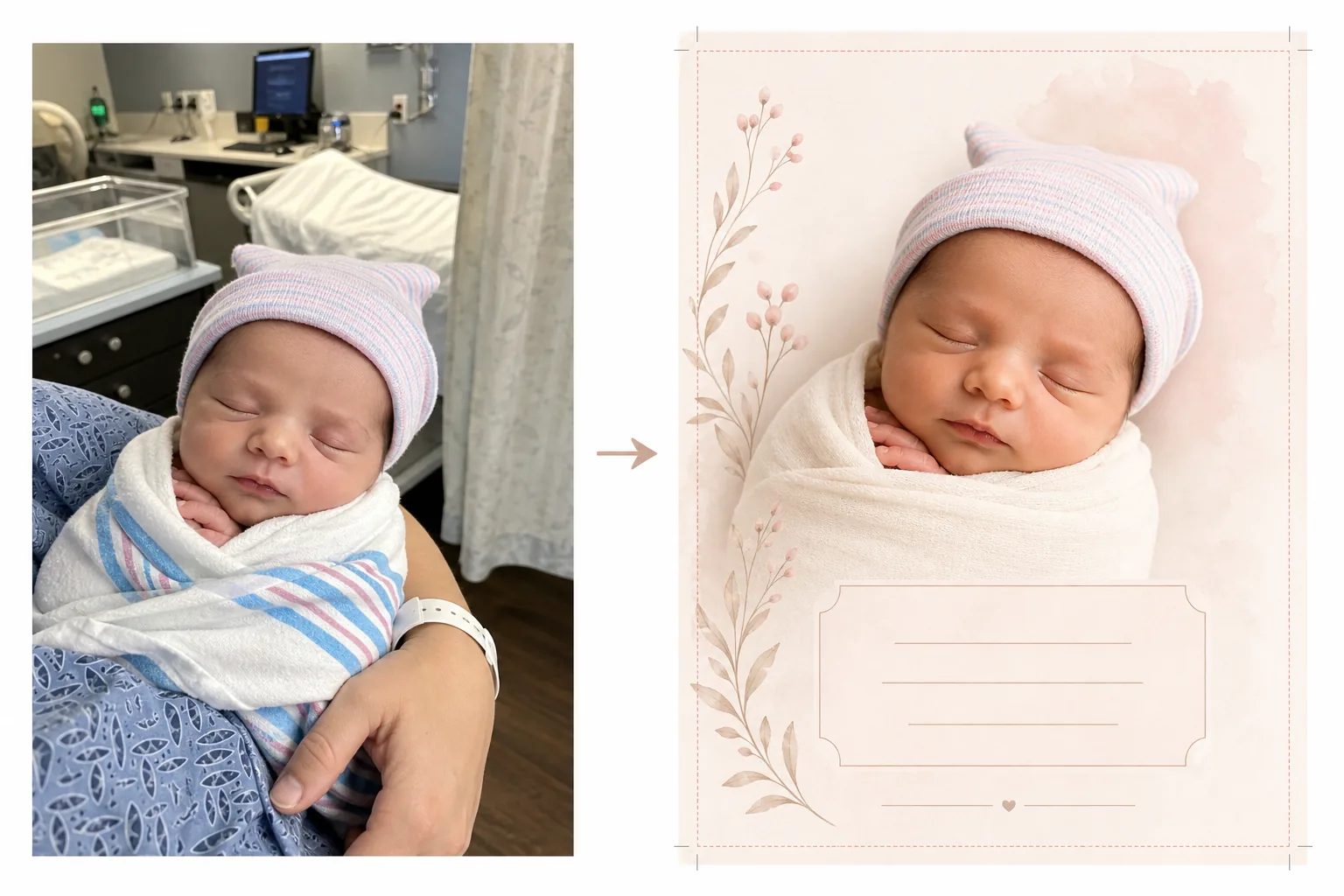
Prepares newborn photos for birth announcement cards by transforming hospital room snapshots into clean, tender images suitable for both printed cards and digital announcements. Hospital rooms have medical equipment, fluorescent lighting, and institutional backgrounds that detract from the intimacy of a newborn photo. Background Eraser isolates the baby and replaces the hospital setting with a soft, clean background in white, cream, or pastel tones. AI Enhance corrects the cold fluorescent hospital lighting to warm, gentle tones that make skin look healthy and natural. The result is an announcement-worthy photo that focuses entirely on the new arrival without any visible medical context.
Template settings
| Background | Soft white, cream, blush, or sage (announcement card appropriate) |
| Color grade | Warm gentle tones (corrects hospital fluorescent to natural warmth) |
| Skin tone | Natural newborn skin enhancement (soft, warm, healthy) |
| Card dimensions | 5×7 in, 4×6 in, or A6 (standard announcement card sizes) |
| Output resolution | 300 DPI at card size (print-shop and home printer ready) |
How to use this template
Upload the newborn photo
Upload a photo of the newborn — in the hospital bassinet, in a parent's arms, or swaddled in a blanket. The template handles various compositions including close-up face shots, full-body swaddled poses, and parent-and-baby portraits. Hospital gowns, monitors, and wristbands visible on the parent are cleaned up automatically.
Background and color transformation
Background Eraser removes the hospital room and replaces it with a soft, clean background in your chosen color. The cold fluorescent lighting is corrected to warm, natural tones. Skin is gently enhanced to look healthy and natural with the soft warm glow associated with newborn photography.
Card formatting
The image is formatted to your chosen card dimensions with proper bleed margins for professional printing. Space is allocated for text overlays — name, date, weight, and length — positioned according to standard announcement card layouts with the baby photo as the visual centerpiece.
Export for printing and sharing
Download at 300 DPI in your chosen card size for printing at a professional print shop, online card service, or home printer. A web-optimized version is also provided for email announcements and social media sharing.
Pro tips for best results
- ✓For the most usable announcement card photo, capture a close-up of the newborn's face while they are sleeping. Sleeping babies have relaxed, serene expressions that photograph beautifully and work well as the focal point of a card layout.
- ✓Wrap the baby in a white or light-colored swaddle before photographing. This creates a clean visual boundary between baby and background that helps Background Eraser produce the cleanest possible edge, especially around tiny fingers and fine hair.
- ✓If one parent's hands or arms are visible holding the baby, that is fine — the template enhances parent skin tones too. Hospital wristbands on the parent's wrist are removed automatically for a cleaner look.
- ✓Take multiple photos and choose the one with the best expression and hand position. Newborns move unpredictably — capturing several options ensures you have a frame where tiny fingers, mouth, and eyes look their most photogenic.
Common questions
Can this remove hospital equipment from the background?
+
Yes. The template is designed specifically for this purpose — it removes hospital bassinets, monitors, IV stands, curtains, and fluorescent ceiling lights, replacing them with a clean announcement-appropriate background. The baby and any holding parent are isolated from the medical environment.
What card sizes are available?
+
Standard announcement card sizes are supported: 5×7 inches (most popular for mailed announcements), 4×6 inches (postcard style), and A6 (international standard). The output includes proper bleed margins for professional printing.
Can I add text to the card?
+
The template prepares the photo with space allocated for text overlays but does not add text directly. Use the exported image in Canva, Shutterfly, Minted, or any card design service to add the baby's name, date of birth, weight, length, and a personal message.
Announce your new arrival with a beautiful photo
Upload hospital or first-day photos and get soft, warm, print-ready images perfect for birth announcement cards.
Try it freeRelated templates
More personal templates for your workflow.
Create compliant ID photos for visas, driver's licenses, and national IDs with proper background color, head sizing, and facial expression requirements.
Enhance graduation photos with background cleanup, cap and gown color correction, blemish removal, and print-ready sharpening for frames and announcements.
Enhance concert and event photos with low-light noise reduction, stage lighting color correction, crowd distraction removal, and detail recovery from dark venue shots.
Prepare family and portrait photos for holiday greeting cards with festive backgrounds, warm color grading, snow effects, and standard card dimensions for printing.
Restore and enhance memorial tribute photos with gentle retouching, background simplification, warm respectful color grading, and print-ready dimensions for services.
Transform shelter and rescue pet photos with background replacement, lighting correction, and fur detail enhancement to help animals find homes faster.