
ID Photo Template
Generate compliant ID photos for visas, driver's licenses, national ID cards, and employee badges from any selfie or portrait. This template replaces the background with the required solid color, adjusts head size and positioning to meet official specifications, corrects lighting for even facial illumination, and outputs at the exact print dimensions required.
Try this template freePersonal template preview
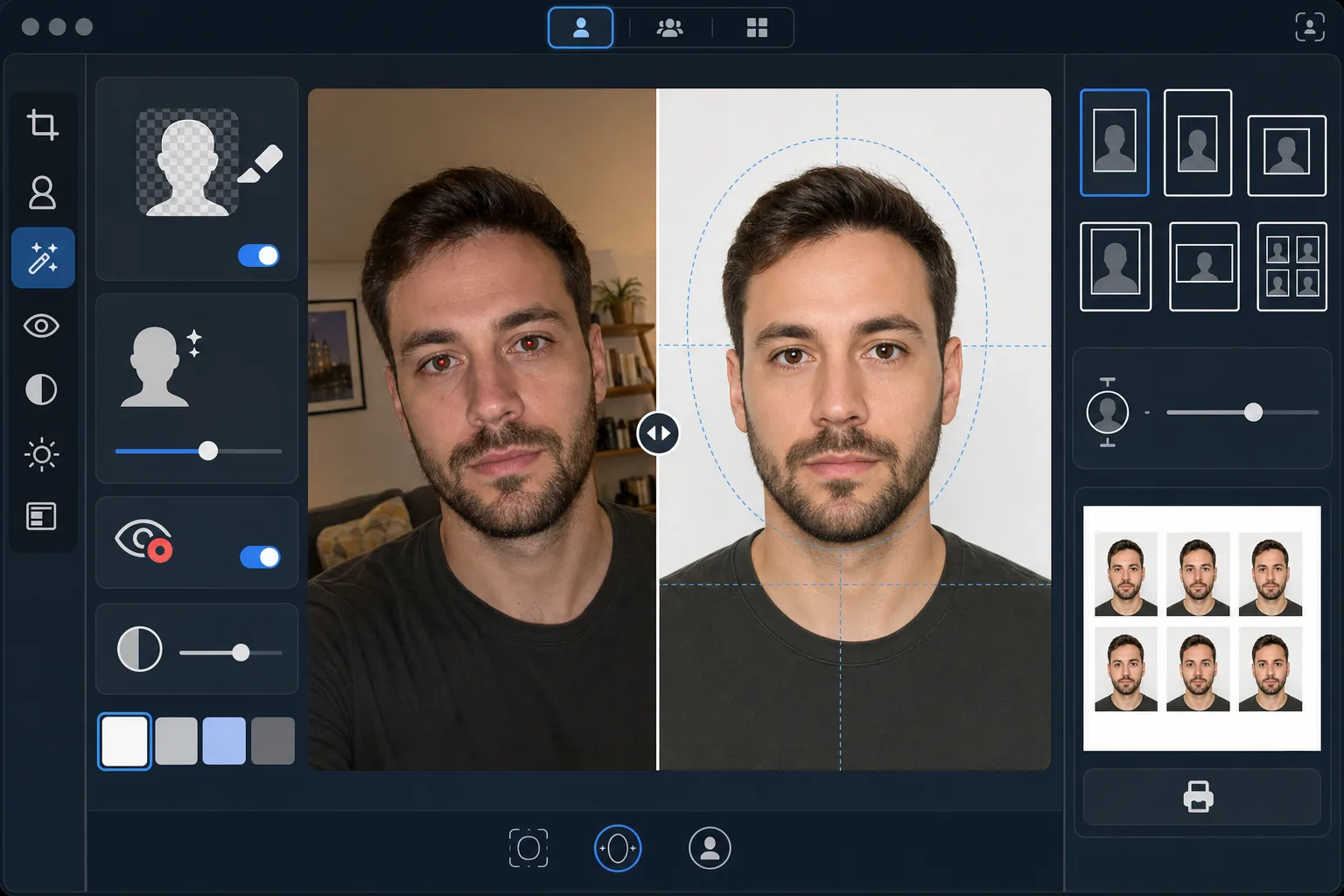
What this template does
Converts any portrait photo into a government-compliant ID photo. Different documents require different specifications — US passports need a white background with head height between 25–35mm on a 2×2 inch print, while Schengen visas require a light gray or white background at 35×45mm. This template handles the most common ID photo standards automatically. Background Eraser removes the original background and replaces it with the required solid color. AI Enhance corrects uneven lighting, removes red-eye from flash, and ensures the face is evenly illuminated with no harsh shadows on one side, which is a common rejection reason at government offices.
Template settings
| Background color | White (#FFFFFF) or light gray (#E5E5E5) — selectable by ID type |
| Head sizing | Auto-fit head height to 70–80% of frame (adjustable per standard) |
| Print dimensions | 2×2 in (US), 35×45 mm (EU/Schengen), 33×48 mm (UK) — selectable |
| Lighting correction | Even facial illumination — no shadows on either side |
| Output resolution | 600 DPI for photo printing (kiosk and home printer compatible) |
How to use this template
Upload a front-facing photo
Upload a clear, front-facing portrait taken at eye level. The photo should show your full face and tops of shoulders with a neutral expression and both eyes open. Remove glasses, hats, and headwear (unless worn for religious reasons) before photographing.
Select your ID type
Choose the document type — US passport, EU/Schengen visa, UK passport, driver's license, or national ID card. The template automatically adjusts background color, head sizing, print dimensions, and aspect ratio to match the official requirements for your selected document.
Background and lighting correction
Background Eraser removes the original background and replaces it with the required solid color. AI Enhance corrects uneven lighting so both sides of the face are evenly illuminated and removes any color cast from artificial lighting. Red-eye from flash is automatically corrected.
Export for printing
Download at 600 DPI in the exact print dimensions required for your document type. The output is formatted for standard 4×6 inch photo paper with multiple ID photos tiled on a single sheet for printing at home, at a pharmacy photo kiosk, or at a professional print shop.
Pro tips for best results
- ✓Take your photo against a plain wall in a well-lit room facing a window. While the template replaces the background, starting with even natural lighting on your face produces a better result than correcting harsh shadows from artificial light.
- ✓Maintain a neutral expression with mouth closed and both eyes open. Government ID photo requirements consistently reject photos with smiles, squinted eyes, or open mouths — these rules are enforced by automated photo verification systems at many government offices.
- ✓Ensure no hair falls across your face or obscures your eyebrows. The face must be fully visible from the bottom of the chin to the top of the forehead. Pin back any hair that crosses the face before taking the photo.
- ✓Wear a top that contrasts with the background color. If the background is white, avoid white clothing — a dark or colored top ensures clean edge separation and prevents your shoulders from blending into the background.
Common questions
Will this be accepted at government offices?
+
The template follows official specifications for each document type (ICAO 9303 for international travel documents, specific national requirements for domestic IDs). However, acceptance ultimately depends on the reviewing official. The template ensures dimensions, background color, head sizing, and lighting meet published requirements.
Can I wear glasses in the photo?
+
Most countries (including the US since 2016) now require that glasses be removed for passport and visa photos. The template does not digitally remove glasses — remove them before taking the source photo. Religious headwear is permitted in most jurisdictions.
How do I print the output?
+
The template outputs a 4×6 inch sheet with multiple ID photos tiled at the correct size. Print at any pharmacy photo kiosk (CVS, Walgreens, Boots), at home on photo paper at 600 DPI, or at a professional print shop. Use glossy or matte photo paper — not regular printer paper.
Get compliant ID photos without leaving home
Upload a selfie and get government-compliant ID photos ready for printing — for passports, visas, driver's licenses, and more.
Try it freeRelated templates
More personal templates for your workflow.
Enhance graduation photos with background cleanup, cap and gown color correction, blemish removal, and print-ready sharpening for frames and announcements.
Enhance concert and event photos with low-light noise reduction, stage lighting color correction, crowd distraction removal, and detail recovery from dark venue shots.
Create beautiful newborn announcement card photos with soft backgrounds, gentle color grading, hospital clutter removal, and print-ready dimensions for mailing.
Prepare family and portrait photos for holiday greeting cards with festive backgrounds, warm color grading, snow effects, and standard card dimensions for printing.
Restore and enhance memorial tribute photos with gentle retouching, background simplification, warm respectful color grading, and print-ready dimensions for services.
Transform shelter and rescue pet photos with background replacement, lighting correction, and fur detail enhancement to help animals find homes faster.