
Concert & Event Photo
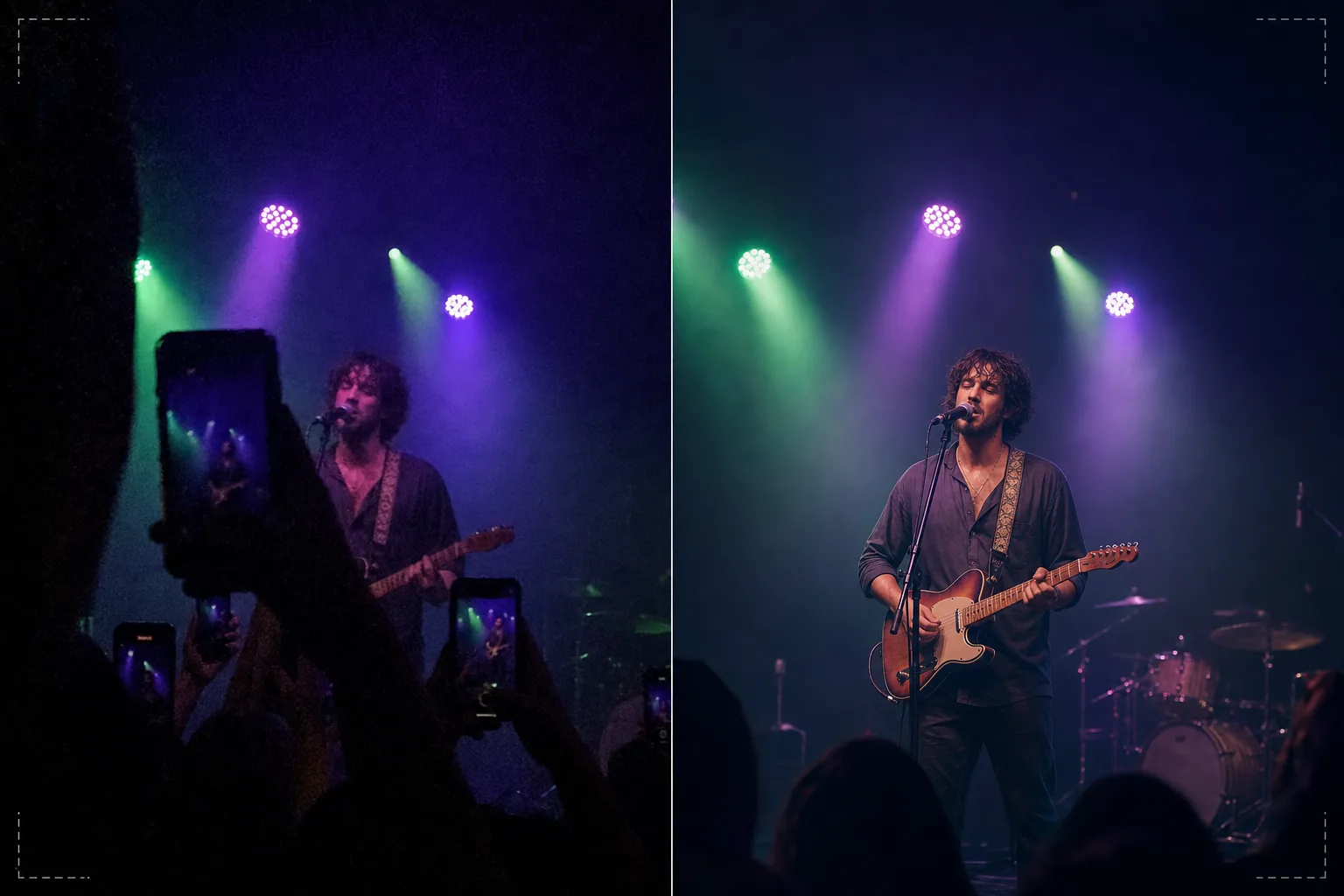
Rescue dark, noisy concert and event photos into shareable memories. This template dramatically reduces low-light noise, recovers detail from underexposed shots, corrects aggressive stage lighting color casts, removes arms and phones blocking your view, and sharpens the performer or event subject.
Try this template freePersonal template preview
What this template does
Salvages the challenging photos taken at concerts, festivals, sporting events, and indoor performances where lighting conditions defeat smartphone cameras. Concert photos are the most technically difficult shots people take regularly — extreme low light forces high ISO noise, mixed colored stage lighting creates bizarre color casts, and the distance to the stage means faces and details are small and soft. AI Enhance applies intelligent noise reduction that removes the grain pattern while recovering the underlying detail, corrects the purple, green, and red color casts from stage lighting to reveal natural skin and instrument tones, and sharpens the performer to bring out facial expressions and instrument details. Magic Eraser removes raised arms, phones, and heads of other audience members blocking your view.
Template settings
| Noise reduction | AI denoise (recovers detail from high-ISO grain up to ISO 12800) |
| Color correction | Stage lighting cast removal (purple, green, red, blue neutralized) |
| Shadow recovery | Lift underexposed areas by up to 3 stops |
| Crowd removal | Remove raised arms, phones, and obstructing heads |
| Subject sharpening | Selective performer/stage sharpening (preserves bokeh atmosphere) |
How to use this template
Upload your concert photo
Upload phone or camera photos from concerts, festivals, theater performances, comedy shows, or sporting events. The template handles the extreme conditions these venues present — near-dark exposures, heavily colored stage lights, motion blur from moving performers, and obstructed views from crowd members.
Noise reduction and detail recovery
AI Enhance removes high-ISO noise grain while preserving the underlying image detail. Underexposed shadows are lifted to reveal faces, instruments, and stage elements that were nearly invisible in the original shot. The noise reduction is calibrated to maintain the atmospheric quality of the venue rather than making the image look artificially smooth.
Color and lighting correction
Aggressive stage lighting color casts are corrected so skin tones, clothing, and instruments appear in recognizable colors. You can choose to fully neutralize the stage lighting for a natural look, or partially correct to retain some of the atmospheric colored lighting while reducing the most extreme casts.
Export your enhanced memories
Download the enhanced photo for social media sharing, personal archives, or printing. The output preserves the atmospheric quality of the live event while making the image clear enough that faces, expressions, and moments are visible and meaningful as keepsakes.
Pro tips for best results
- ✓Shoot during moments of bright stage lighting — spotlights, pyrotechnics, screen transitions — rather than during dark atmospheric segments. The template can recover significant shadow detail, but photos captured during the brightest moments have the most underlying data to work with.
- ✓Use burst mode when photographing moving performers. Motion blur from a singer's hand gesture or a guitarist's strumming arm cannot be removed after the fact, but one frame in a burst of ten may catch a sharp moment that the template can then enhance.
- ✓Hold your phone with both hands and brace your elbows against your body to minimize shake. Camera shake compounds the difficulty of low-light concert photography. A steadier source photo gives the noise reduction algorithm cleaner data and produces a sharper final image.
Common questions
Can this fix photos that are almost completely dark?
+
The template can recover detail from shots that are 2–3 stops underexposed — images where you can barely see the subject. Beyond 3 stops under, the sensor data is mostly noise and the recovered image will show significant artifacts. The brighter the original capture, the better the result.
What about video concert footage?
+
Extract the best still frames from your concert video and process them individually. Video frames are lower resolution than stills but benefit significantly from the noise reduction and color correction, producing shareable images from footage that was too noisy as video.
Will removing crowd obstructions look natural?
+
Removing raised phones, arms, and heads from the crowd in front of you works well when the obstruction covers a small portion of the frame. The AI reconstructs the stage and background behind the removed elements. Removing large obstructions that cover the majority of the subject is less effective.
Turn dark concert shots into vivid memories
Upload your event photos and recover the moments that your camera struggled to capture in challenging venue lighting.
Try it freeRelated templates
More personal templates for your workflow.
Create compliant ID photos for visas, driver's licenses, and national IDs with proper background color, head sizing, and facial expression requirements.
Enhance graduation photos with background cleanup, cap and gown color correction, blemish removal, and print-ready sharpening for frames and announcements.
Create beautiful newborn announcement card photos with soft backgrounds, gentle color grading, hospital clutter removal, and print-ready dimensions for mailing.
Prepare family and portrait photos for holiday greeting cards with festive backgrounds, warm color grading, snow effects, and standard card dimensions for printing.
Restore and enhance memorial tribute photos with gentle retouching, background simplification, warm respectful color grading, and print-ready dimensions for services.
Transform shelter and rescue pet photos with background replacement, lighting correction, and fur detail enhancement to help animals find homes faster.