
Natural Skin Retouching
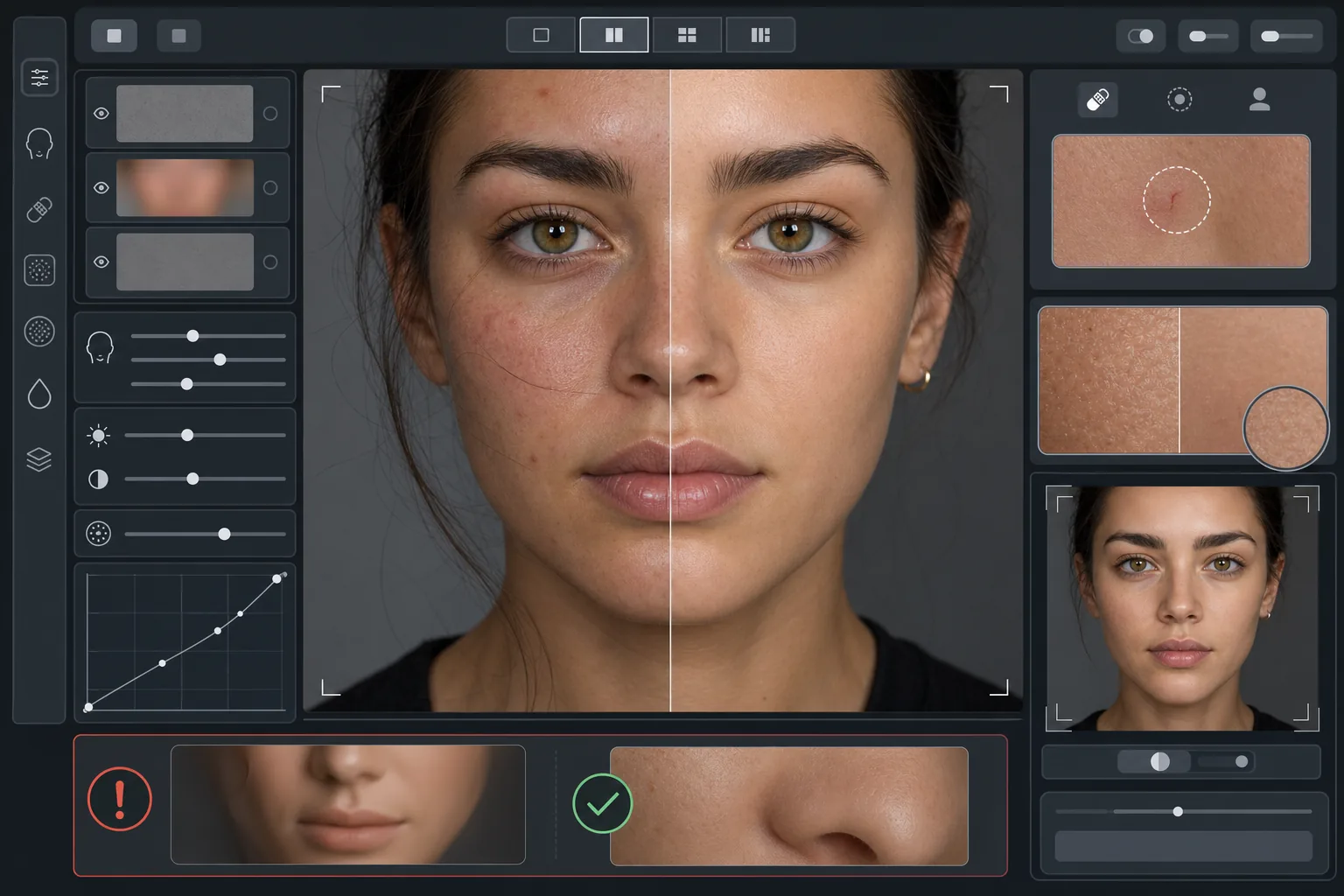
Enhance portraits without the plastic look. This template removes temporary blemishes, evens skin tone, and smooths lighting irregularities while deliberately preserving the pores, fine lines, and natural texture that make skin look real. The result is a portrait where the subject looks like their best self on their best day — not an AI-generated mannequin.
Try this template freePortrait template preview
What this template does
Applies frequency-aware skin retouching that separates texture from tone. AI Enhance removes temporary imperfections (blemishes, redness, undereye circles) while preserving the fine skin texture — pores, peach fuzz, and natural variation — that the eye reads as authentic. Magic Eraser handles specific spot removal where AI enhancement is too broad, like removing a single scratch or an insect bite without affecting the surrounding skin. The overall effect is even, healthy-looking skin that passes the zoom test.
Template settings
| Retouching intensity | Natural — targets blemishes and redness, preserves texture |
| Pore preservation | Full — maintains all natural skin texture at pixel level |
| Tone evening | Moderate — reduces blotchiness and redness without flattening color variation |
| Under-eye correction | Subtle — lightens dark circles without eliminating natural shadow |
| Lighting smoothing | Fills harsh shadows and reduces hot spots from direct flash |
| Output resolution | Matches input (preserves full detail for crop and zoom) |
How to use this template
Upload a portrait photo
Use a well-lit portrait where the face is in sharp focus. The template works best when natural skin texture is visible in the original — soft-focus or heavily compressed images provide less texture for the AI to preserve.
Apply natural retouching
AI Enhance identifies temporary blemishes, uneven redness, and tonal irregularities and corrects them while keeping the underlying skin texture completely intact. Pores, fine lines, and natural color variation remain visible — only the imperfections change.
Spot-correct specific areas
Use Magic Eraser for any remaining individual marks you want to remove — a healing scratch, a temporary rash, or a stray hair across the face. Each removal blends with the natural skin texture around it.
Review at full zoom and export
Zoom to 100% to verify skin texture is intact — pores should be visible and natural. If any area looks too smooth, reduce retouching intensity and reprocess. Export at full resolution to preserve the natural detail.
Pro tips for best results
- ✓Start with the lowest retouching intensity and increase only if needed — it is easier to add smoothing than to recover texture that has been processed away.
- ✓For subjects with acne or rosacea, the template removes individual blemishes without altering the underlying skin tone — the result looks like a clear skin day, not a different person.
- ✓Avoid stacking this template with phone camera beauty filters — the built-in smoothing on many phone cameras already reduces texture, and double-processing creates the plastic look this template is designed to avoid.
- ✓Shoot in RAW format if possible and convert to JPEG before uploading — RAW captures more skin texture data that the AI can preserve during retouching.
Common questions
How is this different from beauty filters that smooth skin?
+
Beauty filters apply uniform blur that erases pores, fine lines, and natural texture — creating the unmistakable plastic look. This template uses frequency-aware processing that separates texture from tone, removing blemishes from the tonal layer while leaving the texture layer untouched. The result looks like real skin, not a rendered surface.
Will this change the shape of facial features?
+
No. The template only affects skin surface appearance — tone, blemishes, and lighting evenness. It never reshapes the nose, jaw, eyes, or any facial structure. The subject looks exactly like themselves, just with clearer, more evenly lit skin.
Can I use this for professional headshots and portfolio work?
+
Yes. The natural retouching standard meets professional expectations for corporate headshots, acting portfolios, dating profiles, and social media where authenticity matters. The subject will look like their photo in person — which is the entire point of natural retouching.
Better skin, still you
Upload a portrait and get natural, texture-preserving skin retouching in seconds. No plastic look, no uncanny smoothing — just you on your best day.
Try it freeRelated templates
More portrait templates for your workflow.
Age-appropriate school portrait retouching template. Natural blemish removal, consistent backgrounds, and yearbook-standard output with batch processing for entire classes.
Studio-quality pet portrait template. Handles fur edges, removes leashes and handlers, replaces backgrounds, and sharpens eyes for dogs, cats, and other animals.
Enhance newborn and baby photos with soft warm tones, gentle skin smoothing, prop and distraction removal, and print-ready sizing for announcements and wall art.
Retouch maternity photos with gentle skin smoothing, soft glow lighting, background simplification, and warm color grading for a timeless pregnancy portrait look.
Clean up family portraits by removing background distractions, fixing uneven exposure, smoothing skin naturally, and ensuring everyone looks their best in the same frame.