
School Portrait Retouching
Give every student a portrait they feel good about while keeping the look natural and age-appropriate. This template handles the common issues in school photography — temporary blemishes, uneven lighting across a session, and inconsistent backgrounds — and produces yearbook-ready images with a uniform, professional quality across every student in a class.
Try this template freePortrait template preview
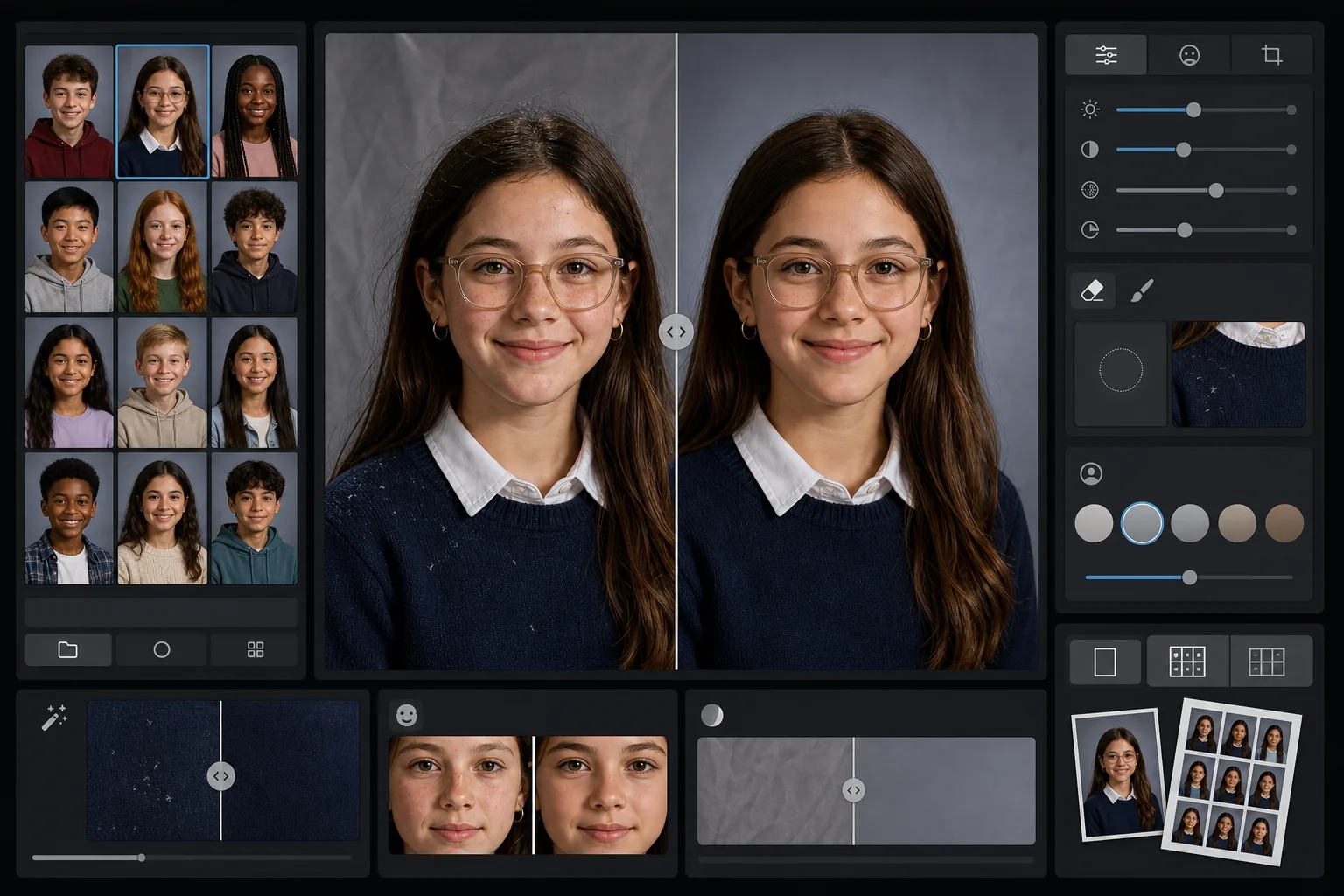
What this template does
Applies gentle, age-appropriate retouching to school portraits that smooths temporary blemishes while preserving each student's natural appearance. AI Enhance corrects the uneven exposure and color shifts that happen when photographing dozens of students under the same lighting setup across a session. Magic Eraser removes stray hairs on clothing, crooked collar edges, and background wrinkles on portable backdrops.
Template settings
| Retouching level | Light — removes temporary blemishes only, preserves freckles and natural features |
| Output size | 1200×1500px (4:5 standard portrait, 300 DPI at wallet size) |
| Background normalization | Matches backdrop tone across all images in a batch |
| Exposure correction | Auto — compensates for lighting drift across a shooting session |
| Color consistency | Uniform white balance across all processed portraits |
| Stray detail cleanup | Removes flyaway hairs on shoulders, lint, and backdrop wrinkles |
How to use this template
Upload the class portraits
Upload one portrait or an entire class batch. The template handles individual images or groups, applying the same retouching standard across all photos for a consistent yearbook section.
Apply age-appropriate retouching
AI Enhance gently smooths temporary blemishes like a breakout or a scratch while keeping every student looking like themselves. Freckles, birthmarks, braces, and glasses are always preserved — the goal is a polished version of their real appearance.
Normalize exposure and background
Lighting conditions shift throughout a portrait session as setups drift. The template corrects exposure and white balance so every student appears consistently lit, and backdrop tone matches across the entire batch.
Clean up and export
Magic Eraser removes small distractions — lint on a dark sweater, a stray hair across the forehead, a wrinkle in the portable backdrop. Export at yearbook-standard resolution for print or lower-res JPEG for the school's online gallery.
Pro tips for best results
- ✓Process the entire class batch together rather than one at a time — the template uses the group to calibrate consistent exposure and color across all portraits.
- ✓For students wearing glasses, the original photo should have the student tilt their chin down slightly to minimize glare — AI enhancement works best when the eyes are visible behind the lenses.
- ✓Run a test batch of 5-10 portraits before processing an entire school to confirm the retouching level meets your yearbook committee's standards.
- ✓Keep the original unretouched files alongside the processed versions — some parents prefer the completely unedited photo for personal use.
Common questions
Is the retouching appropriate for children and teenagers?
+
Yes. The template is specifically designed for school-age subjects. It only removes temporary blemishes like a breakout on picture day — it never reshapes features, changes skin tone, or applies the kind of smoothing used in adult beauty retouching. Every student looks like themselves.
Can I process an entire class or school at once?
+
Yes. Upload up to hundreds of portraits in a single batch. The template applies identical retouching standards and normalizes exposure, color, and background consistency across every image so the yearbook section looks uniform.
Will this remove braces, glasses, or hearing aids?
+
No. The template is designed to preserve all permanent and semi-permanent features including braces, glasses, hearing aids, and medical devices. It only addresses temporary surface blemishes and environmental distractions like lint and backdrop wrinkles.
Deliver yearbook-ready portraits in minutes
Upload school portraits individually or by the class and get consistent, naturally retouched images ready for print. Every student looks their best.
Try it freeRelated templates
More portrait templates for your workflow.
Studio-quality pet portrait template. Handles fur edges, removes leashes and handlers, replaces backgrounds, and sharpens eyes for dogs, cats, and other animals.
Natural skin retouching template that removes blemishes while preserving pores and texture. Even lighting, no plastic look — just better skin on camera.
Enhance newborn and baby photos with soft warm tones, gentle skin smoothing, prop and distraction removal, and print-ready sizing for announcements and wall art.
Retouch maternity photos with gentle skin smoothing, soft glow lighting, background simplification, and warm color grading for a timeless pregnancy portrait look.
Clean up family portraits by removing background distractions, fixing uneven exposure, smoothing skin naturally, and ensuring everyone looks their best in the same frame.