
Maternity Photo Retouching
Create timeless maternity portraits with gentle retouching that celebrates the beauty of pregnancy. This template applies soft skin smoothing while preserving natural texture, adds a warm luminous glow, simplifies backgrounds to keep focus on the expectant mother, and enhances fabric draping and belly contours with subtle light shaping.
Try this template freePortrait template preview
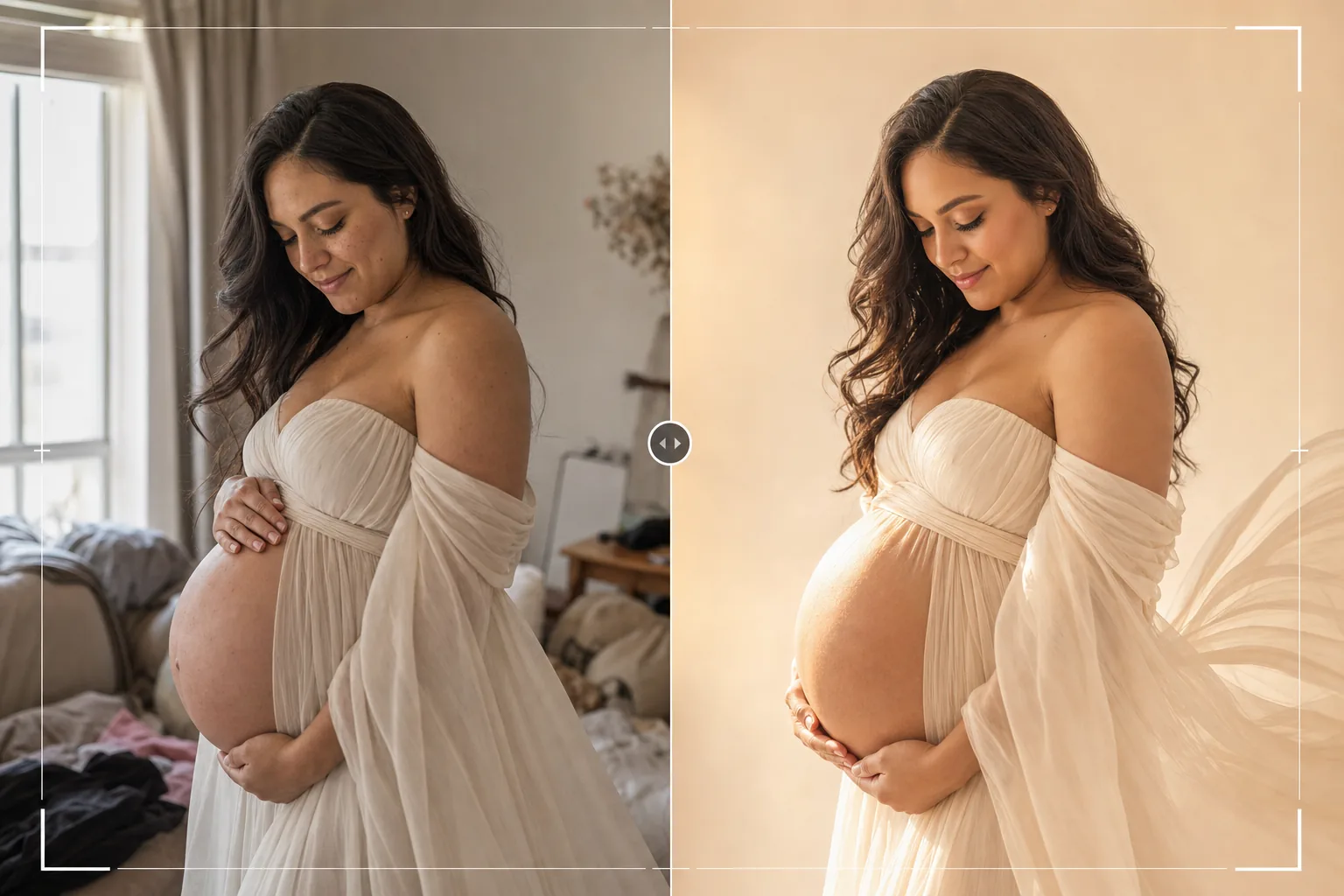
What this template does
Applies professional-grade maternity portrait retouching that follows the soft, luminous aesthetic popular in maternity photography. Skin is smoothed gently to reduce stretch marks and blemishes while preserving the natural glow that pregnancy brings — the result avoids the plastic, over-retouched look. AI Enhance adds a soft warm fill light that wraps around the belly contour and highlights the fabric draping of maternity gowns and wraps. Magic Eraser removes background distractions — furniture, clutter, other people — to create a clean, timeless composition that focuses entirely on the mother-to-be.
Template settings
| Skin smoothing | Gentle frequency separation (preserves texture, reduces marks) |
| Glow effect | Warm luminous wrap light on skin highlights |
| Color grade | Warm earth tones (golden skin, muted background) |
| Background | Simplify and soften (gentle blur) or replace with neutral tone |
| Output resolution | 5000px long edge (print-ready at 300 DPI up to 16×12) |
How to use this template
Upload your maternity photo
Upload a maternity portrait — professional studio shot, outdoor golden hour session, or home setup with window light. The template works best with photos taken between 30–38 weeks when the belly is prominent. Both posed studio portraits and candid lifestyle moments are supported.
Skin and glow enhancement
AI Enhance applies gentle skin smoothing using a frequency separation approach that reduces stretch marks, veins, and temporary blemishes while keeping natural skin texture visible. A warm glow is added to skin highlights, creating the luminous, radiant look associated with professional maternity photography.
Background simplification
Magic Eraser removes distracting elements from the background — furniture, clutter, electrical outlets, and other people. The background is softened and desaturated to create separation between the subject and the environment, drawing all attention to the mother.
Export for print and albums
Download at 5000px long edge for large prints, maternity album spreads, or nursery wall art. The warm earth tone color grade prints beautifully on both glossy and matte photo paper and coordinates with neutral nursery color schemes.
Pro tips for best results
- ✓Golden hour light (the hour before sunset) creates the most flattering starting point for maternity portraits. Side lighting from a low sun angle naturally sculpts the belly contour and creates the warm glow that the template enhances rather than artificially creates.
- ✓Flowing fabrics — chiffon, silk wraps, and long dresses — look dramatically better after enhancement because the template sharpens fabric texture and enhances light catching on folds and drapes. Tight-fitting clothes work too but do not benefit as much from fabric texture enhancement.
- ✓Include silhouette shots in your session alongside direct portraits. The template handles backlit silhouettes by enhancing the rim light around the belly profile while keeping the body as a dramatic dark shape against a bright background.
- ✓For partner or family maternity photos, position the expectant mother as the visual focus with partners and siblings slightly behind or to the side. This natural depth separation helps the template enhance and focus on the mother while keeping family members sharp.
Common questions
How much skin smoothing is applied?
+
The smoothing is calibrated to look natural — it reduces the appearance of stretch marks, veins, and blemishes by about 60–70% while preserving visible skin texture, pores, and the natural pregnancy glow. The result looks like beautiful skin, not airbrushed skin.
Can this enhance a smartphone maternity photo?
+
Yes. Smartphone photos taken near a window or outdoors produce excellent results. The template corrects the flat lighting typical of smartphone cameras by adding directional warmth that simulates professional studio lighting on the belly and face.
Is this appropriate for all body types?
+
The template enhances lighting and skin quality without altering body shape or proportions. No slimming, reshaping, or body modification is applied. The goal is to make every expectant mother look radiant as she is.
Celebrate pregnancy with portraits that glow
Upload your maternity photos and get gently retouched, luminous portraits with soft skin, warm tones, and clean backgrounds.
Try it freeRelated templates
More portrait templates for your workflow.
Age-appropriate school portrait retouching template. Natural blemish removal, consistent backgrounds, and yearbook-standard output with batch processing for entire classes.
Studio-quality pet portrait template. Handles fur edges, removes leashes and handlers, replaces backgrounds, and sharpens eyes for dogs, cats, and other animals.
Natural skin retouching template that removes blemishes while preserving pores and texture. Even lighting, no plastic look — just better skin on camera.
Enhance newborn and baby photos with soft warm tones, gentle skin smoothing, prop and distraction removal, and print-ready sizing for announcements and wall art.
Clean up family portraits by removing background distractions, fixing uneven exposure, smoothing skin naturally, and ensuring everyone looks their best in the same frame.