
Family Portrait Cleanup
Get the perfect family photo without needing a hundred takes. This template removes background distractions, corrects uneven lighting across the group, reduces blemishes naturally on every face, and cleans up the small imperfections that prevent a good group shot from being a great one.
Try this template freePortrait template preview
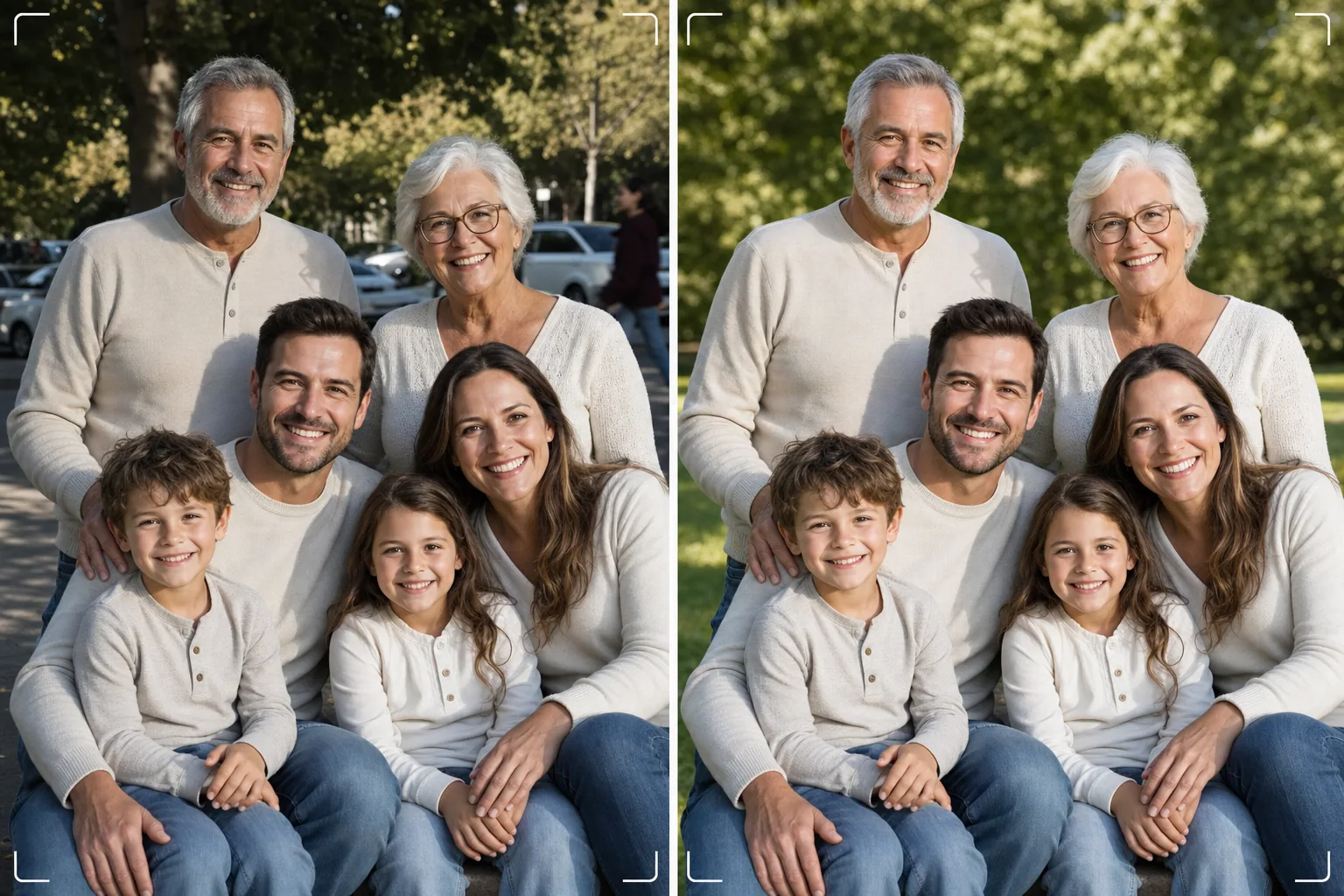
What this template does
Solves the universal family photo problem — getting everyone to look great in a single frame. Magic Eraser removes photobombers, trash cans, exit signs, power lines, parked cars, and other distractions that ruin otherwise good group compositions. AI Enhance corrects the uneven lighting that occurs when some family members are in shade while others are in direct sun, bringing everyone to consistent, flattering exposure. Natural skin smoothing reduces blemishes, under-eye circles, and redness on every face without making anyone look artificially retouched. The result is the family portrait you imagined when you gathered everyone together.
Template settings
| Background cleanup | Auto-detect and remove distractions (people, signs, objects) |
| Exposure balancing | Even lighting across all subjects (shadow fill + highlight recovery) |
| Skin enhancement | Natural per-face blemish reduction (preserves unique features) |
| Color correction | Unified white balance across mixed-lighting group shots |
| Sharpening | Face-aware sharpening (prioritizes eyes and smiles) |
| Output resolution | 6000px long edge (wall print at 300 DPI up to 20×13 inches) |
How to use this template
Upload the family photo
Upload the group photo taken at a family gathering, holiday, reunion, or portrait session. The template handles groups from two to thirty people. For best results, choose the frame where the most faces are looking at the camera with pleasant expressions — the template fixes background and lighting but cannot change facial expressions or closed eyes.
Remove background distractions
Magic Eraser identifies and removes strangers, distracting signs, litter, vehicles, and other unwanted elements from behind the family group. The AI reconstructs the background naturally, filling in grass, sky, walls, or flooring behind removed objects.
Balance lighting and enhance faces
AI Enhance corrects exposure differences between family members — no more half the group in shade and half squinting in sun. Each face receives individual blemish reduction and subtle eye brightening while preserving every person's unique features and natural appearance.
Export for print or sharing
Download at 6000px long edge for large wall prints, or at 2000px for social media and digital holiday cards. The template outputs in sRGB for screen display or Adobe RGB for professional printing. Multiple crop ratios (4:5, 5:7, 8:10) are available for common frame sizes.
Pro tips for best results
- ✓Take three to five shots in rapid succession. Choose the one where the most people have their eyes open and a natural expression — the template handles everything else, but expressions and eye-open status cannot be changed after the fact.
- ✓Position the family in open shade — under a tree canopy or on the shadow side of a building — rather than in mixed sun and shade. This gives the template an evenly lit starting point that produces the most natural enhancement.
- ✓For large groups (ten or more), arrange people in staggered rows with taller members in the back. This natural layering creates depth and ensures every face is visible. The template can brighten faces in back rows that are slightly darker due to distance from the light source.
Common questions
Can this fix closed eyes or bad expressions?
+
No. The template enhances lighting, removes distractions, and smooths skin, but it cannot change facial expressions, open closed eyes, or reposition people. Choose the best expression frame before uploading — the template makes that frame look its absolute best.
What about large reunion groups?
+
The template handles groups up to about thirty people. For very large groups, the individual face enhancement becomes more subtle due to the smaller face size in the frame, but background cleanup and lighting correction are fully effective at any group size.
Can I remove a person from the family photo?
+
Yes, Magic Eraser can remove specific individuals from the group. Select the person you want to remove and the AI will reconstruct the background behind them. This works best when the person is on the edge of the group rather than in the center between others.
The perfect family portrait is one cleanup away
Upload your group photos and get clean, evenly lit, naturally enhanced family portraits ready for the wall.
Try it freeRelated templates
More portrait templates for your workflow.
Age-appropriate school portrait retouching template. Natural blemish removal, consistent backgrounds, and yearbook-standard output with batch processing for entire classes.
Studio-quality pet portrait template. Handles fur edges, removes leashes and handlers, replaces backgrounds, and sharpens eyes for dogs, cats, and other animals.
Natural skin retouching template that removes blemishes while preserving pores and texture. Even lighting, no plastic look — just better skin on camera.
Enhance newborn and baby photos with soft warm tones, gentle skin smoothing, prop and distraction removal, and print-ready sizing for announcements and wall art.
Retouch maternity photos with gentle skin smoothing, soft glow lighting, background simplification, and warm color grading for a timeless pregnancy portrait look.