
Baby & Newborn Soft Glow
Give newborn and baby photos the soft, warm, ethereal quality of a professional studio session. This template applies gentle warmth enhancement, delicate skin smoothing appropriate for infant photography, removes distracting props and background clutter, and sizes output for birth announcements, wall prints, and social sharing.
Try this template freePortrait template preview
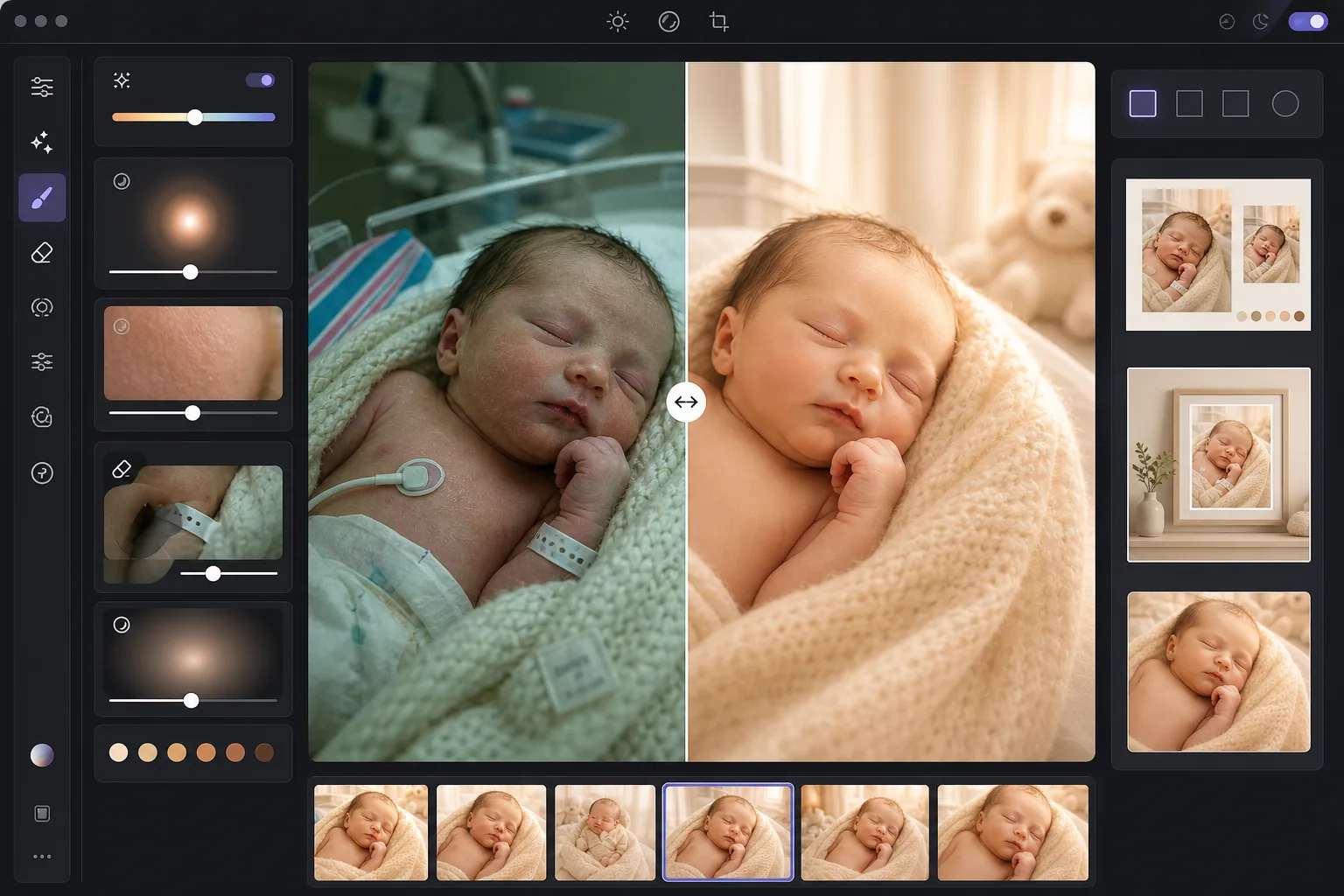
What this template does
Transforms raw newborn and baby photos — whether from a smartphone at the hospital or a home photo session — into the soft, glowing images parents treasure. AI Enhance adds a gentle warm tone that flatters newborn skin, lifts shadows without losing the soft mood, and applies a subtle luminous glow that wraps the image in warmth. Skin smoothing is calibrated specifically for infants — evening out the blotchy redness common in newborn skin while preserving the fine peach-fuzz detail that makes baby photos feel authentic. Magic Eraser removes hospital wristbands, IV lines, monitor cables, diaper edges, pacifier clips, and background clutter from the nursery.
Template settings
| Warmth | +10 warmth with golden midtone shift (newborn skin optimized) |
| Soft glow | Luminous highlight bloom (radius 40px, opacity 25%) |
| Skin smoothing | Infant-calibrated (reduces blotchiness, preserves peach fuzz) |
| Shadow lift | +0.5 EV in shadows with smooth rolloff (no harsh recovery) |
| Vignette | Gentle warm vignette (draws eye to center, 15% edge darkening) |
How to use this template
Upload baby or newborn photos
Upload photos of newborns, infants, or toddlers taken at the hospital, at home, or in a studio. The template adapts to different lighting environments — harsh hospital fluorescents, soft nursery window light, or mixed home lighting. Both smartphone and professional camera images are supported.
Apply warmth and soft glow
AI Enhance adds a warm golden tone to the midtones and a soft luminous glow to the highlights, creating the dreamy, ethereal quality associated with professional newborn photography. The shadow areas are gently lifted to reveal detail in wrapped blankets and dark hair without creating a flat, overprocessed look.
Smooth skin and remove distractions
Infant skin smoothing evens out the blotchy redness and dry flaking common in newborn skin while preserving fine hair and natural skin texture. Magic Eraser removes hospital wristbands, monitor leads, diaper edges peeking out from wraps, tags on blankets, and background items like laundry baskets or electrical outlets.
Export for prints and announcements
Download in multiple sizes: 5x7 and 4x6 for birth announcement cards, 8x10 and 11x14 for framed wall prints, and 1080x1080 square for Instagram birth announcements. All outputs are at 300 DPI for sharp printing on photo paper or card stock.
Pro tips for best results
- ✓The best light for newborn photos is soft, indirect window light from one direction. If you are shooting at home, place the baby near a large window with sheer curtains during the morning or late afternoon. The template enhances this natural light beautifully, whereas harsh direct sunlight creates shadows it must work harder to correct.
- ✓For hospital photos with fluorescent overhead lighting, the template removes the green color cast and warms the image significantly. However, the harsh shadows from overhead fluorescents will still be visible as slightly lifted dark areas under the chin and nose. Asking a nurse to turn off the overhead light and using window light or a soft lamp produces a much better starting point.
- ✓When removing hospital wristbands, position the band so it is on the visible surface of the wrist rather than wrapped around and partially hidden. A fully visible band is easier for the AI to remove cleanly than one that disappears behind skin folds.
- ✓For posed newborn photos with wraps and props, the template preserves the texture of knit blankets, woven baskets, and fur throws while smoothing only the baby's skin. Process a test image first to confirm the wrap texture is maintained before running the full session batch.
Common questions
Is the skin smoothing safe for newborn photos?
+
The skin smoothing is specifically calibrated for infant skin. It reduces the blotchy red patches, stork bites, and dry flaking common in the first weeks without removing the fine lanugo hair, eyebrow detail, and tiny eyelashes that make newborn photos feel real. The result looks like healthy, even skin rather than an airbrushed doll.
Can this improve smartphone hospital photos?
+
Yes, and this is one of the most common use cases. Hospital rooms have harsh fluorescent lighting that makes newborn skin look greenish and creates unflattering overhead shadows. The template corrects the color cast, softens the shadows, warms the overall tone, and removes visible medical equipment, transforming a clinical-looking smartphone photo into a warm, intimate portrait.
What print sizes does the output support?
+
The template outputs at 300 DPI, which supports sharp printing at 5x7, 8x10, 11x14, and 16x20 inches depending on the original image resolution. A standard 12-megapixel smartphone photo can produce sharp prints up to 11x14 inches. Higher-resolution camera images support 16x20 and larger.
Turn precious moments into timeless portraits
Upload newborn and baby photos and get soft, warm, professionally styled images ready for birth announcements, wall prints, and social sharing.
Try it freeRelated templates
More portrait templates for your workflow.
Age-appropriate school portrait retouching template. Natural blemish removal, consistent backgrounds, and yearbook-standard output with batch processing for entire classes.
Studio-quality pet portrait template. Handles fur edges, removes leashes and handlers, replaces backgrounds, and sharpens eyes for dogs, cats, and other animals.
Natural skin retouching template that removes blemishes while preserving pores and texture. Even lighting, no plastic look — just better skin on camera.
Retouch maternity photos with gentle skin smoothing, soft glow lighting, background simplification, and warm color grading for a timeless pregnancy portrait look.
Clean up family portraits by removing background distractions, fixing uneven exposure, smoothing skin naturally, and ensuring everyone looks their best in the same frame.