
Pet Adoption Photo
Help shelter animals find forever homes with photos that show their personality instead of a concrete kennel. This template removes cage bars, kennel floors, and shelter backgrounds, replacing them with warm home-like environments or clean solid backdrops. Lighting correction brightens dark shelter photos, and fur detail enhancement shows the true color and texture of each animal's coat.
Try this template freePersonal template preview
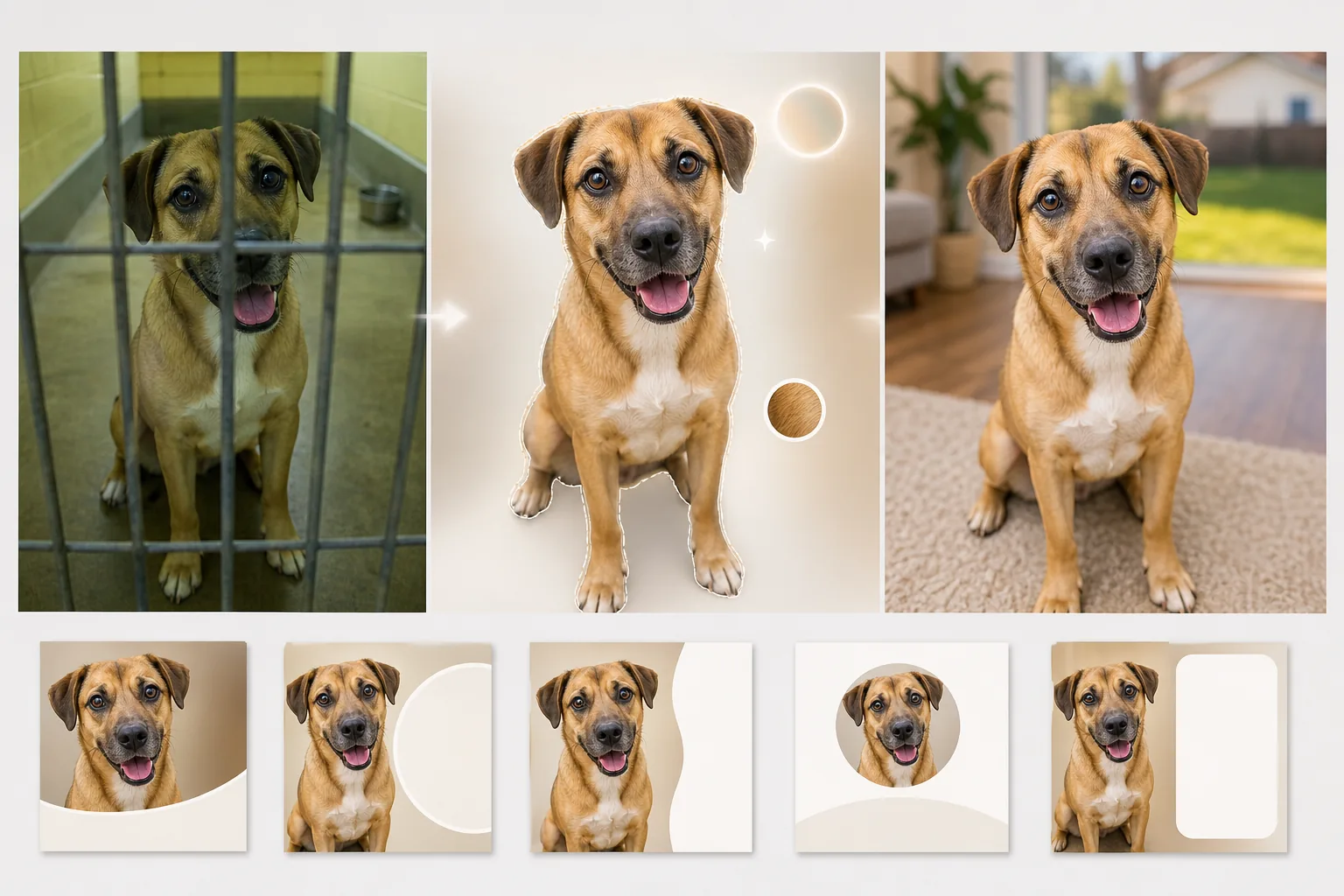
What this template does
Addresses the specific challenges of shelter photography where lighting is poor, backgrounds are institutional, and animals are often photographed through cage bars or in narrow concrete runs. Background Eraser removes kennel bars, chain-link fencing, and shelter environments and replaces them with warm, inviting backdrops — a grassy yard, a cozy living room floor, or a clean solid color that puts all focus on the animal. AI Enhance corrects the underexposure common in shelter photography (fluorescent ceiling lights, no windows), brightens the eyes that are often lost in shadow, and brings out the true color and texture of fur, feathers, or scales so potential adopters can see what the animal actually looks like in natural light.
Template settings
| Background | Grassy yard, living room floor, solid pastel, or transparent |
| Cage bar removal | Auto-detect and remove kennel bars, chain-link, and wire fencing |
| Lighting correction | Brighten underexposed shelter photos to natural daylight equivalent |
| Eye enhancement | Brighten and sharpen eyes to show personality and alertness |
| Fur detail | Enhance coat texture and correct color cast from fluorescent lighting |
| Output resolution | 2000×2000px (square for Petfinder, Adopt-a-Pet, and social media) |
How to use this template
Upload the shelter photo
Upload a photo of the animal taken in the shelter, foster home, or outdoor event. Photos taken through cage bars, in dim kennels, and on concrete floors are all handled. The template works for dogs, cats, rabbits, birds, and other shelter animals.
Remove shelter environment
Background Eraser removes the kennel, cage bars, concrete floors, and institutional shelter backdrop. The animal is isolated with edge detection that preserves the natural outline of fur, whiskers, and ears — including the wispy edges of long-haired breeds.
Enhance lighting and detail
AI Enhance brightens the image to simulate natural daylight, corrects the green-yellow color cast from fluorescent shelter lights, and sharpens fur texture and eye detail. The animal's true coat color and pattern become visible, and their eyes gain the bright, alert look that draws adopters in.
Export for adoption listings
Download at 2000×2000px in square format optimized for Petfinder, Adopt-a-Pet, and rescue organization websites. The format also works directly for Instagram and Facebook adoption posts without additional cropping.
Pro tips for best results
- ✓Get down to the animal's eye level when photographing. Shots taken from above looking down make animals appear smaller and less engaging. Eye-level photos create a connection between the viewer and the animal that drives adoption inquiries.
- ✓Use a treat or toy held just above the camera to capture an alert, ears-forward expression. The AI can brighten dull eyes and enhance fur, but it cannot change a disinterested expression into an engaged one.
- ✓For black dogs and cats — whose features often disappear in shelter photos — make sure there is some light falling on the face from the front. Even a phone flashlight held to the side creates enough dimension for the AI to recover facial details and eye definition.
Common questions
Can this remove cage bars from in front of the animal?
+
Yes. The AI detects the regular pattern of kennel bars and chain-link fencing overlaying the animal and removes them, reconstructing the fur pattern and facial features behind the bars. Thick bars that cover a large portion of the face may leave slight artifacts that require a small manual touch-up.
Will the photo look misleading about the animal's appearance?
+
No. The template corrects poor shelter lighting and removes the institutional environment, but it does not alter the animal's physical features, coat pattern, size, or coloring. The goal is to show what the animal actually looks like in good light and a normal setting.
Can shelters use this for free?
+
The free tier includes enough processing for individual foster volunteers and small rescues. Shelters with high volume can contact us for nonprofit pricing on batch processing.
Help every shelter animal put their best paw forward
Upload shelter photos and get warm, inviting adoption images that show each animal's true personality.
Try it freeRelated templates
More personal templates for your workflow.
Create compliant ID photos for visas, driver's licenses, and national IDs with proper background color, head sizing, and facial expression requirements.
Enhance graduation photos with background cleanup, cap and gown color correction, blemish removal, and print-ready sharpening for frames and announcements.
Enhance concert and event photos with low-light noise reduction, stage lighting color correction, crowd distraction removal, and detail recovery from dark venue shots.
Create beautiful newborn announcement card photos with soft backgrounds, gentle color grading, hospital clutter removal, and print-ready dimensions for mailing.
Prepare family and portrait photos for holiday greeting cards with festive backgrounds, warm color grading, snow effects, and standard card dimensions for printing.
Restore and enhance memorial tribute photos with gentle retouching, background simplification, warm respectful color grading, and print-ready dimensions for services.