
Church Event Photo
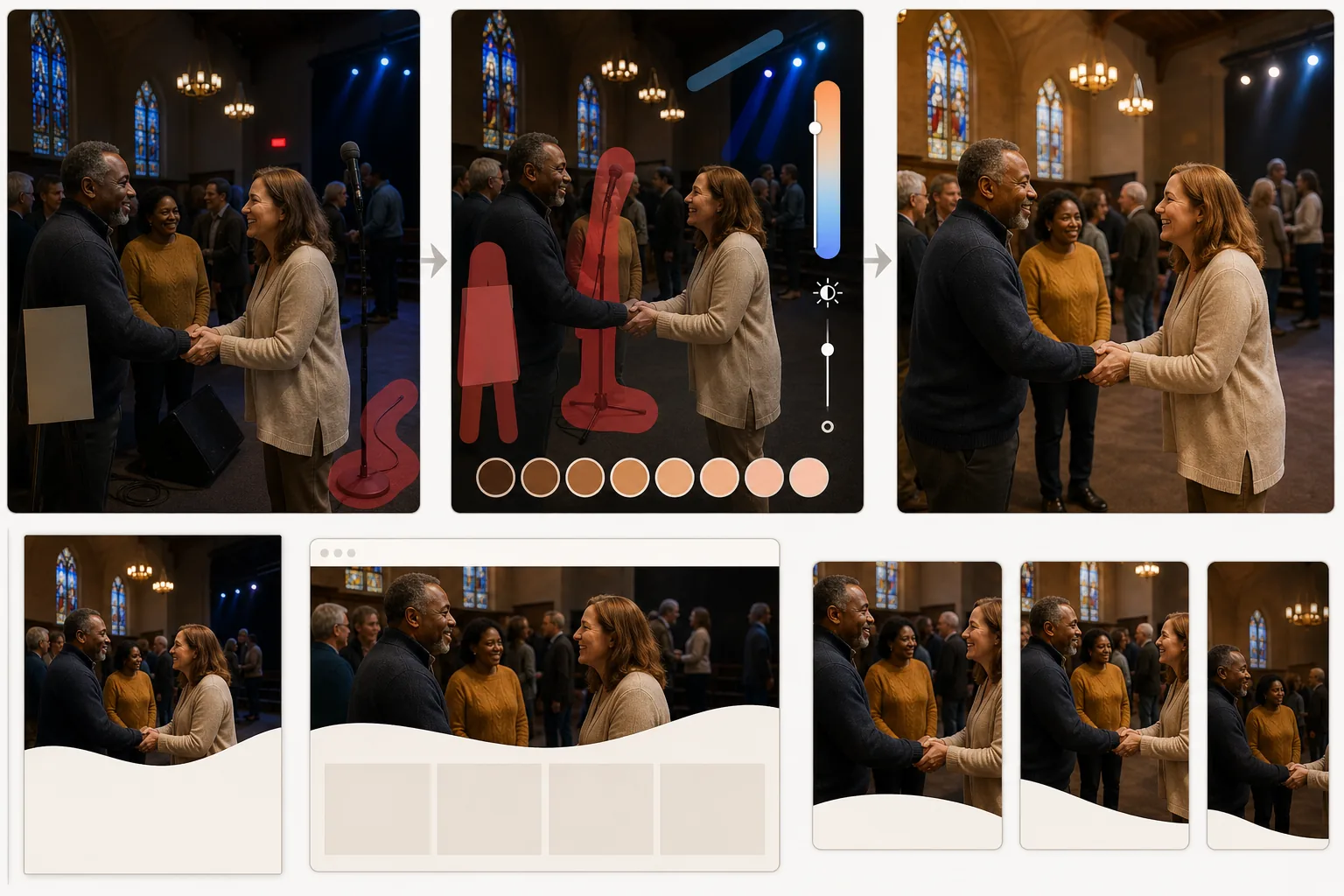
Transform dimly lit church and community event photos into warm, inviting images for bulletins, websites, and social media. This template corrects the challenging indoor lighting found in worship spaces — mixed color temperatures from stained glass, stage lights, and overhead fixtures — while Magic Eraser removes visual distractions like mic stands, cables, and temporary signage that detract from the moment.
Try this template freePersonal template preview
What this template does
Fixes the unique photographic challenges of church and faith community spaces. Worship areas combine warm incandescent chandeliers, cool LED stage lights, and colored light from stained glass windows, creating mixed color casts that make people's skin look unnatural in photos. AI Enhance normalizes these mixed light sources to produce warm, flattering skin tones while preserving the atmospheric quality of the space. Magic Eraser removes distracting elements — microphone stands, speaker monitors, extension cords running across aisles, temporary banners, and exit signs — that pull attention away from the people and the moment. The overall color grade is warm and inviting, reflecting the communal spirit of the events.
Template settings
| Lighting correction | Mixed indoor source normalization with warm skin tone priority |
| Color temperature | Warm community (3800K–4200K balanced for flattering skin) |
| Distraction removal | Mic stands, cables, exit signs, and temporary signage |
| Shadow recovery | Lift dark areas while preserving atmospheric mood lighting |
| Output resolution | 3000×2000px (3:2 for bulletins, websites, and social media) |
How to use this template
Upload your event photo
Upload photos from worship services, youth group events, community dinners, holiday celebrations, baptisms, or any church community gathering. The template handles the wide range of indoor lighting conditions found in worship spaces, fellowship halls, and outdoor church grounds.
Correct lighting and color
AI Enhance analyzes the mixed light sources in the image and normalizes them. Stage lighting color casts are corrected, underexposed congregation areas are brightened, and skin tones are warmed to a natural, flattering tone. The atmospheric quality of candlelight and stained glass light is preserved while removing the unflattering color shifts they cause on faces.
Remove distractions
Magic Eraser removes microphone stands, speaker monitors, cables and extension cords, temporary event banners, exit signs, and other utilitarian elements that clutter the frame. The AI reconstructs the wall, flooring, or pew behind removed objects for a clean result.
Export for church communications
Download at 3000×2000px for church bulletins, website headers, and newsletter features. Web-optimized exports at smaller sizes are available for email campaigns and social media posts. The warm color grade ensures the images feel inviting across all platforms.
Pro tips for best results
- ✓Photograph from a position where the main light source is behind you or to the side. Shooting toward bright windows or stage lights puts faces in silhouette, and while the AI can recover some shadow detail, front-lit or side-lit faces always produce better results.
- ✓Capture candid moments of connection — handshakes, group laughter, children engaged in activities. These authentic interactions communicate community warmth far more effectively than posed group shots for church marketing.
- ✓For large group photos in fellowship halls, turn on every available light before shooting. The AI handles mixed color temperatures well, but very dim environments produce image noise that limits how much enhancement is possible.
Common questions
Will stained glass window colors be preserved?
+
Yes. The template distinguishes between the intentional colored light from stained glass (which it preserves as an atmospheric element) and the unflattering color cast that light creates on nearby faces and surfaces (which it corrects). You get the beauty of the windows without the green or blue skin tones they can cause.
Can I remove people who shouldn't be in the photo?
+
Yes. Magic Eraser can remove specific individuals from group shots if needed. The AI reconstructs the pew, chair, or background behind the removed person. This is useful for photos where someone has left the congregation or for privacy considerations.
Does this work for outdoor church events?
+
Yes. Outdoor events like picnics, festivals, and outdoor services have their own challenges — harsh sun, patchy shade, and bright sky behind the group. The template corrects these outdoor exposure issues just as effectively as indoor lighting problems.
Share your community's moments in their warmest light
Upload church event photos and get beautifully lit, distraction-free images for bulletins, websites, and social media.
Try it freeRelated templates
More personal templates for your workflow.
Create compliant ID photos for visas, driver's licenses, and national IDs with proper background color, head sizing, and facial expression requirements.
Enhance graduation photos with background cleanup, cap and gown color correction, blemish removal, and print-ready sharpening for frames and announcements.
Enhance concert and event photos with low-light noise reduction, stage lighting color correction, crowd distraction removal, and detail recovery from dark venue shots.
Create beautiful newborn announcement card photos with soft backgrounds, gentle color grading, hospital clutter removal, and print-ready dimensions for mailing.
Prepare family and portrait photos for holiday greeting cards with festive backgrounds, warm color grading, snow effects, and standard card dimensions for printing.
Restore and enhance memorial tribute photos with gentle retouching, background simplification, warm respectful color grading, and print-ready dimensions for services.