
Ảnh Blog Du lịch
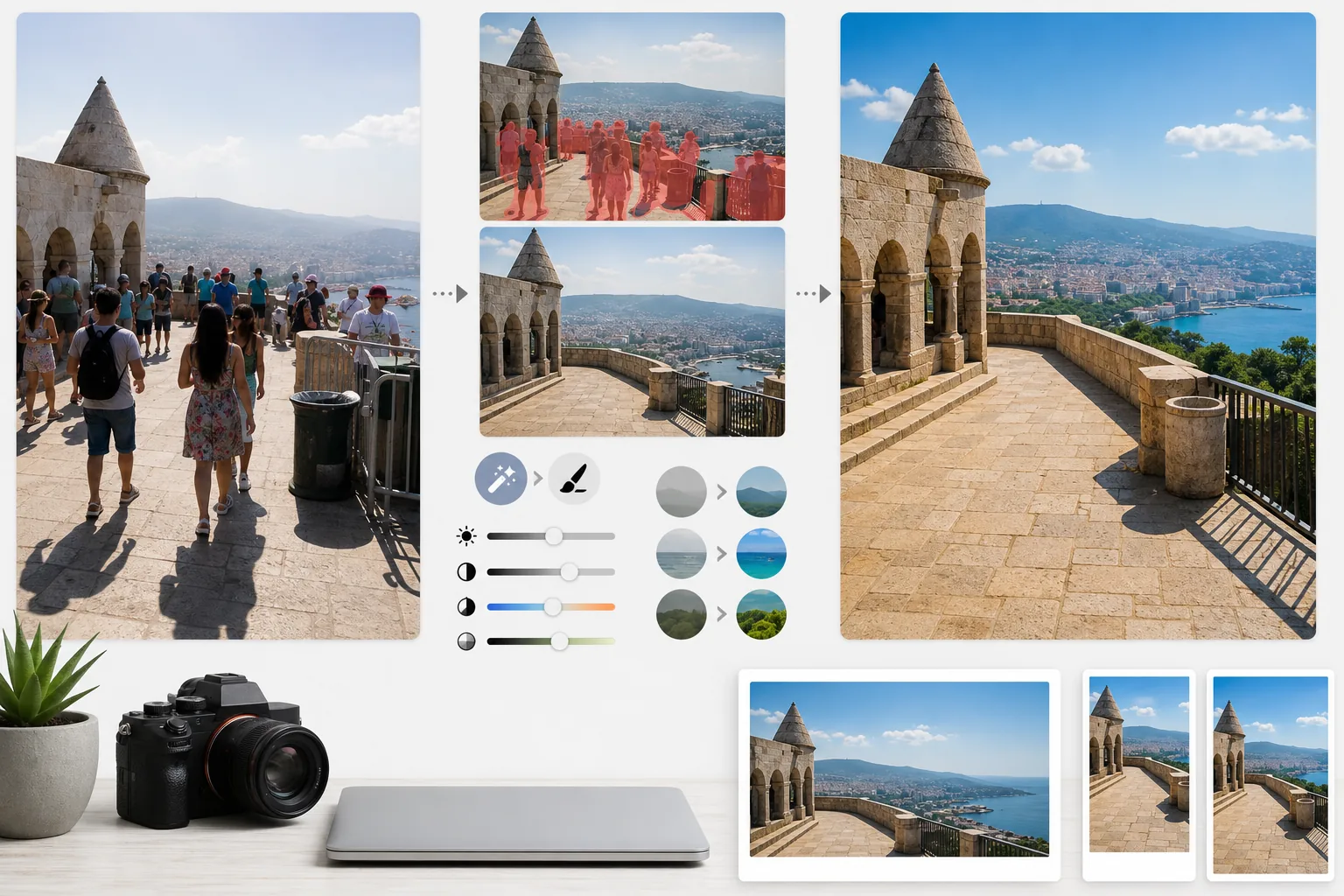
Biến những bức ảnh du lịch đông đúc thành ảnh điểm đến chất lượng xuất bản. Mẫu này xóa khách du lịch, người chụp lén và những chi tiết gây rối mắt khỏi các bức ảnh địa danh và phong cảnh bằng Magic Eraser, sau đó dùng AI Enhance để khắc phục những điều kiện phơi sáng khó thường gặp trong ảnh du lịch — nắng gắt giữa trưa, nội thất đền chùa sâu thẳm, hoàng hôn ngược sáng — và tăng cường màu sắc tự nhiên để có những hình ảnh khiến độc giả muốn đặt vé ngay.
Dùng thử mẫu này miễn phíPersonal template preview
Mẫu này làm gì
Khắc phục hai vấn đề lớn nhất của ảnh du lịch: đám đông và ánh sáng kém. Magic Eraser xóa khách du lịch đứng trước các công trình, người chụp lén đi ngang khung hình và những chi tiết gây rối mắt như thùng rác, rào chắn công trình và biển báo tạm thời làm hỏng cảm giác về nơi chốn. AI tái tạo kiến trúc, mặt đường và phong cảnh phía sau những người và vật thể đã xóa dựa trên bối cảnh xung quanh. AI Enhance sau đó xử lý các thách thức phơi sáng đặc thù của ảnh du lịch — ảnh nội thất nhà thờ và đền chùa nơi cửa sổ bị cháy sáng còn vùng tối thì đen kịt, nắng gắt giữa trưa làm bệt màu ở các điểm đến nhiệt đới, và cảnh hoàng hôn ngược sáng khiến tiền cảnh thành bóng đen. Màu sắc được tăng cường để phản ánh đúng những gì điểm đến trông thực sự như thế nào trong mắt người, điều mà máy ảnh luôn thể hiện thiếu trong dải tương phản động.
Cài đặt mẫu
| Xóa khách du lịch | Tự động nhận diện và xóa người khỏi ảnh địa danh và phong cảnh |
| Chỉnh phơi sáng | Khôi phục vùng sáng và vùng tối theo kiểu HDR cho ánh sáng khó |
| Tăng cường màu sắc | Tăng độ bão hòa tự nhiên (trời, nước, cây lá) mà không bị giả tạo |
| Khử sương mù | Xuyên qua sương mù khí quyển để phong cảnh ở xa rõ nét hơn |
| Độ phân giải đầu ra | Cạnh dài 4000px (ảnh hero blog ở chất lượng retina) |
Cách sử dụng mẫu này
Tải ảnh du lịch của bạn lên
Tải lên bất kỳ ảnh du lịch nào — địa danh đông đúc, toàn cảnh phong cảnh, cảnh đường phố, kiến trúc nội thất. Mẫu này xử lý ảnh JPEG từ điện thoại, máy ảnh không gương lật và camera hành trình. Tệp RAW cũng được chấp nhận để có độ linh hoạt chỉnh sửa tối đa.
Xóa đám đông và chi tiết thừa
Magic Eraser nhận diện người trong khung hình và xóa họ. Bạn có thể chọn xóa tất cả mọi người, giữ lại một số người cụ thể (bản thân hoặc bạn đồng hành), hoặc chỉ xóa có chọn lọc những người che khuất các đặc điểm kiến trúc hay phong cảnh quan trọng. AI lấp đầy những vùng trống bằng mặt đất, tường và cảnh vật được tái tạo.
Tăng cường ánh sáng và màu sắc
AI Enhance áp dụng xử lý kiểu HDR giúp khôi phục bầu trời bị cháy sáng và nâng vùng tối sâu — điều thường gặp ở nội thất đền chùa và những con phố hẹp châu Âu. Màu sắc được tăng cường để khớp với những gì mắt bạn thấy tại điểm đến, đặc biệt là sắc xanh của bầu trời, xanh ngọc của biển và xanh lá của cây cối. Sương mù khí quyển được giảm bớt để toàn cảnh núi non và thành phố rõ nét hơn.
Xuất cho blog và mạng xã hội
Tải về ở cạnh dài 4000px cho ảnh hero blog chất lượng retina, hoặc ở các kích thước riêng cho Instagram, Pinterest và Facebook. Tệp có giữ lại dữ liệu EXIF được tối ưu cho các nhiếp ảnh gia gắn thẻ địa lý cho tác phẩm của mình.
Mẹo chuyên nghiệp để có kết quả tốt nhất
- ✓Chụp nhiều ảnh cùng một cảnh cách nhau vài giây. Khi khách du lịch di chuyển giữa các khung hình, AI có thông tin tham chiếu về mặt đất và tường phía sau họ, tạo ra kết quả tái tạo sạch hơn so với chỉ một khung hình.
- ✓Với ảnh nội thất nhà thờ, đền chùa và bảo tàng, hãy phơi sáng dư một chút khi chụp. AI khôi phục vùng sáng dễ hơn nhiều so với việc nâng vùng tối cực kỳ tối, và ảnh nội thất thường bị thiếu sáng theo mặc định.
- ✓Hãy chụp phong cảnh vào giờ vàng hoặc giờ xanh nếu có thể. AI Enhance có thể tăng cường màu sắc trong ánh sáng bệt giữa trưa, nhưng ánh sáng ấm và có hướng của giờ vàng tạo nên bóng đổ và chiều sâu cho phong cảnh mà không cách chỉnh màu nào tái hiện được.
Công cụ
Câu hỏi thường gặp
Tôi có thể giữ mình trong ảnh nhưng xóa những khách du lịch khác không?
+
Có. Bạn có thể đánh dấu bản thân hoặc bạn đồng hành là đối tượng được bảo vệ. AI xóa tất cả những người khác khỏi cảnh trong khi giữ nguyên những người được bảo vệ với vị trí, ánh sáng và bóng đổ ban đầu của họ.
Cách này hoạt động tốt đến đâu với cảnh rất đông?
+
Hiệu quả nhất khi đám đông che phủ dưới khoảng 40% khung hình. Những cảnh cực kỳ đông đúc — như một quảng trường chật cứng nơi bạn không thấy mặt đất giữa những người — cung cấp quá ít thông tin tham chiếu nền để tái tạo sạch sẽ. Trong những trường hợp đó, việc xóa một phần các hàng phía trước thường cho kết quả thuyết phục.
Khử sương mù có làm ảnh trông không tự nhiên không?
+
Việc giảm sương mù được hiệu chỉnh để cho kết quả trông tự nhiên. Nó loại bỏ lớp tán xạ khí quyển xám xanh che mờ núi non và công trình ở xa, nhưng vẫn giữ lại phối cảnh không khí tinh tế tạo chiều sâu cho ảnh phong cảnh. Kết quả trông như chụp vào một ngày trong trẻo, quang đãng chứ không phải ảnh đã qua bộ lọc hay xử lý quá đà.
Khoe mọi điểm đến ở trạng thái đẹp nhất không đông đúc
Tải ảnh du lịch lên và nhận về những hình ảnh không có khách du lịch, màu sắc được tăng cường khiến độc giả của bạn muốn xách vali lên đường.
Dùng thử miễn phíRelated templates
More personal templates for your workflow.
Tạo ảnh ID phù hợp cho thị thực, giấy phép lái xe và ID quốc gia với các yêu cầu về màu nền, kích thước đầu và nét mặt phù hợp.
Nâng cao chất lượng ảnh tốt nghiệp với tính năng làm sạch nền, đội mũ và áo choàng Color correction, loại bỏ vết bẩn và làm sắc nét các khung và thông báo để in sẵn.
Nâng cao chất lượng ảnh buổi hòa nhạc và sự kiện bằng tính năng giảm nhiễu trong điều kiện ánh sáng yếu, ánh sáng sân khấu hiệu chỉnh màu, loại bỏ sự xao lãng của đám đông và phục hồi chi tiết từ ảnh chụp ở địa điểm tối.
Tạo những bức ảnh thiệp thông báo đẹp mắt cho trẻ sơ sinh với nền mềm mại, phân loại màu sắc nhẹ nhàng, loại bỏ sự lộn xộn của bệnh viện và kích thước sẵn sàng để in để gửi thư.
Chuẩn bị ảnh gia đình và ảnh chân dung cho thiệp chúc mừng ngày lễ với nền lễ hội, phân loại màu ấm, hiệu ứng tuyết và kích thước thiệp tiêu chuẩn để in.
Khôi phục và cải thiện các bức ảnh tưởng niệm bằng tính năng chỉnh sửa nhẹ nhàng, đơn giản hóa nền, phân loại màu tôn trọng ấm áp và kích thước sẵn sàng để in cho các dịch vụ.