
Nâng cao ảnh tốt nghiệp
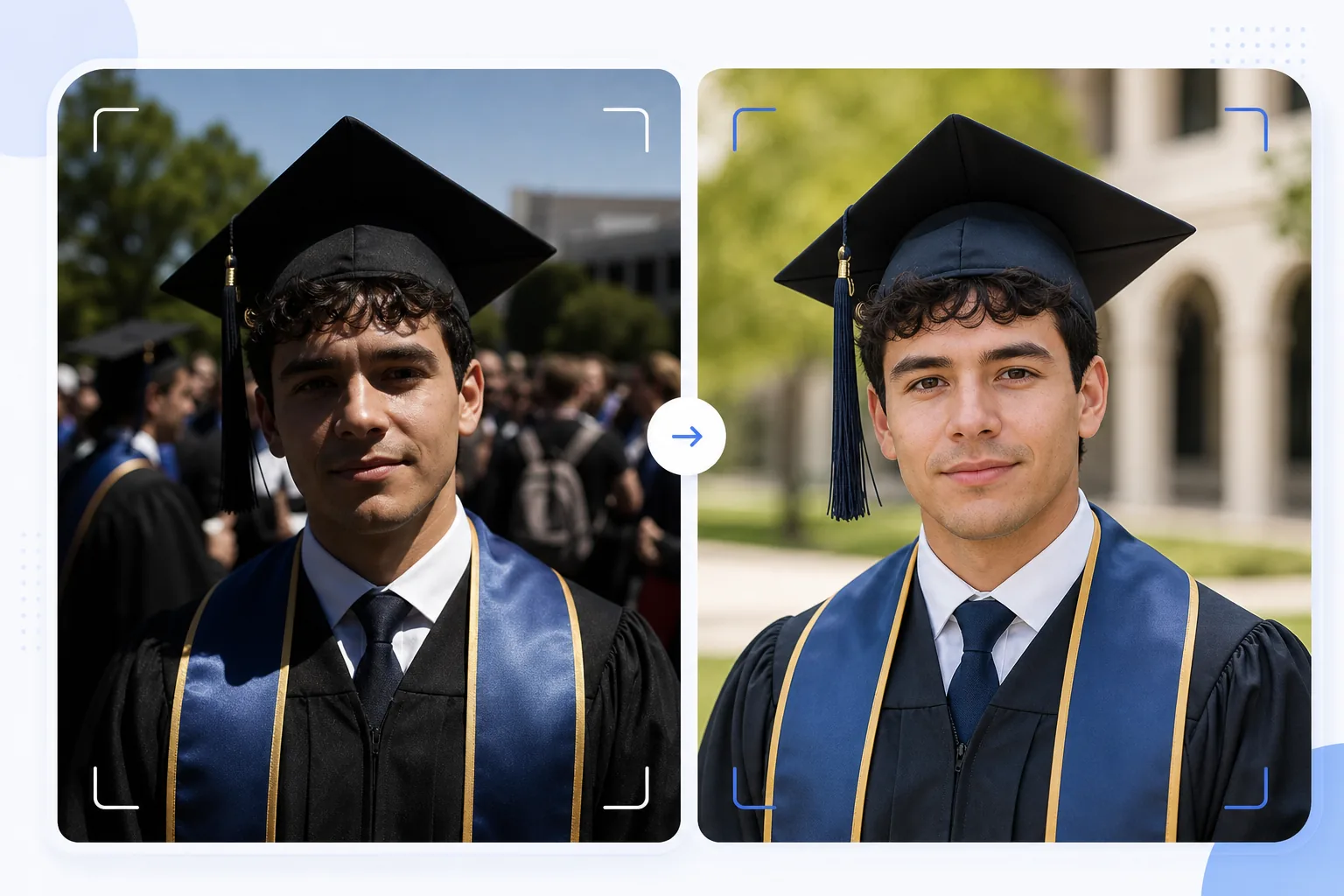
Biến những bức ảnh tốt nghiệp chụp vội thành chân dung xứng tầm để đóng khung. Mẫu này khắc phục ánh sáng ngoài trời gay gắt thường gặp tại các lễ tốt nghiệp, xóa người chụp lén và đám đông lộn xộn phía sau tân cử nhân, làm nổi bật màu mũ và áo choàng, đồng thời làm sắc nét hình ảnh để in cỡ lớn treo tường và đặt trên kệ lò sưởi.
Dùng thử mẫu này miễn phíPersonal template preview
Mẫu này làm được gì
Biến những bức ảnh chụp vội trong ngày tốt nghiệp thành chân dung chỉn chu, phù hợp để đóng khung, làm thiệp báo và chia sẻ trên mạng xã hội. Lễ tốt nghiệp được chụp trong điều kiện khó khăn — nắng trưa gay gắt tạo bóng tối quầng mắt dưới vành mũ, phông nền đám đông lộn xộn, và màu áo choàng trông nhợt nhạt dưới ánh nắng trực tiếp. AI Enhance hiệu chỉnh độ phơi sáng để lấp đầy bóng tối dưới mũ, khôi phục màu sắc đậm đà cho áo choàng và dải khăn, đồng thời làm sắc nét chi tiết khuôn mặt vốn bị mờ trong các bức ảnh chụp vội giữa đám đông. Magic Eraser xóa người chụp lén, những người trong đám đông xuất hiện phía sau tân cử nhân, biển hiệu gây xao nhãng và các vật thừa khác trong buổi lễ để làm nổi bật tân cử nhân trên một phông nền gọn gàng hơn.
Cài đặt mẫu
| Khôi phục vùng tối | Lấp bóng tối dưới mũ (làm sáng khuôn mặt mà không cháy vùng sáng) |
| Nâng cao màu áo choàng | Khôi phục màu vải cho áo choàng đen, xanh navy, đỏ thẫm và vàng |
| Làm mịn da | Giảm nhẹ khuyết điểm trong khi vẫn giữ kết cấu da tự nhiên |
| Dọn dẹp phông nền | Xóa người chụp lén và đám đông phía sau tân cử nhân |
| Độ phân giải đầu ra | Cạnh dài 5000px (sẵn sàng in ở 300 DPI lên đến 16×12 inch) |
| Làm sắc nét | Làm sắc nét tối ưu cho chân dung (chi tiết khuôn mặt + kết cấu vải áo choàng) |
Cách sử dụng mẫu này
Tải lên ảnh tốt nghiệp của bạn
Tải lên bất kỳ ảnh lễ tốt nghiệp nào — chân dung tạo dáng, khoảnh khắc bước qua sân khấu, tung mũ, hay khoảnh khắc ăn mừng tự nhiên. Mẫu này xử lý được ảnh từ điện thoại thông minh và máy DSLR chụp trong mọi điều kiện ánh sáng, từ nắng ngoài trời chói chang đến hội trường trong nhà thiếu sáng.
Khắc phục ánh sáng và màu sắc
AI Enhance khắc phục bóng tối gay gắt do chiếc mũ vuông tạo ra, vốn thường làm tối mắt và phần trên khuôn mặt của tân cử nhân. Màu áo choàng và dải khăn được khôi phục về tông màu đậm đà thật của chúng — áo choàng đen lấy lại chiều sâu thay vì trông xám xịt, và dải khăn danh dự thể hiện đầy đủ độ bão hòa màu.
Xóa các yếu tố gây xao nhãng
Magic Eraser xóa những người trong đám đông, các tân cử nhân khác, ghế gấp và biển hiệu xuất hiện phía sau chủ thể. AI tái tạo phông nền với một phiên bản gọn gàng của địa điểm — bãi cỏ, mặt tiền tòa nhà hay tấm màn — tạo nên bố cục giống chân dung từ một khung cảnh đông người.
Xuất để in và chia sẻ
Tải xuống ở cạnh dài 5000px cho bản in đóng khung lên đến 16×12 inch ở 300 DPI, hoặc ở 2000px cho mạng xã hội và thiệp báo kỹ thuật số. Hồ sơ màu được đặt là sRGB để hiển thị trên màn hình hoặc Adobe RGB để in chuyên nghiệp.
Mẹo chuyên nghiệp để có kết quả tốt nhất
- ✓Nếu có thể lên kế hoạch trước, hãy chụp chân dung trang trọng ngay sau buổi lễ ở khu vực có bóng râm thay vì dưới nắng trực tiếp. Bóng râm loại bỏ những bóng tối gay gắt từ mũ, vốn là vấn đề khó khắc phục nhất. Mẫu này có thể khắc phục bóng nắng, nhưng bóng râm cho kết quả tự nhiên nhất.
- ✓Hãy chụp cả chân dung tạo dáng truyền thống lẫn khoảnh khắc ăn mừng tự nhiên (ôm gia đình, tung mũ). Mẫu này nâng cao cả hai phong cách, và có một phiên bản chỉn chu của mỗi loại sẽ cho bạn nhiều lựa chọn giữa bản in đóng khung và bài đăng mạng xã hội.
- ✓Đối với ảnh chụp nhóm cùng gia đình, hãy để tân cử nhân đứng nhỉnh về phía trước nhóm. Điều này tạo độ tách biệt chiều sâu tự nhiên, giúp Magic Eraser cô lập và xóa các yếu tố gây xao nhãng ở phông nền mà không ảnh hưởng đến các thành viên gia đình.
Công cụ
Câu hỏi thường gặp
Mẫu này có khắc phục được ảnh tốt nghiệp bị mờ không?
+
AI Enhance có thể làm sắc nét những bức ảnh hơi mờ nhẹ do rung tay nhẹ hoặc lấy nét tự động hơi lệch. Tuy nhiên, những bức ảnh mờ nghiêm trọng do nhòe chuyển động mạnh (như ảnh chụp lúc bước qua sân khấu từ xa) không thể khôi phục hoàn toàn — mẫu này nâng cao chi tiết nhưng không thể tạo ra độ sắc nét vốn chưa từng được ghi lại.
Còn ảnh chụp lễ trong nhà thì sao?
+
Ảnh tốt nghiệp trong nhà với ánh sáng hội trường (vàng ấm hoặc đèn huỳnh quang pha trộn) được hiệu chỉnh về nhiệt độ màu. Mẫu này điều chỉnh cân bằng trắng để tông da trông tự nhiên và màu áo choàng hiện đúng thật. Nhiễu hạt do thiếu sáng từ cài đặt ISO cao được giảm bớt trong khi vẫn giữ chi tiết khuôn mặt.
Tôi có thể xóa hoàn toàn phông nền không?
+
Có. Bạn có thể dùng tính năng dọn dẹp phông nền để xóa toàn bộ các yếu tố nền và thay bằng màu trơn hoặc dải chuyển màu cho hiệu ứng chân dung trong studio. Cách này hiệu quả khi phông nền buổi lễ gốc quá lộn xộn để xóa chọn lọc.
Chân dung tốt nghiệp xứng tầm đóng khung từ những bức ảnh chụp vội
Tải lên ảnh ngày tốt nghiệp của bạn và nhận chân dung đã nâng cao, sẵn sàng để in, với phông nền gọn gàng và màu mũ-áo choàng rực rỡ.
Dùng thử miễn phíRelated templates
More personal templates for your workflow.
Tạo ảnh ID phù hợp cho thị thực, giấy phép lái xe và ID quốc gia với các yêu cầu về màu nền, kích thước đầu và nét mặt phù hợp.
Nâng cao chất lượng ảnh buổi hòa nhạc và sự kiện bằng tính năng giảm nhiễu trong điều kiện ánh sáng yếu, ánh sáng sân khấu hiệu chỉnh màu, loại bỏ sự xao lãng của đám đông và phục hồi chi tiết từ ảnh chụp ở địa điểm tối.
Tạo những bức ảnh thiệp thông báo đẹp mắt cho trẻ sơ sinh với nền mềm mại, phân loại màu sắc nhẹ nhàng, loại bỏ sự lộn xộn của bệnh viện và kích thước sẵn sàng để in để gửi thư.
Chuẩn bị ảnh gia đình và ảnh chân dung cho thiệp chúc mừng ngày lễ với nền lễ hội, phân loại màu ấm, hiệu ứng tuyết và kích thước thiệp tiêu chuẩn để in.
Khôi phục và cải thiện các bức ảnh tưởng niệm bằng tính năng chỉnh sửa nhẹ nhàng, đơn giản hóa nền, phân loại màu tôn trọng ấm áp và kích thước sẵn sàng để in cho các dịch vụ.
Chuyển đổi ảnh nơi trú ẩn và giải cứu thú cưng bằng tính năng thay nền, hiệu chỉnh ánh sáng và cải thiện chi tiết lông để giúp động vật tìm nhà nhanh hơn.