Skip to content

Generative fill cho ảnh sản phẩm, social và creative

Dùng AI Fill để thay thế vùng chọn, mở rộng chi tiết còn thiếu và tái tạo background tự nhiên hơn cho ảnh sản phẩm, social visual, thumbnail và marketing asset.

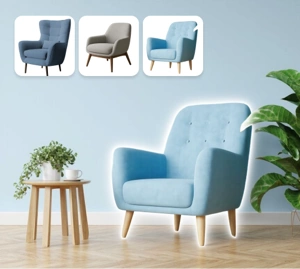
Dùng generative fill để tái tạo phần ảnh còn thiếu

Generative fill giúp bạn thay thế vùng không mong muốn và tái tạo phần hình ảnh còn thiếu mà không để lộ cảm giác vá ảnh rõ rệt. Công cụ này phù hợp cho ảnh sản phẩm, cleanup visual và production nhanh khi bạn cần kết quả tự nhiên hơn.

Dùng thử AI Fill
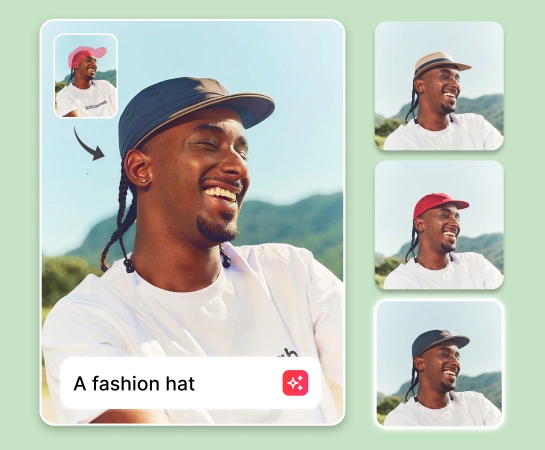
Ví dụ generative fill
Tái tạo tự nhiên

Tăng tốc chỉnh ảnh với generative fill thay cho retouch thủ công

Thay vì vá ảnh thủ công từng vùng nhỏ, bạn có thể chọn khu vực cần sửa và để AI Fill tạo lại phần hình ảnh còn thiếu theo bố cục tổng thể. Điều này đặc biệt hữu ích khi cần sửa mép ảnh, xóa chi tiết gây nhiễu hoặc cứu một khung hình chưa hoàn chỉnh.

Dùng thử AI Fill
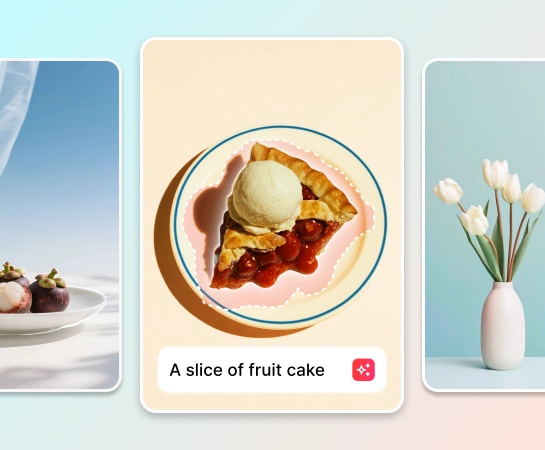
Ví dụ workflow AI Fill
Chỉnh nhanh hơn

Dùng generative fill cho nhiều tình huống chỉnh ảnh khác nhau

AI Fill phù hợp khi bạn muốn lấp khoảng trống sau khi xóa vật thể, thay một phần background, chỉnh lại mép ảnh hoặc thêm ngữ cảnh cho hình ảnh. Từ ecommerce đến social content, bạn có thể tạo visual sạch và đồng nhất hơn mà không cần dựng lại ảnh từ đầu.

Dùng thử AI Fill
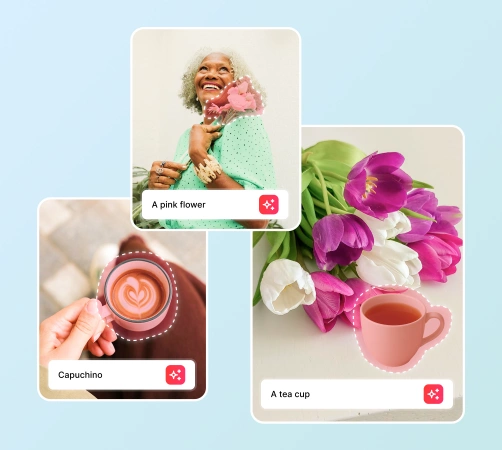
Các tình huống generative fill
Nhiều use case

Kết hợp AI Fill với workflow AI editing trọn vẹn

AI Fill phát huy hiệu quả cao nhất khi đi cùng Remove Objects, Remove Background, AI Enhance và AI Expand. Bạn có thể cleanup ảnh, tái tạo vùng thiếu, tăng chất lượng ảnh và chuẩn hóa đầu ra cho nhiều kênh trong cùng một flow.

Dùng thử AI Fill
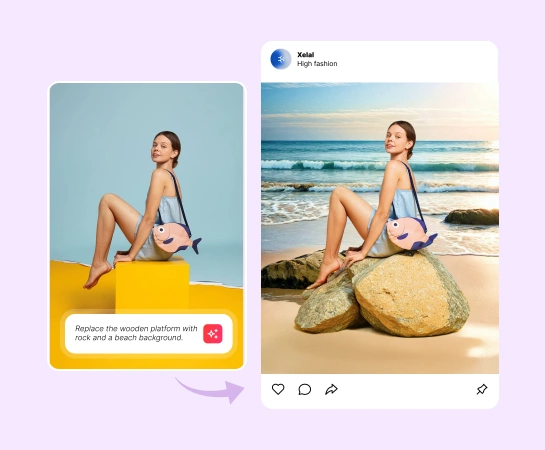
Workflow chỉnh ảnh với AI Fill
Một workflow

Cách dùng generative fill

Bước 1

Tải ảnh lên

Bắt đầu với ảnh sản phẩm, ảnh social, lifestyle visual hoặc bất kỳ hình ảnh nào cần tái tạo lại một phần.

Bước 2

Chọn vùng cần thay đổi

Tô lên khu vực bạn muốn thay thế, sửa lại hoặc tái tạo bằng AI Fill.

Bước 3

Nhập mô tả bằng text

Nhập prompt ngắn để mô tả nội dung, background hoặc chi tiết mới mà bạn muốn AI Fill tạo ra.

Bước 4

Chạy generative fill

Để AI tái tạo vùng đã chọn sao cho phần nội dung mới hòa vào tổng thể ảnh tự nhiên hơn.

Tất cả công cụ AI image editing bạn cần

Khám phá các tính năng chỉnh ảnh chính hiện có trong Magic Eraser Web, từ cleanup và enhancement đến generation, expand và design.

AI Fill

Thay thế vùng chọn và tái tạo phần nội dung còn thiếu với kết quả tự nhiên hơn.

Xóa vật thể

Loại bỏ người, đồ vật, chữ hoặc chi tiết gây nhiễu trước khi tái tạo lại vùng đã xóa.

Xóa background

Tách chủ thể trước, rồi dùng AI Fill để chỉnh mép và tái tạo chi tiết cảnh nền.

AI Enhance

Tăng độ rõ, chi tiết và độ hoàn thiện sau khi generative fill xử lý xong.

AI Expand

Mở rộng canvas và kết hợp generative fill để tạo thêm không gian sử dụng cho ảnh.

Design

Đưa ảnh đã chỉnh vào layout, ad creative, thumbnail hoặc thiết kế đơn giản.

AI Filter

Đổi style và mood của ảnh sau khi hoàn tất phần chỉnh sửa chính bằng AI Fill.

AI Create

Tạo hình ảnh mới từ prompt rồi tiếp tục refine bằng AI Fill.

Người dùng nói gì về workflow AI Fill trong Magic Eraser

Các phản hồi này phản ánh nhu cầu thực tế khi người dùng cần generative fill, object cleanup, background rebuilding và chỉnh ảnh nhanh trong một công cụ đơn giản.

"Cần dọn vài vùng lỗi trong ảnh sản phẩm và app rebuild nền đẹp hơn mình nghĩ rất nhiều. Tiết kiệm cả đống thời gian retouch thủ công."

A. Nguyen
14 tháng 3, 2026 • 67 lượt thấy hữu ích

"Kết quả fill nhìn tự nhiên đủ để dùng cho social creative. Xóa chi tiết thừa, vá chỗ thiếu rồi tiếp tục mà không cần mở app nặng trên desktop."

Linh Tran
25 tháng 2, 2026 • 43 lượt thấy hữu ích

"Thích cách kết hợp object removal và AI fill trong cùng workflow. Edit nhanh dễ hơn nhiều khi cần visual sạch cho ads."

Minh Pham
8 tháng 1, 2026 • 31 lượt thấy hữu ích

"Tốt cho cleanup concept nhanh. Mình dùng để thay thế vùng thô và rebuild lại phần cảnh trước khi đưa ảnh vào design."

Hoang Le
2 tháng 4, 2026

Câu hỏi thường gặp

AI Fill là workflow generative fill dùng để thay thế vùng chọn và tái tạo phần nội dung còn thiếu sao cho kết quả hòa vào tổng thể ảnh tự nhiên hơn.

Bạn nên dùng generative fill khi cần tái tạo vùng đã xóa, thay một phần background, vá phần nội dung bị thiếu hoặc hoàn thiện một cảnh ảnh sau chỉnh sửa.

Có. Công cụ này phù hợp cho ảnh sản phẩm, ecommerce visual, social creative, thumbnail và marketing asset khi bạn cần cleanup nhanh nhưng vẫn muốn đầu ra gọn và đẹp hơn.

Có. Nhiều workflow hiệu quả hơn khi bạn xóa vật thể hoặc xóa nền trước, sau đó dùng AI Fill để tái tạo vùng cần sửa và cuối cùng enhance hoặc expand ảnh để xuất bản.

Flow cơ bản gồm: tải ảnh lên, tô vùng cần thay đổi, chạy AI Fill, xem lại kết quả được tạo ra và xuất ảnh hoàn chỉnh.

So sánh khác

Xem Magic Eraser so với các công cụ chỉnh sửa ảnh khác.

Phần Mềm Chỉnh Sửa Ảnh AI Tốt Nhất 2025 — So Sánh Chi Tiết

Chúng tôi đã thử nghiệm và so sánh các công cụ chỉnh sửa ảnh AI hàng đầu. Từ xóa vật thể đến thay nền, hãy xem công cụ nào cho kết quả tốt nhất cho nhu cầu của bạn.

Magic Eraser vs Photoshop: Which Photo Editor Fits Faster Workflows?

Photoshop is the industry standard for deep image editing, but many people only need fast object removal, clean backgrounds, and AI-powered fixes. Magic Eraser focuses on those jobs with a lighter workflow that works in seconds on web and mobile.

Magic Eraser vs Inpaint: Which Tool Removes Distractions More Efficiently?

Inpaint is a recognizable name for removing unwanted objects from photos. Magic Eraser builds on that workflow with broader AI editing tools, faster cross-device access, and more useful cleanup features beyond a single task.

The Faster Photoshop Alternative for Everyday Photo Editing

Adobe Photoshop is powerful, but most people only use a fraction of its features. Magic Eraser delivers the photo cleanup tools you actually need — object removal, background removal, AI enhancement, and generative fill — in a simpler interface that works on web and mobile with no subscription required to start.

Magic Eraser vs Adobe Express: Which Is Better for Photo Cleanup?

Adobe Express bundles photo editing inside a design and content-creation suite tied to Adobe Firefly. Magic Eraser is purpose-built for AI photo cleanup: object removal, background replacement, generative fill, and enhancement. This comparison shows where each tool fits best.

Magic Eraser vs Pixelcut: Which AI Photo Editor Should You Pick?

Magic Eraser and Pixelcut both offer AI-powered photo editing across web, iOS, and Android with free tiers and paid Pro tiers. Pixelcut leans heavily into e-commerce product photos with templates. Magic Eraser is purpose-built for AI cleanup tasks across the full range of photo work. This comparison shows where each tool wins.

Trường hợp sử dụng liên quan

Xem cách các chuyên gia sử dụng công cụ này trong quy trình thực tế.

Xoá vật thể thừa trong ảnh bất động sản chỉ vài giây

Ảnh tin rao bán lộn xộn đồ cá nhân, xe hơi hay vật liệu xây dựng khiến người mua mất hứng. Magic Eraser dùng AI xoá sạch mọi thứ thừa trong ảnh — không cần biết Photoshop.

Xoá chữ, chú thích, dấu ngày tháng và lớp phủ khỏi mọi bức ảnh

Bạn đang gặp phải ảnh chụp màn hình đầy chú thích, ảnh cũ bị đóng dấu ngày tháng, hay hình ảnh bị phủ đầy chữ? Công cụ xoá chữ AI của Magic Eraser xoá sạch mọi chữ không mong muốn và tái tạo nền ảnh tự nhiên, giúp ảnh của bạn trông sạch đẹp và chuyên nghiệp.

Yearbook Photo Editing with AI Tools

Yearbook photos need consistent backgrounds, even lighting, and clean portraits. Magic Eraser helps schools, studios, and parents get professional-looking results without expensive retouching workflows.

Food Photography Cleanup with AI Editing

Great food photos drive orders and engagement, but messy tables, utensils, and background clutter ruin the shot. Magic Eraser helps restaurants, food bloggers, and delivery platforms clean up food images fast.

Pet Photo Editing with AI Tools

Pet photos rarely come out the way you want. The dog moves, the cat is half in shadow, the background is full of clutter. Magic Eraser handles all of that in seconds — background swaps, leash removal, blur cleanup, sharper fur — without manual masking or expensive software.

Virtual Staging with AI

Empty listings sit on the market longer because buyers struggle to visualize the space. Virtual staging with AI fills the rooms with furniture in the style your buyer wants — modern, transitional, coastal, traditional — in minutes per room instead of days. Magic Eraser handles the pre-staging cleanup (paint touch-ups, painter's tape, debris) and the post-staging polish (lighting refinement, edge cleanup).

Restaurant Menu Photo Editing

Dish photos move delivery and dine-in revenue more than menu copy ever will. Magic Eraser turns phone-shot food photos into delivery-platform-ready images: clean the cluttered table, enhance the dish, swap to a brand-consistent background, and export to DoorDash, Uber Eats, Yelp, and Instagram specs without a food photographer.

YouTube Thumbnail Editing for Creators

YouTube thumbnails decide 50-70% of the click decision in the first 1-2 seconds of feed exposure. Magic Eraser handles the workflow that lets creators ship higher-CTR thumbnails in 25-40 minutes per video: subject isolation via Background Eraser, dark-mode-feed color contrast via AI Filter, clean text-overlay surfaces via AI Fill, and 2-3 distinct variants ready for YouTube's native Test & Compare in under 30 minutes.

Travel Photo Editing for Trip Recaps and Memory Books

Travel photos are the most-edited and most-shared images on most cameras — and the hardest to fix manually. Crowds at every landmark, harsh midday sun, lens glare from phone cameras pressed against bus windows, dim interiors, and decades-old film scans that finally need restoration. Magic Eraser handles every common travel-photo failure mode in seconds, on the same phone you took the photo with.

Pinterest Pin Design for Bloggers, Creators, and Small Brands

Pinterest is a visual search engine, not a social feed — pins keep earning impressions for 6-18 months on evergreens and 2-5 years on seasonal evergreens like holiday recipes and gift guides. That long-tail traffic only compounds if every pin is built for the 2:3 vertical canvas at 1000×1500 displayed at ~320px on mobile (85%+ of Pinterest traffic). Magic Eraser's AI tools turn a landscape source photo library into pin-ready vertical compositions in 2-3 minutes per pin instead of 20-40 minutes in Photoshop.

Online Course Creator Photo Workflow: Sales Page to Last Lesson

Online course businesses live or die by their visual production quality. The sales-page hero photo, the instructor headshot in the bio section, the in-lesson screenshots, the social-promo carousels driving traffic to the sales page, and the email-newsletter inline imagery in the launch sequence — every one of those surfaces directly affects conversion, completion, and refund rates. Magic Eraser handles the full course-creator image workflow without a designer on staff, on the same laptop or phone you record courses with.

Podcaster Photo Workflow: Cover Art, Guest Graphics, Per-Season Refresh

Podcasting is a uniquely visual-poor medium that lives or dies by its visual surfaces. The cover art is the most-viewed surface of every podcast brand, displayed at 56-100px in feed where new listeners decide whether to tap in under a second. The supporting graphic set per episode (Instagram squares, Stories, TikTok, YouTube audiogram covers, email-newsletter inline imagery) is where the show's growth happens between episodes. Magic Eraser handles the full podcaster visual stack — 3000×3000 cover art, host-portrait libraries, per-episode guest graphics, per-season AI refreshes, supporting graphic sets — without a designer on staff, on the laptop or phone you record episodes with.

Self-Published Author Photo Workflow: Covers, Headshots, BookTok, Series

Indie authors compete with traditional publishing on Amazon's discovery surface where the same algorithms, the same readers, and the same 100-150px mobile-thumbnail decision window apply equally to both. The difference is the production budget — traditional publishers have in-house art departments and marketing teams; indie authors have to handle covers, author headshots, BookTok and Instagram promo, A+ Content modules, and series-consistent visual identity themselves. Magic Eraser preps the full self-published author visual stack — book covers that survive the thumbnail render, author headshots for back covers and bios, social-promo across BookTok / Instagram / Pinterest, Amazon A+ Content modules, and series-consistent presets across 3-12 books — in minutes per asset instead of $400-1500 of designer time per book.

Newsletter Writer Photo Workflow: Hero Images, Inline Imagery, Notes, Author Photos

Newsletter writing in 2026 is platform-fragmented across Substack (35M+ subscribers), beehiiv, ConvertKit, Ghost, and Beehiiv-adjacent indie tools — and the visual surfaces have multiplied with each platform's discovery features (Substack Notes, beehiiv Boost, Ghost's recommendation network). Newsletter writers need post hero images that survive every platform's render pipeline, author photos that work across bylines and email signatures, microblog imagery for the discovery-driving feed surfaces, and email-newsletter inline graphics that render across Gmail / Apple Mail / Outlook. Magic Eraser preps the full newsletter visual stack — phone-to-publish in minutes per asset — without a designer on staff.

Interior Design Portfolio: Clean Rooms, Correct Lighting & Extend Compositions

An interior designer's portfolio is the primary sales tool for landing new clients — prospective homeowners and commercial clients evaluate design sensibility, style range, and attention to detail entirely through project photography. The challenge is that completed projects are photographed in occupied spaces where client belongings, everyday clutter, power cords, and personal items compete with the design work for visual attention. Magic Eraser removes the distractions that undermine design photography, AI Enhance corrects the mixed-lighting conditions endemic to interior spaces, and AI Fill extends tight compositions to show the full spatial context of the design.

Common removals with this tool

Quick guides for specific things people remove most often.

Bài viết liên quan

Khám phá thêm hướng dẫn và nội dung chuyên sâu liên quan đến workflow này.

AI Generative Fill Tool - Thay Thế Và Tái Tạo Ảnh - Magic Eraser