Skip to content

Áp dụng AI filter để đổi mood ảnh, tạo style nổi bật và biến ảnh thường thành visual cuốn hơn

Dùng AI Filter của Magic Eraser để áp dụng các bộ lọc ảnh như anime, cinematic, portrait, retro và nhiều phong cách sáng tạo khác chỉ trong vài giây. Phù hợp cho social content, ảnh chân dung, ảnh lifestyle, thumbnail và visual marketing cần bắt mắt hơn.
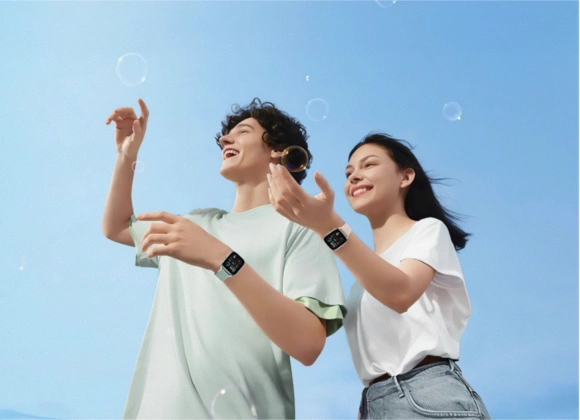
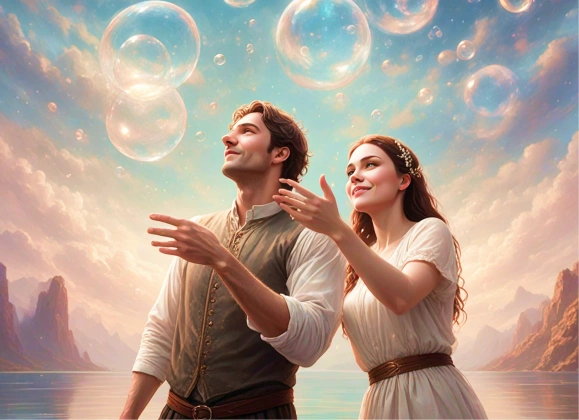
AI Filter before and after preview
Before
After

Biến một ảnh gốc thành nhiều hướng visual khác nhau

AI Filter giúp bạn thử nhiều phong cách từ cùng một ảnh mà không phải dựng lại từng bản edit. Bạn có thể đổi mood, đổi style chân dung và thử các treatment màu sắc mạnh hơn để lặp ý tưởng nhanh hơn.

Mở AI Filter
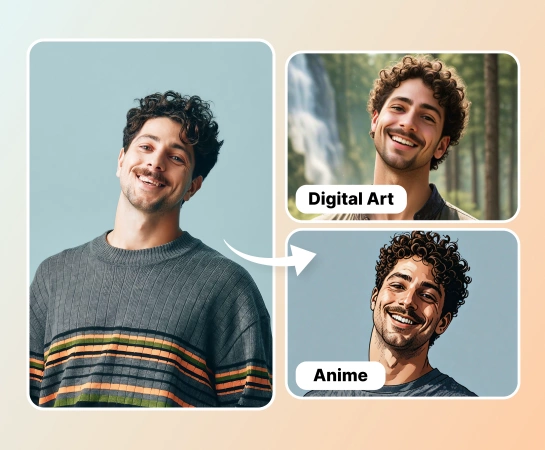
Xem trước nhiều style AI filter
Nhiều hướng visual hơn

Tạo content có style nhanh hơn so với chỉnh màu thủ công

Thay vì phải chỉnh tone, contrast và mood cho từng asset bằng tay, bạn chỉ cần chọn filter và xem preview ngay. Cách này đặc biệt hữu ích cho team social, creator và các chiến dịch cần nhiều biến thể hình ảnh.

Mở AI Filter
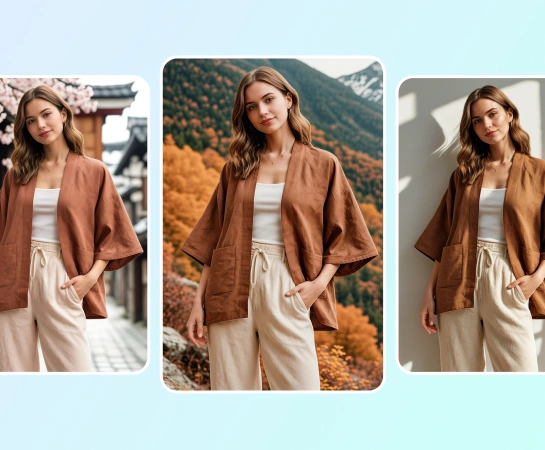
Workflow AI filter nhanh hơn
Một chạm để đổi style

Dùng AI filter cho chân dung, social post và ảnh sản phẩm

Từ ảnh lifestyle, chân dung đến thumbnail và visual ecommerce, AI Filter giúp bạn đưa ảnh về đúng mood nhanh hơn. Phù hợp khi bạn cần style cinematic, vui mắt, sáng tạo hoặc bắt trend hơn.

Mở AI Filter
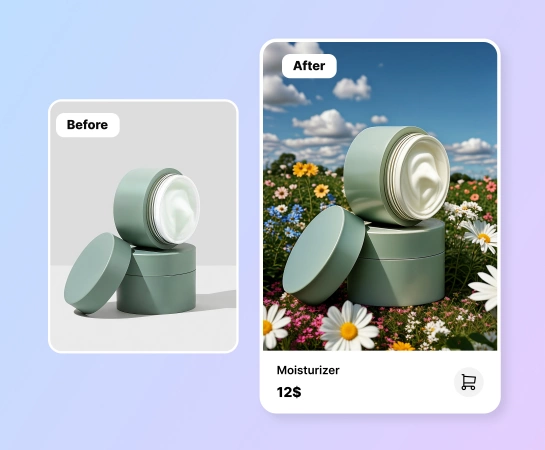
Use case AI filter
Từ chân dung tới ads

Tiếp tục chỉnh ảnh sau khi áp filter

Sau khi đã có style phù hợp, bạn có thể tiếp tục với các flow khác của Magic Eraser như Remove Background, AI Enhance, Design hoặc AI Create. AI Filter vì vậy rất hợp làm bước đầu trong quy trình làm content.

Mở AI Filter
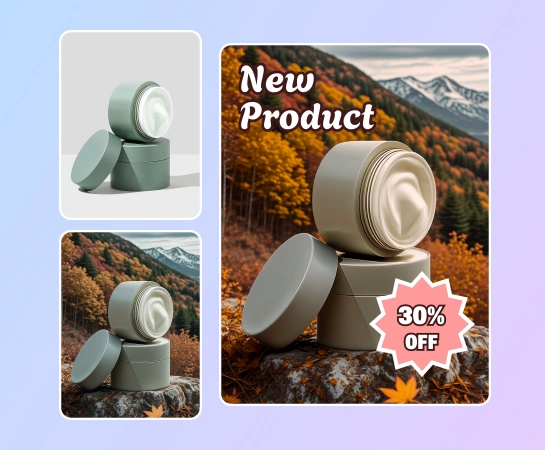
Workflow AI filter hoàn chỉnh
Một workflow

Cách áp dụng AI filter

Bước 1

Tải ảnh lên

Bắt đầu với ảnh chân dung, ảnh sản phẩm, ảnh lifestyle hoặc bất kỳ hình nào bạn muốn đổi style bằng AI.

Bước 2

Chọn filter

Duyệt các style như anime, cinematic, retro, portrait hoặc các mood filter khác có sẵn trong app.

Bước 3

Xem trước kết quả

Để Magic Eraser áp filter đã chọn để bạn so sánh ảnh gốc với phiên bản đã được stylize.

Bước 4

Tải xuống hoặc chỉnh tiếp

Xuất ảnh đã áp filter hoặc tiếp tục chuyển sang AI Enhance, Remove Background hoặc Design.

Tất cả công cụ AI image editing bạn cần

Khám phá các tính năng chỉnh ảnh chính hiện có trong Magic Eraser Web, từ cleanup và enhancement đến generation và design.

AI Filter

Áp dụng các look sáng tạo bằng AI cho ảnh hằng ngày với workflow đổi style chỉ bằng một chạm.

Portrait styles

Giúp ảnh chân dung có cảm giác cinematic, polished, vui mắt hoặc hợp trend hơn mà không cần chỉnh màu thủ công.

Mood-based filters

Đổi tone visual của ảnh nhanh hơn khi bạn cần một cảm giác khác cho campaign hoặc từng nền tảng.

One-tap preview

Chọn filter và xem kết quả cập nhật nhanh để dễ thử nhiều hướng hình ảnh liên tiếp.

AI Enhance

Tăng thêm độ rõ, màu sắc và chi tiết sau bước filter khi ảnh cần hoàn thiện chỉn chu hơn.

Xóa background

Đưa ảnh đã filter sang flow tách nền khi bạn cần ảnh sản phẩm gọn hơn hoặc file nền trong suốt.

Design

Đặt ảnh đã filter vào các layout thiết kế đơn giản cho ads, post, thumbnail và social content.

AI Create

Kết hợp ảnh generate và filter để thử nhiều hướng sáng tạo hơn trong cùng một bộ công cụ.

Những workflow phổ biến cho AI Filter

Các ví dụ dưới đây mô tả cách creator, marketer và seller dùng AI Filter để tạo visual đậm chất riêng nhanh hơn mà không cần chỉnh màu thủ công.

"Mình làm food blog và AI Filter biến ảnh chụp bằng điện thoại thành ảnh trông như chụp chuyên nghiệp. Filter phong cách film ấm là yêu thích nhất."

FoodieFrames_Lily
28 tháng 3, 2026 • 82 lượt thấy hữu ích

"Áp filter anime lên ảnh chân dung rồi viral trên TikTok. Các option style sáng tạo và kết quả nhất quán đáng ngạc nhiên."

T. Kimura
14 tháng 2, 2026 • 127 lượt thấy hữu ích

"Brand mình cần style hình ảnh đồng nhất trên tất cả kênh social. AI Filter cho phép áp cùng mood lên nhiều ảnh khác nhau chỉ trong vài giây."

NovaBrand Creative
22 tháng 1, 2026 • 59 lượt thấy hữu ích

"Biến ảnh sản phẩm thường thành visual mùa lễ cho seasonal sale mà không cần book photographer. Nhanh và hiệu quả."

GiftBox_Sarah
3 tháng 4, 2026

Câu hỏi thường gặp

Bạn tải ảnh lên, chọn filter muốn dùng rồi để Magic Eraser tự áp phong cách đó lên ảnh. Sau đó bạn có thể so sánh trước và sau, tải ảnh về hoặc chỉnh tiếp.

AI Filter tập trung vào các phong cách sáng tạo như portrait look, cinematic mood, retro, anime-inspired và nhiều kiểu biến đổi hình ảnh khác tùy theo template hiện có trong app.

AI Filter phù hợp cho ảnh chân dung, lifestyle, social content, ảnh sản phẩm, thumbnail và các asset sáng tạo cần look rõ ràng hoặc cá tính hơn.

Có. Sau khi áp filter, bạn có thể tiếp tục với AI Enhance, Remove Background, Design hoặc các flow khác trong Magic Eraser Web tùy mục tiêu tiếp theo.

Flow cơ bản gồm: tải ảnh lên, chọn filter, xem trước kết quả, so sánh với ảnh gốc rồi xuất ảnh hoặc chuyển sang bước chỉnh sửa tiếp theo.

So sánh khác

Xem Magic Eraser so với các công cụ chỉnh sửa ảnh khác.

Magic Eraser vs Fotor: Which AI Photo Editor Is Better for Fast Edits?

Fotor offers a broad online photo editor with templates and beauty tools. Magic Eraser focuses on practical AI cleanup, background removal, enhancement, and generative editing for faster daily workflows.

Magic Eraser vs Luminar Neo: Which AI Editor Fits Everyday Work Better?

Luminar Neo is powerful for desktop photographers who want deep enhancement and creative controls. Magic Eraser is built for faster cleanup, lighter workflows, and flexible editing across web and mobile.

Magic Eraser vs RetouchMe: AI Automation vs Human Retouching

RetouchMe uses human retouchers for portrait and body edits with results delivered in minutes. Magic Eraser uses AI for instant results across object removal, background editing, enhancement, and generative tools — giving you more control and faster turnaround.

Magic Eraser vs AirBrush: AI Cleanup vs Beauty Retouching

AirBrush is a selfie and beauty editor focused on portrait retouching and filters. Magic Eraser is a versatile AI photo editor built for object removal, background removal, enhancement, and generative editing across all photo types.

Best Photo Editing Apps for iPhone in 2026 — Compared

We tested the top photo editing apps for iPhone to find which ones deliver the best results for AI editing, object removal, enhancement, and creative effects. Here are our picks for the best iPhone photo editors this year.

Best Photo Editing Apps for Android in 2026 — Compared

We tested the top photo editing apps available on Android to compare AI editing, object removal, enhancement, and creative tools. Here are the best Android photo editors this year and how they compare.

Trường hợp sử dụng liên quan

Xem cách các chuyên gia sử dụng công cụ này trong quy trình thực tế.

Chỉnh Sửa Ảnh Cho Instagram, TikTok & Mạng Xã Hội Bằng AI

Người lạ phá hỏng ảnh du lịch của bạn? Phông nền lộn xộn làm hỏng ảnh selfie? Đừng tốn hàng giờ với Photoshop nữa. Magic Eraser xóa vật thể thừa, dọn dẹp background và mở rộng ảnh cho mọi định dạng — chỉ với một chạm.

Tạo Tranh AI Đẹp Mắt Cho Mạng Xã Hội Trong Vài Giây

Chán ảnh stock mà đối thủ nào cũng dùng? Đừng tốn tiền thuê designer cho từng bài đăng nữa. AI Create tạo tranh minh họa, artwork và hình ảnh gốc từ mô tả văn bản — sau đó AI Filter và AI Enhance hoàn thiện chúng. Nội dung độc đáo, đúng phong cách thương hiệu cho mọi nền tảng, mỗi ngày.

YouTube Thumbnail Editing for Creators

YouTube thumbnails decide 50-70% of the click decision in the first 1-2 seconds of feed exposure. Magic Eraser handles the workflow that lets creators ship higher-CTR thumbnails in 25-40 minutes per video: subject isolation via Background Eraser, dark-mode-feed color contrast via AI Filter, clean text-overlay surfaces via AI Fill, and 2-3 distinct variants ready for YouTube's native Test & Compare in under 30 minutes.

Pinterest Pin Design for Bloggers, Creators, and Small Brands

Pinterest is a visual search engine, not a social feed — pins keep earning impressions for 6-18 months on evergreens and 2-5 years on seasonal evergreens like holiday recipes and gift guides. That long-tail traffic only compounds if every pin is built for the 2:3 vertical canvas at 1000×1500 displayed at ~320px on mobile (85%+ of Pinterest traffic). Magic Eraser's AI tools turn a landscape source photo library into pin-ready vertical compositions in 2-3 minutes per pin instead of 20-40 minutes in Photoshop.

Online Course Creator Photo Workflow: Sales Page to Last Lesson

Online course businesses live or die by their visual production quality. The sales-page hero photo, the instructor headshot in the bio section, the in-lesson screenshots, the social-promo carousels driving traffic to the sales page, and the email-newsletter inline imagery in the launch sequence — every one of those surfaces directly affects conversion, completion, and refund rates. Magic Eraser handles the full course-creator image workflow without a designer on staff, on the same laptop or phone you record courses with.

Podcaster Photo Workflow: Cover Art, Guest Graphics, Per-Season Refresh

Podcasting is a uniquely visual-poor medium that lives or dies by its visual surfaces. The cover art is the most-viewed surface of every podcast brand, displayed at 56-100px in feed where new listeners decide whether to tap in under a second. The supporting graphic set per episode (Instagram squares, Stories, TikTok, YouTube audiogram covers, email-newsletter inline imagery) is where the show's growth happens between episodes. Magic Eraser handles the full podcaster visual stack — 3000×3000 cover art, host-portrait libraries, per-episode guest graphics, per-season AI refreshes, supporting graphic sets — without a designer on staff, on the laptop or phone you record episodes with.

Self-Published Author Photo Workflow: Covers, Headshots, BookTok, Series

Indie authors compete with traditional publishing on Amazon's discovery surface where the same algorithms, the same readers, and the same 100-150px mobile-thumbnail decision window apply equally to both. The difference is the production budget — traditional publishers have in-house art departments and marketing teams; indie authors have to handle covers, author headshots, BookTok and Instagram promo, A+ Content modules, and series-consistent visual identity themselves. Magic Eraser preps the full self-published author visual stack — book covers that survive the thumbnail render, author headshots for back covers and bios, social-promo across BookTok / Instagram / Pinterest, Amazon A+ Content modules, and series-consistent presets across 3-12 books — in minutes per asset instead of $400-1500 of designer time per book.

Newsletter Writer Photo Workflow: Hero Images, Inline Imagery, Notes, Author Photos

Newsletter writing in 2026 is platform-fragmented across Substack (35M+ subscribers), beehiiv, ConvertKit, Ghost, and Beehiiv-adjacent indie tools — and the visual surfaces have multiplied with each platform's discovery features (Substack Notes, beehiiv Boost, Ghost's recommendation network). Newsletter writers need post hero images that survive every platform's render pipeline, author photos that work across bylines and email signatures, microblog imagery for the discovery-driving feed surfaces, and email-newsletter inline graphics that render across Gmail / Apple Mail / Outlook. Magic Eraser preps the full newsletter visual stack — phone-to-publish in minutes per asset — without a designer on staff.

Fashion Influencer Content: Background Swaps, Feed Aesthetic & Brand-Ready Photos

Fashion influencers operate in a visual-first economy where feed consistency, photo quality, and content volume directly determine brand-partnership rates, follower growth, and affiliate revenue. The production reality is that most outfit shoots happen in bedrooms, parking lots, coffee shops, and hotel lobbies — not studios — and the gap between where the photo was taken and where it needs to look like it was taken is the core editing challenge. Background Eraser, AI Filter, and AI Enhance transform location-constrained outfit photos into feed-consistent, brand-ready content at the volume Instagram's algorithm and brand partners demand.

Band & Musician Promo: EPKs, Social Media, Gig Posters & Merch

Musicians and bands need a constant supply of visual assets — electronic press kit photos for venue and festival submissions, social media content to maintain audience engagement between releases, gig posters and flyers for upcoming shows, and merchandise designs for an increasingly important revenue stream. Professional photo shoots cost $300-$1,500 per session, and the results age quickly as lineups change, looks evolve, and the visual identity needs refreshing for each release cycle. Background Eraser isolates band and artist photos from venue and rehearsal-space clutter. AI Filter applies stylized treatments that establish visual identity. AI Enhance recovers detail from low-light live performance captures. Together, they maintain a professional visual presence on the budget reality of working musicians.

Bài viết liên quan

Khám phá thêm hướng dẫn và nội dung chuyên sâu liên quan đến workflow này.

AI Photo Filter - Đổi Mood Và Style Ảnh - Magic Eraser