
Mẫu Ảnh ID
Tạo ảnh ID hợp lệ cho thị thực, giấy phép lái xe, thẻ căn cước quốc gia và thẻ nhân viên từ bất kỳ ảnh selfie hoặc ảnh chân dung nào. Mẫu này thay nền bằng màu trơn theo yêu cầu, điều chỉnh kích thước và vị trí đầu để đáp ứng các thông số chính thức, hiệu chỉnh ánh sáng cho khuôn mặt được chiếu sáng đều và xuất ra đúng kích thước in cần thiết.
Dùng thử mẫu này miễn phíPersonal template preview
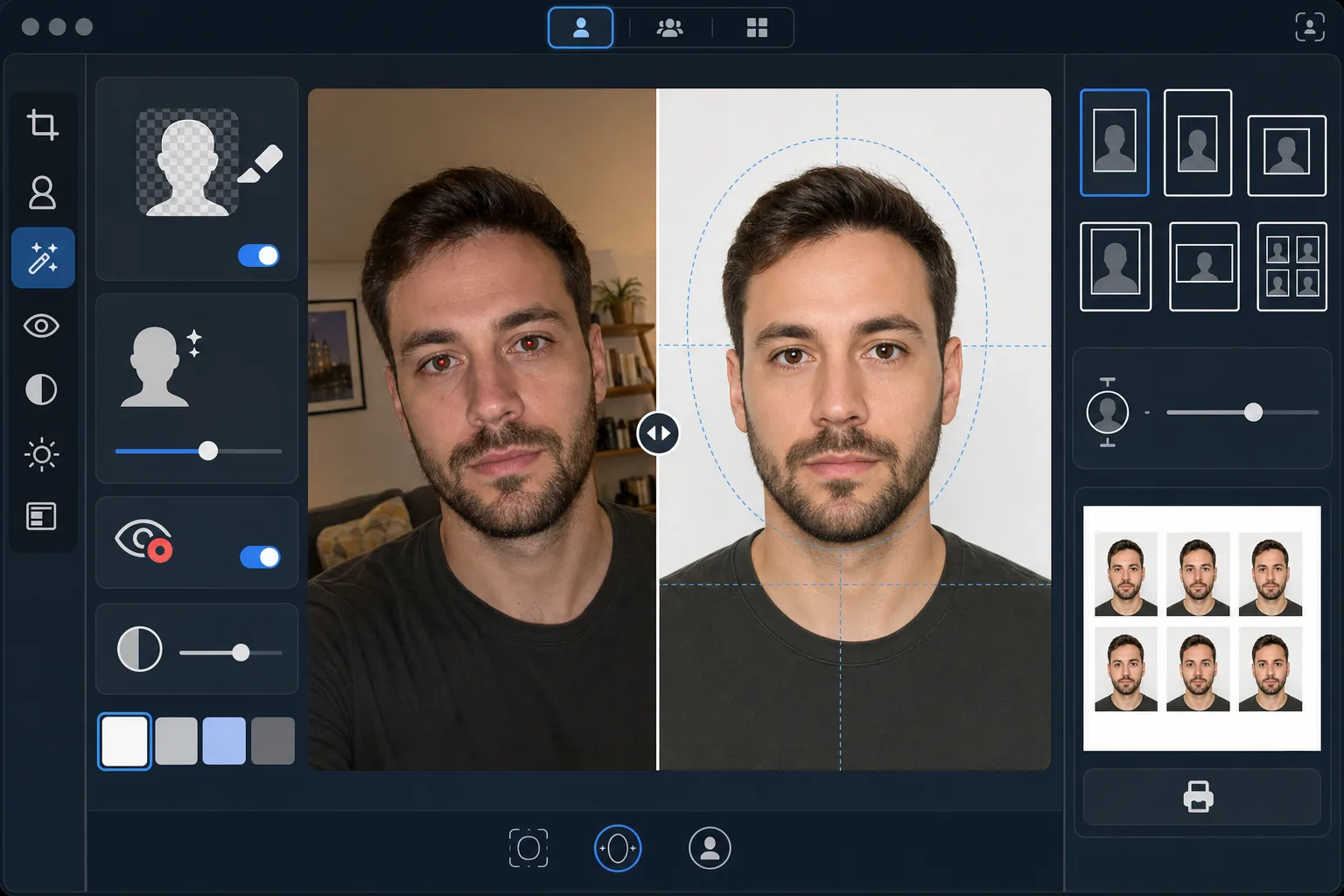
Mẫu này làm gì
Chuyển bất kỳ ảnh chân dung nào thành ảnh ID tuân thủ quy định của chính phủ. Mỗi loại giấy tờ yêu cầu thông số khác nhau — hộ chiếu Mỹ cần nền trắng với chiều cao đầu từ 25–35mm trên bản in 2×2 inch, trong khi thị thực Schengen yêu cầu nền xám nhạt hoặc trắng ở kích thước 35×45mm. Mẫu này tự động xử lý các tiêu chuẩn ảnh ID phổ biến nhất. Background Eraser xóa nền gốc và thay bằng màu trơn theo yêu cầu. AI Enhance hiệu chỉnh ánh sáng không đều, loại bỏ hiện tượng mắt đỏ do đèn flash và đảm bảo khuôn mặt được chiếu sáng đều, không có bóng đổ gắt ở một bên — một lý do từ chối thường gặp tại các cơ quan chính phủ.
Cài đặt mẫu
| Màu nền | Trắng (#FFFFFF) hoặc xám nhạt (#E5E5E5) — chọn theo loại ID |
| Kích thước đầu | Tự động khớp chiều cao đầu vào 70–80% khung hình (điều chỉnh theo từng tiêu chuẩn) |
| Kích thước in | 2×2 in (Mỹ), 35×45 mm (EU/Schengen), 33×48 mm (Anh) — có thể chọn |
| Hiệu chỉnh ánh sáng | Chiếu sáng khuôn mặt đều — không có bóng đổ ở cả hai bên |
| Độ phân giải xuất | 600 DPI để in ảnh (tương thích với ki-ốt và máy in tại nhà) |
Cách sử dụng mẫu này
Tải lên ảnh chính diện
Tải lên ảnh chân dung chính diện rõ nét, chụp ngang tầm mắt. Ảnh phải hiển thị đầy đủ khuôn mặt và phần trên vai với biểu cảm trung tính và cả hai mắt mở. Tháo kính, mũ và đồ đội đầu (trừ khi đội vì lý do tôn giáo) trước khi chụp.
Chọn loại ID của bạn
Chọn loại giấy tờ — hộ chiếu Mỹ, thị thực EU/Schengen, hộ chiếu Anh, giấy phép lái xe hoặc thẻ căn cước quốc gia. Mẫu sẽ tự động điều chỉnh màu nền, kích thước đầu, kích thước in và tỷ lệ khung hình để khớp với yêu cầu chính thức của giấy tờ bạn chọn.
Hiệu chỉnh nền và ánh sáng
Background Eraser xóa nền gốc và thay bằng màu trơn theo yêu cầu. AI Enhance hiệu chỉnh ánh sáng không đều để cả hai bên khuôn mặt được chiếu sáng đều và loại bỏ mọi sắc màu lệch do ánh sáng nhân tạo. Hiện tượng mắt đỏ do đèn flash được tự động sửa.
Xuất để in
Tải xuống ở 600 DPI với đúng kích thước in cần thiết cho loại giấy tờ của bạn. Bản xuất được định dạng cho giấy ảnh tiêu chuẩn 4×6 inch với nhiều ảnh ID xếp trên một tờ để in tại nhà, tại ki-ốt ảnh ở hiệu thuốc hoặc tại cửa hàng in chuyên nghiệp.
Mẹo chuyên nghiệp để có kết quả tốt nhất
- ✓Chụp ảnh trước một bức tường trơn trong phòng đủ sáng, hướng về phía cửa sổ. Dù mẫu có thay nền, việc bắt đầu với ánh sáng tự nhiên đều trên khuôn mặt sẽ cho kết quả tốt hơn so với việc phải sửa bóng đổ gắt từ ánh sáng nhân tạo.
- ✓Giữ biểu cảm trung tính với miệng khép và cả hai mắt mở. Yêu cầu ảnh ID của chính phủ luôn từ chối ảnh có nụ cười, mắt nheo hoặc miệng mở — các quy định này được thực thi bởi hệ thống xác minh ảnh tự động tại nhiều cơ quan chính phủ.
- ✓Đảm bảo tóc không phủ xuống mặt hay che lông mày. Khuôn mặt phải nhìn thấy rõ hoàn toàn từ cằm đến đỉnh trán. Kẹp gọn phần tóc vắt ngang qua mặt trước khi chụp.
- ✓Mặc áo tương phản với màu nền. Nếu nền trắng, tránh mặc đồ trắng — áo tối màu hoặc có màu giúp tách viền sạch sẽ và ngăn vai bị hòa lẫn vào nền.
Công cụ
Câu hỏi thường gặp
Ảnh này có được chấp nhận tại cơ quan chính phủ không?
+
Mẫu tuân theo các thông số chính thức cho từng loại giấy tờ (ICAO 9303 cho giấy tờ du lịch quốc tế, yêu cầu quốc gia riêng cho ID trong nước). Tuy nhiên, việc chấp nhận cuối cùng phụ thuộc vào cán bộ xét duyệt. Mẫu đảm bảo kích thước, màu nền, kích thước đầu và ánh sáng đáp ứng các yêu cầu đã công bố.
Tôi có được đeo kính trong ảnh không?
+
Hầu hết các quốc gia (bao gồm Mỹ từ năm 2016) hiện yêu cầu tháo kính khi chụp ảnh hộ chiếu và thị thực. Mẫu không xóa kính bằng kỹ thuật số — hãy tháo kính trước khi chụp ảnh nguồn. Đồ đội đầu vì lý do tôn giáo được phép ở hầu hết các khu vực pháp lý.
Làm thế nào để in bản xuất?
+
Mẫu xuất ra một tờ 4×6 inch với nhiều ảnh ID xếp ở đúng kích thước. In tại bất kỳ ki-ốt ảnh ở hiệu thuốc nào (CVS, Walgreens, Boots), tại nhà trên giấy ảnh ở 600 DPI hoặc tại cửa hàng in chuyên nghiệp. Dùng giấy ảnh bóng hoặc mờ — không dùng giấy in thường.
Nhận ảnh ID hợp lệ mà không cần ra khỏi nhà
Tải lên một ảnh selfie và nhận ảnh ID tuân thủ quy định chính phủ, sẵn sàng để in — cho hộ chiếu, thị thực, giấy phép lái xe và hơn thế nữa.
Dùng thử miễn phíRelated templates
More personal templates for your workflow.
Nâng cao chất lượng ảnh tốt nghiệp với tính năng làm sạch nền, đội mũ và áo choàng Color correction, loại bỏ vết bẩn và làm sắc nét các khung và thông báo để in sẵn.
Nâng cao chất lượng ảnh buổi hòa nhạc và sự kiện bằng tính năng giảm nhiễu trong điều kiện ánh sáng yếu, ánh sáng sân khấu hiệu chỉnh màu, loại bỏ sự xao lãng của đám đông và phục hồi chi tiết từ ảnh chụp ở địa điểm tối.
Tạo những bức ảnh thiệp thông báo đẹp mắt cho trẻ sơ sinh với nền mềm mại, phân loại màu sắc nhẹ nhàng, loại bỏ sự lộn xộn của bệnh viện và kích thước sẵn sàng để in để gửi thư.
Chuẩn bị ảnh gia đình và ảnh chân dung cho thiệp chúc mừng ngày lễ với nền lễ hội, phân loại màu ấm, hiệu ứng tuyết và kích thước thiệp tiêu chuẩn để in.
Khôi phục và cải thiện các bức ảnh tưởng niệm bằng tính năng chỉnh sửa nhẹ nhàng, đơn giản hóa nền, phân loại màu tôn trọng ấm áp và kích thước sẵn sàng để in cho các dịch vụ.
Chuyển đổi ảnh nơi trú ẩn và giải cứu thú cưng bằng tính năng thay nền, hiệu chỉnh ánh sáng và cải thiện chi tiết lông để giúp động vật tìm nhà nhanh hơn.