
Thiệp thông báo trẻ sơ sinh
Biến những bức ảnh chụp tại bệnh viện và trong ngày đầu đời thành hình ảnh thiệp thông báo tuyệt đẹp. Mẫu này loại bỏ sự lộn xộn của nền bệnh viện, áp dụng phân loại màu ấm áp nhẹ nhàng, tách bé khỏi nền sạch hoặc pastel, và xuất ra hình ảnh sẵn sàng để in ở kích thước thiệp tiêu chuẩn để gửi thư và chia sẻ kỹ thuật số.
Dùng thử mẫu này miễn phíPersonal template preview
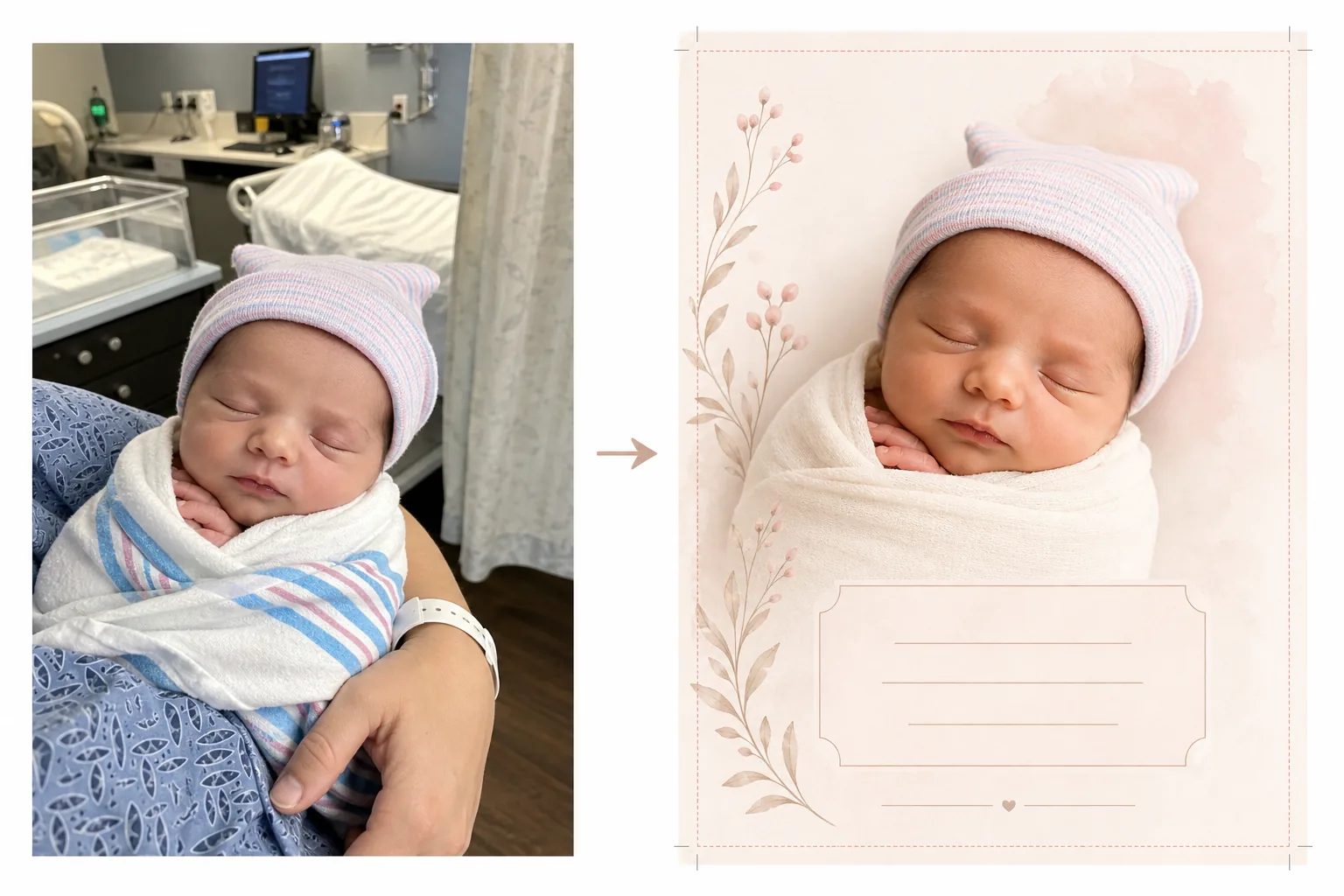
Mẫu này làm gì
Chuẩn bị ảnh trẻ sơ sinh cho thiệp thông báo chào đời bằng cách biến những bức ảnh chụp vội trong phòng bệnh viện thành hình ảnh sạch sẽ, dịu dàng phù hợp cho cả thiệp in và thông báo kỹ thuật số. Phòng bệnh viện có thiết bị y tế, ánh sáng huỳnh quang và nền mang tính cơ sở làm mất đi sự thân mật của một bức ảnh trẻ sơ sinh. Background Eraser tách bé ra và thay khung cảnh bệnh viện bằng nền sạch, mềm mại với tông trắng, kem hoặc pastel. AI Enhance điều chỉnh ánh sáng huỳnh quang lạnh lẽo của bệnh viện thành tông màu ấm áp, nhẹ nhàng giúp làn da trông khỏe mạnh và tự nhiên. Kết quả là một bức ảnh xứng đáng để thông báo, tập trung hoàn toàn vào thiên thần mới chào đời mà không có bất kỳ bối cảnh y tế nào.
Cài đặt mẫu
| Nền | Trắng mềm, kem, hồng phấn hoặc xanh xô thơm (phù hợp với thiệp thông báo) |
| Phân loại màu | Tông màu ấm nhẹ nhàng (điều chỉnh ánh sáng huỳnh quang bệnh viện thành sự ấm áp tự nhiên) |
| Tông da | Tăng cường làn da trẻ sơ sinh tự nhiên (mềm mại, ấm áp, khỏe mạnh) |
| Kích thước thiệp | 5×7 in, 4×6 in hoặc A6 (kích thước thiệp thông báo tiêu chuẩn) |
| Độ phân giải đầu ra | 300 DPI ở kích thước thiệp (sẵn sàng cho tiệm in và máy in tại nhà) |
Cách sử dụng mẫu này
Tải ảnh trẻ sơ sinh lên
Tải lên một bức ảnh của bé — trong nôi bệnh viện, trong vòng tay cha mẹ hoặc được quấn trong chăn. Mẫu này xử lý nhiều bố cục khác nhau bao gồm ảnh cận mặt, tư thế quấn chăn toàn thân và chân dung cha mẹ bế bé. Áo choàng bệnh viện, máy theo dõi và vòng tay nhìn thấy trên cha mẹ sẽ được dọn dẹp tự động.
Biến đổi nền và màu sắc
Background Eraser loại bỏ phòng bệnh viện và thay bằng nền sạch, mềm mại với màu bạn chọn. Ánh sáng huỳnh quang lạnh lẽo được điều chỉnh thành tông màu ấm áp, tự nhiên. Làn da được tăng cường nhẹ nhàng để trông khỏe mạnh và tự nhiên với ánh sáng ấm áp dịu dàng đặc trưng của nhiếp ảnh trẻ sơ sinh.
Định dạng thiệp
Hình ảnh được định dạng theo kích thước thiệp bạn chọn với lề tràn lề phù hợp để in chuyên nghiệp. Không gian được dành cho phần văn bản chèn — tên, ngày sinh, cân nặng và chiều dài — được bố trí theo bố cục thiệp thông báo tiêu chuẩn với ảnh bé làm tâm điểm thị giác.
Xuất để in và chia sẻ
Tải xuống ở 300 DPI với kích thước thiệp bạn chọn để in tại tiệm in chuyên nghiệp, dịch vụ thiệp trực tuyến hoặc máy in tại nhà. Một phiên bản tối ưu cho web cũng được cung cấp để thông báo qua email và chia sẻ trên mạng xã hội.
Mẹo chuyên nghiệp để có kết quả tốt nhất
- ✓Để có bức ảnh thiệp thông báo dùng được nhất, hãy chụp cận mặt bé khi bé đang ngủ. Những em bé đang ngủ có biểu cảm thư giãn, thanh thản chụp ảnh rất đẹp và phù hợp làm điểm nhấn của bố cục thiệp.
- ✓Quấn bé trong khăn quấn màu trắng hoặc màu sáng trước khi chụp. Điều này tạo ranh giới thị giác rõ ràng giữa bé và nền, giúp Background Eraser tạo ra đường viền sạch nhất có thể, đặc biệt quanh những ngón tay nhỏ xíu và sợi tóc mảnh.
- ✓Nếu nhìn thấy tay hoặc cánh tay của một phụ huynh đang bế bé thì cũng không sao — mẫu này cũng tăng cường tông da của phụ huynh. Vòng tay bệnh viện trên cổ tay phụ huynh được loại bỏ tự động để trông gọn gàng hơn.
- ✓Chụp nhiều ảnh và chọn ảnh có biểu cảm và tư thế tay đẹp nhất. Trẻ sơ sinh cử động khó lường — chụp nhiều lựa chọn đảm bảo bạn có một khung hình mà những ngón tay nhỏ xíu, miệng và mắt trông ăn ảnh nhất.
Công cụ
Câu hỏi thường gặp
Mẫu này có thể loại bỏ thiết bị bệnh viện khỏi nền không?
+
Có. Mẫu này được thiết kế đặc biệt cho mục đích này — nó loại bỏ nôi bệnh viện, máy theo dõi, giá truyền dịch, rèm cửa và đèn huỳnh quang trên trần, thay bằng nền sạch phù hợp với thiệp thông báo. Bé và bất kỳ phụ huynh nào đang bế được tách khỏi môi trường y tế.
Có những kích thước thiệp nào?
+
Hỗ trợ các kích thước thiệp thông báo tiêu chuẩn: 5×7 inch (phổ biến nhất cho thiệp gửi thư), 4×6 inch (kiểu bưu thiếp) và A6 (tiêu chuẩn quốc tế). Đầu ra bao gồm lề tràn lề phù hợp để in chuyên nghiệp.
Tôi có thể thêm văn bản vào thiệp không?
+
Mẫu này chuẩn bị ảnh với không gian dành cho phần văn bản chèn nhưng không thêm văn bản trực tiếp. Hãy dùng ảnh đã xuất trong Canva, Shutterfly, Minted hoặc bất kỳ dịch vụ thiết kế thiệp nào để thêm tên bé, ngày sinh, cân nặng, chiều dài và lời nhắn cá nhân.
Thông báo thiên thần mới chào đời bằng một bức ảnh đẹp
Tải lên ảnh chụp tại bệnh viện hoặc trong ngày đầu đời và nhận hình ảnh mềm mại, ấm áp, sẵn sàng để in hoàn hảo cho thiệp thông báo chào đời.
Dùng thử miễn phíRelated templates
More personal templates for your workflow.
Tạo ảnh ID phù hợp cho thị thực, giấy phép lái xe và ID quốc gia với các yêu cầu về màu nền, kích thước đầu và nét mặt phù hợp.
Nâng cao chất lượng ảnh tốt nghiệp với tính năng làm sạch nền, đội mũ và áo choàng Color correction, loại bỏ vết bẩn và làm sắc nét các khung và thông báo để in sẵn.
Nâng cao chất lượng ảnh buổi hòa nhạc và sự kiện bằng tính năng giảm nhiễu trong điều kiện ánh sáng yếu, ánh sáng sân khấu hiệu chỉnh màu, loại bỏ sự xao lãng của đám đông và phục hồi chi tiết từ ảnh chụp ở địa điểm tối.
Chuẩn bị ảnh gia đình và ảnh chân dung cho thiệp chúc mừng ngày lễ với nền lễ hội, phân loại màu ấm, hiệu ứng tuyết và kích thước thiệp tiêu chuẩn để in.
Khôi phục và cải thiện các bức ảnh tưởng niệm bằng tính năng chỉnh sửa nhẹ nhàng, đơn giản hóa nền, phân loại màu tôn trọng ấm áp và kích thước sẵn sàng để in cho các dịch vụ.
Chuyển đổi ảnh nơi trú ẩn và giải cứu thú cưng bằng tính năng thay nền, hiệu chỉnh ánh sáng và cải thiện chi tiết lông để giúp động vật tìm nhà nhanh hơn.