
Ảnh hòa nhạc & sự kiện
Cứu vãn những bức ảnh hòa nhạc và sự kiện tối, nhiễu thành kỷ niệm có thể chia sẻ. Mẫu này giảm đáng kể nhiễu trong điều kiện thiếu sáng, phục hồi chi tiết từ ảnh thiếu phơi sáng, hiệu chỉnh ám màu mạnh từ ánh sáng sân khấu, loại bỏ cánh tay và điện thoại che khuất tầm nhìn, và làm sắc nét nghệ sĩ biểu diễn hoặc đối tượng sự kiện.
Dùng thử mẫu này miễn phíPersonal template preview
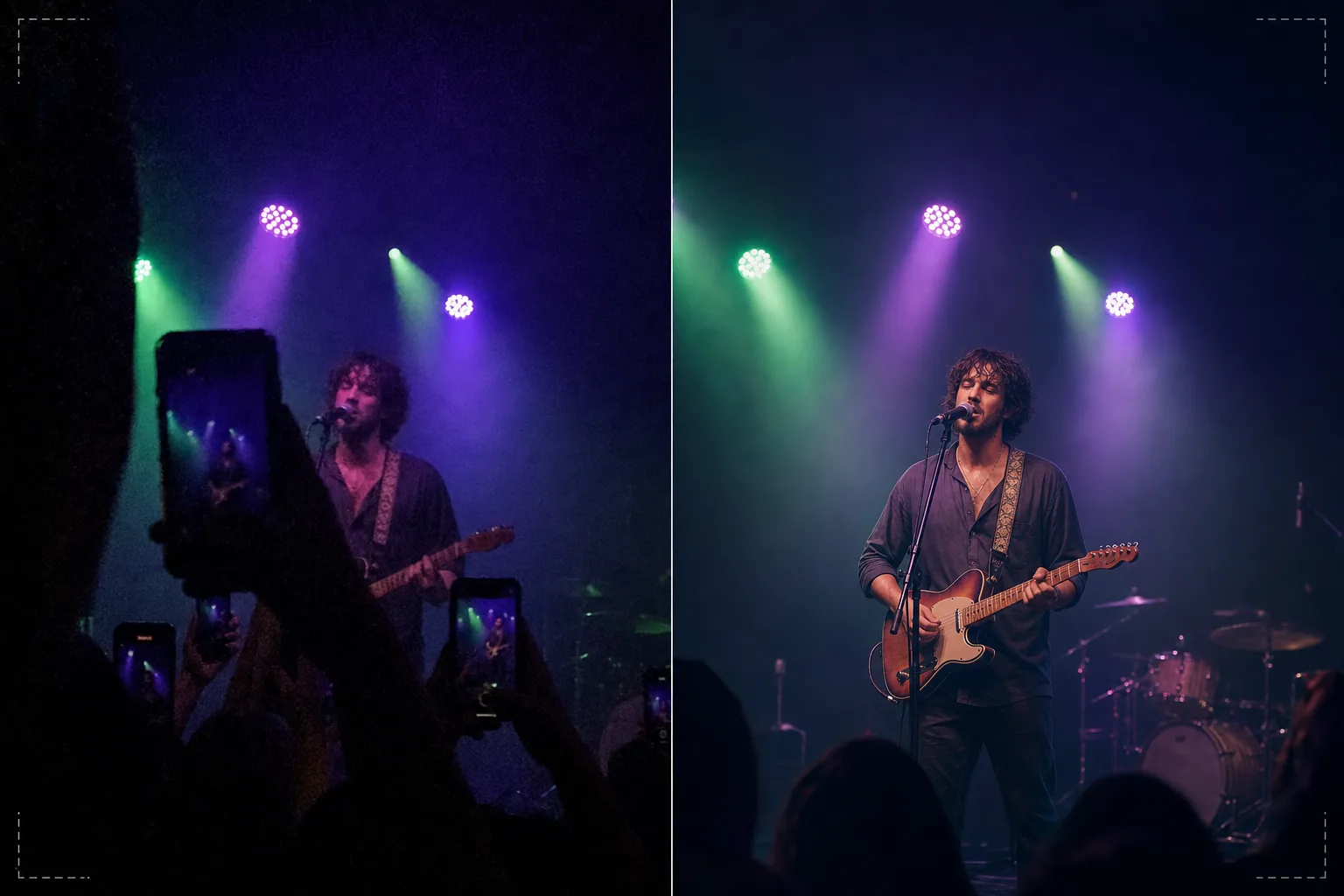
Mẫu này làm gì
Cứu vãn những bức ảnh khó chụp tại các buổi hòa nhạc, lễ hội, sự kiện thể thao và buổi biểu diễn trong nhà nơi điều kiện ánh sáng đánh bại máy ảnh điện thoại. Ảnh hòa nhạc là những cảnh khó về mặt kỹ thuật nhất mà mọi người thường xuyên chụp — ánh sáng cực yếu buộc ISO cao gây nhiễu, ánh sáng sân khấu nhiều màu pha trộn tạo ám màu kỳ lạ, và khoảng cách đến sân khấu khiến khuôn mặt và chi tiết nhỏ và mờ. AI Enhance áp dụng khử nhiễu thông minh giúp loại bỏ kiểu hạt nhiễu trong khi phục hồi chi tiết bên dưới, hiệu chỉnh ám màu tím, xanh lá và đỏ từ ánh sáng sân khấu để lộ tông da và nhạc cụ tự nhiên, và làm sắc nét nghệ sĩ để làm nổi bật biểu cảm khuôn mặt và chi tiết nhạc cụ. Magic Eraser loại bỏ cánh tay giơ lên, điện thoại và đầu của khán giả khác che khuất tầm nhìn của bạn.
Cài đặt mẫu
| Khử nhiễu | Khử nhiễu AI (phục hồi chi tiết từ hạt nhiễu ISO cao lên đến ISO 12800) |
| Hiệu chỉnh màu | Loại bỏ ám màu ánh sáng sân khấu (trung hòa tím, xanh lá, đỏ, xanh dương) |
| Phục hồi vùng tối | Nâng vùng thiếu phơi sáng lên đến 3 khẩu độ |
| Loại bỏ đám đông | Loại bỏ cánh tay giơ lên, điện thoại và những cái đầu che khuất |
| Làm sắc nét đối tượng | Làm sắc nét chọn lọc nghệ sĩ/sân khấu (giữ bầu không khí bokeh) |
Cách sử dụng mẫu này
Tải lên ảnh hòa nhạc của bạn
Tải lên ảnh điện thoại hoặc máy ảnh từ các buổi hòa nhạc, lễ hội, buổi biểu diễn sân khấu, chương trình hài kịch hoặc sự kiện thể thao. Mẫu xử lý các điều kiện khắc nghiệt mà những địa điểm này mang lại — phơi sáng gần như tối, ánh sáng sân khấu đậm màu, nhòe chuyển động từ nghệ sĩ di chuyển và tầm nhìn bị che khuất bởi khán giả.
Khử nhiễu và phục hồi chi tiết
AI Enhance loại bỏ hạt nhiễu ISO cao trong khi giữ chi tiết hình ảnh bên dưới. Các vùng tối thiếu phơi sáng được nâng lên để lộ khuôn mặt, nhạc cụ và các yếu tố sân khấu vốn gần như vô hình trong ảnh gốc. Việc khử nhiễu được hiệu chỉnh để duy trì chất lượng bầu không khí của địa điểm thay vì làm hình ảnh trông mịn một cách giả tạo.
Hiệu chỉnh màu sắc và ánh sáng
Ám màu mạnh từ ánh sáng sân khấu được hiệu chỉnh để tông da, trang phục và nhạc cụ hiện ra với màu sắc dễ nhận biết. Bạn có thể chọn trung hòa hoàn toàn ánh sáng sân khấu để có vẻ tự nhiên, hoặc hiệu chỉnh một phần để giữ lại một số ánh sáng màu tạo không khí trong khi giảm những ám màu cực đoan nhất.
Xuất kỷ niệm đã nâng cao của bạn
Tải xuống ảnh đã nâng cao để chia sẻ trên mạng xã hội, lưu trữ cá nhân hoặc in ấn. Kết quả giữ được chất lượng bầu không khí của sự kiện trực tiếp trong khi làm hình ảnh đủ rõ để khuôn mặt, biểu cảm và khoảnh khắc hiện rõ và có ý nghĩa như những kỷ vật.
Mẹo chuyên nghiệp để có kết quả tốt nhất
- ✓Chụp vào những khoảnh khắc ánh sáng sân khấu sáng rực — đèn pha, pháo hoa, chuyển cảnh màn hình — thay vì những đoạn tối tạo không khí. Mẫu có thể phục hồi đáng kể chi tiết vùng tối, nhưng ảnh chụp vào những khoảnh khắc sáng nhất có nhiều dữ liệu cơ sở nhất để xử lý.
- ✓Sử dụng chế độ chụp liên tục khi chụp nghệ sĩ đang di chuyển. Nhòe chuyển động từ cử chỉ tay của ca sĩ hay cánh tay gảy đàn của tay guitar không thể loại bỏ sau khi chụp, nhưng một khung hình trong loạt mười khung có thể bắt được khoảnh khắc sắc nét mà mẫu sau đó có thể nâng cao.
- ✓Giữ điện thoại bằng cả hai tay và tì khuỷu tay vào cơ thể để giảm rung. Rung máy làm tăng thêm khó khăn cho nhiếp ảnh hòa nhạc thiếu sáng. Một ảnh gốc ổn định hơn cung cấp dữ liệu sạch hơn cho thuật toán khử nhiễu và tạo ra hình ảnh cuối cùng sắc nét hơn.
Công cụ
Câu hỏi thường gặp
Tính năng này có thể sửa ảnh gần như hoàn toàn tối không?
+
Mẫu có thể phục hồi chi tiết từ những cảnh thiếu phơi sáng 2–3 khẩu độ — hình ảnh mà bạn hầu như không thấy được đối tượng. Vượt quá 3 khẩu độ, dữ liệu cảm biến chủ yếu là nhiễu và hình ảnh phục hồi sẽ có nhiều nhiễu hình. Ảnh gốc càng sáng, kết quả càng tốt.
Còn cảnh quay video hòa nhạc thì sao?
+
Trích xuất những khung hình tĩnh tốt nhất từ video hòa nhạc của bạn và xử lý từng khung riêng lẻ. Khung hình video có độ phân giải thấp hơn ảnh tĩnh nhưng hưởng lợi đáng kể từ việc khử nhiễu và hiệu chỉnh màu, tạo ra hình ảnh có thể chia sẻ từ cảnh quay vốn quá nhiễu khi ở dạng video.
Việc loại bỏ vật cản từ đám đông có trông tự nhiên không?
+
Loại bỏ điện thoại giơ lên, cánh tay và đầu của đám đông phía trước bạn hoạt động tốt khi vật cản che một phần nhỏ khung hình. AI tái tạo sân khấu và nền phía sau các yếu tố bị loại bỏ. Loại bỏ các vật cản lớn che phần lớn đối tượng thì kém hiệu quả hơn.
Biến những cảnh hòa nhạc tối thành kỷ niệm sống động
Tải lên ảnh sự kiện của bạn và phục hồi những khoảnh khắc mà máy ảnh của bạn khó nắm bắt trong điều kiện ánh sáng địa điểm đầy thách thức.
Dùng thử miễn phíRelated templates
More personal templates for your workflow.
Tạo ảnh ID phù hợp cho thị thực, giấy phép lái xe và ID quốc gia với các yêu cầu về màu nền, kích thước đầu và nét mặt phù hợp.
Nâng cao chất lượng ảnh tốt nghiệp với tính năng làm sạch nền, đội mũ và áo choàng Color correction, loại bỏ vết bẩn và làm sắc nét các khung và thông báo để in sẵn.
Tạo những bức ảnh thiệp thông báo đẹp mắt cho trẻ sơ sinh với nền mềm mại, phân loại màu sắc nhẹ nhàng, loại bỏ sự lộn xộn của bệnh viện và kích thước sẵn sàng để in để gửi thư.
Chuẩn bị ảnh gia đình và ảnh chân dung cho thiệp chúc mừng ngày lễ với nền lễ hội, phân loại màu ấm, hiệu ứng tuyết và kích thước thiệp tiêu chuẩn để in.
Khôi phục và cải thiện các bức ảnh tưởng niệm bằng tính năng chỉnh sửa nhẹ nhàng, đơn giản hóa nền, phân loại màu tôn trọng ấm áp và kích thước sẵn sàng để in cho các dịch vụ.
Chuyển đổi ảnh nơi trú ẩn và giải cứu thú cưng bằng tính năng thay nền, hiệu chỉnh ánh sáng và cải thiện chi tiết lông để giúp động vật tìm nhà nhanh hơn.