
Удалить автомобили с фотографий
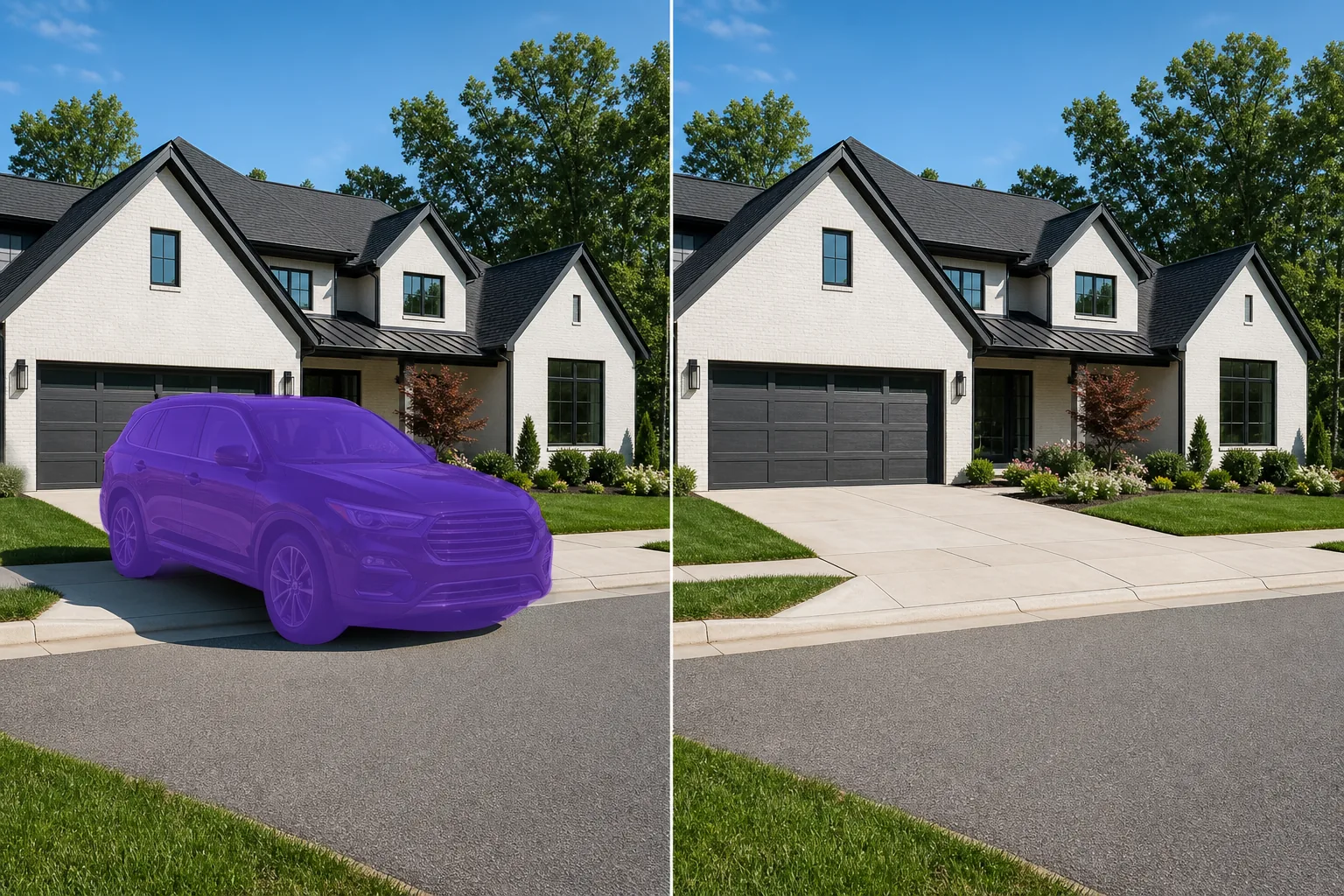
Удалите припаркованные автомобили, грузовики, мотоциклы и другие транспортные средства из списков недвижимости, архитектурных снимков, туристических фотографий и городских пейзажей. Magic Eraser удаляет транспортное средство и его тень, а затем реконструирует дорогу, подъездную дорожку или парковку позади него с соответствующей текстурой поверхности и перспективой.
Последнее обновление
Почему автомобили загромождают фотографии недвижимости и архитектуры
Чтобы убрать машины и другой транспорт с фотографии, откройте Magic Eraser в браузере, на iOS или Android, загрузите снимок, закрасьте кистью автомобиль, грузовик или фургон — и ИИ достроит дорогу, подъездную дорожку или фон за ним. Это бесплатно и без регистрации. Лучше всего работает, когда вокруг транспорта есть ровная однородная поверхность — асфальт, трава, тротуар, — которую ИИ может убедительно продлить. Небольшая или удалённая машина на фоне открытого пространства исчезает почти бесследно; а вот транспорт, занимающий весь передний план или стоящий у детализированного здания, оставляет больше работы по восстановлению — поэтому закрашивайте по частям, повторяйте обработку и приближайте, чтобы проверить результат. Автомобиль соседа на подъездной дорожке по соседству, грузовик, закрывающий вид на улицу, припаркованный седан, закрывающий ландшафт — транспортные средства являются наиболее распространенным визуальным беспорядком при съемке экстерьера недвижимости. Они отвлекают покупателей от недвижимости, скрывают привлекательность и указывают дату на фотографии (год модели, номерные знаки). В архитектурной фотографии транспортные средства в кадре конкурируют со зданием за визуальное внимание. Magic Eraser удаляет транспортные средства любого размера и восстанавливает то, что находится за ними. ИИ обрабатывает сложные поверхности, включая асфальтированные дороги, бетонные подъездные пути, брусчатку, гравий и траву. Для фотографов недвижимости, которые не могут контролировать уличную парковку во время съемки, это избавляет от необходимости дорогостоящих повторных съемок или утомительной ручной работы с Photoshop.
Удаление транспортных средств в три шага
- 1
Загрузите свою фотографию
Откройте Magic Eraser в Интернете, на iOS или Android и загрузите фотографию объекта недвижимости, архитектурный снимок или уличную сцену, содержащую автомобиль, который вы хотите удалить. Принимаются все стандартные форматы изображений.
- 2
Зачистить автомобиль
Закрасьте весь автомобиль, включая колеса, зеркала, тени на земле и любые отражения в ближайших окнах или лужах. Для больших транспортных средств, таких как грузовики или внедорожники, используйте широкую кисть, покрывающую весь силуэт. Добавьте небольшой запас за контуром автомобиля, чтобы создать контекст ИИ для реконструкции поверхности.
- 3
Сотрите и проверьте поверхность
Нажмите «Стереть», и ИИ удалит транспортное средство, реконструируя дорожное покрытие, подъездную дорожку, бордюр и любой ландшафт, находившийся за ним. Убедитесь, что дорожная разметка, линии бордюров и края травы выглядят непрерывными. Для транспортных средств, отбрасывающих длинные тени, убедитесь, что область тени естественным образом сливается с остальной поверхностью. Экспортируйте списки, портфолио или маркетинговые материалы.
Лучшее для
- Фотографии экстерьера недвижимости, на которых припаркованные автомобили скрывают привлекательность объекта.
- Архитектурная фотография, где автомобили в кадре конкурируют со зданием
- Фотографии объявления Airbnb, демонстрирующие чистоту и гостеприимство при прибытии
- Туристическая фотография, где припаркованные автомобили нарушают живописную композицию
- Городская пейзажная фотография в поисках эстетики, ориентированной на пешеходов.
- Фотографии коммерческой недвижимости для розничной, офисной или промышленной недвижимости.
- Маркетинговые фотографии отелей и курортов, на которых гостевые автомобили загромождают территорию
- Презентации городского планирования, показывающие предлагаемые уличные пейзажи без текущего движения транспорта.
Советы по чистой эвакуации автомобиля
Транспортные средства — это большие объекты, занимающие значительную площадь кадра, что делает реконструкцию ИИ более сложной задачей, чем удаление небольшого объекта. Для достижения наилучших результатов используйте исходное изображение с самым высоким доступным разрешением — больше данных в пикселях дает ИИ лучший контекст для реконструкции поверхности. Когда транспортное средство частично закрывает здание, забор или элемент ландшафта, ИИ определяет, что находится позади транспортного средства, на основе видимого контекста с обеих сторон. Реконструкция обычно точна для непрерывных объектов (линия забора, ряд кустов, дорожное покрытие), но может потребоваться доработка уникальных элементов (номер дома, декоративный почтовый ящик, конкретное растение). Для широкоугольных снимков, на которых видно несколько транспортных средств, удаляйте их по одному, начиная с самого большого. Это дает ИИ лучший контекст для каждого последующего удаления. Номерные знаки на экспортированных изображениях на некоторых рынках вызывают вопросы конфиденциальности — удаление транспортных средств полностью устраняет эту проблему.
Часто задаваемые вопросы
- Можно ли бесплатно удалять транспортные средства с фотографий недвижимости?
- Да. Уровень бесплатного пользования Magic Eraser обеспечивает удаление транспортных средств с дневными лимитами. Фотографы недвижимости, делающие полноценные снимки объектов недвижимости, получают Премиум (29,99 долларов США в год) для неограниченного использования и экспорта в более высоком разрешении.
- Сможет ли он справиться с большими грузовиками и внедорожниками?
- Да. Magic Eraser удаляет автомобили любого размера — седаны, внедорожники, пикапы, фургоны и коммерческие автомобили. Более крупные транспортные средства требуют большей фоновой реконструкции, но ИИ точно обрабатывает сложные поверхности, такие как дороги, подъездные пути и ландшафтный дизайн.
- Что происходит с дорожной разметкой и бордюрами?
- Искусственный интеллект реконструирует непрерывные элементы дороги, включая разметку полос, края бордюров и линии водосточных желобов. Он распространяет видимые узоры на территорию, где был припаркован автомобиль. В случае необычной разметки (переходы, стрелки) проверьте результат при 100 % и при необходимости выполните второй проход.
- Стоит ли включать тень автомобиля в выделение?
- Да. Всегда включайте полную тень. Оставшаяся тень без отбрасывающего ее объекта является наиболее очевидным артефактом неполного удаления. Нанесите кисть на автомобиль и его тень, чтобы получить чистый результат.