
Удалить линии электропередачи с фотографий
Избавьтесь от воздушных проводов, пересекающих ваш закат, от телефонных кабелей, блокирующих ваш архитектурный план, от инженерных сетей, пересекающих ваш объект недвижимости. Magic Eraser закрашивает линии электропередач и восстанавливает небо, линию деревьев или крышу за считанные секунды — без клонирования или ручной восстанавливающей кисти.
Последнее обновление
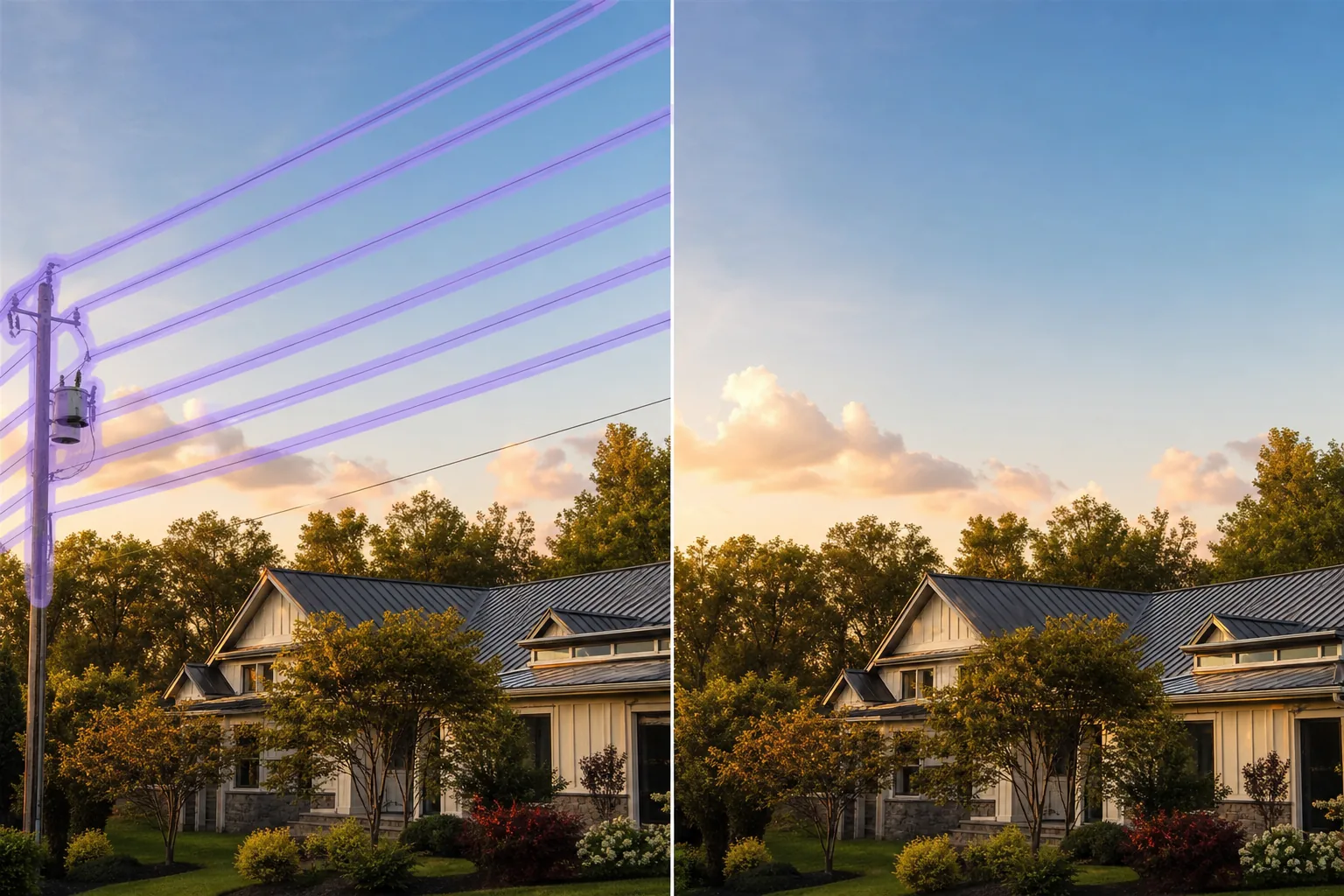
Почему линии электропередач являются наиболее редактируемым элементом пейзажного фотографа
Воздушные линии электропередачи проходят почти через каждый кадр, снятый в застроенной местности — через закаты, за домами, между деревьями, над линией крыш архитектурных объектов. Они редко располагаются по центру, обычно достаточно тонкие, чтобы глаз не замечал их во время съемки, и они доминируют в кадре в тот момент, когда фотография открывается на большом экране. Удаление вручную — это медленное и сложное занятие, поскольку линия пересекает несколько фонов на одной фотографии: небо, линию деревьев, здание, крышу — для каждого из которых требуется своя текстура заливки. Magic Eraser автоматически обрабатывает переходы, восстанавливая градиент неба там, где линия пересекала открытый воздух, листву деревьев там, где она пересекала ветки, а также здание или крышу там, где она пересекала конструкцию, и все это за один проход кисти.
Удалить линии электропередачи за три шага
- 1
Загрузите свою фотографию
Откройте Magic Eraser в Интернете, iOS или Android и добавьте фотографии пейзажа, архитектуры или недвижимости с ненужными проводами. Поддерживаются JPEG, PNG, HEIC и WebP.
- 2
Щетка вдоль каждой линии электропередачи
Проследите каждый провод от края до края кадра, включая любые столбы и трансформаторы, видимые на снимке. Кисть немного большего размера, чем сама линия, дает ИИ более чистое пространство для перестройки — отслеживание точной ширины линии в пикселях заставляет модель бороться за информацию о краях. Добавьте тень линии на землю или здание, если она видна.
- 3
Нажмите «Стереть и проверить».
Magic Eraser восстанавливает градиент неба, линию деревьев, крышу или стену в месте пересечения проводов за считанные секунды. Сканируйте исходные линии с масштабом 100 % на наличие остаточных ореолов, запустите второй проход для любого оставшегося артефакта, а затем экспортируйте в полном разрешении для портфолио, списка MLS или публикации в социальных сетях.
Лучшее для
- Фотографии пейзажей и закатов, где воздушные провода пересекают небо.
- Архитектурная фотография, где инженерные коммуникации проходят перед фасадом здания.
- Объявления о недвижимости, где линии электропередачи пересекают двор перед домом, линию крыши или подъездную дорожку.
- Фотографии из путешествий: исторические улицы и городские пейзажи, загроможденные телефонными кабелями.
- Внешний вид свадебного зала, где провода пересекают вход, сад или задний двор
- Фотографии, сделанные с помощью дрона, где воздушные провода мешают обзору недвижимости с высоты птичьего полета
- Винтажные или отреставрированные фотографии с сохраненными в оригинале телефонными и телеграфными линиями.
- Композитные астрофотографии: электрические провода пересекают звездные следы с длинной выдержкой.
Крайние случаи и советы
Удаление линий электропередачи — один из самых чистых способов редактирования фотографий с помощью ИИ, поскольку провода обычно тонкие, высококонтрастные и пересекают относительно предсказуемый фон (небо, листву, крышу). Два крайних случая нуждаются в дополнительной осторожности. Во-первых: когда несколько проводов объединяются в один плотный пучок кабелей, пересекающий сложный фон (линия неба встречается с линией крыши здания), выполните два или три меньших прохода кисти, а не один большой — ИИ получает более чистый контекст для каждого участка, чем для одной гигантской замаскированной области. Во-вторых: когда трансформатор или изолятор, установленный на опоре, находится в месте пересечения проводов, чистите щеткой весь корпус трансформатора, а не только входящие в него провода; ИИ более точно заполняет небо или здание под ним, когда вся конструкция замаскирована сразу. Для коммерческого использования с высокими ставками, такого как архитектурные портфолио, заявки MLS и маркетинг недвижимости, следуйте отраслевому стандарту раскрытия изображений, очищенных с помощью искусственного интеллекта (FTC для рекламных копий, статья 12 Кодекса этики NAR для объявлений о недвижимости: любое существенное изменение не должно искажать состояние объекта или его окружение).
Часто задаваемые вопросы
- Бесплатно ли удалить линии электропередачи с фотографии?
- Да. Уровень бесплатного пользования Magic Eraser включает отключение линии электропередачи с ежедневными ограничениями на использование. Обновление до Премиум-версии (29,99 долларов США в год) снимает ограничения и открывает возможность экспорта с более высоким разрешением, что полезно для печатных архитектурных портфолио, материалов MLS и галерейных отпечатков.
- Могу ли я удалить все провода на городской улице?
- Да хоть фотографии с десятком видимых телефонных линий и линий электропередачи. Нанесите кисть на каждый провод, а также на любые столбы или трансформаторы в раме, затем сотрите. ИИ восстанавливает фасады зданий, небо и линию деревьев под ними. Для плотных городских сцен (виды улиц Токио, исторические центры Америки), где доминирующим визуальным элементом являются провода, выполните два или три прохода, охватывающих разные плоскости глубины (сначала провода перед кадром, затем посередине земли, а затем фоновые провода только с небом) для получения наиболее чистого результата.
- Работает ли это на фотографиях недвижимости, где линии электропередачи проходят над домом?
- Да, и это одно из самых рентабельных приложений. Списки MLS с видимыми коммуникациями над участком, как правило, уступают спискам сопоставимых домов без них — линии воспринимаются как визуальный беспорядок и воспринимаемая опасность для коммунальных предприятий. Закрасьте линии (включая любые линии связи, подходящие к дому), и ИИ восстановит линию крыши и неба. Раскройте редактирование в соответствии со статьей 12 Кодекса этики NAR — существенные изменения не должны искажать собственность; фактические линии остаются на территории объекта, а раскрытие информации сохраняет прозрачность.
- А как насчет трансформатора или изолятора на опоре?
- Протрите весь корпус трансформатора, а не только входящие в него провода. AI заполняется более точно, когда вся структура маскируется сразу, чем когда преобразователь остается в виде остаточного серого пятна. То же самое касается керамических изоляторов, ограничителей перенапряжения и любого оборудования, установленного на опоре, видимого в раме.
- Будет ли очищенное небо выглядеть явно отредактированным?
- На большинстве фотографий нет — ИИ подбирает градиент неба, края облаков и экспозицию. Места, которые он может показывать, - это небо с указателями направления, по которым случайно совпал провод (длинное тонкое облако, инверсионный след, край солнечного ореола), где восстановление пути линии может прервать сигнал; проблема обычно решается чисткой немного более широкой области и повторением второго прохода. Для закатов и рассветов с длинной выдержкой, когда небо имеет тонкую градиентную текстуру, увеличьте масштаб до 100 % и проверьте исходные пути линий перед экспортом.