
Magic Eraser vs VanceAI: 1つの統合型AIエディター vs 15以上のAIユーティリティのカタログ
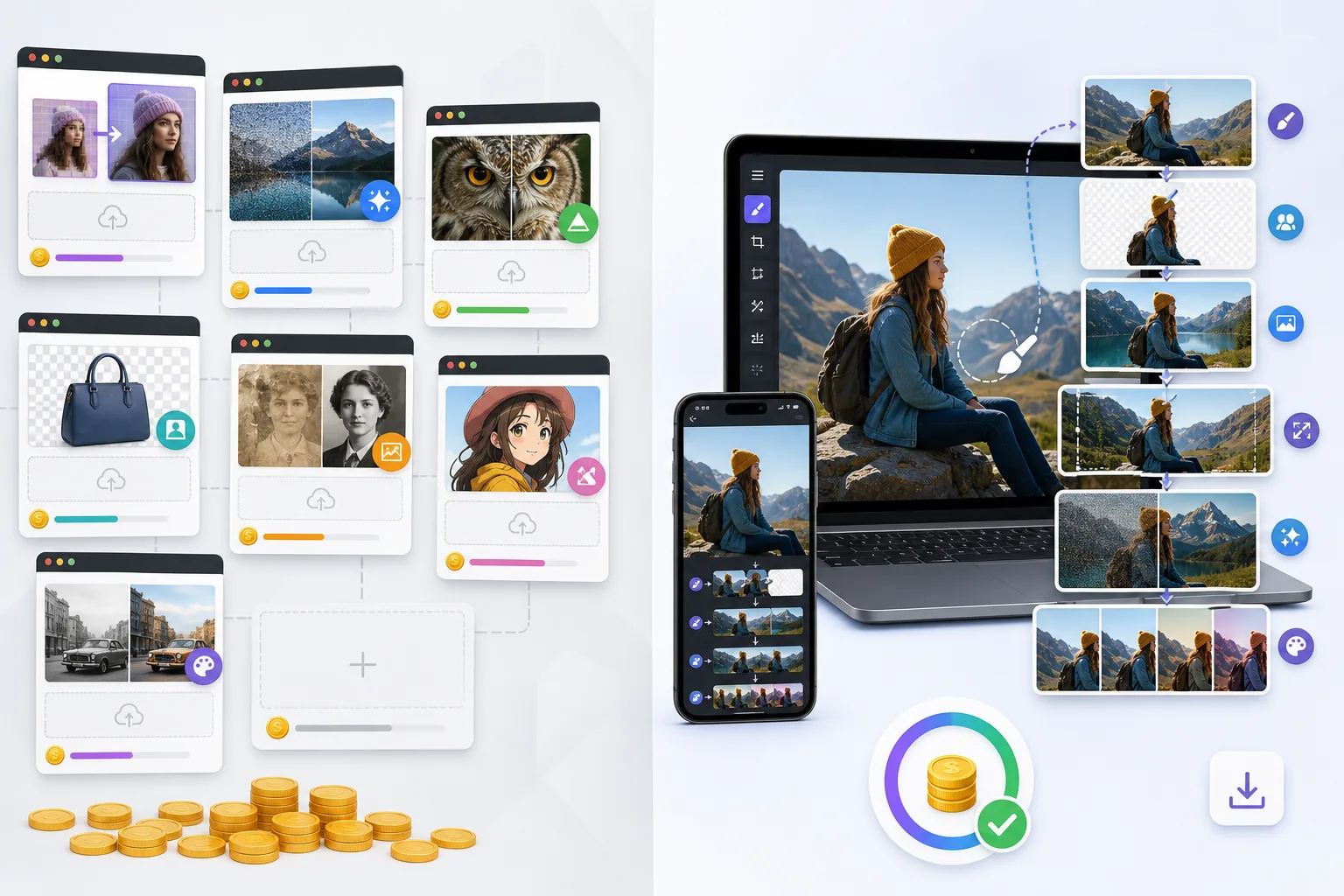
VanceAIは、その機能を15以上の個別の単一目的ツール — VanceAI Image Enhancer、VanceAI BG Remover、VanceAI Photo Restorer、VanceAI Image Sharpener、VanceAI Image Denoiser、VanceAI Anime Generatorなど — として提供するウェブ優先のAI写真プラットフォームであり、それぞれが独自のページ、独自のクレジット消費、そして(パワーユーザー向けには)独自のAPIエンドポイントを持つ単独製品として利用できます。Magic Eraserは、同じ機能領域を1つのクロスプラットフォームエディター — Magic Eraserブラシ、Background Eraser、AI Fill、AI Enhance、AI Filter — として、ウェブ、iOS、Androidの1つのアプリにまとめて提供します。この2つの製品は重なり合う課題を解決しますが、最適化する判断ポイントが異なります。VanceAIは特定の課題に特定のユーティリティを購入したいユーザー向けであり、Magic Eraserはワークフロー全体を処理する1つのエディターを求めるユーザー向けです。
Last updated
Magic Eraserを無料で試すComparison rows are editorial summaries from the latest page review, not a guarantee of current pricing, limits, watermark policy, batch support, speed, or platform availability.
概要
Magic Eraserは統合型AI写真エディターです — 不要物除去のためのMagic Eraserブラシ、背景置き換えのためのBackground Eraser、生成塗りつぶしとアウトペインティングのためのAI Fill、シャープ化/ノイズ除去/アップスケールを1回の操作で行うAI Enhance、そしてカラーグレーディングのためのAI Filter。全機能セットがウェブ、iOS、Androidで動作し、すべてのプラットフォームに無料プランと$29.99/yearのPremiumプランがあります。本製品は「写真を開き、2〜4個の操作を実行し、書き出す」というワークフローの形に沿って構築されており、あらゆる機能が同じキャンバス内にあり、クレジットプールはそれらすべてで統合されています。
VanceAIは、Vance AI(深圳拠点)が1つのブランドの下で提供するAI写真ユーティリティのカタログです。製品ラインには、VanceAI Image Enhancer(2x/4x/8xのアップスケール)、VanceAI BG Remover、VanceAI Photo Restorer、VanceAI Image Sharpener、VanceAI Image Denoiser、VanceAI Anime Generator、VanceAI Photo Colorizer、VanceAI Cartoonizer、VanceAI Toongineer、VanceAI AI Paintingなどが含まれ、それぞれが独自のアップロードフローを持つ別々のウェブページとして提供されます。価格はクレジット制で、月額および年額プランは100クレジットで月額約$9.90から始まります。デスクトップアプリ(Windows)は、オフラインのバッチ作業向けに選択された機能をまとめています。本製品は、汎用エディターよりも特定の作業に特定のAI機能を購入したいユーザーをターゲットにしています。
機能比較
Magic Eraserは統合型AI写真エディターです — 不要物除去のためのMagic Eraserブラシ、背景置き換えのためのBackground Eraser、生成塗りつぶしとアウトペインティングのためのAI Fill、シャープ化/ノイズ除去/アップスケールを1回の操作で行うAI Enhance、そしてカラーグレーディングのためのAI Filter。全機能セットがウェブ、iOS、Androidで動作し、すべてのプラットフォームに無料プランと$29.99/yearのPremiumプランがあります。本製品は「写真を開き、2〜4個の操作を実行し、書き出す」というワークフローの形に沿って構築されており、あらゆる機能が同じキャンバス内にあり、クレジットプールはそれらすべてで統合されています。
VanceAIは、Vance AI(深圳拠点)が1つのブランドの下で提供するAI写真ユーティリティのカタログです。製品ラインには、VanceAI Image Enhancer(2x/4x/8xのアップスケール)、VanceAI BG Remover、VanceAI Photo Restorer、VanceAI Image Sharpener、VanceAI Image Denoiser、VanceAI Anime Generator、VanceAI Photo Colorizer、VanceAI Cartoonizer、VanceAI Toongineer、VanceAI AI Paintingなどが含まれ、それぞれが独自のアップロードフローを持つ別々のウェブページとして提供されます。価格はクレジット制で、月額および年額プランは100クレジットで月額約$9.90から始まります。デスクトップアプリ(Windows)は、オフラインのバッチ作業向けに選択された機能をまとめています。本製品は、汎用エディターよりも特定の作業に特定のAI機能を購入したいユーザーをターゲットにしています。
| Feature | Magic Eraser | VanceAI |
|---|---|---|
| 製品の形 | 1つの統合エディター | 15以上の個別の単一目的ツール |
| オブジェクト/不要物の除去 | Magic Eraserブラシ、1回の操作 | BG Removerと手動クロップに分散 |
| 背景の除去/置き換え | ワンクリックのBackground Eraser | VanceAI BG Remover(別ツール) |
| 生成AI塗りつぶし | あり — テキストプロンプト付きのAI Fill | AI Painting(写真内塗りつぶしではなく別のアート生成ツール) |
| AIシャープ化/ノイズ除去/アップスケール | AI Enhance、1回の操作 | 3つの別ツール: Sharpener/Denoiser/Image Enhancer |
| カラーグレーディング/フィルター | AI Filterのプリセット+調整 | 主要機能ではない |
| 写真の修復(古い/傷んだ) | Magic Eraser+AI Enhanceの組み合わせ | VanceAI Photo Restorer(専用ツール) |
| アニメ/カートゥーン風スタイル化 | AI Filterのプリセット経由 | VanceAI Anime Generator+Toongineer+Cartoonizer(3ツール) |
| モバイル(iOS/Android) | あり — 両方で全機能セット | 限定的なモバイル体験(ウェブレスポンシブのみ、ネイティブアプリなし) |
| クレジット/利用モデル | 統合された無料の日次制限。Premiumは無制限 | ツールごとに異なる消費のクレジットプール |
| バッチ処理 | スマホ/ウェブで1件ずつ+Premiumのバッチ | バッチ用デスクトップアプリ(Windows) |
| 価格 | 無料+$29.99/yearのPremium | 100クレジットで約$9.90/month/約$59.40/yearから |
| 最適なワークフローの形 | 1か所で完結するマルチステップ編集 | 作業ごとに適切なユーティリティを選ぶ |
| 典型的なユーザー | 写真を最初から最後まで編集する人 | 特定のAI機能を探しているユーザー |
Feature rows summarize visible product positioning and should be rechecked against official product pages before purchase, migration, or compliance decisions.
- Last content review May 16, 2026
- VanceAI source: official product site (https://vanceai.com/)
- Magic Eraser source: https://magiceraser.live/ja/product/magic-eraser
- Pricing, feature availability, platform support, and limits can change; recheck official sources before relying on a buying decision.
価格比較
| Plan | Magic Eraser | VanceAI |
|---|---|---|
| 無料プラン | 無料 — 編集回数制限あり | 無料 — 3クレジット |
| 月額 | $9.99/mo | $9.90/mo(Pro) |
| 年額 | $4.99/mo(年払い) | $5.94/mo(Pro、年払い) |
価格はMay 2026時点のものです。最新の料金は各プロバイダーでご確認ください。
Pricing rows are snapshots from review time. Free tiers, subscriptions, trials, export limits, and regional availability can change without notice.
- Last content review May 16, 2026
- VanceAI source: official product site (https://vanceai.com/)
- Magic Eraser source: https://magiceraser.live/ja/product/magic-eraser
- Pricing, feature availability, platform support, and limits can change; recheck official sources before relying on a buying decision.
Magic Eraserを選ぶ理由
4〜6個の別々のツールページではなく、ワークフロー全体に1つのエディター
典型的な写真編集ワークフローは、複数の操作を伴います — 邪魔なオブジェクトの除去、背景の置き換え、シャープ化とノイズ除去、カラーグレーディング。Magic Eraserでは、これら4つすべてが同じキャンバス内で同じクレジットプールを使って行われます — 写真を開き、4つの操作を実行し、書き出す。VanceAIでは、同じワークフローは、写真をBG Removerにアップロードし、結果をダウンロードし、シャープ化+ノイズ除去+アップスケールのためにImage Enhancerにアップロードし(これ自体が選ぶものによって3つの別々のVanceAIツールになります)、という具合になります。このツール間の行き来というオーバーヘッドこそがVanceAIの製品形態が生む摩擦であり、マルチステップ編集のたびに積み重なっていきます。
VanceAIが写真内では提供しない生成AI Fill
VanceAIのカタログにはAI Paintingが含まれますが、それは既存の写真にコンテンツを追加する写真内の生成塗りつぶしではなく、ゼロから新しい画像を作り出すテキストから画像へのアート生成ツールです。写真内コンテンツ追加に最も近いVanceAIの機能は、BG Removerとストック画像による背景置き換えです。Magic EraserのAI Fillでは、テキストプロンプト(「既存の地平線の上の夕焼け空」、「前景に合った暖かい木目」)で既存の写真に直接新しいコンテンツを生成し、風景写真を縦長や正方形のアスペクト比にアウトペイントできます — VanceAIのカタログには直接的な相当機能がないワークフローです。
iOSとAndroidで全機能セット — VanceAIはウェブ専用
VanceAIの製品はブラウザベースで、モバイルレスポンシブ性は限定的です。専用のVanceAI iOSアプリも専用のVanceAI Androidアプリもありません — スマホユーザーが得られるのはモバイルウェブ体験であり、機能はしますがタッチ向けに最適化されていません。Magic Eraserは、ウェブアプリと並んでネイティブのiOSアプリとAndroidアプリを提供し、3つすべてで完全な機能パリティを備えています。主要な写真ソースと主要な編集面がスマホであるユーザー(2026年の主流のパターン)にとって、Magic Eraserのモバイルファーストな製品形態はワークフローに合致しますが、VanceAIのウェブ専用形態は合致しません。
シンプルな価格 — ツールごとのクレジットプールではなく1つのPremiumプラン
VanceAIの価格はクレジット制で、クレジットはツールによって異なる消費をします。Image Enhancerの8xアップスケールは2xアップスケールより多くのクレジットを消費します。BG Removerは定額のクレジットがかかります。Photo Restorerは複雑な修復ではより多くかかります。ユーザーは、事前に分からない作業のために予算を確保しようとしてクレジットを過剰に購入するか、プロジェクトの途中でプールが尽きたときに従量制でチャージするかのどちらかになります。Magic Eraser Premiumは、すべての機能を実質無制限に使えて$29.99/yearです — クレジットの計算も、ツール固有の消費率も、追加購入もありません。複数の機能タイプにまたがって定期的に編集するユーザーにとって、統合されたサブスクリプションは予算化と予測がよりシンプルです。
エディターを離れずに単一クレジットプールでのバッチ作業
バッチの製品カタログ作業 — すべて背景除去、シャープ化、カラーグレーディングが必要な50枚のEC写真 — は、Magic Eraser Premiumでエディターを離れることなくネイティブに実行されます。VanceAIで同等のバッチ作業を行う経路は、Windowsデスクトップアプリ(オフラインのバッチ向けに選択された機能をまとめたもの)に加えて、各ツールにまたがるクレジットプールの管理です。Macユーザー、Linuxユーザー、あるいは単発の編集と同じワークフローでバッチを行いたいユーザーにとって、Magic Eraserのエディター内バッチモデルの方が摩擦が少なくなります。
よくある質問
VanceAIはその役割を得意としていますか?
+
はい、提供する特定の機能については得意です。VanceAI Image Enhancer(アップスケーラー)は、Topaz Photo AIやGigapixelに匹敵するディテール保持品質を持つ8xアップスケーラーとして高く評価されています。VanceAI BG Removerは、Remove.bgに匹敵する、無地背景の写真でのきれいな切り抜きを生み出します。VanceAI Photo Restorerは、専用の修復ツールに匹敵する結果で、古い/傷んだ写真の修復を処理します。製品への批評は「これらのツールが優れているか」ではなく — 一般的に優れています — 「自然に連鎖するワークフローに対して、4〜6個の別々のAIユーティリティを購入することが正しい製品形態か」です。作業が単一ステップのユーザー(アップスケールだけ、背景除去だけ)には、VanceAIの機能ごとのツールページモデルが合うことがあります。マルチステップのワークフローには、連鎖の摩擦が現実的なものになります。
必要なときにVanceAIの個別ツールを使えばいいのでは?
+
それは可能です。あなたのワークフローがセッションごとに本当に単一ステップであれば — 低解像度スキャンのバッチのアップスケールだけが必要、あるいは製品写真の背景除去だけが必要 — 専用のVanceAIツールは汎用エディターよりも良い選択かもしれません。トレードオフは、ワークフローが連鎖するときです。製品写真のセッションでは通常、背景除去+シャープ化+ノイズ除去+カラーグレーディングを順番に行う必要があり、それを4回のアップロードと4回のダウンロードで4つのVanceAIツールにまたがって管理することが、Magic Eraserが取り除く摩擦です。ワークフローが自然にマルチステップであるユーザーには、統合エディターが勝ります。本当に単一ステップのユーザーには、専用ユーティリティが勝ります。
Magic EraserにはVanceAI Image Enhancerのような8xアップスケーラーがありますか?
+
Magic EraserのAI Enhanceは、シャープ化とノイズ除去とともにアップスケールを含み、最も一般的なユースケース(スマホから印刷へ、低解像度から表示へ、ソーシャルからアーカイブへ)に最適化された2xと4xの実用的なアップスケール比率を備えています。VanceAI Image Enhancerは特に、極端な解像度回復(小さな参照画像から大判印刷へ)を狙った8xアップスケールオプションを提供します。大判出力のために小さなソース画像を8xアップスケールするという特定のニーズを持つユーザーには、VanceAI Image Enhancerの方がより的を絞ったツールです。シャープ化とノイズ除去を1回の操作にまとめた、はるかに一般的な2x〜4xのアップスケール比率には、Magic EraserのAI Enhanceの方がより効率的なワークフローです。
VanceAIとMagic Eraserを併用できますか?
+
はい。一部のユーザーが採用するハイブリッドワークフロー: マルチステップの日常作業(クリーンアップ、背景置き換え、生成塗りつぶし、カラーグレーディング、AI Enhanceのまとめ)の主要エディターとしてMagic Eraserを使い、専用ツールの極端な比率が重要になるまれな8xアップスケール作業のためだけにVanceAI Image Enhancerを引き込みます。両方を運用するコスト: Magic Eraser Premium($29.99/year)+必要に応じて購入するVanceAIの最小クレジットパック(約$10で約100クレジット)=両方の機能をカバーして合計で年間$50未満。ほとんどのユーザーにとってこれは過剰です — Magic EraserのAI Enhanceがアップスケールニーズの95%以上を処理します — が、極端なアップスケール比率があなたの特定の作業に重要であれば、ハイブリッドの道は存在します。
VanceAIのAIアニメ/カートゥーンジェネレーターはどうですか?
+
VanceAIは3つの別々のスタイル化ツール — Anime Generator、Toongineer、Cartoonizer — を提供し、それぞれが入力写真の異なるスタイル化レンダリング(それぞれアニメ風、コマ漫画カートゥーン、滑らかなカートゥーン)を生み出します。Magic EraserのAI Filterには、一般的な隣接ユースケース(芸術的/イラスト的/映画的な見た目)をカバーするスタイル化プリセットが含まれますが、極めて特定的なアニメ風やコミックカートゥーンの出力については、VanceAIの専用スタイル化ツールがそれらの出力スタイル向けに特別に学習されているため、より要件に沿った結果を生み出します。主要なニーズがアニメ/カートゥーン変換そのものであるユーザーには、VanceAIのスタイル化カタログが的を絞った選択肢です。より広範な編集ワークフローの一部としての汎用的なカラーグレーディングとスタイル化には、Magic EraserのAI Filterが適切な形です。
モバイル体験はどう比較されますか?
+
VanceAIはモバイルブラウザで動作しますが、専用のiOSアプリやAndroidアプリはありません — その体験は小さな画面向けに再配置されたデスクトップウェブアプリであり、ツールごとに同じアップロード・処理・ダウンロードのフローです。Magic Eraserは、タッチ最適化されたブラシ操作、ジェスチャーベースのズームとパン、Apple Photos/iCloud/Google Photosの完全な統合、オフライン対応のUI状態を備えたネイティブのiOSアプリとAndroidアプリを提供します。主要な写真ソースがスマホであるユーザー(2026年の編集ボリュームの大半を占めます)にとって、Magic Eraserのモバイルファーストな製品形態は、ブラウザタブの曲芸なしにワークフローに合致します。VanceAIのウェブ専用の形態は、スマホでの編集は機能はしても快適ではないことを意味します。
どちらの製品も無料で評価する方法はありますか?
+
どちらも無料プランを提供していますが、形が異なります。VanceAIはアカウントごとに月3クレジットの無料分を提供します — 各ツールを1〜2回テストするには十分ですが、実際の継続的な作業をするには不十分です。Magic Eraserの無料プランは、日次の利用制限付きで、ウォーターマークのない画像を無期限に書き出せます — 週に5〜15枚の写真を編集するユーザーにとって実際の作業をするのに十分です。予算を投じる前に評価したいユーザーには、Magic Eraserの無料プランの方がより長い実利用の評価を支えます。クレジットを購入する前に特定のVanceAIツールをテストしたいユーザーには、VanceAIのツールごとの無料クレジットがそのより狭い評価ケースをカバーします。
写真ワークフロー全体のための1つのAIエディター
Magic Eraserは、オブジェクト除去、背景置き換え、生成AI塗りつぶし、カラーグレーディング、AI Enhanceを、ウェブ、iOS、Androidの1つのエディターに統合します。すべてのプラットフォームに無料プラン。全機能を無制限に使える$29.99/yearのPremium。
Magic Eraserを無料で試す関連するユースケース
プロフェッショナルが実際のワークフローでこれらのツールをどのように活用しているかをご覧ください。
生活感あふれる私物や路上駐車、工事機材が写り込んだ物件写真は、内見意欲を下げてしまいます。Magic Eraserを使えば、Photoshopのスキルがなくても瞬時にきれいな物件写真に仕上がります。
背景がごちゃごちゃした商品写真では、お客様はすぐにスクロールして通り過ぎてしまいます。Magic Eraserなら、プロ品質の商品画像を数秒で作成できます。Photoshopのスキルは不要。アップロードして、不要な部分を消して、すぐに出品しましょう。
旅行写真に知らない人が写り込んでいませんか?自撮りの背景がごちゃごちゃしていませんか?Photoshopで何時間もかける必要はもうありません。Magic Eraserなら不要なオブジェクトの除去、背景のクリーンアップ、各プラットフォーム向けのリサイズがワンタップで完了します。
他の比較
Magic Eraserが他の写真編集ツールとどう比較されるかをご覧ください。
主要なAI写真編集ツールをテスト・比較しました。オブジェクト除去から背景置換まで、あなたのワークフローに最適なエディターを見つけましょう。
Adobe Photoshopは強力ですが、ほとんどの人はその機能のごく一部しか使っていません。Magic Eraserは、本当に必要な写真クリーンアップツール — オブジェクト除去、背景除去、AIによる画質向上、生成塗りつぶし — を、よりシンプルなインターフェースで提供します。Webとモバイルで動作し、開始するのにサブスクリプションは不要です。
Tried to remove an object or background and hit a Pro paywall in Canva, Adobe Express/Photoshop, or Fotor? Magic Eraser does the same job — object removal, background removal, watermark cleanup, and enhancement — for free. No subscription, and no watermark stamped on your download.
Magic Eraserとmagic-eraser.ioを比較。機能、価格、使いやすさを並べて確認。AI写真編集にMagic Eraserが最適な理由をご覧ください。
Magic EraserとPixelcutを比較。機能、価格、使いやすさを並べて確認。AI写真編集にMagic Eraserが最適な理由をご覧ください。
Adobe Express は、Adobe Firefly に連携したデザイン・コンテンツ制作スイートの中に写真編集機能をまとめています。Magic Eraser は AI 写真クリーンアップに特化して作られています:オブジェクト除去、背景置き換え、生成塗りつぶし、画質向上です。この比較では、各ツールが最も適している場面を示します。