
Magic Eraser vs Photoshop:より速いワークフローに合うのはどちら?
Photoshopは本格的な画像編集の業界標準ですが、多くの人は素早いオブジェクト削除、きれいな背景、AIによる補正だけを必要としています。Magic Eraserはそうした作業に特化し、ウェブとモバイルで数秒で動く軽快なワークフローを提供します。
Last updated
Magic Eraserを無料で試すComparison rows are editorial summaries from the latest page review, not a guarantee of current pricing, limits, watermark policy, batch support, speed, or platform availability.
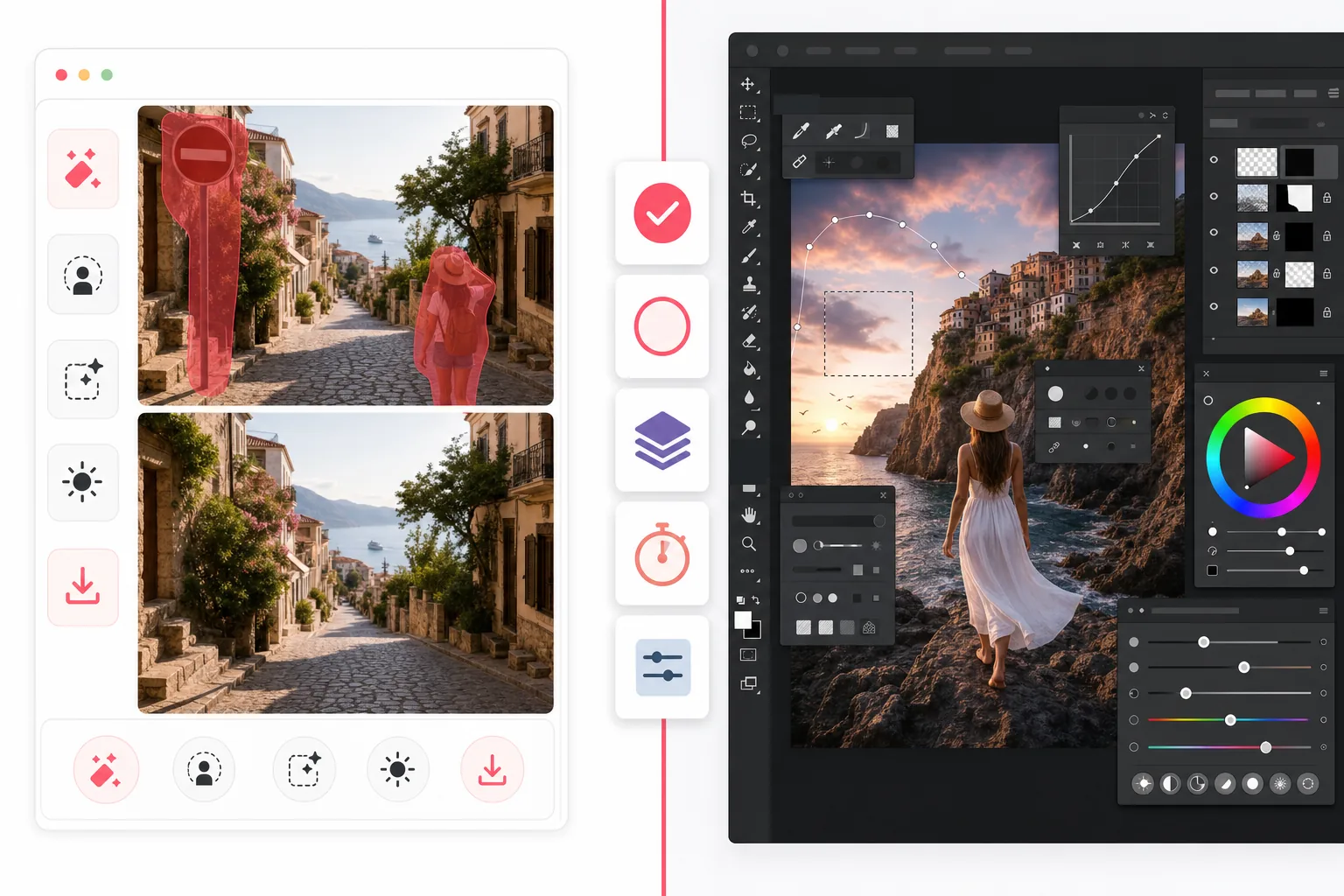
概要
Magic Eraserは、人物の削除、雑然とした要素の消去、背景の置換、ぼやけた画像の補正、欠けた部分の補完など、素早いクリーンアップ作業のために作られたAI写真エディターで、複雑な学習を必要としません。
Adobe Photoshopは、高度なレイヤー、マスキング、レタッチ、生成塗りつぶし、合成ツールを備えた本格的なプロ向け画像編集スイートで、デスクトップとiPadで細かなクリエイティブ制御を行うために設計されています。
機能比較
Magic Eraserは、人物の削除、雑然とした要素の消去、背景の置換、ぼやけた画像の補正、欠けた部分の補完など、素早いクリーンアップ作業のために作られたAI写真エディターで、複雑な学習を必要としません。
Adobe Photoshopは、高度なレイヤー、マスキング、レタッチ、生成塗りつぶし、合成ツールを備えた本格的なプロ向け画像編集スイートで、デスクトップとiPadで細かなクリエイティブ制御を行うために設計されています。
| Feature | Magic Eraser | Adobe Photoshop |
|---|---|---|
| オブジェクト削除 | あり — AIブラシ | あり — コンテンツに応じたツール |
| 背景削除 | あり — ワンクリック | あり — 手動 + AI |
| 生成塗りつぶし | あり — 簡素化したワークフロー | あり — 高度なプロンプトツール |
| 学習コスト | 初心者向け | 高い |
| プラットフォーム | ウェブ + iOS + Android | デスクトップ + iPad + ウェブベータ |
| 一括編集 | あり | あり — 設定が多い |
| サブスク必須 | 開始時は不要 | 必要 |
| 最適な用途 | 速い日常編集 | プロの制作業務 |
Feature rows summarize visible product positioning and should be rechecked against official product pages before purchase, migration, or compliance decisions.
- Last content review May 1, 2026
- Adobe Photoshop source: official product site (https://www.adobe.com/products/photoshop.html)
- Magic Eraser source: https://magiceraser.live/ja/product/magic-eraser
- Pricing, feature availability, platform support, and limits can change; recheck official sources before relying on a buying decision.
価格比較
| Plan | Magic Eraser | Adobe Photoshop |
|---|---|---|
| 無料プラン | 無料 — 編集回数に制限あり | 7日間の試用 |
| 月額 | $9.99/月 | $22.99/月 |
| 年額 | $4.99/月(年払い) | $20.99/月(年払い) |
価格は2026年5月時点。現在の料金は各プロバイダーをご確認ください。
Pricing rows are snapshots from review time. Free tiers, subscriptions, trials, export limits, and regional availability can change without notice.
- Last content review May 1, 2026
- Adobe Photoshop source: official product site (https://www.adobe.com/products/photoshop.html)
- Magic Eraser source: https://magiceraser.live/ja/product/magic-eraser
- Pricing, feature availability, platform support, and limits can change; recheck official sources before relying on a buying decision.
Magic Eraserを選ぶ理由
最初のクリックから書き出しまで速い
Magic Eraserは設定の手間を省きます。エディターを開き、不要な部分をなぞるだけで、レイヤーやマスク、複雑なメニューを操作せずにAIがその領域を再構築します。
実用的な写真クリーンアップ向けに設計
観光客、看板、傷、配線、テキスト、雑然とした背景の除去が目的なら、Magic Eraserはクリエイティブスイート全体を学ばせるのではなく、その結果に直接到達します。
どこでも使える
Photoshopは依然として本格的なデスクトップ作業で輝きますが、Magic Eraserはブラウザとモバイル端末で動作するため、マーケター、出品者、クリエイター、チームがどこからでも編集しやすくなります。
チームの導入障壁が低い
Magic Eraserは、商品写真、SNS素材、出品、広告のために一貫した速い編集を必要とするチーム全体で標準化しやすく、全員に本格的なクリエイティブソフトを購入する必要がありません。
よくある質問
Magic EraserはPhotoshopの代わりになりますか?
+
素早いクリーンアップ、背景削除、AIによる写真補正にはなります。高度な合成、レイヤーを多用するデザイン作業、細かなプロのレタッチには、Photoshopの方が依然として奥行きがあります。
初心者にはどちらが簡単ですか?
+
Magic Eraserは初心者にとってはるかに簡単です。本格的なプロ向け作業環境ではなく、ガイド付きのAI編集作業を中心に設計されているためです。
Photoshopの方が制御性は高いですか?
+
はい。Photoshopは特にプロのレタッチや合成において、より多くの手動制御を提供します。Magic Eraserはその奥行きの一部を引き換えに、はるかに速い日常編集を実現します。
Magic Eraserはモバイルで使えますか?
+
はい。Magic EraserはiOSとAndroidで利用でき、ウェブでも動作するため、ツールを変えずに端末間を移動できます。
ECの商品写真にはどちらが向いていますか?
+
背景の削除、不要な要素の整理、大量の商品画像の準備には、Magic Eraserの方が速い選択肢になることが多いです。各画像にデザインレベルのカスタムレタッチが必要な場合はPhotoshopの方が適しています。
Photoshopの複雑さなしで素早く編集したいですか?
Magic Eraserを無料で試して、AIによるオブジェクト削除、背景クリーンアップ、生成塗りつぶしで写真を数秒でクリーンアップしましょう。
Magic Eraserを無料で試す関連するユースケース
プロフェッショナルが実際のワークフローでこれらのツールをどのように活用しているかをご覧ください。
生活感あふれる私物や路上駐車、工事機材が写り込んだ物件写真は、内見意欲を下げてしまいます。Magic Eraserを使えば、Photoshopのスキルがなくても瞬時にきれいな物件写真に仕上がります。
背景がごちゃごちゃした商品写真では、お客様はすぐにスクロールして通り過ぎてしまいます。Magic Eraserなら、プロ品質の商品画像を数秒で作成できます。Photoshopのスキルは不要。アップロードして、不要な部分を消して、すぐに出品しましょう。
旅行写真に知らない人が写り込んでいませんか?自撮りの背景がごちゃごちゃしていませんか?Photoshopで何時間もかける必要はもうありません。Magic Eraserなら不要なオブジェクトの除去、背景のクリーンアップ、各プラットフォーム向けのリサイズがワンタップで完了します。
他の比較
Magic Eraserが他の写真編集ツールとどう比較されるかをご覧ください。
主要なAI写真編集ツールをテスト・比較しました。オブジェクト除去から背景置換まで、あなたのワークフローに最適なエディターを見つけましょう。
Adobe Photoshopは強力ですが、ほとんどの人はその機能のごく一部しか使っていません。Magic Eraserは、本当に必要な写真クリーンアップツール — オブジェクト除去、背景除去、AIによる画質向上、生成塗りつぶし — を、よりシンプルなインターフェースで提供します。Webとモバイルで動作し、開始するのにサブスクリプションは不要です。
Tried to remove an object or background and hit a Pro paywall in Canva, Adobe Express/Photoshop, or Fotor? Magic Eraser does the same job — object removal, background removal, watermark cleanup, and enhancement — for free. No subscription, and no watermark stamped on your download.
Magic Eraserとmagic-eraser.ioを比較。機能、価格、使いやすさを並べて確認。AI写真編集にMagic Eraserが最適な理由をご覧ください。
Magic EraserとPixelcutを比較。機能、価格、使いやすさを並べて確認。AI写真編集にMagic Eraserが最適な理由をご覧ください。
写真編集に最適な絵文字削除ツールを発見。機能、価格、AI性能を比較して、あなたに合ったツールを選びましょう。