
Magic Eraser vs Affinity Photo: AIファーストのクラウド vs プロ向けデスクトップ買い切り
Affinity Photo(現在はAffinity Photo 2)は最も定評のあるPhotoshop代替ソフトです。レイヤー、マスク、RAW現像、周波数分離レタッチ、レンズ補正、パノラマ合成、HDRマージを備えたフル機能のラスターエディタで、サブスクリプションではなく買い切りのデスクトップ製品として販売されています。Magic Eraserは逆の位置付けを持つAIファーストの写真エディタです。ワンクリックのクリーンアップ、生成塗りつぶし、AI主導のカラーグレーディング、品質回復のためのAI Enhanceを備え、$29.99/yearのクロスプラットフォームサブスクリプションとして販売されています。2つのツールは同じ課題領域の両極に位置し、正しい選択はピクセル単位の手動制御を望むか、AI主導のスピードを望むかによって決まります。
Last updated
Magic Eraserを無料で試すComparison rows are editorial summaries from the latest page review, not a guarantee of current pricing, limits, watermark policy, batch support, speed, or platform availability.
概要
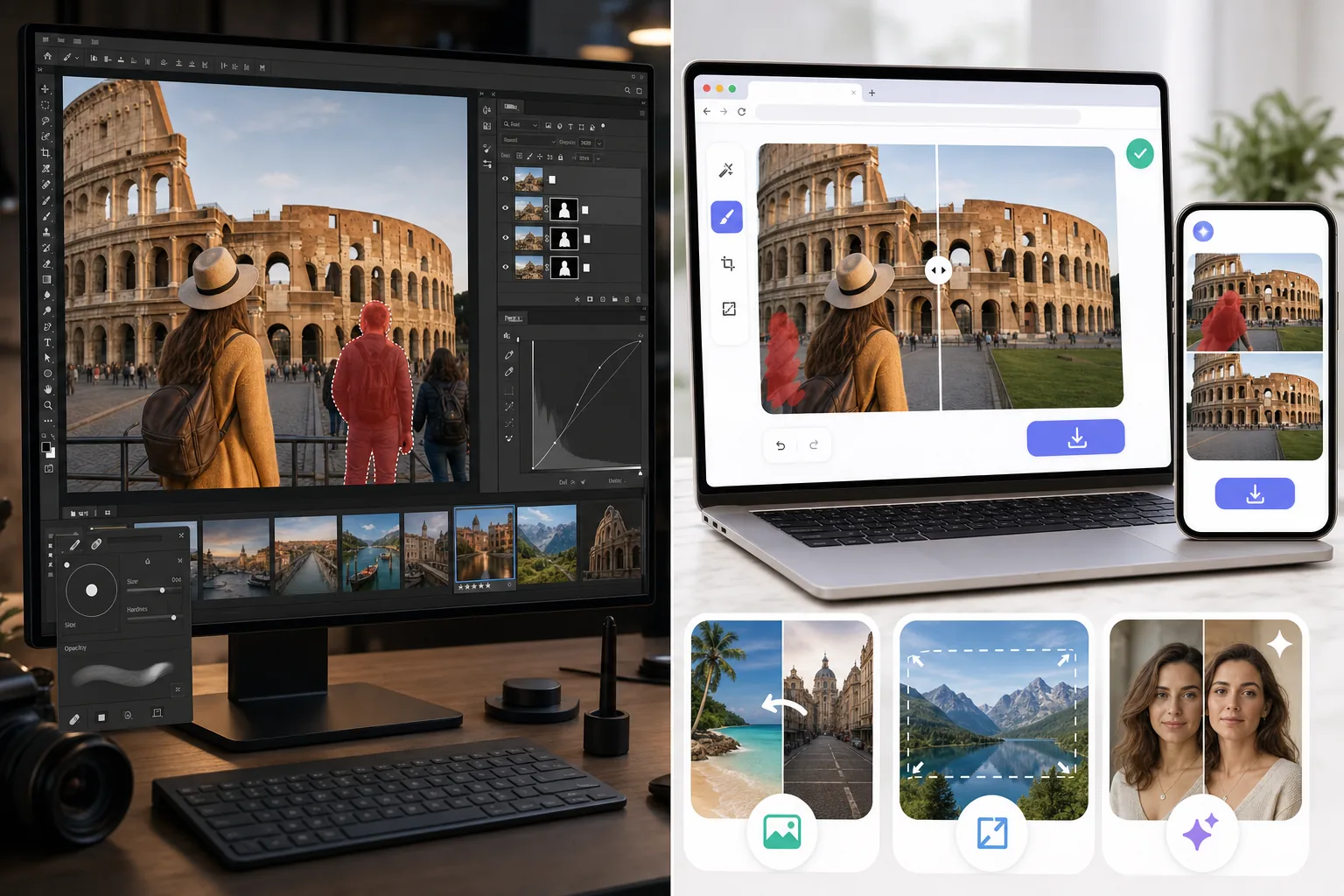
Magic Eraserはスピードに重点を置いたAIファーストの写真エディタです。邪魔なものを除去するMagic Eraserブラシ、背景を入れ替えるBackground Eraser、生成塗りつぶしとアウトペインティングのためのAI Fill、シャープ化/ノイズ除去/アップスケールのためのAI Enhance、カラーグレーディングのためのAI Filterを備えています。フル機能セットはweb、iOS、Androidで動作し、すべてのプラットフォームに無料プランと$29.99/yearのPremiumプランがあります。各ツールは単一のキャンバス操作で完結します。レイヤーパネルも、手動マスキングも、80以上のアイコンが並ぶツールパレットもありません。この製品は、編集を組み立てたいユーザーではなく、編集を済ませたいユーザーのために作られています。
Affinity PhotoはPhotoshop代替として位置付けられるプロ向けラスターエディタです。調整レイヤー、マスク、ブレンドモード、レンズ補正、Develop PersonaでのRAW現像、周波数分離レタッチ、パノラマ合成、HDRマージ、フォーカススタック、100以上のファイル形式対応を備えた、フル機能のレイヤーベース編集が可能です。ライセンスは買い切り$69.99のデスクトップ製品(Windows、macOS、iPad)に加え、オプションのiPad版が$18.49です。サブスクリプションはありません。この製品は、Photoshopスタイルのインターフェースに慣れていて、Adobe Creative Cloudの継続的なレンタルよりも所有型ソフトウェアを望む写真家やデザイナーを対象としています。
機能比較
Magic Eraserはスピードに重点を置いたAIファーストの写真エディタです。邪魔なものを除去するMagic Eraserブラシ、背景を入れ替えるBackground Eraser、生成塗りつぶしとアウトペインティングのためのAI Fill、シャープ化/ノイズ除去/アップスケールのためのAI Enhance、カラーグレーディングのためのAI Filterを備えています。フル機能セットはweb、iOS、Androidで動作し、すべてのプラットフォームに無料プランと$29.99/yearのPremiumプランがあります。各ツールは単一のキャンバス操作で完結します。レイヤーパネルも、手動マスキングも、80以上のアイコンが並ぶツールパレットもありません。この製品は、編集を組み立てたいユーザーではなく、編集を済ませたいユーザーのために作られています。
Affinity PhotoはPhotoshop代替として位置付けられるプロ向けラスターエディタです。調整レイヤー、マスク、ブレンドモード、レンズ補正、Develop PersonaでのRAW現像、周波数分離レタッチ、パノラマ合成、HDRマージ、フォーカススタック、100以上のファイル形式対応を備えた、フル機能のレイヤーベース編集が可能です。ライセンスは買い切り$69.99のデスクトップ製品(Windows、macOS、iPad)に加え、オプションのiPad版が$18.49です。サブスクリプションはありません。この製品は、Photoshopスタイルのインターフェースに慣れていて、Adobe Creative Cloudの継続的なレンタルよりも所有型ソフトウェアを望む写真家やデザイナーを対象としています。
| Feature | Magic Eraser | Affinity Photo |
|---|---|---|
| オブジェクト/邪魔なものの除去 | ワンクリックのMagic Eraserブラシ | Inpainting Brush + Healing Brush(手動) |
| 背景の除去/入れ替え | ワンクリックのBackground Eraser | 手動の選択+マスキング |
| 生成AI塗りつぶし | あり — テキストプロンプト付きAI Fill | なし(Inpaintingのみ、AI生成なし) |
| AIシャープ化/ノイズ除去/アップスケール | AI Enhance、単一操作 | フィルター経由で手動(AIアップスケールなし) |
| カラーグレーディング/フィルター | AI Filterプリセット+調整 | 調整レイヤー+LUT対応 |
| レイヤーベース編集 | なし — 単一キャンバスのAI操作 | あり — フルレイヤーパネル |
| RAW現像 | 主な用途ではない | あり — Develop Persona |
| レンズ補正/パノラマ/HDRマージ | なし | あり — 内蔵 |
| モバイル(iOS/Android) | あり — 両方でフル機能セット | iPadのみ(Androidなし) |
| Webアプリ(インストール不要) | あり | なし — デスクトップインストールが必要 |
| ファイル形式 | JPEG、PNG、WebP、HEIC | 100+(PSD、RAW、TIFFを含む) |
| 価格 | 無料 + $29.99/year Premium | $69.99買い切りデスクトップ + $18.49 iPad |
| 最適なワークフロー形態 | 数秒でスマホから公開まで | レイヤーベースの合成作業 |
| 典型的なユーザー | 写真を編集するすべての人 | デザイナー/プロ写真家 |
Feature rows summarize visible product positioning and should be rechecked against official product pages before purchase, migration, or compliance decisions.
- Last content review May 16, 2026
- Affinity Photo source: official product site (https://affinity.serif.com/photo/)
- Magic Eraser source: https://magiceraser.live/ja/product/magic-eraser
- Pricing, feature availability, platform support, and limits can change; recheck official sources before relying on a buying decision.
価格比較
| Plan | Magic Eraser | Affinity Photo |
|---|---|---|
| 無料プラン | 無料 — 編集制限あり | トライアルあり |
| 月額 | $9.99/mo | N/A — 買い切り$69.99 |
| 年額 | $4.99/mo(年払い) | N/A — 買い切り |
価格はMay 2026時点のものです。現在の料金は各プロバイダーでご確認ください。
Pricing rows are snapshots from review time. Free tiers, subscriptions, trials, export limits, and regional availability can change without notice.
- Last content review May 16, 2026
- Affinity Photo source: official product site (https://affinity.serif.com/photo/)
- Magic Eraser source: https://magiceraser.live/ja/product/magic-eraser
- Pricing, feature availability, platform support, and limits can change; recheck official sources before relying on a buying decision.
Magic Eraserを選ぶ理由
Photoshopレベルのスキルを必要としないAIファーストのクリーンアップ
Affinity PhotoのInpainting BrushとHealing Brushは優れたツールですが、操作スキルが必要です。正しいソース領域の選択、複数回のパスでの修復のブレンド、難しいケースでのクローンスタンプへの切り替えなどです。これらをプロレベルで使うための学習曲線は現実のものです。Magic Eraserのブラシは1ストロークと1タップだけです。AIがソース選択、ブレンド、背景の再構築を単一の操作で処理します。技術を学ばずに結果を求めるユーザーにとって、その差は大きいです。
Affinityには全くない生成AI塗りつぶしとアウトペインティング
Affinity Photoは生成AI機能を含みません。Inpainting Brushはコンテンツに応じた塗りつぶし(既存のピクセルをサンプリングするもの)であり、生成型ではありません。写真に元々なかったコンテンツを生成することはできません。Magic EraserのAI Fillはテキストプロンプト(「前景に合う暖かい木目のテクスチャ」「既存の地平線の上の夕焼け空」)で新しいコンテンツを生成し、風景写真を縦長や正方形のアスペクト比にアウトペインティングします。既存コンテンツをきれいにするだけでなく新しいコンテンツが必要なワークフローにとって、Magic Eraserは2つのうち唯一のツールです。
web、iOS、Androidで動作 — Affinityはデスクトップとipadのみ
Affinity PhotoはWindows、macOS、iPadで動作します。Android版もWebアプリもなく、iPad版は別途$18.49のライセンスです。Magic Eraserは3つのモバイルプラットフォーム(iOS、Android、web)すべてで動作し、それらの間で完全な機能パリティがあります。主にAndroidスマホで写真を編集するユーザーや、ソフトウェアをインストールせずブラウザで編集するユーザーにとって、Affinityは選択肢になりません。Magic Eraserはこの比較でプラットフォームに適合する唯一のツールです。
無料プランで実作業をカバー — 評価のための購入は不要
Affinity Photoは30-dayの無料トライアルを提供します。その後、ソフトウェアを使い続けるには$69.99の買い切りライセンスが必要です。Magic Eraserの無料プランは、毎日の使用制限付きで、ウォーターマークなしの画像を無期限にエクスポートできます。週に5-15 photosを編集するユーザー(典型的な小規模ビジネスやカジュアルクリエイターのボリューム)にとって、無料プランは支払いなしで実作業をするのに十分であり、$29.99/yearのPremiumプランは初年度でAffinityの買い切りコストの半分未満です(そしてAffinityが時折有料のメジャーバージョンアップグレードをリリースするため、その差は時間とともに広がります)。
編集を30-90 secondsで完了する単一操作のワークフロー
ランドマーク写真から観光客を除去するAffinity Photoのワークフロー: Photo Personaを開き、Inpainting Brushに切り替え、その領域を塗り、結果を評価し、エッジのためにHealing Brushに切り替え、繰り返し、頑固な箇所にはClone Stampに切り替えることもあります。1枚あたり5-15分です。同じタスクのMagic Eraserのワークフロー: 写真を開き、観光客の上をブラシでなぞり、Applyをタップして完了。30-60秒です。1セッションで20-50 photosを処理するユーザー(休暇の振り返り、商品カタログ、不動産リスティング)にとって、スピードの差は積み重なってセッションあたり数時間の節約になります。
よくある質問
Affinity Photoは真のPhotoshop代替ですか?
+
はい、ほとんどの写真家やデザイナーのワークフローにとってはそうです。Affinity Photoはレイヤー、調整レイヤー、マスク、ブレンドモード、RAW現像(Develop Persona)、周波数分離レタッチ、パノラマ合成、HDRマージ、フォーカススタック、そしてPSDの往復を含む100+のファイル形式に対応しています。Photoshopで動くワークフローは、メニューの位置を少し調整すれば、概ねAffinity Photoでも動きます。主な不足点は、一部の高度なタイポグラフィ機能、ドキュメント間でのSmart Objectのリンク動作、そしてPhotoshopプラグインのエコシステム(一部のサードパーティプラグインにはAffinity版がありません)です。写真編集タスクの90%+にとって、Affinityはわずかなコストで完全に置き換えられる代替です。
Affinity Photoの方が強力なら、なぜMagic Eraserを選ぶのですか?
+
Affinity Photoが強力なのは、マニュアルトランスミッションがオートマよりも制御しやすいのと同じ意味です。その力を引き出すには操作スキルが必要です。すでにPhotoshopを知っているユーザーや、Affinityのインターフェースを学ぶのに20-40 hoursを投資する意欲のあるユーザーにとって、その深さは現実的で価値があります。レイヤーマスクが何かを学ばずに30秒で休暇写真から観光客を除去したいユーザーにとって、Magic Eraserは学習曲線なしでその作業をこなします。正しいツールは、振るうためのパワーツールを望むか、委任するためのAIアシスタントを望むかによって決まります。
Magic EraserはPSDやRAWファイルを開けますか?
+
直接は開けません。Magic EraserはJPEG、PNG、WebP、HEICの入力を受け付けます。これらはスマホやほとんどのデジタルカメラが生成する形式です。RAWファイル(.CR3、.NEF、.ARW、.DNG)については、まずLightroom、Capture One、またはAffinity PhotoでRAWを現像し、それからMagic Eraserで編集するためにJPEGまたはHEICにエクスポートする必要があります。複数のレイヤーを持つPSDファイルについては、インポート前にJPEG/PNGに統合してください。ワークフローがRAWファーストのユーザーにとって、Magic EraserはRAW現像後の第2段階のクリーンアップ・編集パスとして組み込まれます。ソースファイルがすでにJPEGまたはHEICのユーザーにとっては、変換は不要です。
Affinity PhotoはMagic EraserのようにAIシャープ化やアップスケールを行いますか?
+
Affinity PhotoはAIアップスケールを含みません。シャープ化はUnsharp MaskとClarityのフィルターで利用できますが、これらは手動の周波数領域の調整であり、AIベースのディテール回復ではありません。AIアップスケール(低解像度のソース写真から印刷解像度のディテールを回復すること)に特化したものについては、Affinityのユーザーは通常、別の品質回復ステップとしてTopaz Photo AIなどを実行します。Magic EraserのAI Enhanceは、シャープ化、ノイズ除去、アップスケールを単一の操作で含み、別の専用ユーティリティなしで品質回復が必要なスマホ写真という一般的なケースのために設計されています。
それぞれの選択肢の生涯コストはいくらですか?
+
Affinity Photo 2 desktopは買い切り$69.99のライセンスで、2.xメジャーバージョン内の無料アップデートを含みます。メジャーバージョンアップグレード(Affinity 1からAffinity 2)は、歴史的におよそ4〜6年ごとに有料アップグレードを必要としてきました。生涯コストの見積もり: メジャーアップグレード次第で5年間に$70-140。Magic Eraser Premiumは$29.99/year — 5年間で$150です。コストの差は現実的ですが、メジャーバージョンアップグレードを考慮すると見た目より小さく、価格モデルは異なる対象を狙っています。Affinityは所有型ソフトウェアの経済性を好むユーザーを、Magic EraserはSaaSの経済性を好み、クロスプラットフォームのモバイルが含まれることを望むユーザーを狙っています。
両方のツールを一緒に使えますか?
+
はい、多くのユーザーがそうしています。一般的なハイブリッドワークフロー: レイヤーベースの合成作業、RAW現像、ピクセル単位の制御が重要な複雑なレタッチにはAffinity Photoを。クリーンアップパス(邪魔なものの除去、背景の入れ替え)、AI生成塗りつぶし、ワークフローのモバイル編集の脚にはMagic Eraserを。2つのツールは写真編集領域の異なる部分をカバーします。手動制御の作業にはAffinity、AIスピードの作業にはMagic Eraserです。本格的な写真活動を行うユーザーにとって、両方を使っても$29.99/year + $69.99買い切り = 初年度$100未満であり、単一のAdobe Creative Cloud Photography Planの年間コストの半分未満です。
モバイル体験はどちらが優れていますか?
+
iPad上のAffinity Photoは高く評価されています。タブレット上のほぼデスクトップクラスのエディタです。しかし、iPhoneやAndroid版はありません。Magic EraserはiPhone、Android、iPad、Androidタブレット、webで完全な機能パリティを持ちます。主な写真編集がスマホで行われるユーザー(2026年の支配的なパターン)にとって、Magic Eraserは2つのうち唯一の選択肢です。特にiPadで編集するユーザーにとっては、両方とも実用的です。Affinity Photo iPadはより多くの手動制御を、Magic Eraserはより多くのAIスピードを提供します。
Photoshopの学習曲線なしでAI主導の編集をしたいですか?
Magic Eraserは、一般的な写真編集タスク — 邪魔なものの除去、背景の入れ替え、生成塗りつぶし、カラーグレーディング、品質回復 — を、1枚あたり30-90 secondsで完了する単一操作のワークフローで処理します。web、iOS、Androidで、すべてのプラットフォームに無料プランがあります。
Magic Eraserを無料で試す関連するユースケース
プロフェッショナルが実際のワークフローでこれらのツールをどのように活用しているかをご覧ください。
生活感あふれる私物や路上駐車、工事機材が写り込んだ物件写真は、内見意欲を下げてしまいます。Magic Eraserを使えば、Photoshopのスキルがなくても瞬時にきれいな物件写真に仕上がります。
背景がごちゃごちゃした商品写真では、お客様はすぐにスクロールして通り過ぎてしまいます。Magic Eraserなら、プロ品質の商品画像を数秒で作成できます。Photoshopのスキルは不要。アップロードして、不要な部分を消して、すぐに出品しましょう。
旅行写真に知らない人が写り込んでいませんか?自撮りの背景がごちゃごちゃしていませんか?Photoshopで何時間もかける必要はもうありません。Magic Eraserなら不要なオブジェクトの除去、背景のクリーンアップ、各プラットフォーム向けのリサイズがワンタップで完了します。
他の比較
Magic Eraserが他の写真編集ツールとどう比較されるかをご覧ください。
主要なAI写真編集ツールをテスト・比較しました。オブジェクト除去から背景置換まで、あなたのワークフローに最適なエディターを見つけましょう。
Adobe Photoshopは強力ですが、ほとんどの人はその機能のごく一部しか使っていません。Magic Eraserは、本当に必要な写真クリーンアップツール — オブジェクト除去、背景除去、AIによる画質向上、生成塗りつぶし — を、よりシンプルなインターフェースで提供します。Webとモバイルで動作し、開始するのにサブスクリプションは不要です。
Tried to remove an object or background and hit a Pro paywall in Canva, Adobe Express/Photoshop, or Fotor? Magic Eraser does the same job — object removal, background removal, watermark cleanup, and enhancement — for free. No subscription, and no watermark stamped on your download.
Magic Eraserとmagic-eraser.ioを比較。機能、価格、使いやすさを並べて確認。AI写真編集にMagic Eraserが最適な理由をご覧ください。
Magic EraserとPixelcutを比較。機能、価格、使いやすさを並べて確認。AI写真編集にMagic Eraserが最適な理由をご覧ください。
Adobe Express は、Adobe Firefly に連携したデザイン・コンテンツ制作スイートの中に写真編集機能をまとめています。Magic Eraser は AI 写真クリーンアップに特化して作られています:オブジェクト除去、背景置き換え、生成塗りつぶし、画質向上です。この比較では、各ツールが最も適している場面を示します。