
Magic Eraser vs Pixlr: quale editor web è migliore per risultati più rapidi?
Pixlr offre agli utenti un classico ambiente di editing basato su browser con livelli ed effetti. Magic Eraser si concentra su pulizia, miglioramento e lavoro sullo sfondo basati sull'IA, per chi desidera risultati curati senza un'interfaccia di editing completa.
Last updated
Prova Magic Eraser gratisComparison rows are editorial summaries from the latest page review, not a guarantee of current pricing, limits, watermark policy, batch support, speed, or platform availability.
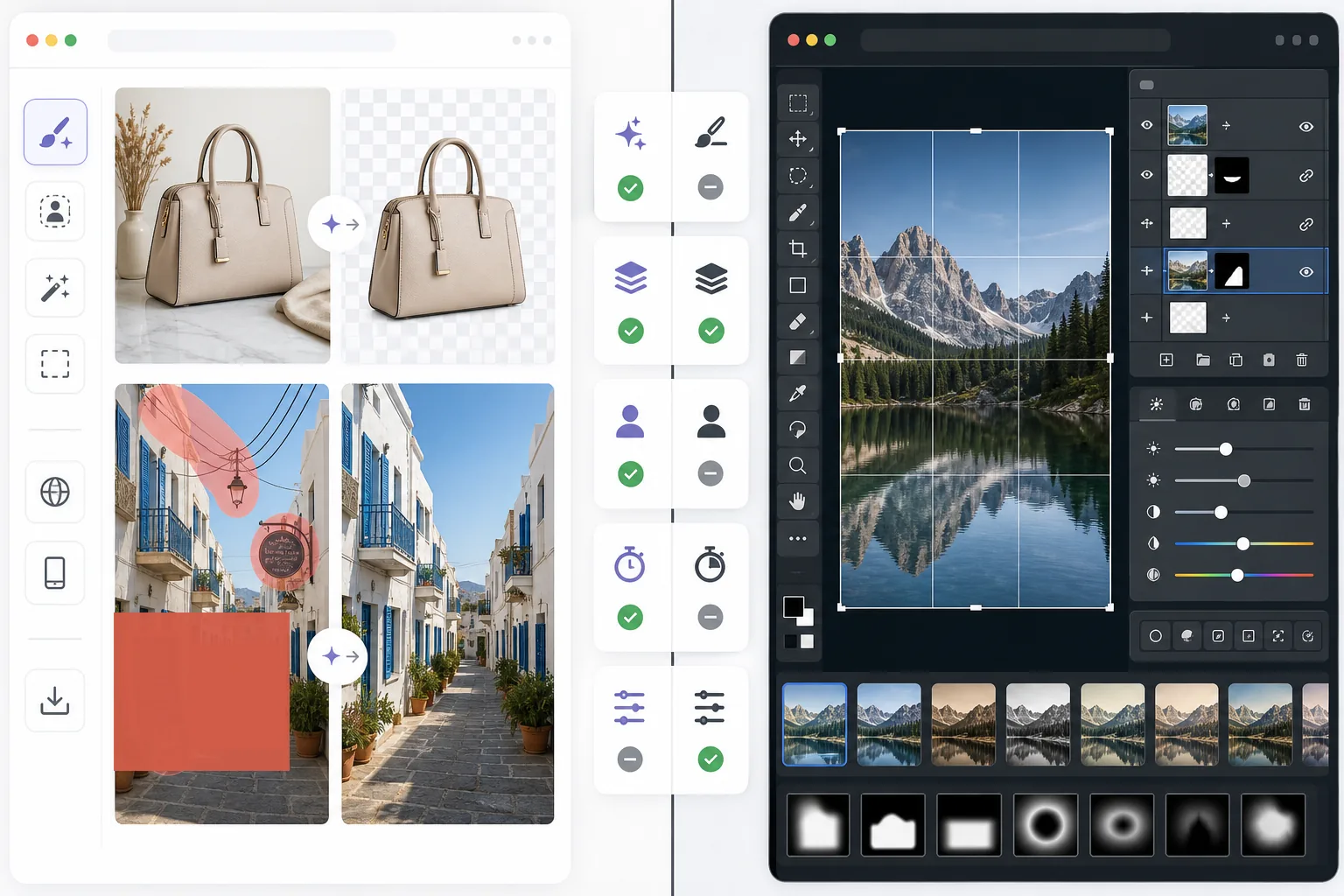
Panoramica
Magic Eraser aiuta gli utenti a risolvere rapidamente problemi pratici delle immagini con l'IA: rimuovere oggetti indesiderati, cancellare testo, pulire gli sfondi, definire i dettagli e riempire le aree mancanti.
Pixlr offre un'esperienza di editing basata su browser più tradizionale, con livelli, filtri e strumenti manuali. È flessibile, ma spesso più lento per le attività di pulizia ripetitive.
Confronto delle funzionalità
Magic Eraser aiuta gli utenti a risolvere rapidamente problemi pratici delle immagini con l'IA: rimuovere oggetti indesiderati, cancellare testo, pulire gli sfondi, definire i dettagli e riempire le aree mancanti.
Pixlr offre un'esperienza di editing basata su browser più tradizionale, con livelli, filtri e strumenti manuali. È flessibile, ma spesso più lento per le attività di pulizia ripetitive.
| Feature | Magic Eraser | Pixlr |
|---|---|---|
| Rimozione di oggetti | Sì — pennello IA | Limitata |
| Rimozione dello sfondo | Sì | Sì |
| Miglioramento dell'immagine | Sì | Di base |
| Editing basato su livelli | No | Sì |
| Riempimento generativo | Sì | Limitato |
| Adatto ai principianti | Sì | Moderato |
| Ideale per | Pulizia rapida e modifiche con IA | Editing generico nel browser |
| Piattaforma | Web + mobile | Web + mobile |
Feature rows summarize visible product positioning and should be rechecked against official product pages before purchase, migration, or compliance decisions.
- Last content review June 21, 2026
- Pixlr source: official product site (https://pixlr.com/)
- Magic Eraser source: https://magiceraser.live/it/product/magic-eraser
- Pricing, feature availability, platform support, and limits can change; recheck official sources before relying on a buying decision.
Confronto dei prezzi
| Plan | Magic Eraser | Pixlr |
|---|---|---|
| Piano gratuito | Gratis — modifiche limitate | Gratis — di base + pubblicità |
| Mensile | $9.99/mo | $7.99/mo (Plus) |
| Annuale | $4.99/mo (con fatturazione annuale) | $4.90/mo (Plus, con fatturazione annuale) |
Prezzi aggiornati a May 2026. Verifica le tariffe attuali presso ciascun fornitore.
Pricing rows are snapshots from review time. Free tiers, subscriptions, trials, export limits, and regional availability can change without notice.
- Last content review June 21, 2026
- Pixlr source: official product site (https://pixlr.com/)
- Magic Eraser source: https://magiceraser.live/it/product/magic-eraser
- Pricing, feature availability, platform support, and limits can change; recheck official sources before relying on a buying decision.
Perché scegliere Magic Eraser
Meno tempo tra i controlli di editing
Magic Eraser riduce la necessità di gestire barre degli strumenti, livelli ed effetti manuali quando l'obiettivo principale è semplicemente pulire e migliorare una foto in modo rapido.
Più utile per i flussi di lavoro ripetibili
Quando modifichi ogni giorno foto di prodotti, immagini per i social, inserzioni o asset per creator, il flusso di lavoro IA più ristretto ma più potente di Magic Eraser spesso fa risparmiare più tempo di un editor generico.
Migliore per la pulizia di sfondi e distrazioni
Magic Eraser è particolarmente efficace quando il problema è il disordine, il testo, i cavi o un ambiente che distrae e che deve sparire in modo naturale.
Minor impegno di formazione
I team possono iniziare più velocemente con Magic Eraser perché richiede meno conoscenze di editing rispetto a un classico editor da browser con una gamma più ampia di strumenti manuali.
Domande frequenti
Magic Eraser è più facile da usare di Pixlr?
+
Sì per le attività incentrate sulla pulizia. Pixlr offre una maggiore flessibilità di editing tradizionale, ma Magic Eraser è più facile per gli utenti che hanno principalmente bisogno della rimozione di oggetti e delle modifiche dello sfondo con IA.
Pixlr dispone dei livelli?
+
Sì. Pixlr include un ambiente di editing basato sui livelli più classico. Magic Eraser è più orientato a risultati rapidi assistiti dall'IA che all'editing manuale dei livelli.
Quale strumento è migliore per chi fa marketing e per i venditori?
+
Magic Eraser è spesso la scelta più adatta perché gestisce più velocemente pulizia, miglioramento e preparazione delle immagini pronte per la presentazione.
Posso rimuovere il testo dalle immagini con Magic Eraser?
+
Sì. Magic Eraser può rimuovere testo, etichette, cartelli e altre distrazioni ricostruendo lo sfondo in modo naturale.
Quale editor funziona meglio su mobile e desktop insieme?
+
Magic Eraser offre un flusso di lavoro IA più coerente tra web e mobile, il che rende più semplice passare da un dispositivo all'altro per le attività pratiche di editing.
Hai bisogno di un editor web più veloce per la pulizia delle immagini reali?
Prova Magic Eraser gratis e usa l'IA per rimuovere le distrazioni, migliorare la nitidezza e completare modifiche curate con meno passaggi.
Prova Magic Eraser gratisCasi d'uso correlati
Scopri come i professionisti utilizzano questi strumenti nei flussi di lavoro reali.
Le foto degli annunci piene di oggetti personali, auto parcheggiate o materiali di cantiere allontanano gli acquirenti. Magic Eraser usa l'IA per ripulire le foto dei tuoi immobili all'istante — senza bisogno di Photoshop.
Sfondi disordinati e foto prodotto trascurate ti costano vendite ogni giorno. Magic Eraser ti aiuta a creare immagini prodotto professionali in pochi secondi — senza competenze di Photoshop. Carica, cancella le distrazioni e pubblica con sicurezza.
Sconosciuti che rovinano le tue foto di viaggio? Sfondi disordinati che uccidono i tuoi selfie? Basta sprecare ore su Photoshop. Magic Eraser rimuove le distrazioni, pulisce le immagini e adatta le foto a qualsiasi formato — tutto con un tocco.
Guide correlate
Esplora altre guide e contenuti editoriali relativi a questo flusso di lavoro.
Scopri come usare Magic Eraser per rimuovere oggetti, persone, testo e distrazioni dalle foto con risultati AI più puliti.
Scopri come rimuovere persone dalle foto con l'IA in pochi secondi. Guida per foto di viaggio, immobiliari e prodotti.
Guida passo passo per rimuovere filigrane dalle tue foto con l'IA. Quando è appropriato, tecniche e consigli.
Altri confronti
Scopri come Magic Eraser si confronta con altri strumenti di editing fotografico.
Due potenti editor foto IA con punti di forza diversi. Magic Eraser offre un set più ampio di strumenti IA generativi, mentre Photoroom eccelle nella fotografia di prodotti e-commerce e nell'elaborazione batch. Scopri quale si adatta al tuo flusso di lavoro.
Abbiamo testato e confrontato i migliori strumenti di editing foto AI per te. Dalla rimozione di oggetti alla sostituzione dello sfondo, scopri quale editor offre i risultati migliori per il tuo flusso di lavoro.
Adobe Photoshop è potente, ma la maggior parte delle persone ne usa solo una piccola parte delle funzioni. Magic Eraser offre gli strumenti di pulizia delle foto di cui hai davvero bisogno — rimozione di oggetti, rimozione dello sfondo, miglioramento con AI e riempimento generativo — in un'interfaccia più semplice che funziona su web e dispositivi mobili, senza abbonamento richiesto per iniziare.
remove.bg è ottimo per una cosa: rimuovere sfondi. Magic Eraser lo fa altrettanto bene, e in più rimuove oggetti indesiderati, migliora la qualità delle immagini, riempie le aree mancanti con l'AI e gestisce l'intero flusso di fotoritocco — tutto in un unico posto.
Tried to remove an object or background and hit a Pro paywall in Canva, Adobe Express/Photoshop, or Fotor? Magic Eraser does the same job — object removal, background removal, watermark cleanup, and enhancement — for free. No subscription, and no watermark stamped on your download.
Confronta Magic Eraser con magic-eraser.io. Scopri funzionalità, prezzi e facilità d'uso a confronto. Scopri perché Magic Eraser è la scelta migliore per il fotoritocco AI.