
एआई के साथ शादी की फोटो संपादन को तेज बनाया गया
शादी की तस्वीरें पूर्णता की हकदार हैं, लेकिन मैन्युअल सुधार में घंटों लग जाते हैं। Magic Eraser फोटोग्राफरों और जोड़ों को ध्यान भटकाने वाले तत्वों को हटाने, पृष्ठभूमि को साफ करने और विवरणों को बढ़ाने में मदद करता है ताकि हर शॉट सबसे अच्छा दिखे।
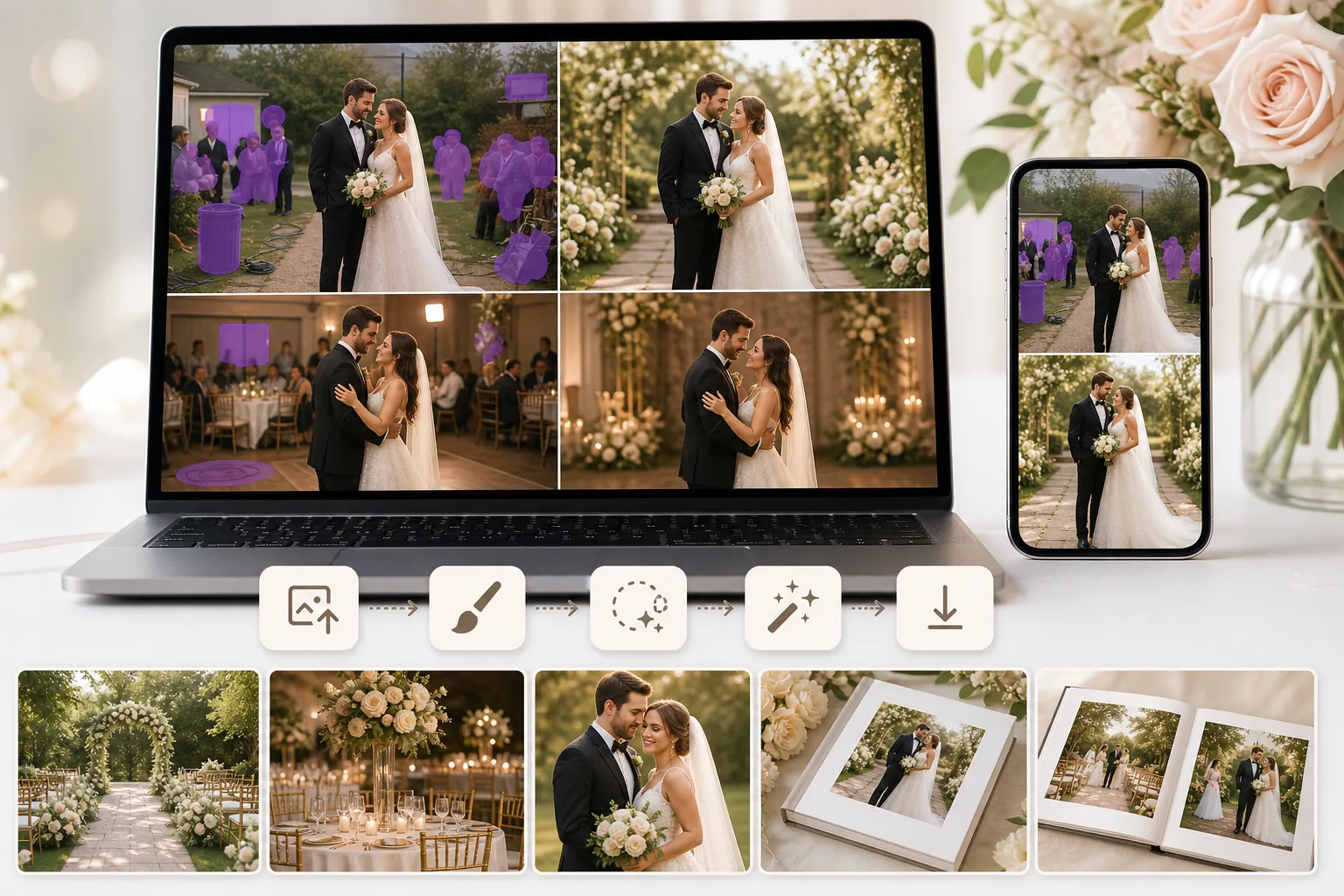
पृष्ठभूमि में अवांछित लोग
बाहर निकलने के संकेत, अजनबी और फोटोबॉम्बर जोड़े का ध्यान भटकाते हैं। फ़ोटोशॉप में उन्हें मैन्युअल रूप से क्लोन करना कठिन है, खासकर सैकड़ों समारोह और रिसेप्शन शॉट्स में।
दिन भर असंगत प्रकाश व्यवस्था
शादी के कार्यक्रमों में इनडोर समारोह, आउटडोर पोर्ट्रेट और शाम के रिसेप्शन शामिल होते हैं। इन स्थितियों में एक्सपोज़र और रंग को संतुलित करने से संपादन का समय नष्ट हो जाता है।
वितरित करने के लिए फ़ोटो की मात्रा
फ़ोटोग्राफ़र प्रति विवाह सैकड़ों छवियाँ प्रदान करते हैं। प्रत्येक विकर्षण को दूर करने में कई मिनट खर्च करने से तेजी से वृद्धि होती है और डिलीवरी की समयसीमा बढ़ जाती है।
Magic Eraser शादी की तस्वीरों में कैसे मदद करता है
फोटो अपलोड करें
अपने ब्राउज़र में या अपने फ़ोन पर Magic Eraser खोलें और शादी की वह छवि अपलोड करें जिसे आप साफ़ करना चाहते हैं।
विकर्षणों पर काबू पाएं
अवांछित मेहमानों, संकेतों, कूड़ेदानों, केबलों, या किसी भी वस्तु पर पेंट करने के लिए इरेज़र टूल का उपयोग करें जो जोड़े से ध्यान हटाता है।
निखारें और निखारें
विवरणों को तेज़ करने, प्रकाश संतुलन में सुधार करने और एक पॉलिश अंतिम छवि के लिए रंग लाने के लिए AI Enhancement का उपयोग करें।
डाउनलोड करें और वितरित करें
साफ़ की गई छवि को पूर्ण रिज़ॉल्यूशन पर निर्यात करें, एल्बम, प्रिंट या ऑनलाइन गैलरी के लिए तैयार।
अक्सर पूछे जाने वाले प्रश्नों
क्या Magic Eraser लोगों को शादी की तस्वीरों से हटा सकता है?
+
हाँ। अवांछित मेहमानों या फोटोबॉम्बर्स पर ब्रश करें और Magic Eraser स्वाभाविक रूप से पृष्ठभूमि का पुनर्निर्माण करते हुए उन्हें हटा दें।
क्या संपादित क्षेत्र प्राकृतिक दिखेगा?
+
Magic Eraser हटाए गए क्षेत्र को संदर्भ-जागरूक सामग्री से भरने के लिए AI का उपयोग करता है जो आसपास के दृश्य से मेल खाता है, इसलिए परिणाम साफ और निर्बाध दिखता है।
क्या मैं अपने फ़ोन पर शादी की तस्वीरें संपादित कर सकता हूँ?
+
हाँ। Magic Eraser वेब और मोबाइल दोनों पर काम करता है, इसलिए आप इवेंट के तुरंत बाद अपने फोन से त्वरित सुधार कर सकते हैं।
क्या यह पेशेवर विवाह फोटोग्राफरों के लिए उपयोगी है?
+
हाँ। पेशेवर फ़ोटोग्राफ़र विशेष रूप से उच्च-मात्रा वाली शादी की शूटिंग के लिए वर्कफ़्लो को तेज करने और साफ़ करने के लिए Magic Eraser का उपयोग करते हैं।
क्या मैं जोड़े के पीछे की पृष्ठभूमि भी ठीक कर सकता हूँ?
+
हाँ। आप इरेज़र और फ़िल टूल का एक साथ उपयोग करके पृष्ठभूमि को पूरी तरह से हटा सकते हैं या जोड़े के पीछे विशिष्ट विकर्षणों को साफ़ कर सकते हैं।
हर शादी के फोटो एलबम को तैयार करें
Magic Eraser को निःशुल्क आज़माएं और विकर्षणों को दूर करें, विवरणों को बेहतर बनाएं, और शानदार शादी की छवियां तेजी से वितरित करें।
Magic Eraser निःशुल्क आज़माएँसंबंधित उपयोग के मामले
देखें कि पेशेवर इन उपकरणों का कैसे उपयोग करते हैं।
निजी सामान, खड़ी कारों या निर्माण उपकरणों से भरी लिस्टिंग तस्वीरें खरीदारों को दूर कर सकती हैं। Magic Eraser आपकी प्रॉपर्टी तस्वीरों को तुरंत साफ करने के लिए AI का उपयोग करता है — Photoshop कौशल की कोई जरूरत नहीं।
धुंधले बैकग्राउंड और बिखरी हुई प्रोडक्ट तस्वीरें हर दिन आपकी बिक्री घटाती हैं। Magic Eraser आपको सेकंडों में साफ, प्रोफेशनल प्रोडक्ट इमेज बनाने में मदद करता है — Photoshop की जरूरत नहीं। बस अपलोड करें, ध्यान भटकाने वाली चीजें मिटाएँ, और भरोसे के साथ लिस्ट करें।
अनचाहे लोग आपकी ट्रैवल तस्वीरें खराब कर रहे हैं? गंदा बैकग्राउंड आपकी सेल्फी बिगाड़ रहा है? Photoshop में घंटों बर्बाद करना बंद करें। Magic Eraser ध्यान भटकाने वाली चीज़ें हटाता है, बिखरी हुई तस्वीरें साफ करता है और आपकी फोटो को किसी भी प्लेटफॉर्म फॉर्मेट के लिए बढ़ाता है — सब एक टैप में।
संबंधित तुलनाएं
देखें कि Magic Eraser समान टूल्स से कैसे तुलना करता है।
TouchRetouch ऑब्जेक्ट और दाग-धब्बे हटाने के लिए एक लोकप्रिय भुगतान वाला मोबाइल ऐप है। Magic Eraser किसी भी डिवाइस पर बिना इंस्टॉल किए मुफ्त AI-संचालित एडिटिंग प्रदान करता है। देखें कि वे फीचर्स, मूल्य और उपयोग में आसानी के मामले में कैसे तुलना करते हैं।
Cleanup.pictures त्वरित ऑब्जेक्ट रिमूवल के लिए एक मुफ़्त वेब टूल है. Magic Eraser 8 AI-संचालित एडिटिंग टूल, मोबाइल ऐप्स और उन्नत प्रोसेसिंग के साथ इससे आगे जाता है. देखें कि दोनों की तुलना कैसी है.
remove.bg बैकग्राउंड हटाने के लिए मार्केट लीडर है, जो एक शक्तिशाली API और Photoshop तथा Figma के साथ इंटीग्रेशन प्रदान करता है। Magic Eraser आठ AI-संचालित एडिटिंग टूल के साथ इससे आगे जाता है — ऑब्जेक्ट हटाने और जेनरेटिव फिल से लेकर AI एन्हांस और डिज़ाइन तक — सब कुछ एक ही एडिटर में।
अलग-अलग ताकत वाले दो शक्तिशाली AI फ़ोटो एडिटर। Magic Eraser रचनात्मक संपादन के लिए जेनरेटिव AI उपकरणों का व्यापक सेट प्रदान करता है, जबकि Photoroom ई-कॉमर्स उत्पाद फ़ोटोग्राफ़ी और बैच प्रोसेसिंग में उत्कृष्ट है। देखें कौन-सा आपके वर्कफ़्लो में फ़िट बैठता है।
संबंधित गाइड
इस वर्कफ़्लो से संबंधित और गाइड देखें।
जानें कि Magic Eraser से फ़ोटो में ऑब्जेक्ट, लोग, टेक्स्ट और ध्यान भटकाने वाली चीज़ें हटाकर साफ़ AI एडिटिंग परिणाम कैसे पाएँ।
AI से कुछ ही सेकंड में फ़ोटो से लोगों को हटाना सीखें। यात्रा, रियल एस्टेट और प्रोडक्ट फ़ोटो के लिए गाइड।
AI का उपयोग करके अपनी फ़ोटो से वॉटरमार्क हटाने की चरण-दर-चरण गाइड। कब उपयुक्त है, बेहतरीन तकनीकें, और Magic Eraser इसे कैसे संभालता है।