
उत्पाद फ़ोटो, सामाजिक क्रिएटिव और मार्केटिंग संपादनों के लिए जेनरेटिव फ़िल
चयनित क्षेत्रों को बदलने, गायब विवरणों को फिर से बनाने और किसी फोटो को सफाई, दृश्य मरम्मत या दृश्य विस्तार की आवश्यकता होने पर अधिक प्राकृतिक परिणाम बनाने के लिए एआई फिल का उपयोग करें।
Magic Eraser AI फ़िल संदर्भ-जागरूक जनरेटिव फ़िल के साथ गुम या हटाए गए छवि क्षेत्रों का पुनर्निर्माण करता है। किसी ऑब्जेक्ट को हटाने के बाद, एआई फिल आसपास के दृश्य से मेल खाने वाली सामग्री के साथ खाली क्षेत्र का पुनर्निर्माण करता है - आमतौर पर संपादित क्षेत्रों को ठीक करने, हटाए गए ऑब्जेक्ट को प्राकृतिक पृष्ठभूमि से बदलने और क्षतिग्रस्त तस्वीरों की मरम्मत के लिए उपयोग किया जाता है।
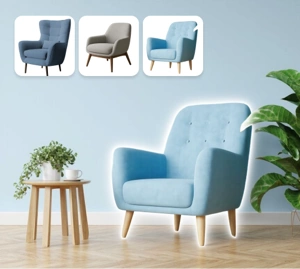

किसी छवि के छूटे हुए हिस्सों को फिर से बनाने के लिए जेनरेटिव फिल का उपयोग करें
एआई फिल आपको अवांछित क्षेत्रों को बदलने और स्पष्ट पैच निशान के बिना गायब दृश्य जानकारी को पुन: उत्पन्न करने में मदद करता है। जब आपको भारी सुधार के बिना यथार्थवादी दिखने वाले परिणामों की आवश्यकता होती है तो यह उत्पाद फोटोग्राफी, रचनात्मक सफाई और तेज़ सामग्री उत्पादन के लिए उपयोगी होता है।
अभी एआई फिल आज़माएं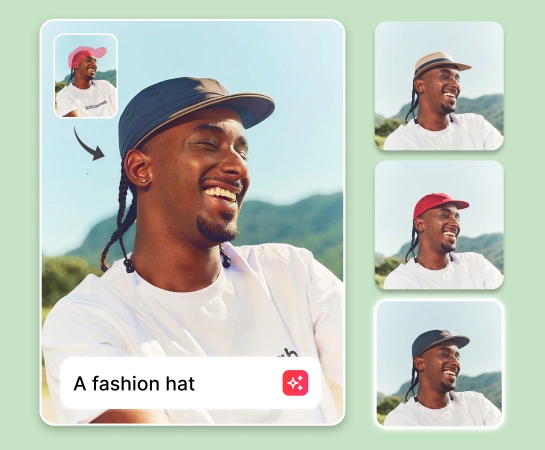
मैन्युअल रीटचिंग के बजाय जेनरेटिव फिल के साथ फोटो संपादन को गति दें
हर छोटे क्षेत्र को हाथ से पैच करने के बजाय, उस क्षेत्र का चयन करें जिसे आप बदलना चाहते हैं और एआई फिल को बेहतर मिलान उत्पन्न करने दें। यह तब अच्छी तरह से काम करता है जब आपको छवि को व्यावसायिक कार्य के लिए उपयोग योग्य बनाए रखते हुए किनारों की मरम्मत करने, विकर्षणों को दूर करने या किसी अधूरे दृश्य को पूरा करने की आवश्यकता होती है।
अभी एआई फिल आज़माएं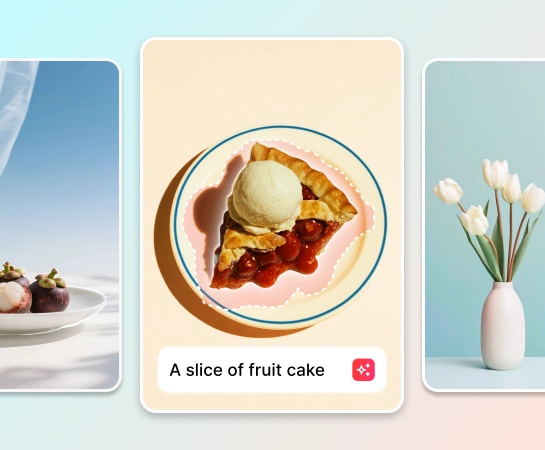
एकाधिक छवि संपादन परिदृश्यों में जेनरेटिव फ़िल का उपयोग करें
जब आप ऑब्जेक्ट हटाने के बाद खाली जगह भरना चाहते हैं, पृष्ठभूमि का हिस्सा बदलना चाहते हैं, छवि किनारों को परिष्कृत करना चाहते हैं, या अधिक दृश्य संदर्भ जोड़ना चाहते हैं तो एआई फिल अच्छी तरह से काम करता है। यह ईकॉमर्स फ़ोटो, सोशल मीडिया संपत्तियों और तेज़ अभियान सफ़ाई के लिए उपयोगी है।
अभी एआई फिल आज़माएं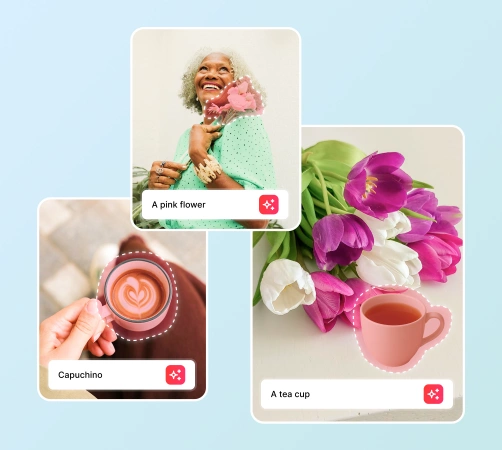
संपूर्ण AI फ़ोटो संपादन वर्कफ़्लो के साथ AI फ़िल को जोड़ें
ऑब्जेक्ट हटाएं, बैकग्राउंड हटाएं, AI Enhance और AI एक्सपैंड के साथ संयुक्त होने पर AI फिल अधिक उपयोगी हो जाता है। छवि साफ़ करें, छूटे हुए क्षेत्रों का पुनर्निर्माण करें, परिणाम को बेहतर बनाएं, और एक वर्कफ़्लो के अंदर विज्ञापनों, बाज़ारों और सामाजिक चैनलों के लिए अंतिम संपत्ति तैयार करें।
अभी एआई फिल आज़माएं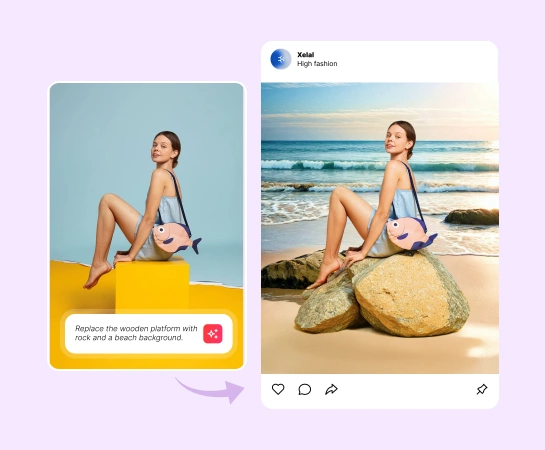
जनरेटिव फ़िल का उपयोग कैसे करें
अपनी छवि अपलोड करें
किसी उत्पाद फ़ोटो, सामाजिक दृश्य, जीवनशैली छवि, या किसी संपत्ति से शुरुआत करें जिसके आंशिक पुनर्निर्माण की आवश्यकता है।
बदलने के लिए क्षेत्र का चयन करें
उस क्षेत्र पर ब्रश करें जिसे आप एआई फिल के साथ बदलना, मरम्मत करना या पुनर्जीवित करना चाहते हैं।
पाठ के माध्यम से बताएं कि आप क्या चाहते हैं
उस नई सामग्री, पृष्ठभूमि, या दृश्य विवरण का वर्णन करते हुए एक संक्षिप्त संकेत दर्ज करें जिसे आप एआई फिल से उत्पन्न कराना चाहते हैं।
जनरेटिव भरण चलाएँ
एआई को चयनित क्षेत्र का पुनर्निर्माण करने दें ताकि नई सामग्री बाकी छवि के साथ अधिक स्वाभाविक रूप से मिश्रित हो जाए।
आपके लिए आवश्यक सभी AI छवि संपादन उपकरण
सफाई और संवर्द्धन से लेकर उत्पादन, विस्तार और डिज़ाइन तक, Magic Eraser वेब में उपलब्ध मुख्य संपादन क्षमताओं का अन्वेषण करें।

ऐ भरण
चयनित क्षेत्रों को बदलें और प्राकृतिक दिखने वाले परिणामों के साथ गायब सामग्री को पुन: उत्पन्न करें।

ऑब्जेक्ट हटाएँ
साफ़ किए गए क्षेत्र का पुनर्निर्माण करने से पहले लोगों, प्रॉप्स, टेक्स्ट या विकर्षणों को मिटा दें।

पृष्ठभूमि निकालें
पहले अपने विषय को अलग करें, फिर किनारों को परिष्कृत करने या दृश्य विवरण को फिर से बनाने के लिए एआई फिल का उपयोग करें।

AI Enhance
भरण परिणाम उत्पन्न होने के बाद स्पष्टता, विवरण और समग्र पॉलिश में सुधार करें।

एआई विस्तार
अधिक उपयोगी स्थान बनाने के लिए कैनवास का विस्तार करें और इसे जेनरेटिव फिल के साथ संयोजित करें।

डिज़ाइन
संपादित दृश्यों को लेआउट, विज्ञापन क्रिएटिव, थंबनेल या सरल डिज़ाइन रचनाओं में ले जाएँ।

एआई फ़िल्टर
मुख्य जनरेटिव भरण संपादन पूरा होने के बाद दृश्य मनोदशा या शैली बदलें।

एआई बनाएं
संकेतों से नए दृश्य विचार उत्पन्न करें और उन्हें एआई फिल के साथ परिष्कृत करना जारी रखें।
अक्सर पूछे जाने वाले प्रश्नों
एआई फिल एक जेनरेटिव फिल वर्कफ़्लो है जो चयनित क्षेत्रों को प्रतिस्थापित करता है और गायब दृश्य सामग्री को फिर से बनाता है ताकि संपादन बाकी छवि के साथ अधिक स्वाभाविक रूप से मिश्रित हो जाए।
जब आपको साफ़ किए गए क्षेत्र को फिर से बनाने, पृष्ठभूमि के हिस्से को बदलने, गायब सामग्री की मरम्मत करने, या संपादन के बाद अधिक संपूर्ण दृश्य बनाने की आवश्यकता हो तो जेनरेटिव फ़िल का उपयोग करें।
हाँ। यह उत्पाद फोटोग्राफी, ईकॉमर्स विज़ुअल, सोशल मीडिया क्रिएटिव, थंबनेल और मार्केटिंग संपत्तियों के लिए उपयोगी है जहां आपको तेज़ सफाई और अधिक परिष्कृत परिणामों की आवश्यकता होती है।
हाँ। कई वर्कफ़्लो तब बेहतर काम करते हैं जब आप पहली बार ऑब्जेक्ट या पृष्ठभूमि हटाते हैं, फिर क्षेत्रों के पुनर्निर्माण के लिए एआई फिल का उपयोग करते हैं, और अंत में अंतिम निर्यात के लिए छवि को बढ़ाते या विस्तारित करते हैं।
सामान्य प्रवाह सरल है: एक छवि अपलोड करें, उस क्षेत्र पर ब्रश करें जिसे आप बदलना चाहते हैं, एआई फिल चलाएं, उत्पन्न परिणाम की समीक्षा करें और अंतिम छवि निर्यात करें।