
Magic Eraser बनाम TouchRetouch: कौन सा ऑब्जेक्ट रिमूवर बेहतर है?
TouchRetouch ऑब्जेक्ट और दाग-धब्बे हटाने के लिए एक लोकप्रिय भुगतान वाला मोबाइल ऐप है। Magic Eraser किसी भी डिवाइस पर बिना इंस्टॉल किए मुफ्त AI-संचालित एडिटिंग प्रदान करता है। देखें कि वे फीचर्स, मूल्य और उपयोग में आसानी के मामले में कैसे तुलना करते हैं।
Last updated
Magic Eraser मुफ्त आज़माएंComparison rows are editorial summaries from the latest page review, not a guarantee of current pricing, limits, watermark policy, batch support, speed, or platform availability.
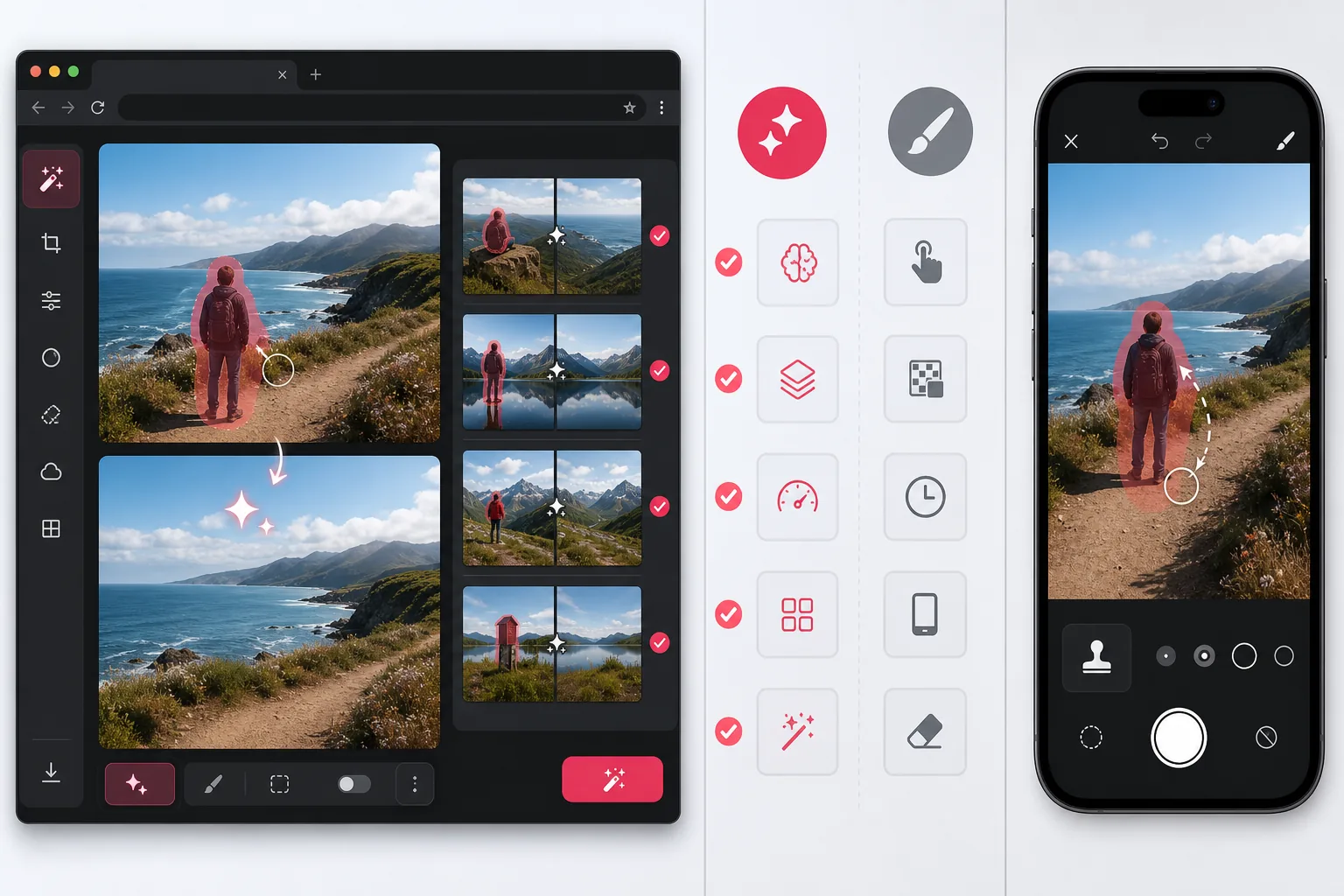
अवलोकन
Magic Eraser एक मुफ्त वेब-आधारित AI फोटो एडिटर है जिसमें ऑब्जेक्ट हटाना, बैकग्राउंड हटाना, AI एन्हांस, AI एक्सपैंड, AI फिल, AI फिल्टर और बैच प्रोसेसिंग शामिल है। यह ब्राउज़र वाले किसी भी डिवाइस पर काम करता है — किसी ऐप इंस्टॉल की जरूरत नहीं।
TouchRetouch एक भुगतान वाला मोबाइल ऐप ($2.99) है जो सटीक टच-आधारित ऑब्जेक्ट और दाग-धब्बे हटाने पर केंद्रित है। इसमें iOS और Android पर विस्तृत मैनुअल रीटचिंग के लिए एक लाइन रिमूवल टूल और क्लोन स्टैम्प की सुविधा है।
फीचर तुलना
Magic Eraser एक मुफ्त वेब-आधारित AI फोटो एडिटर है जिसमें ऑब्जेक्ट हटाना, बैकग्राउंड हटाना, AI एन्हांस, AI एक्सपैंड, AI फिल, AI फिल्टर और बैच प्रोसेसिंग शामिल है। यह ब्राउज़र वाले किसी भी डिवाइस पर काम करता है — किसी ऐप इंस्टॉल की जरूरत नहीं।
TouchRetouch एक भुगतान वाला मोबाइल ऐप ($2.99) है जो सटीक टच-आधारित ऑब्जेक्ट और दाग-धब्बे हटाने पर केंद्रित है। इसमें iOS और Android पर विस्तृत मैनुअल रीटचिंग के लिए एक लाइन रिमूवल टूल और क्लोन स्टैम्प की सुविधा है।
| Feature | Magic Eraser | TouchRetouch |
|---|---|---|
| ऑब्जेक्ट हटाना | हाँ — AI-संचालित | हाँ — मैनुअल ब्रश |
| बैकग्राउंड हटाना | हाँ — एक क्लिक | नहीं |
| लाइन हटाना | हाँ — AI ब्रश के माध्यम से | हाँ — समर्पित टूल |
| बैच प्रोसेसिंग | हाँ | नहीं |
| AI एन्हांस और अपस्केल | हाँ | नहीं |
| AI एक्सपैंड (आउटपेंट) | हाँ | नहीं |
| प्लेटफॉर्म | वेब + मोबाइल | केवल मोबाइल |
| मूल्य | शुरू करने के लिए मुफ्त | $2.99 एक बार |
Feature rows summarize visible product positioning and should be rechecked against official product pages before purchase, migration, or compliance decisions.
- Last content review May 1, 2026
- TouchRetouch source: official product site (https://www.adva-soft.com/products/touch-retouch)
- Magic Eraser source: https://magiceraser.live/hi/product/magic-eraser
- Pricing, feature availability, platform support, and limits can change; recheck official sources before relying on a buying decision.
मूल्य तुलना
| Plan | Magic Eraser | TouchRetouch |
|---|---|---|
| मुफ्त टियर | मुफ्त — सीमित एडिट | कोई मुफ्त टियर नहीं |
| मासिक | $9.99/mo | लागू नहीं — एक बार $4.99 |
| वार्षिक | $4.99/mo (सालाना बिल किया गया) | लागू नहीं — एक बार की खरीद |
मूल्य May 2026 के अनुसार। वर्तमान दरों के लिए प्रत्येक प्रदाता की जांच करें।
Pricing rows are snapshots from review time. Free tiers, subscriptions, trials, export limits, and regional availability can change without notice.
- Last content review May 1, 2026
- TouchRetouch source: official product site (https://www.adva-soft.com/products/touch-retouch)
- Magic Eraser source: https://magiceraser.live/hi/product/magic-eraser
- Pricing, feature availability, platform support, and limits can change; recheck official sources before relying on a buying decision.
Magic Eraser क्यों चुनें
बिना इंस्टॉल के शुरू करने के लिए मुफ्त
Magic Eraser आपके ब्राउज़र में चलता है। डाउनलोड करने के लिए कोई ऐप नहीं और कोई अग्रिम भुगतान नहीं। किसी भी डिवाइस से सेकंडों में फोटो एडिट करना शुरू करें।
एक प्लेटफॉर्म में कई AI टूल
ऑब्जेक्ट हटाने से आगे बढ़ें। बैकग्राउंड हटाएं, रिज़ॉल्यूशन बढ़ाएं, कैनवास का विस्तार करें, AI फिल्टर लगाएं और फिल जनरेट करें — सब एक ही एडिटर में।
टीमों के लिए बैच प्रोसेसिंग
एक साथ कई इमेज एडिट करें। प्रोडक्ट फोटोग्राफर, ई-कॉमर्स विक्रेता और मार्केटिंग टीमें टूल बदले बिना पूरे फोटो सेट प्रोसेस कर सकती हैं।
किसी भी डिवाइस पर काम करता है
डेस्कटॉप, टैबलेट या फोन से Magic Eraser एक्सेस करें। कोई प्लेटफॉर्म लॉक-इन नहीं और डिवाइसों के बीच फाइलें ट्रांसफर करने की जरूरत नहीं।
अक्सर पूछे जाने वाले प्रश्न
क्या Magic Eraser उपयोग करने के लिए मुफ्त है?
+
हाँ। Magic Eraser एक मुफ्त टियर प्रदान करता है जो आपको बिना भुगतान के ऑब्जेक्ट हटाने और अन्य AI टूल आज़माने देता है। प्रीमियम फीचर्स किफायती प्लान के माध्यम से उपलब्ध हैं।
क्या TouchRetouch डेस्कटॉप पर काम करता है?
+
TouchRetouch केवल iOS और Android के लिए डिज़ाइन किया गया है। Magic Eraser किसी भी आधुनिक ब्राउज़र में काम करता है, इसलिए आप डेस्कटॉप, लैपटॉप, टैबलेट या फोन पर एडिट कर सकते हैं।
फोटो से लोगों को हटाने के लिए कौन सा टूल बेहतर है?
+
दोनों टूल फोटो से लोगों को हटा सकते हैं। Magic Eraser बैकग्राउंड को स्वचालित रूप से फिर से बनाने के लिए AI का उपयोग करता है, जबकि TouchRetouch जटिल हटाने के लिए अधिक मैनुअल ब्रश काम की आवश्यकता रखता है।
क्या मैं TouchRetouch से बैकग्राउंड हटा सकता हूँ?
+
नहीं। TouchRetouch केवल ऑब्जेक्ट और दाग-धब्बे हटाने पर केंद्रित है। Magic Eraser एक अंतर्निहित फीचर के रूप में एक-क्लिक बैकग्राउंड हटाना प्रदान करता है।
क्या Magic Eraser बैच एडिटिंग का समर्थन करता है?
+
हाँ। आप एक साथ कई इमेज अपलोड और प्रोसेस कर सकते हैं, जिससे यह प्रोडक्ट फोटोग्राफी और कंटेंट क्रिएशन वर्कफ़्लो के लिए आदर्श बन जाता है।
बिजली की लाइनों जैसे बारीक विवरणों को कौन सा टूल बेहतर संभालता है?
+
TouchRetouch में एक समर्पित लाइन रिमूवल टूल है जो बिजली की लाइनों और तारों के लिए अच्छी तरह काम करता है। Magic Eraser अपने AI ब्रश के माध्यम से समान कार्यों को संभाल सकता है, जो स्वचालित रूप से अंतराल भरता है।
अपनी फोटो एडिट करने के लिए तैयार हैं?
Magic Eraser मुफ्त में आज़माएं। कोई डाउनलोड नहीं, कोई साइन-अप नहीं — बस अपना ब्राउज़र खोलें और AI के साथ ऑब्जेक्ट हटाना शुरू करें।
Magic Eraser मुफ्त आज़माएंसंबंधित उपयोग के मामले
देखें कि पेशेवर इन उपकरणों का कैसे उपयोग करते हैं।
निजी सामान, खड़ी कारों या निर्माण उपकरणों से भरी लिस्टिंग तस्वीरें खरीदारों को दूर कर सकती हैं। Magic Eraser आपकी प्रॉपर्टी तस्वीरों को तुरंत साफ करने के लिए AI का उपयोग करता है — Photoshop कौशल की कोई जरूरत नहीं।
धुंधले बैकग्राउंड और बिखरी हुई प्रोडक्ट तस्वीरें हर दिन आपकी बिक्री घटाती हैं। Magic Eraser आपको सेकंडों में साफ, प्रोफेशनल प्रोडक्ट इमेज बनाने में मदद करता है — Photoshop की जरूरत नहीं। बस अपलोड करें, ध्यान भटकाने वाली चीजें मिटाएँ, और भरोसे के साथ लिस्ट करें।
अनचाहे लोग आपकी ट्रैवल तस्वीरें खराब कर रहे हैं? गंदा बैकग्राउंड आपकी सेल्फी बिगाड़ रहा है? Photoshop में घंटों बर्बाद करना बंद करें। Magic Eraser ध्यान भटकाने वाली चीज़ें हटाता है, बिखरी हुई तस्वीरें साफ करता है और आपकी फोटो को किसी भी प्लेटफॉर्म फॉर्मेट के लिए बढ़ाता है — सब एक टैप में।
संबंधित गाइड
इस वर्कफ़्लो से संबंधित और गाइड देखें।
जानें कि Magic Eraser से फ़ोटो में ऑब्जेक्ट, लोग, टेक्स्ट और ध्यान भटकाने वाली चीज़ें हटाकर साफ़ AI एडिटिंग परिणाम कैसे पाएँ।
AI से कुछ ही सेकंड में फ़ोटो से लोगों को हटाना सीखें। यात्रा, रियल एस्टेट और प्रोडक्ट फ़ोटो के लिए गाइड।
AI का उपयोग करके अपनी फ़ोटो से वॉटरमार्क हटाने की चरण-दर-चरण गाइड। कब उपयुक्त है, बेहतरीन तकनीकें, और Magic Eraser इसे कैसे संभालता है।
अन्य तुलनाएं
देखें कि Magic Eraser अन्य फोटो एडिटिंग टूल्स से कैसे तुलना करता है।
अलग-अलग ताकत वाले दो शक्तिशाली AI फ़ोटो एडिटर। Magic Eraser रचनात्मक संपादन के लिए जेनरेटिव AI उपकरणों का व्यापक सेट प्रदान करता है, जबकि Photoroom ई-कॉमर्स उत्पाद फ़ोटोग्राफ़ी और बैच प्रोसेसिंग में उत्कृष्ट है। देखें कौन-सा आपके वर्कफ़्लो में फ़िट बैठता है।
हमने शीर्ष AI फोटो एडिटिंग टूल्स का परीक्षण और तुलना की ताकि आपको ऐसा न करना पड़े। ऑब्जेक्ट हटाने से लेकर बैकग्राउंड बदलने तक, देखें कि कौन-सा एडिटर आपके वर्कफ़्लो के लिए सर्वोत्तम परिणाम देता है।
Photoshop गहन इमेज एडिटिंग के लिए उद्योग मानक है, लेकिन कई लोगों को सिर्फ़ तेज़ ऑब्जेक्ट हटाना, साफ़ बैकग्राउंड और AI-संचालित सुधार चाहिए। Magic Eraser उन कार्यों पर हल्के वर्कफ़्लो के साथ ध्यान केंद्रित करता है जो वेब और मोबाइल पर सेकंडों में काम करता है।
Canva लेआउट और सोशल ग्राफिक्स के लिए उत्कृष्ट है, लेकिन कई उपयोगकर्ताओं को तेज़ ऑब्जेक्ट हटाने, साफ़ बैकग्राउंड एडिट और मज़बूत AI फोटो टूल की ज़रूरत होती है। यह तुलना दिखाती है कि इमेज-फर्स्ट वर्कफ़्लो के लिए Magic Eraser कहाँ बेहतर फिट बैठता है।
Pixlr उपयोगकर्ताओं को लेयर्स और इफ़ेक्ट्स के साथ एक क्लासिक ब्राउज़र-आधारित संपादन वातावरण देता है। Magic Eraser उन उपयोगकर्ताओं के लिए AI-प्रथम सफ़ाई, एन्हांसमेंट और बैकग्राउंड कार्य पर ध्यान केंद्रित करता है जो पूर्ण संपादन इंटरफ़ेस के बिना परिष्कृत परिणाम चाहते हैं।
PicWish बैकग्राउंड हटाने और तेज़ उत्पाद इमेज वर्कफ़्लो के लिए जाना जाता है। Magic Eraser एक ही एडिटर में मज़बूत ऑब्जेक्ट हटाने, फ़िल, एन्हांसमेंट और रचनात्मक AI टूल्स के साथ अधिक व्यापक है।