
सिनेमैटिक, एनीमे, पोर्ट्रेट और क्रिएटिव लुक के लिए सेकंडों में एआई फोटो फिल्टर ऑनलाइन लागू करें
पोर्ट्रेट, सोशल मीडिया सामग्री, थंबनेल, जीवनशैली छवियों और रचनात्मक विपणन संपत्तियों के लिए एक-टैप शैलियों के साथ फ़ोटो को बदलने के लिए Magic Eraser के AI फ़िल्टर टूल का उपयोग करें। जटिल संपादन वर्कफ़्लो के बिना एनीमे, सिनेमैटिक, रेट्रो और मूड-आधारित फ़ोटो फ़िल्टर आज़माएँ।
Magic Eraser AI फ़िल्टर AI का उपयोग करके फ़ोटो पर एक-टैप रचनात्मक शैली लागू करता है। यह पोर्ट्रेट, जीवनशैली छवियों और सामाजिक सामग्री को सिनेमाई, एनीमे, रेट्रो और मूड-आधारित लुक के साथ बदल देता है - आमतौर पर सामग्री निर्माताओं, सोशल मीडिया प्रबंधकों और विपणक द्वारा उपयोग किया जाता है, जिन्हें मैन्युअल संपादन के बिना विशिष्ट दृश्य स्टाइल की आवश्यकता होती है।

AI फ़िल्टर स्टाइल
सीधे कोई फ़िल्टर स्टाइल खोलें
किसी लोकप्रिय AI फ़िल्टर स्टाइल से शुरू करें या अधिक लुक देखने के लिए पूरी स्टाइल लाइब्रेरी ब्राउज़ करें।
एक स्रोत छवि को कई रचनात्मक दिशाओं में बदलें
एआई फ़िल्टर आपको हर बार संपादन को दोबारा बनाए बिना एक ही फोटो से अलग-अलग लुक का पता लगाने में मदद करता है। तेज़ सामग्री पुनरावृत्ति के लिए मूड में बदलाव, पोर्ट्रेट शैलियाँ और अधिक अभिव्यंजक रंग उपचार आज़माएँ।
एआई फ़िल्टर खोलें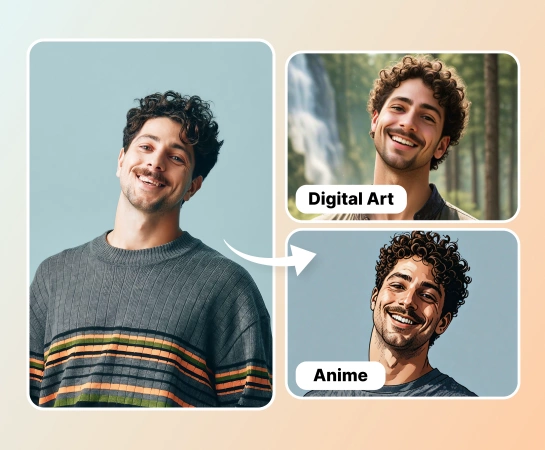
मैन्युअल रंग ग्रेडिंग की तुलना में तेज़ी से शैलीबद्ध सामग्री बनाएं
प्रत्येक परिसंपत्ति के लिए टोन, कंट्रास्ट और मूड को हाथ से समायोजित करने के बजाय, एक फ़िल्टर चुनें और परिवर्तन का तुरंत पूर्वावलोकन करें। यह सामाजिक ग्राफिक्स, निर्माता सामग्री और तीव्र अभियान विविधताएं तैयार करने वाली टीमों के लिए उपयोगी है।
एआई फ़िल्टर खोलें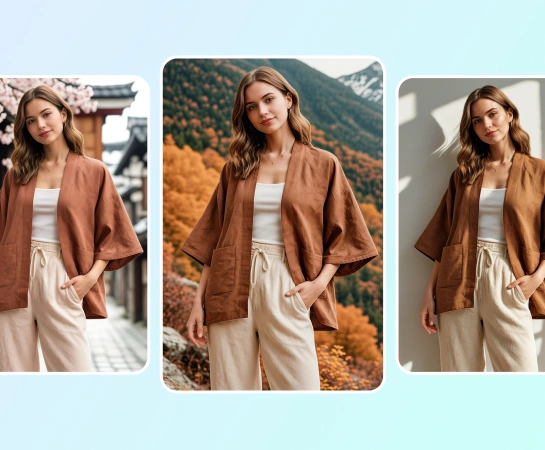
पोर्ट्रेट, सामाजिक पोस्ट और उत्पाद विज़ुअल के लिए AI फ़ोटो फ़िल्टर का उपयोग करें
लाइफस्टाइल फोटोग्राफी और पोर्ट्रेट से लेकर थंबनेल और ईकॉमर्स सामग्री तक, एआई फ़िल्टर एक विशिष्ट वाइब से मेल खाना आसान बनाता है। यह तब अच्छा काम करता है जब आपको सिनेमाई, परिष्कृत, चंचल या ट्रेंड-संचालित लुक की आवश्यकता होती है।
एआई फ़िल्टर खोलें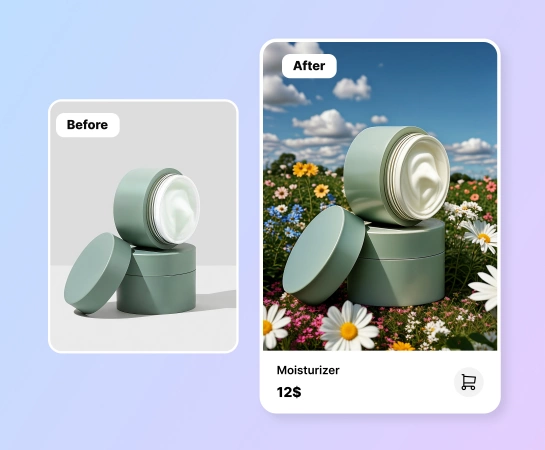
फ़िल्टर लागू होने के बाद संपादन जारी रखें
एक बार स्टाइल ठीक हो जाने पर, अन्य Magic Eraser वर्कफ़्लो जैसे बैकग्राउंड हटाएँ, AI Enhance, डिज़ाइन, या AI क्रिएट जारी रखें। यह एआई फ़िल्टर को बड़े सामग्री उत्पादन प्रवाह में एक व्यावहारिक पहला कदम बनाता है।
एआई फ़िल्टर खोलें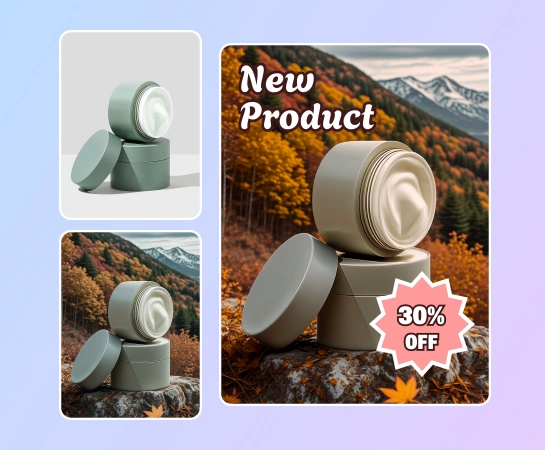
एआई फ़िल्टर कैसे लागू करें
फोटो अपलोड करें
एक पोर्ट्रेट, उत्पाद छवि, जीवनशैली शॉट, या किसी भी फोटो से शुरुआत करें जिसे आप एआई के साथ पुनः स्टाइल करना चाहते हैं।
एक फ़िल्टर चुनें
एनीमे, सिनेमैटिक, रेट्रो, पोर्ट्रेट, या अन्य मूड-आधारित एआई शैलियों जैसे उपलब्ध लुक ब्राउज़ करें।
परिणाम का पूर्वावलोकन करें
Magic Eraser को चयनित AI फ़िल्टर लागू करने दें ताकि आप मूल छवि की तुलना शैलीबद्ध संस्करण से कर सकें।
डाउनलोड करें या संपादन जारी रखें
फ़िल्टर की गई छवि को निर्यात करें या AI Enhance, पृष्ठभूमि हटाएँ, या डिज़ाइन जैसे अन्य टूल में ले जाएँ।
आपके लिए आवश्यक सभी AI छवि संपादन उपकरण
क्लीनअप और एन्हांसमेंट से लेकर जेनरेशन और डिज़ाइन तक, Magic Eraser वेब में वर्तमान में उपलब्ध मुख्य संपादन क्षमताओं का अन्वेषण करें।

एआई फ़िल्टर
तेज़ वन-टैप स्टाइलिंग वर्कफ़्लो के साथ रोजमर्रा की छवियों पर रचनात्मक एआई-संचालित लुक लागू करें।

पोर्ट्रेट शैलियाँ
मैन्युअल ग्रेडिंग के बिना पोर्ट्रेट को अधिक सिनेमाई, पॉलिश, चंचल या ट्रेंड-संचालित लुक दें।

मूड-आधारित फ़िल्टर
जब आपको एक अलग अभियान अनुभव या प्लेटफ़ॉर्म सौंदर्य की आवश्यकता हो तो किसी छवि के दृश्य टोन को तुरंत बदलें।

एक-टैप पूर्वावलोकन
एक फ़िल्टर चुनें और परिणाम को तेज़ी से अपडेट होते हुए देखें ताकि आप एकाधिक लुक के माध्यम से अधिक आसानी से पुनरावृत्ति कर सकें।
AI Enhance
जब छवि को अधिक परिष्कृत फिनिश की आवश्यकता हो तो फ़िल्टर करने के बाद तीक्ष्णता, रंग और स्पष्टता को साफ़ करें।

पृष्ठभूमि निकालें
जब आपको स्वच्छ उत्पाद संरचना या पारदर्शी निर्यात की आवश्यकता हो तो फ़िल्टर की गई छवि को कटआउट वर्कफ़्लो में लें।

डिज़ाइन
अपनी फ़िल्टर की गई छवि को विज्ञापनों, पोस्ट, थंबनेल और सामाजिक सामग्री के लिए सरल डिज़ाइन लेआउट में रखें।

एआई बनाएं
एक संपादन स्टैक के अंदर अधिक रचनात्मक दिशाओं का पता लगाने के लिए फ़िल्टर स्टाइल के साथ उत्पन्न दृश्यों को जोड़ें।
अक्सर पूछे जाने वाले प्रश्नों
एक फोटो अपलोड करें, अपना इच्छित फ़िल्टर चुनें और Magic Eraser को चयनित शैली को स्वचालित रूप से लागू करने दें। फिर आप पहले और बाद की तुलना कर सकते हैं, परिणाम डाउनलोड कर सकते हैं, या उसे संपादित करना जारी रख सकते हैं।
एआई फ़िल्टर को रचनात्मक शैलियों जैसे पोर्ट्रेट लुक, सिनेमाई मूड, रेट्रो सौंदर्यशास्त्र, एनीमे-प्रेरित उपचार और ऐप में उपलब्ध टेम्पलेट्स के आधार पर अन्य दृश्य परिवर्तनों के लिए डिज़ाइन किया गया है।
एआई फ़िल्टर पोर्ट्रेट, जीवनशैली फ़ोटो, सामाजिक सामग्री, उत्पाद दृश्य, थंबनेल और निर्माता संपत्तियों के लिए अच्छी तरह से काम करता है जिन्हें एक मजबूत लुक या अधिक विशिष्ट दृश्य पहचान की आवश्यकता होती है।
हाँ। फ़िल्टर लागू करने के बाद, आप अन्य Magic Eraser वेब टूल जैसे AI Enhance, रिमूव बैकग्राउंड, डिज़ाइन, या अन्य वर्कफ़्लो में आगे बढ़ सकते हैं, जो इस बात पर निर्भर करता है कि आपको आगे क्या चाहिए।
सामान्य प्रवाह सरल है: एक छवि अपलोड करें, एक फ़िल्टर चुनें, परिणाम का पूर्वावलोकन करें, मूल छवि के साथ नए रूप की तुलना करें, और निर्यात करें या संपादन जारी रखें।