
Magic Eraser + Photoshop : nettoyage rapide, édition approfondie
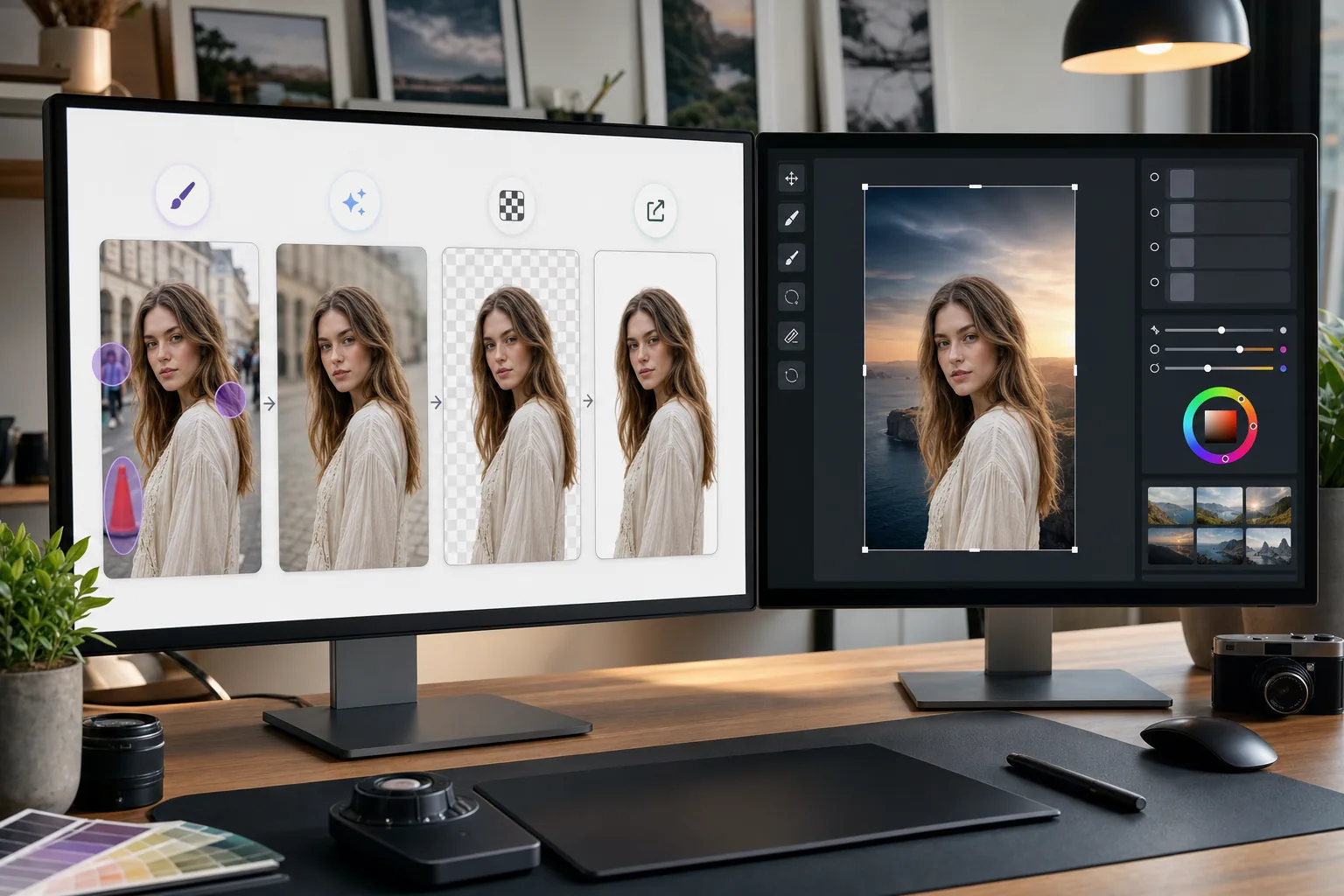
Photoshop est la norme industrielle pour l'édition d'images détaillées. Magic Eraser gère les tâches de nettoyage rapide (suppression des arrière-plans, effacement des objets et remplissage des lacunes avec l'IA) afin que vous puissiez vous lancer directement dans le travail de qualité dans Photoshop.
À propos de Adobe Photoshop
Adobe Photoshop est le logiciel de retouche d'images professionnel utilisé par les photographes, designers et artistes numériques du monde entier. Il fournit des outils avancés pour la composition, la retouche, le Color correction et l'édition au niveau des pixels.
Avantages
Nettoyage plus rapide avant une édition détaillée
Supprimez les objets indésirables et les distractions en quelques secondes avec Magic Eraser au lieu de passer du temps avec le tampon de clonage ou le pinceau de guérison de Photoshop sur des tâches simples.
Suppression de l'arrière-plan en un clic
Isolez instantanément les sujets grâce à la suppression de l'arrière-plan basée sur l'IA de Magic Eraser. Importez le PNG transparent dans Photoshop pour la composition et le masquage avancé.
Remplissage alimenté par l'IA pour les zones manquantes
Utilisez le remplissage AI de Magic Eraser pour reconstruire intelligemment les zones après avoir supprimé des objets. Les résultats fournissent un point de départ clair pour le raffinement de Photoshop.
Alternative accessible pour des tâches simples
Toutes les images n’ont pas besoin de toute la puissance de Photoshop. Utilisez Magic Eraser dans le navigateur pour des solutions rapides et réservez Photoshop pour les travaux nécessitant son ensemble d'outils avancés.
Comment utiliser Magic Eraser avec Photoshop
Télécharger sur Magic Eraser
Ouvrez Magic Eraser dans votre navigateur et téléchargez l'image qui nécessite un nettoyage initial avant l'édition Photoshop.
Effectuer un nettoyage rapide
Supprimez les arrière-plans, effacez les objets indésirables ou utilisez le remplissage AI pour gérer les modifications simples qui prendraient plus de temps dans Photoshop.
Exportez en pleine qualité
Téléchargez l'image nettoyée au format PNG pour préserver la transparence ou au format JPEG de haute qualité pour les images non transparentes.
Ouvrir dans Photoshop pour un travail de détail
Importez l'image traitée dans Photoshop et poursuivez l'édition avancée, la retouche, la composition ou l'étalonnage des couleurs.
Foire aux questions
Magic Eraser s’intègre-t-il directement à Photoshop ?
+
Non. Cette page décrit un flux manuel d’exportation et d’importation, et non un module Photoshop ni une intégration directe. Retouchez l’image dans Magic Eraser, téléchargez-la au format PNG ou JPEG, puis ouvrez ce fichier dans Photoshop.
Pourquoi utiliser Magic Eraser si j'ai déjà Photoshop ?
+
Magic Eraser gère des tâches de nettoyage simples en quelques secondes sans lancer Photoshop. Il est plus rapide pour la suppression de l'arrière-plan, l'effacement des objets et le nettoyage de base, vous permettant ainsi d'utiliser Photoshop pour le travail qui le nécessite réellement.
Magic Eraser remplace-t-il Photoshop ?
+
Non. Magic Eraser complète Photoshop en gérant des tâches rapides pilotées par l'IA. Photoshop reste essentiel pour la retouche détaillée, la composition, le travail des couleurs et l'édition au niveau des pixels.
Quels formats de fichiers fonctionnent entre les deux outils ?
+
Exportez depuis Magic Eraser au format PNG (avec transparence) ou JPEG de haute qualité. Les deux formats sont importés directement dans Photoshop avec une qualité totale préservée.
La suppression de l'arrière-plan de Magic Eraser est-elle aussi précise que celle de Photoshop ?
+
Pour la plupart des sujets, la suppression de l'arrière-plan IA de Magic Eraser produit des résultats nets en un seul clic. Pour les images comportant des détails extrêmement fins, comme des cheveux vaporeux, vous souhaiterez peut-être affiner davantage les bords dans Photoshop.
Puis-je utiliser Magic Eraser sur un fichier PSD ?
+
Magic Eraser fonctionne avec les formats d'image standard tels que JPEG, PNG et WebP. Exportez une image aplatie depuis Photoshop, traitez-la dans Magic Eraser, puis ramenez-la dans votre projet PSD.
Accélérez votre flux de travail Photoshop
Essayez Magic Eraser gratuitement pour supprimer rapidement l’arrière-plan, effacer les objets et remplir l’IA avant de vous lancer dans l’édition détaillée de Photoshop.
Essayez Magic Eraser gratuitementCas d'utilisation associés
Découvrez comment les professionnels utilisent ces outils dans des workflows réels.
Des photos d'annonce encombrées d'effets personnels, de voitures garées ou de matériel de chantier font fuir les acheteurs. Magic Eraser nettoie vos photos de biens en un instant grâce à l'IA — aucune compétence Photoshop requise.
Des photos produits mal cadrées avec des arrière-plans encombrés vous font perdre des ventes chaque jour. Magic Eraser vous permet de créer des images produits professionnelles en quelques secondes — sans compétences Photoshop. Importez, effacez les distractions, et publiez en toute confiance.
Des inconnus qui gâchent vos photos de voyage ? Un arrière-plan en désordre qui ruine vos selfies ? Arrêtez de perdre des heures sur Photoshop. Magic Eraser supprime les distractions, nettoie vos clichés et adapte vos photos à tous les formats — en un clic.
Comparaisons associées
Découvrez comment Magic Eraser se compare à des outils similaires.
TouchRetouch est une application mobile payante populaire pour supprimer objets et imperfections. Magic Eraser propose l'édition IA gratuite sur tout appareil sans installation. Comparez les fonctionnalités, prix et facilité d'utilisation.
Cleanup.pictures est un outil web gratuit pour supprimer rapidement des objets. Magic Eraser propose 8 outils d'édition IA, des applications mobiles et un traitement avancé. Découvrez la comparaison.
remove.bg est le leader du marché pour la suppression d'arrière-plan, avec une API puissante et des intégrations Photoshop et Figma. Magic Eraser va plus loin avec huit outils IA — suppression d'objets, remplissage génératif, amélioration IA et design — réunis dans un seul éditeur.
Deux puissants éditeurs photo IA avec des forces différentes. Magic Eraser propose un ensemble plus large d'outils IA génératifs, tandis que Photoroom excelle en photographie e-commerce et traitement par lots. Découvrez lequel vous convient.
Articles associés
Astuces, guides et tutoriels sur ce sujet.
Apprenez à utiliser Magic Eraser pour supprimer objets, personnes, texte et distractions d’une photo avec un résultat IA plus propre.
Apprenez à supprimer des personnes de vos photos avec l'IA en quelques secondes. Guide pour photos de voyage, immobilier et produits.
Guide pour supprimer les filigranes de vos propres photos avec l'IA. Quand c'est approprié, techniques et utilisation de Magic Eraser.
Autres intégrations
Explorez d'autres plateformes compatibles avec Magic Eraser.