
Watch Product Photo
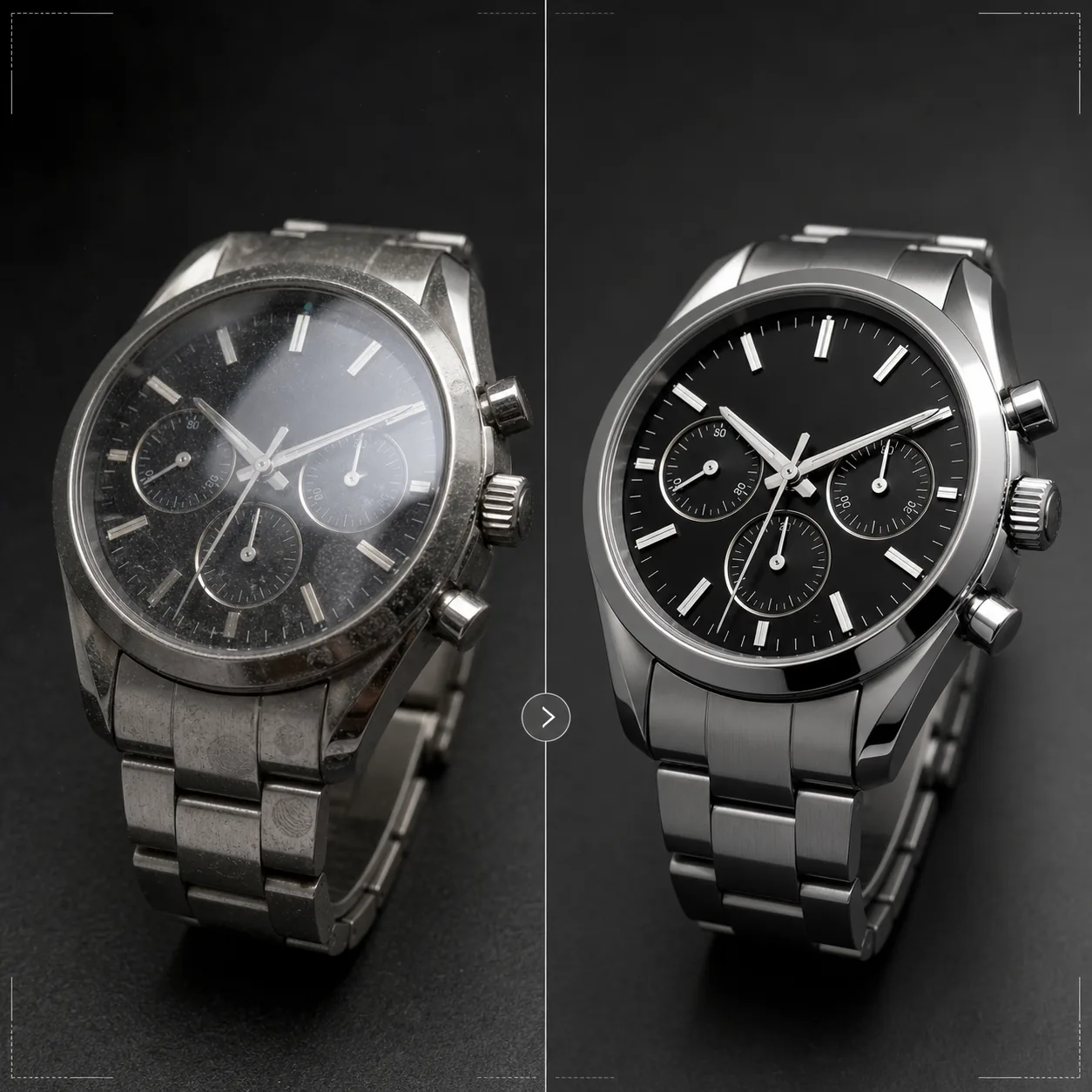
Showcase timepieces with the precision they deserve. This template sharpens dial details and indices, controls crystal reflections, enhances bracelet and case metal textures, removes dust and fingerprints from polished surfaces, and prepares the image for luxury e-commerce listings and catalog use.
Try this template freeE-commerce template preview
What this template does
Addresses the specific challenges of watch photography where tiny details matter enormously to buyers. Watch dials contain intricate details — indices, subdials, date windows, printed text — that must be razor-sharp for the image to convey quality. This template uses AI Enhance to selectively sharpen dial elements while keeping the overall image natural. Magic Eraser removes dust particles, fingerprints on polished cases, and minor scratches on crystals that appear at high magnification. Crystal reflections are reduced so the dial beneath is clearly visible, and metal textures on cases and bracelets are enhanced to show the brushed versus polished finishing that watch buyers evaluate carefully.
Template settings
| Dial sharpening | Selective micro-detail enhancement (indices, hands, text) |
| Crystal reflection | Reduce glare and reflections on sapphire/mineral crystal |
| Metal texture | Enhance brushed and polished surface differentiation |
| Surface cleanup | Remove dust, fingerprints, and minor scratches |
| Output resolution | 4000 × 4000 px (macro detail for zoom-in viewing) |
| Background | Pure white, solid dark, or gradient (luxury product standard) |
How to use this template
Upload your watch photo
Upload a product photo of the watch — wrist shot, flat lay, or studio setup on a cushion or stand. Macro close-ups of the dial face and case side views are also supported. For best results, photograph the watch at the 10:10 hand position, which is the industry standard that frames the logo and creates a balanced, symmetrical composition.
Dial and detail enhancement
AI Enhance selectively sharpens the dial — hour markers, hands, subdials, date window, and printed text become crisp and legible. The lume dots on indices are brightened slightly to show their presence. The enhancement respects the depth of field in your original shot, keeping intentionally blurred areas soft.
Surface cleanup and reflection control
Magic Eraser removes dust particles on the dial, fingerprints on the case and bracelet, and minor surface scratches on the crystal. Crystal reflections are reduced to reveal the full dial beneath while maintaining enough reflection to convey the presence of glass — completely removing reflections makes the watch look unrealistically flat.
Export for listing or catalog
Download at 4000 × 4000 px for zoom-capable e-commerce listings, or at print resolution for catalogs and advertisements. Background options include pure white for marketplace listings, dark solid for luxury brand aesthetics, and gradients for editorial use.
Pro tips for best results
- ✓Photograph the watch with hands set to 10:10 or 10:08 — this position frames the brand logo between the hands, shows both the date window and subdials clearly, and creates a visually balanced composition that is used across the entire watch industry.
- ✓Use a macro lens or close-up mode to capture the maximum dial detail. The template can sharpen existing detail but cannot create detail that was not captured — a higher-resolution source image with more dial detail gives significantly better results.
- ✓For metal bracelet watches, angle the light to show the difference between brushed and polished surfaces. The template enhances this contrast, but starting with visible surface differentiation produces the most striking result.
- ✓Clean the watch with a microfiber cloth immediately before shooting. While Magic Eraser removes dust and fingerprints, starting clean means less AI reconstruction and more accurate metal texture preservation in the cleaned areas.
E-commerce workflow
Product photo hub
Use this template with the full ecommerce product photo workflow for marketplace backgrounds, cleanup, compression, resizing, and listing-ready exports.
View ecommerce product photo workflowCommon questions
Can this fix photos where the dial is obscured by reflection?
+
Moderate reflections can be reduced to reveal dial detail beneath. However, if the reflection is so strong that no dial detail is visible in the original photo, the AI cannot create detail that was never captured. For best results, photograph with the light source positioned to minimize direct reflection off the crystal.
Does this work for smartwatches?
+
Yes. Smartwatch screens are enhanced with sharpened interface elements and reduced fingerprints on the glass. The template recognizes both traditional analog dials and digital displays and adjusts its sharpening approach accordingly.
What about watch bands and straps?
+
Leather straps receive texture enhancement that shows grain and stitching detail. NATO and fabric straps get subtle texture sharpening. Metal bracelets receive the brushed/polished surface enhancement. The full watch — case, crystal, dial, and strap — is treated as a complete product.
Every detail matters when selling a timepiece
Upload watch photos and get crystal-clear dial detail, controlled reflections, and jewelry-grade image quality for your listings.
Try it freeRelated templates
More e-commerce templates for your workflow.
Pure white background template for product photos. Amazon, Shopify, and marketplace-ready settings for clean, professional product images that convert.
Etsy-optimized listing photo template. Converts lifestyle shots to clean white backgrounds at 2000px, enhances handmade product details, and meets Etsy's image guidelines.
eBay-optimized listing photo template. White background for gallery images, condition documentation enhancement, and multi-angle layouts that meet eBay's image standards.
Professional jewelry photography template for rings, necklaces, and watches. Controls reflections, enhances gemstone sparkle, and delivers marketplace-ready images on clean backgrounds.
Professional furniture photo template for marketplace listings. Remove room clutter, show true dimensions, and present pieces on clean backgrounds or in styled room contexts.
Clean up clothing flat lay photos with wrinkle removal, lint cleanup, pure white backgrounds, and accurate fabric color. Ready for Shopify, Amazon, and boutique stores.