
Furniture Listing Photo
Sell furniture faster with clean, professional listing photos. This template removes room clutter and personal items from the background, corrects color distortion from indoor lighting, and presents every piece in its best condition — whether you need a white background for marketplace requirements or a styled room context for lifestyle appeal.
Try this template freeE-commerce template preview
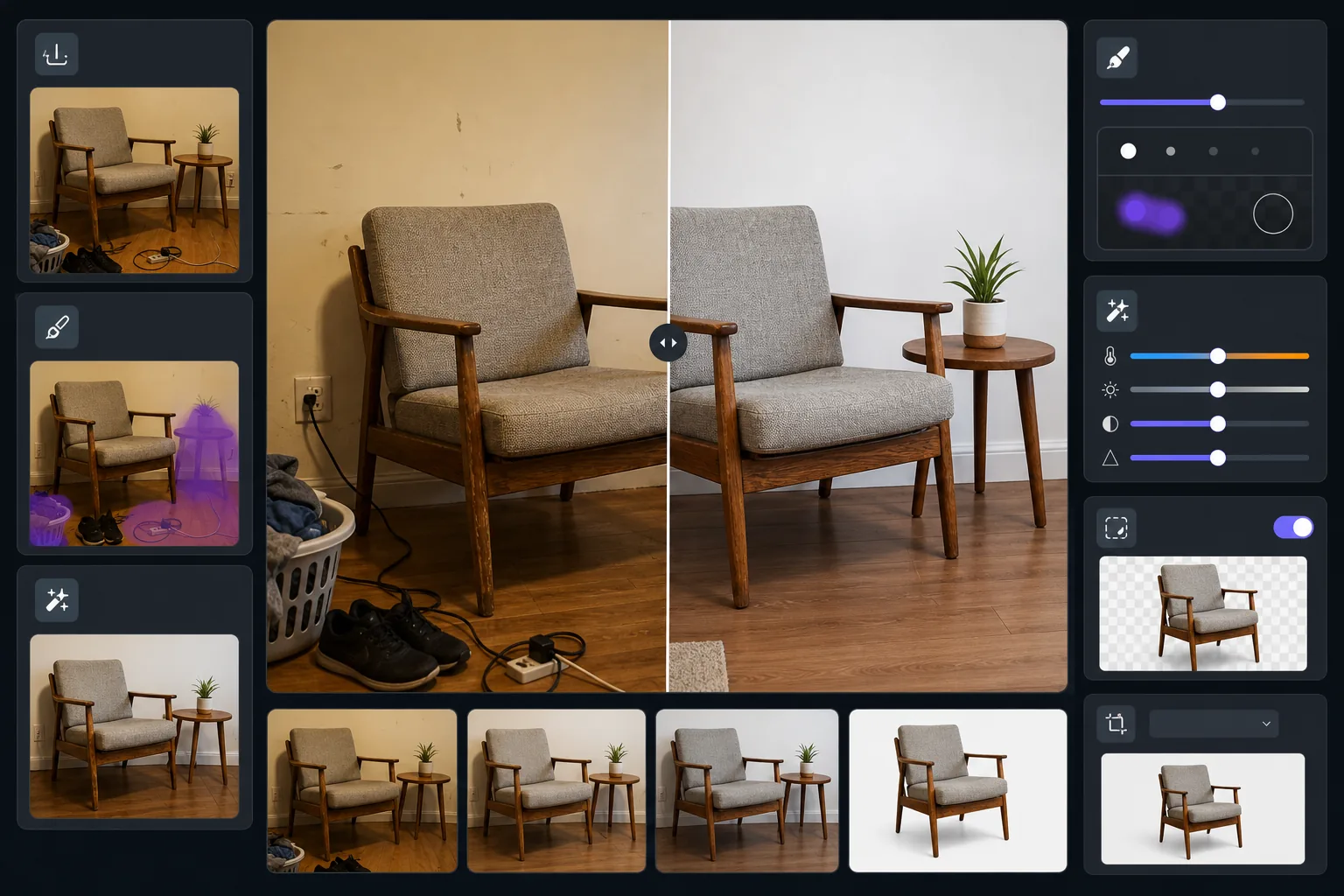
What this template does
Transforms furniture photos taken in lived-in rooms into polished listing images. Magic Eraser removes surrounding clutter, personal items, and wall damage visible in the shot. AI Enhance corrects the yellow cast from indoor lighting to show true wood tones and fabric colors. Background Eraser can isolate the piece entirely for a clean white background that meets Facebook Marketplace, Craigslist, and Chairish listing standards.
Template settings
| Background mode | Clean white or decluttered room context (selectable) |
| Output size | 2000×1500px (4:3 landscape, listing standard) |
| Color correction | Indoor-to-daylight white balance adjustment |
| Clutter removal | Automatic — removes objects within 12 inches of furniture edges |
| Detail enhancement | Texture-aware — sharpens wood grain, fabric weave, and hardware |
| Condition documentation | Preserves wear marks and patina for honest representation |
How to use this template
Photograph the furniture piece
Step back far enough to capture the full piece with some surrounding space. Shoot from standing eye level for chairs and tables, or from seated height for low pieces like coffee tables. Turn on all room lights and open curtains for even illumination.
Remove surrounding clutter
Magic Eraser automatically detects and removes nearby objects — shoes on the floor, items on adjacent surfaces, wall decorations, and power cords. The result shows just the furniture piece in a clean environment.
Correct color and enhance detail
AI Enhance removes the warm yellow or cool fluorescent cast from indoor photos, revealing the true color of wood stains, upholstery fabrics, and metal hardware. Texture sharpening brings out grain patterns and stitching details buyers want to inspect.
Choose background and export
Keep the decluttered room context for lifestyle appeal, or switch to pure white background for marketplace compliance. Export at listing-optimized dimensions that load quickly while maintaining zoom-worthy detail.
Pro tips for best results
- ✓Include a common object like a book or mug on the furniture surface before removing it — this helps buyers gauge scale from the before image while the after stays clean.
- ✓Photograph upholstered pieces from a three-quarter angle to show both the front face and side profile in one shot.
- ✓For wood furniture, shoot during daylight hours near a window to capture accurate wood tones — artificial light shifts oak to orange and walnut to muddy brown.
- ✓Take one wide shot and one close-up of any notable details (joinery, hardware, fabric texture) and process both with this template for a complete listing.
E-commerce workflow
Product photo hub
Use this template with the full ecommerce product photo workflow for marketplace backgrounds, cleanup, compression, resizing, and listing-ready exports.
View ecommerce product photo workflowCommon questions
Will this hide damage or wear on the furniture?
+
No, and intentionally so. The template preserves existing wear marks, scratches, and patina on the furniture itself — it only removes surrounding clutter and corrects lighting color. Honest condition representation builds buyer trust and reduces return disputes.
Can I show the piece in a room setting without the mess?
+
Yes. The decluttered room context mode removes personal items, clutter, and distractions while keeping the walls, floor, and general room environment. Buyers see the furniture in a realistic setting without the visual noise of a lived-in space.
What dimensions work for Facebook Marketplace and Craigslist?
+
The default 2000×1500px output works across all major platforms. Facebook Marketplace displays images at 1200px wide, and Craigslist accepts up to 600×450px — the template output looks sharp at any of these display sizes.
List furniture that sells on sight
Upload your furniture photo and get a clean, professional listing image in seconds. No staging, no photo studio, no design skills required.
Try it freeRelated templates
More e-commerce templates for your workflow.
Pure white background template for product photos. Amazon, Shopify, and marketplace-ready settings for clean, professional product images that convert.
Etsy-optimized listing photo template. Converts lifestyle shots to clean white backgrounds at 2000px, enhances handmade product details, and meets Etsy's image guidelines.
eBay-optimized listing photo template. White background for gallery images, condition documentation enhancement, and multi-angle layouts that meet eBay's image standards.
Professional jewelry photography template for rings, necklaces, and watches. Controls reflections, enhances gemstone sparkle, and delivers marketplace-ready images on clean backgrounds.
Clean up clothing flat lay photos with wrinkle removal, lint cleanup, pure white backgrounds, and accurate fabric color. Ready for Shopify, Amazon, and boutique stores.
Create Amazon-compliant product photos with pure white backgrounds, proper lighting correction, and optimized dimensions for main and secondary listing images.