
Clothing Flat Lay Cleanup
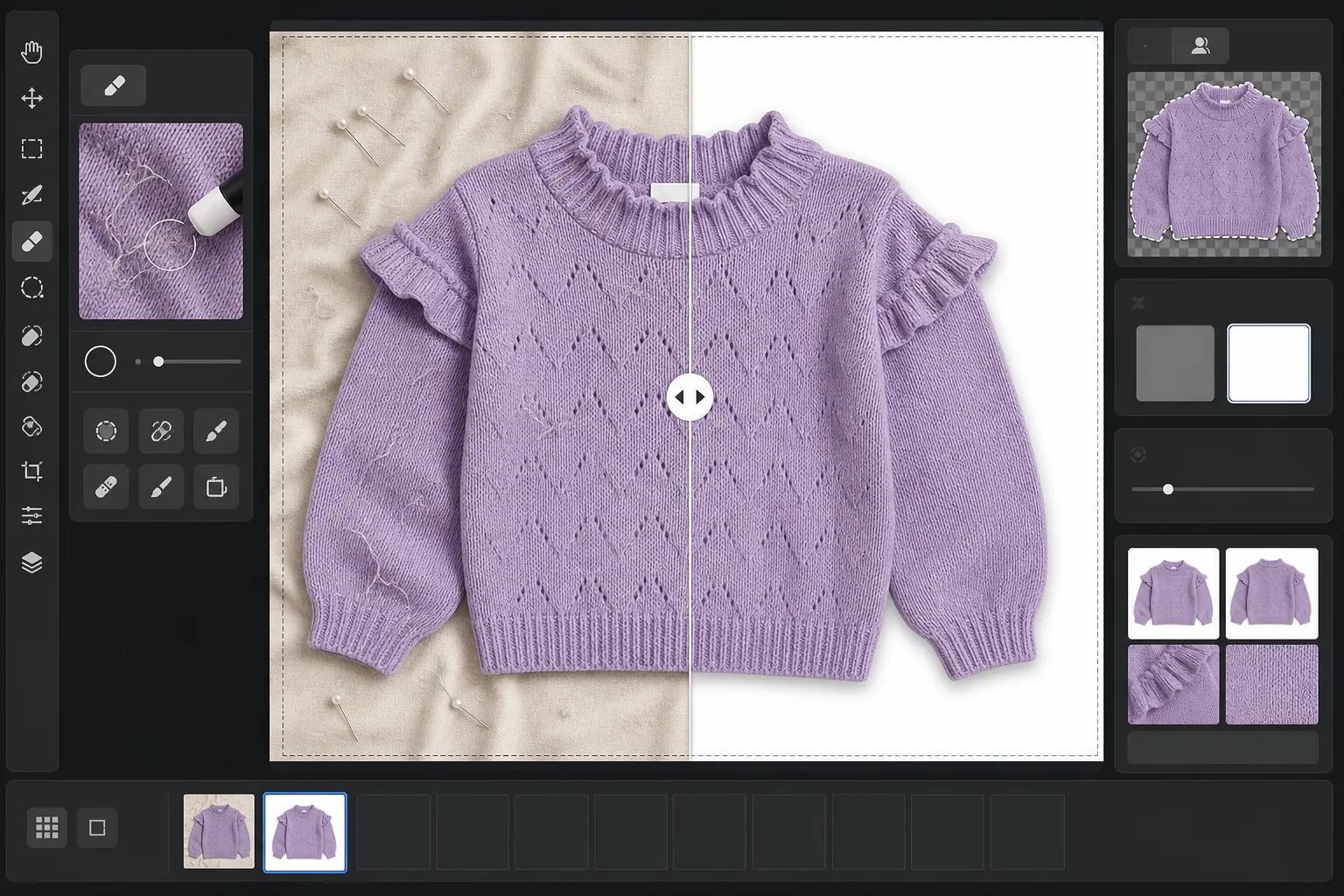
Turn raw flat lay clothing photos into marketplace-ready product images. This template removes wrinkles, lint, pet hair, and stray threads, replaces messy backgrounds with pure white, and corrects fabric color so what customers see on screen matches what arrives in the package.
Try this template freeE-commerce template preview
What this template does
Addresses the most common problems in clothing flat lay photography: fabric wrinkles from folding and shipping, lint and pet hair that the camera picks up but the eye missed, uneven backgrounds from bedsheets or poster board seams, and inaccurate fabric color caused by mixed lighting. Magic Eraser removes surface debris, stray threads, and care-label tags poking out from necklines. Background Eraser isolates the garment and places it on a clean white field. AI Enhance corrects color temperature so fabric dyes appear accurate across monitors and print catalogs.
Template settings
| Background | Pure white (#FFFFFF) with 2px soft-edge feather |
| Wrinkle reduction | Medium (smooths shipping creases, preserves intentional pleats) |
| Color accuracy | sRGB with auto white-point calibration to neutral gray card |
| Lint removal | Automatic detection of fibers, hair, and dust above 3px |
| Shadow | Subtle drop shadow (4px offset, 15% opacity) for depth |
| Output dimensions | 2000×2000px square crop with 10% padding |
How to use this template
Upload your flat lay photo
Photograph the garment laid flat on any clean surface — a bed, a table, or poster board. The background does not need to be perfectly white or wrinkle-free because it will be replaced. Natural daylight near a window produces the most accurate fabric colors.
Remove lint, threads, and tags
Magic Eraser automatically detects and removes lint, pet hair, stray threads, and care-label tags that are visible above the neckline or waistband. You can also manually select and remove hangers, clips, or styling pins that were left in the shot.
Replace the background
Background Eraser isolates the garment from whatever surface it was photographed on and places it on a pure white background. The edge detection follows the garment's true outline including ruffles, fringes, and lace detail without clipping fine features.
Correct color and export
AI Enhance adjusts white balance so the fabric color on screen matches the physical garment as closely as possible. Download the final image as a 2000x2000px square JPEG ready for Shopify, Amazon, Etsy, or your own storefront — sized to meet most marketplace image requirements.
Pro tips for best results
- ✓Steam or iron the garment before shooting if possible. The wrinkle reduction handles light shipping creases well, but deep-set fold lines from long-term storage are harder to smooth without affecting the fabric's natural drape and texture.
- ✓Include a small gray card or white balance reference card at the edge of your frame (outside the final crop area). The color-accuracy algorithm uses it to calibrate the white point, producing fabric colors that are noticeably more accurate than auto white balance alone.
- ✓For dark fabrics on white backgrounds, make sure the original photo has enough contrast between the garment edge and the surface. Black garments on dark wood are harder to extract cleanly than black garments on a light gray or white sheet.
- ✓Shoot all garments in the same batch under the same lighting to maintain color consistency across your catalog. Processing them together through the template ensures uniform white balance across the entire product line.
E-commerce workflow
Product photo hub
Use this template with the full ecommerce product photo workflow for marketplace backgrounds, cleanup, compression, resizing, and listing-ready exports.
View ecommerce product photo workflowCommon questions
Does wrinkle removal make fabric look artificially smooth?
+
The wrinkle reduction is calibrated to remove creases from folding and shipping while preserving the natural texture of the fabric — linen weave, denim twill, cotton ribbing, and knit patterns are all maintained. The result looks like a freshly steamed garment, not a digitally painted surface.
Will the colors match between the photo and the actual garment?
+
Color accuracy depends on the lighting in your original photo. Under natural daylight or calibrated studio lights, the color-correction algorithm produces results that are within a delta-E of 3 from the physical garment on a calibrated monitor. Under strong fluorescent or tungsten light, the improvement is significant but exact matching requires a gray card reference.
What marketplaces accept these dimensions?
+
The 2000x2000px square output meets the image requirements for Amazon, Shopify, Etsy, eBay, Poshmark, and most other e-commerce platforms. Amazon recommends at least 1000px on the longest side for zoom functionality, and 2000px exceeds this by a comfortable margin.
List clothing that looks as good online as it does in person
Upload flat lay photos and get lint-free, wrinkle-smoothed, white-background product images ready for any e-commerce platform.
Try it freeRelated templates
More e-commerce templates for your workflow.
Pure white background template for product photos. Amazon, Shopify, and marketplace-ready settings for clean, professional product images that convert.
Etsy-optimized listing photo template. Converts lifestyle shots to clean white backgrounds at 2000px, enhances handmade product details, and meets Etsy's image guidelines.
eBay-optimized listing photo template. White background for gallery images, condition documentation enhancement, and multi-angle layouts that meet eBay's image standards.
Professional jewelry photography template for rings, necklaces, and watches. Controls reflections, enhances gemstone sparkle, and delivers marketplace-ready images on clean backgrounds.
Professional furniture photo template for marketplace listings. Remove room clutter, show true dimensions, and present pieces on clean backgrounds or in styled room contexts.
Create Amazon-compliant product photos with pure white backgrounds, proper lighting correction, and optimized dimensions for main and secondary listing images.