
eBay Listing Photo
Create eBay listings that stand out in search results and win buyer trust. This template produces clean white-background gallery images, enhances condition detail shots for pre-owned items, and ensures every photo meets eBay's 500px minimum with room to spare for the zoom feature.
Try this template freeE-commerce template preview
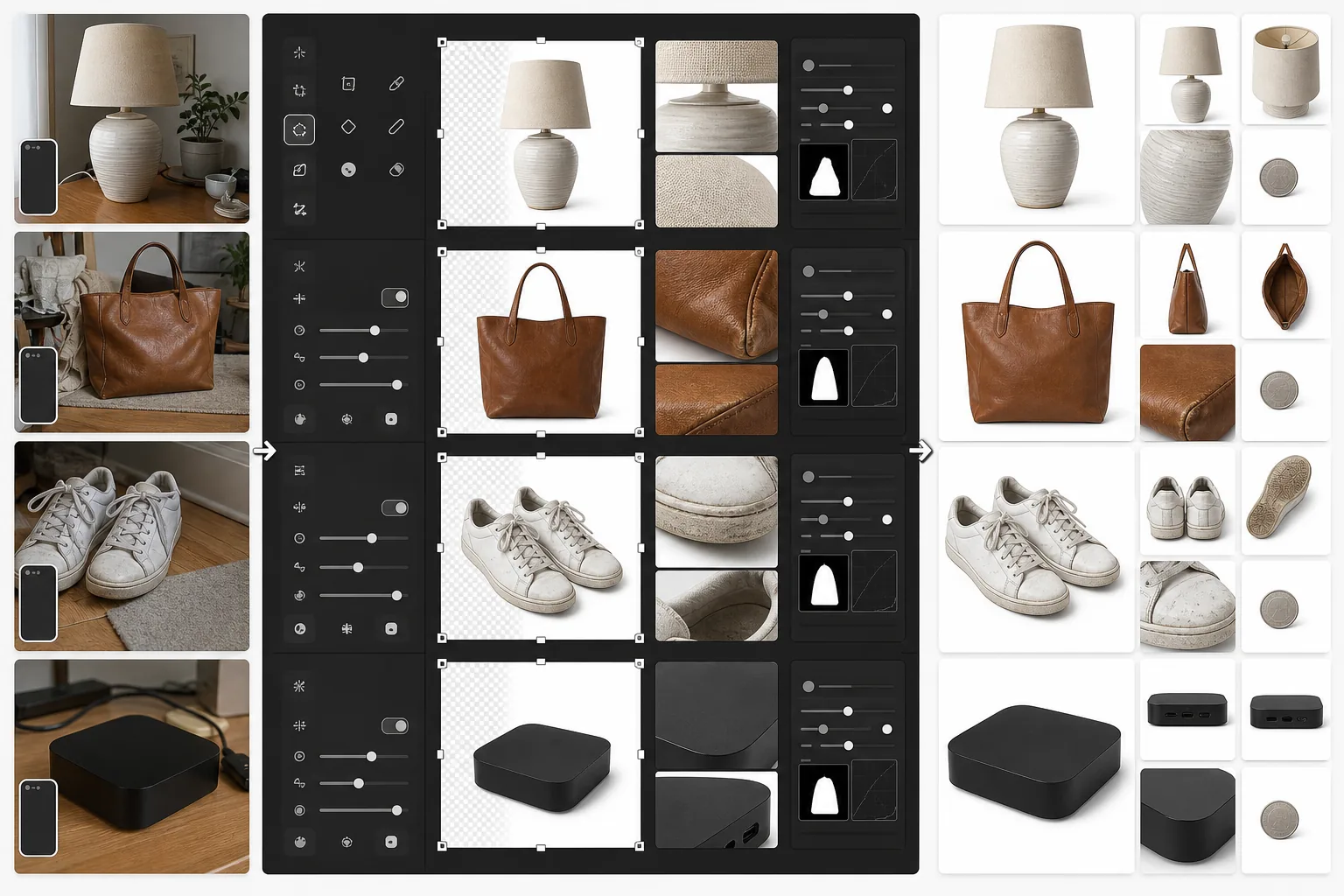
What this template does
Prepares product photos specifically for eBay listings. The primary image gets a clean white background to perform well in eBay search results and category browsing. Secondary images are enhanced to clearly show item condition — scratches, wear marks, labels, and serial numbers become sharply visible. Magic Eraser removes background clutter from condition shots without affecting the item itself.
Template settings
| Primary image size | 1600×1600px (square, exceeds eBay's 500px minimum) |
| Background (primary) | Pure white (#FFFFFF) for gallery thumbnail |
| Condition detail mode | Micro-contrast boost for scratches, labels, and wear |
| File format | JPEG 90% quality (under 12MB eBay limit) |
| Color profile | sRGB (web standard) |
| Watermark | None (eBay prohibits watermarks on listing images) |
How to use this template
Upload your item photos
Take photos of your item from the front, back, sides, and close-ups of any condition details like scratches, tags, or serial numbers. Use natural light and avoid flash, which can wash out details and create glare on reflective surfaces.
Create the gallery image
Background Eraser isolates the item and places it on pure white for the primary listing photo. eBay's search algorithm favors white-background images, and they perform significantly better in 'Buy It Now' and auction search results.
Enhance condition documentation
For pre-owned, refurbished, or vintage items, AI Enhance applies micro-contrast sharpening that makes condition details clearly visible — scuffs, patina, fabric pills, and authentication marks. Magic Eraser removes background mess from detail shots without touching the item.
Export your listing photo set
Download all images at 1600×1600px. eBay allows up to 24 photos per listing — use the full set for the best buyer confidence and lowest return rate.
Pro tips for best results
- ✓For the primary gallery image, photograph the item against any contrasting background. Background Eraser handles the rest. A dark item on a light surface (or vice versa) gives the cleanest edge detection.
- ✓Document every flaw in pre-owned items with close-up photos. Enhanced condition images reduce 'item not as described' returns, which protects your seller rating and keeps your listings visible.
- ✓Include a photo with a common object for scale — a coin next to small electronics, or a pen next to clothing items. eBay buyers frequently misjudge size from product-only photos.
- ✓Photograph electronics and collectibles with serial numbers and authentication marks clearly visible. AI Enhance's detail sharpening makes these legible even from smartphone photos taken at a slight angle.
E-commerce workflow
Product photo hub
Use this template with the full ecommerce product photo workflow for marketplace backgrounds, cleanup, compression, resizing, and listing-ready exports.
View ecommerce product photo workflowCommon questions
Does eBay require a white background?
+
eBay does not strictly require white backgrounds, but their search algorithm and Best Match ranking favor clean, white-background primary images. Listings with white-background gallery photos consistently receive more impressions and higher click-through rates in eBay's search results.
Can I remove watermarks or logos from my photos?
+
eBay prohibits watermarks, borders, and text overlays on listing images. This template produces clean images without any added elements. If your camera adds a date stamp, Magic Eraser can remove it.
How many photos should I include per listing?
+
Use as many as the condition warrants — eBay allows up to 24 free photos. For new items, 4-6 angles typically suffice. For pre-owned items, include every angle plus close-ups of any wear, labels, and accessories. More photos correlate with higher sell-through rates and fewer buyer disputes.
Create eBay listings that sell faster
Upload your item photos and get search-optimized gallery images plus enhanced condition documentation in seconds.
Try it freeRelated templates
More e-commerce templates for your workflow.
Pure white background template for product photos. Amazon, Shopify, and marketplace-ready settings for clean, professional product images that convert.
Etsy-optimized listing photo template. Converts lifestyle shots to clean white backgrounds at 2000px, enhances handmade product details, and meets Etsy's image guidelines.
Professional jewelry photography template for rings, necklaces, and watches. Controls reflections, enhances gemstone sparkle, and delivers marketplace-ready images on clean backgrounds.
Professional furniture photo template for marketplace listings. Remove room clutter, show true dimensions, and present pieces on clean backgrounds or in styled room contexts.
Clean up clothing flat lay photos with wrinkle removal, lint cleanup, pure white backgrounds, and accurate fabric color. Ready for Shopify, Amazon, and boutique stores.
Create Amazon-compliant product photos with pure white backgrounds, proper lighting correction, and optimized dimensions for main and secondary listing images.