
Vehicle Inventory Photo
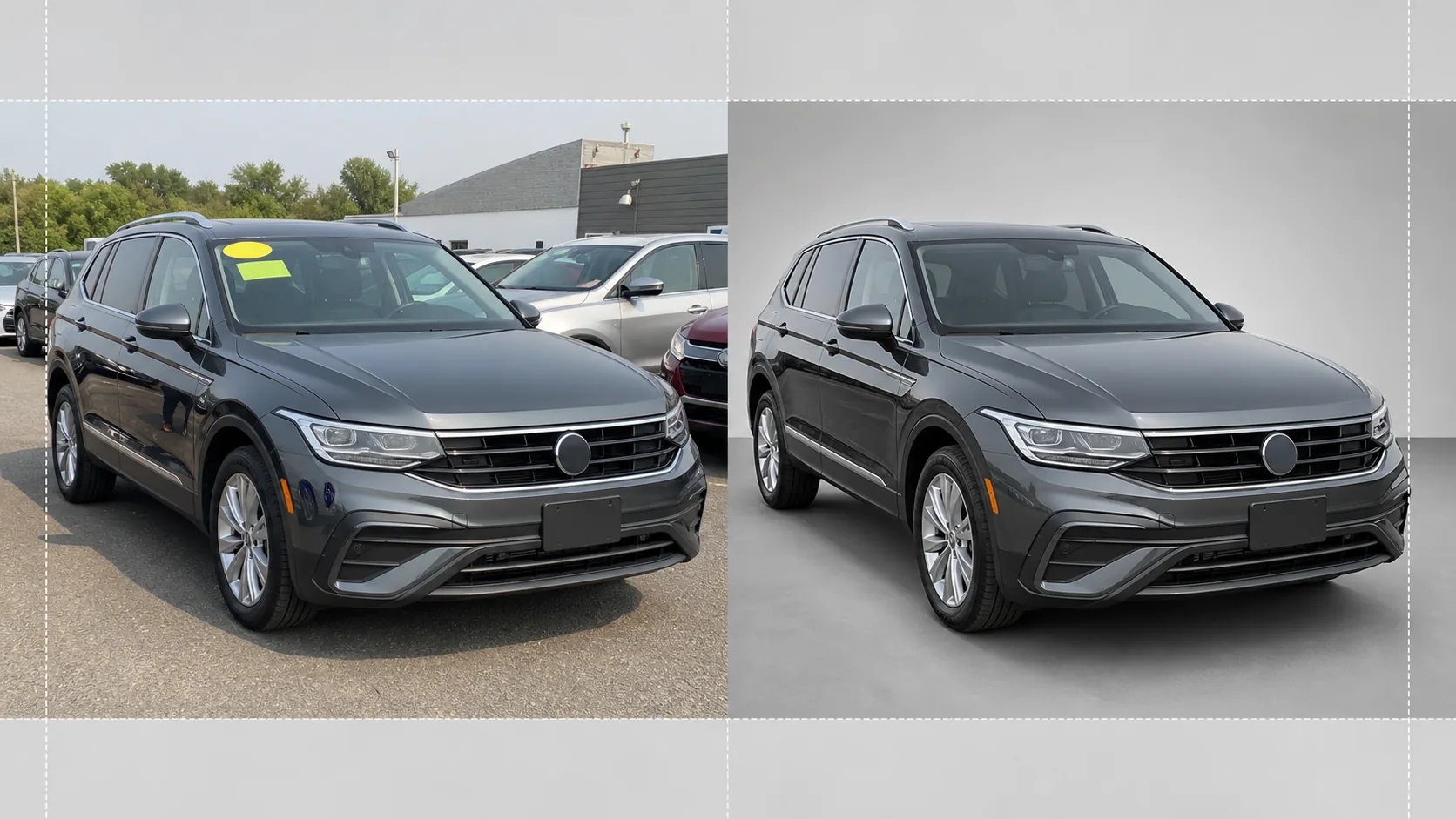
Turn lot photos into showroom-quality vehicle images for online inventory listings. This template removes cluttered dealership backgrounds — other cars, signage, buildings — and replaces them with a clean white, grey, or studio-style backdrop. Magic Eraser cleans up windshield reflections, license plate details, and lot stickers, while the color correction ensures the paint appears true to life under any lighting.
Try this template freeE-commerce template preview
What this template does
Handles the entire workflow for dealership inventory photography. Background Eraser isolates the vehicle from the lot environment and replaces the background with a clean studio-style backdrop that puts all focus on the car, truck, or SUV. Magic Eraser removes windshield price stickers, lot tags, license plates (for privacy), and reflections of the photographer or surrounding vehicles in glossy paint and glass. Color correction normalizes the paint color so that photos taken under overcast skies, sodium parking lot lights, or harsh midday sun all show the same accurate paint tone. The final image is cropped and leveled so the vehicle sits centered and horizontal across your entire inventory.
Template settings
| Background | Studio white, neutral grey, or gradient showroom floor |
| Reflection cleanup | Remove photographer, lot clutter, and adjacent cars from paint and glass reflections |
| Paint color correction | Normalize to manufacturer paint code appearance under neutral daylight |
| Privacy redaction | Auto-blur or remove license plates |
| Crop and level | Auto-center vehicle, horizon-level, 16:9 aspect ratio |
| Output resolution | 3000×1688px (optimized for AutoTrader, Cars.com, and dealer websites) |
How to use this template
Upload the lot photo
Upload a photo of the vehicle taken on the dealership lot. Three-quarter front angle is ideal but side profiles and rear angles also work. The template handles smartphones, point-and-shoot cameras, and professional setups alike.
Remove background and distractions
Background Eraser cuts out the lot environment and replaces it with a clean backdrop. Magic Eraser removes windshield stickers, lot number tags, price decals, and license plate text. Reflections of neighboring cars and the photographer in the paint and windows are cleaned up automatically.
Correct color and exposure
The paint color is normalized to match the manufacturer's intended tone under neutral daylight. Overexposed highlights on chrome and glass are recovered, and shadow detail under wheel arches and bumpers is lifted for an even, showroom-quality look.
Export for inventory listing
Download the finished image at 3000×1688px in 16:9 aspect ratio. The format is optimized for AutoTrader, Cars.com, CarGurus, Facebook Marketplace, and your dealer management system. Batch processing is available for full-lot inventory shoots.
Pro tips for best results
- ✓Photograph the vehicle from a three-quarter front angle at bumper height. This captures both the front fascia and the side profile in a single frame and is the most clicked-on angle in online inventory listings.
- ✓Avoid shooting in direct overhead sun — it creates harsh shadows under the car and blown-out highlights on the roof and hood. Overcast days or shaded areas of the lot produce the most even lighting for the AI to work with.
- ✓Remove the windshield price sticker before shooting if possible. While the AI can erase it digitally, large stickers that cover dashboard details sometimes leave a faint outline that requires manual touch-up.
- ✓Keep the vehicle clean before photographing. The template corrects lighting and background, but dirt, water spots, and bird droppings on the paint are better handled with a quick wash than with AI retouching.
E-commerce workflow
Product photo hub
Use this template with the full ecommerce product photo workflow for marketplace backgrounds, cleanup, compression, resizing, and listing-ready exports.
View ecommerce product photo workflowCommon questions
Can I process an entire inventory at once?
+
Yes. Upload multiple vehicle photos and the template applies the same background, color correction, and cleanup settings to each one. This ensures visual consistency across your full online inventory.
Will the paint color be accurate?
+
The color correction normalizes the paint to match how it appears under neutral daylight (5500K). If you know the manufacturer paint code, the AI uses that as a reference to ensure the on-screen color closely matches the physical vehicle.
Does it work for motorcycles and boats?
+
Yes. The background removal and reflection cleanup work for any vehicle type including motorcycles, boats, RVs, and heavy trucks. The auto-centering and crop ratio may need manual adjustment for non-standard vehicle proportions.
Make every vehicle on your lot look showroom-ready
Upload dealership lot photos and get clean, consistent, professional inventory images in seconds.
Try it freeRelated templates
More e-commerce templates for your workflow.
Pure white background template for product photos. Amazon, Shopify, and marketplace-ready settings for clean, professional product images that convert.
Etsy-optimized listing photo template. Converts lifestyle shots to clean white backgrounds at 2000px, enhances handmade product details, and meets Etsy's image guidelines.
eBay-optimized listing photo template. White background for gallery images, condition documentation enhancement, and multi-angle layouts that meet eBay's image standards.
Professional jewelry photography template for rings, necklaces, and watches. Controls reflections, enhances gemstone sparkle, and delivers marketplace-ready images on clean backgrounds.
Professional furniture photo template for marketplace listings. Remove room clutter, show true dimensions, and present pieces on clean backgrounds or in styled room contexts.
Clean up clothing flat lay photos with wrinkle removal, lint cleanup, pure white backgrounds, and accurate fabric color. Ready for Shopify, Amazon, and boutique stores.