
Tattoo Portfolio Photo
Showcase tattoo work with the detail and color accuracy that attracts new clients. This template enhances ink saturation and line crispness, reduces post-session skin redness and swelling, corrects studio lighting for true ink colors, and creates clean portfolio presentations that let the artwork speak for itself.
Try this template freeBusiness template preview
What this template does
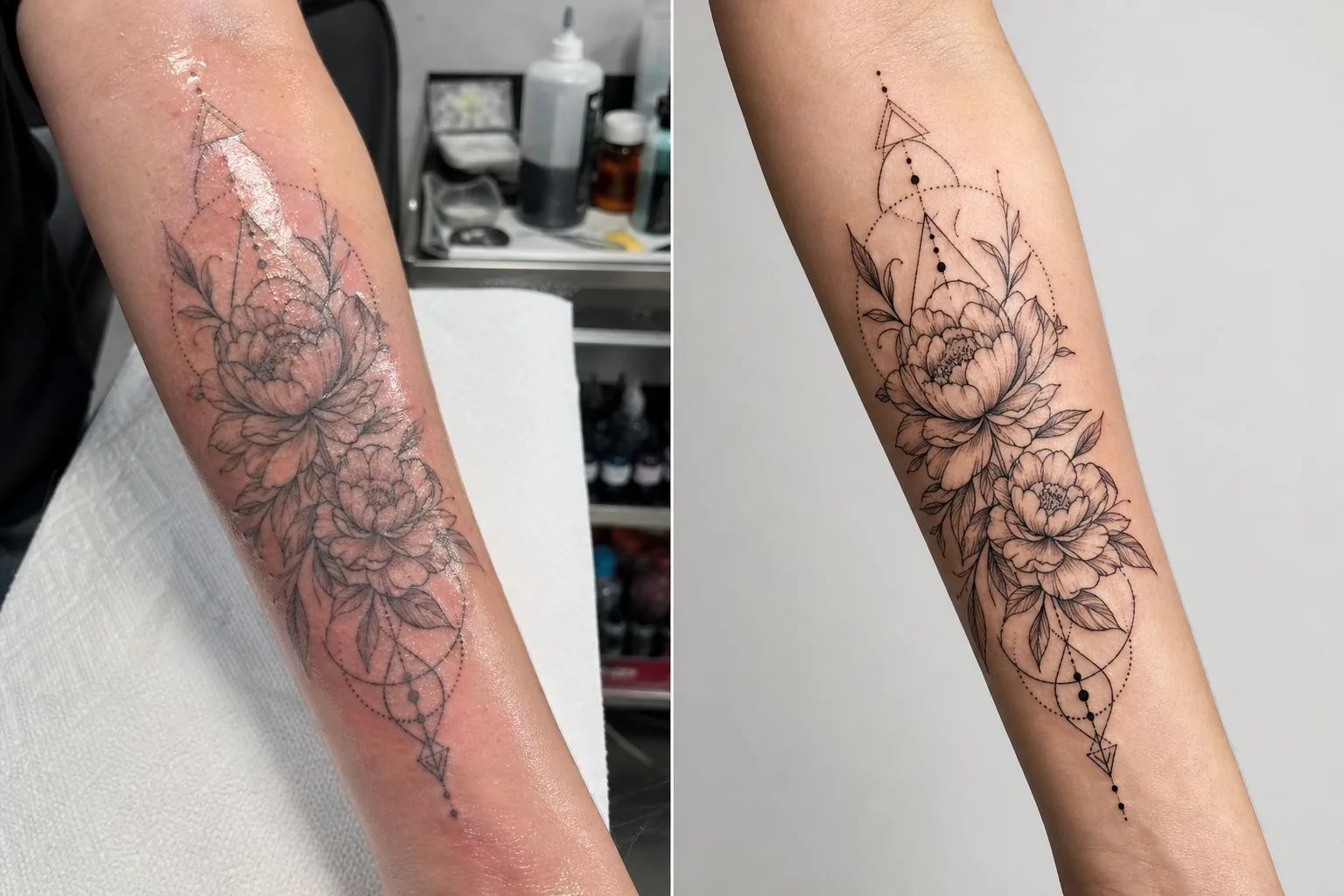
Addresses the specific photography challenges tattoo artists face when documenting their work. Fresh tattoos are photographed in studio conditions with mixed lighting, and the skin around new ink is red, swollen, and covered in excess ink and ointment — none of which represents the final healed result. This template uses AI Enhance to correct lighting so ink colors appear as they will when healed, sharpens fine line work and dot work detail, and reduces the redness and swelling around fresh tattoos. Magic Eraser removes background clutter from the tattoo station, including ink bottles, paper towels, gloves, and equipment, creating a clean backdrop that focuses attention entirely on the artwork.
Template settings
| Ink enhancement | Color saturation boost for black, color, and watercolor tattoo styles |
| Line sharpening | Fine line and dot work micro-detail enhancement |
| Skin correction | Reduce redness, swelling, and ointment sheen around fresh tattoos |
| Lighting correction | Correct mixed studio lighting to neutral daylight for true ink colors |
| Background | Clean solid or blurred background (remove station clutter) |
| Output dimensions | 2000 × 2000 px (Instagram square) or 4000px for portfolio print |
How to use this template
Upload your tattoo photo
Upload a photo of the completed tattoo — fresh or healed. Photograph the tattoo straight-on to minimize perspective distortion. The template handles close-up detail shots, full-piece overview shots, and wrap-around compositions on curved body surfaces like arms, legs, and ribs.
Ink and line enhancement
AI Enhance boosts ink saturation so black tattoos appear deep and rich while color tattoos show their full vibrancy. Fine lines, dot work, and geometric patterns are sharpened to show the precision of your needle work. The enhancement respects different tattoo styles — bold traditional, fine line, watercolor, and blackwork each receive appropriate treatment.
Skin and background correction
For fresh tattoos, the redness and swelling around the ink is reduced to approximate the healed appearance. Ointment sheen and excess ink on surrounding skin are toned down. Magic Eraser removes the tattoo station background — ink cups, paper towels, gloves, and equipment — replacing it with a clean backdrop.
Export for portfolio and social
Download at 2000 × 2000 px square for Instagram portfolio posts, or at 4000px long edge for website portfolios and printed lookbooks. The color profile preserves the full range of tattoo ink colors including the subtle hue variations in watercolor and neo-traditional styles.
Pro tips for best results
- ✓Photograph the tattoo under a daylight-balanced light (5000–5500K) from a consistent angle. This gives the template the most accurate color data to work with. Warm tungsten lights make ink appear more yellow-orange, and the correction, while effective, produces better results when starting from neutral lighting.
- ✓Wipe excess ink and ointment from the skin surface before photographing. The template reduces ointment sheen, but a clean, patted-dry surface shows the ink work more clearly and produces a better enhanced result.
- ✓Photograph both fresh and healed versions of the same tattoo when possible. The fresh photo processed through the template gives you immediate portfolio content, and the healed photo confirms the actual settled result. Both versions in your portfolio demonstrate professionalism.
- ✓For large pieces that wrap around limbs, take multiple overlapping detail shots in addition to the full-piece overview. The template sharpens detail that gets lost in wide overview shots, and close-ups of standout elements make compelling individual portfolio posts.
Common questions
Can this make a fresh tattoo look healed?
+
The template reduces redness and swelling to approximate the healed appearance, but the result is an enhancement, not a perfect prediction of healing. Individual healing varies by skin type, ink type, and body location. The enhanced fresh photo will look close to healed but may not be identical to the actual healed result.
Does this work for all tattoo styles?
+
Yes. The template recognizes and appropriately enhances bold traditional, Japanese, fine line, dot work, geometric, watercolor, neo-traditional, blackwork, and realistic portrait styles. Each style receives different sharpening and color treatment calibrated to what looks best for that aesthetic.
What about cover-up tattoos?
+
Cover-up tattoos are processed the same as any other tattoo. The template enhances the visible ink, which is the cover-up design. If you want to show the before-and-after (original versus cover-up), process each photo separately for the most consistent portfolio presentation.
A portfolio that books your chair solid
Upload tattoo photos and get detail-sharp, color-accurate portfolio images that showcase your artistry and attract new clients.
Try it freeRelated templates
More business templates for your workflow.
Polish corporate team photos with consistent backgrounds, professional lighting correction, brand-appropriate color grading, and uniform image quality across the team.
Enhance gym and fitness photos with muscle definition enhancement, dynamic lighting correction, background cleanup, and high-contrast athletic color grading.
Create a polished resume headshot with background replacement, skin smoothing, and lighting correction. Ideal for CVs, job portals, and corporate directories.
Create professional team and individual player photos with background replacement, jersey color enhancement, and stadium or studio backdrops for rosters and programs.
Create professional band and musician promo photos with background replacement, dramatic lighting enhancement, and print-ready outputs for press kits and venue submissions.
Showcase nail art with macro-level detail enhancement, true gel and polish color accuracy, and clean hand positioning for Instagram portfolios and booking pages.