
Band Promo Photo
Turn rehearsal room shots and casual snapshots into press-kit-quality promotional photos for your band or solo project. This template removes cluttered backgrounds — garages, basements, messy green rooms — and replaces them with dramatic or clean backdrops. AI Enhance adds concert-style lighting effects, sharpens instrument details, and produces images ready for Spotify artist profiles, venue submissions, and EPK press pages.
Try this template freeBusiness template preview
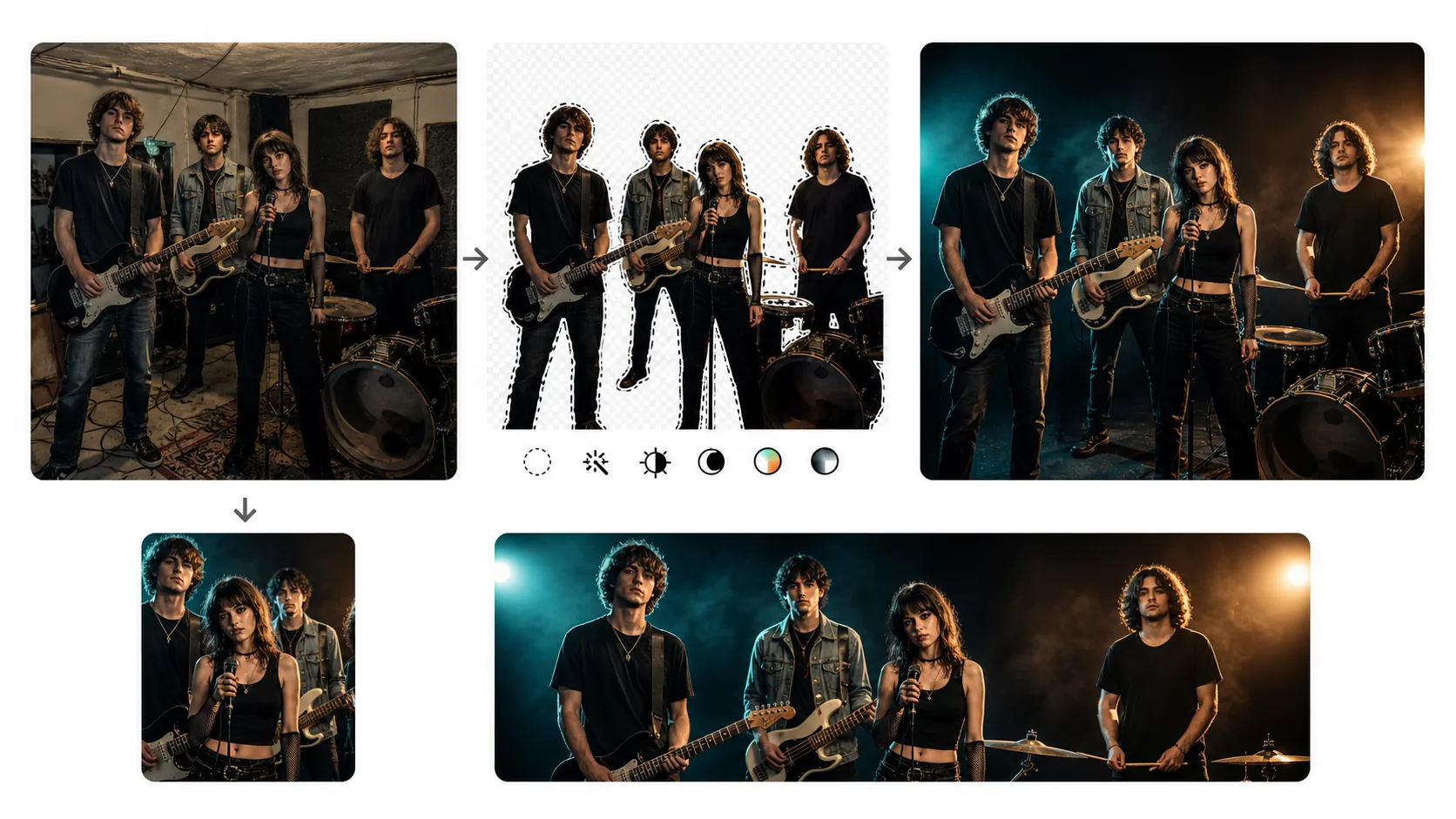
What this template does
Gives independent musicians and bands the visual quality that labels provide to signed artists. Background Eraser removes the distracting environments where most band photos are actually taken — rehearsal spaces with exposed wiring, dim bar corners during sound check, someone's cluttered living room. The background is replaced with options ranging from clean studio looks (for EPK and venue submissions) to dramatic concert-style environments with moody lighting and smoke effects. AI Enhance adjusts the lighting to be more dramatic — deepening shadows, adding subtle rim light to separate band members from the background, and warming skin tones for a flattering, editorial look. Instruments are sharpened so guitars, drums, and microphones are as detailed as the musicians holding them.
Template settings
| Background | Studio black, concert stage, brick wall, urban alley, or gradient |
| Lighting style | Dramatic (deep shadows, rim light) or clean studio (even, bright) |
| Skin tone | Warm editorial with natural shadow fall-off on facial features |
| Instrument detail | Sharpen guitar fretboards, drum hardware, and microphone grilles |
| Color grade | Concert moody (teal/orange split tone) or clean editorial (neutral) |
| Output resolution | 4000×2667px (3:2 landscape for press kits and web headers) |
How to use this template
Upload your band photo
Upload a group shot or individual member photo. Rehearsal room shots, live performance captures, casual outdoor photos, and phone selfies all work. The template handles group compositions from duos to full bands with six or more members.
Remove background
Background Eraser isolates all band members and their instruments from the original environment. Edge detection preserves guitar headstocks, cymbal edges, drumstick tips, and microphone stands — the fine details that give music photography its energy.
Apply lighting and color grade
Choose between dramatic concert-style lighting (with deep shadows and colored rim lights) or clean studio lighting for formal press kits. The color grade options range from moody teal-and-orange split tones popular in concert photography to neutral editorial tones preferred by publications and venue promoters.
Export for press and promo
Download at 4000×2667px for print press kits and high-resolution web use. Additional exports at 1500×1500px (square for Spotify artist profile), 1500×500px (Twitter/X header), and 820×312px (Facebook page cover) are available in a single batch.
Pro tips for best results
- ✓Have all band members wear clothing in a similar tonal range — all dark, all neutral, or all bold. Mixed wardrobes where one person wears neon and another wears black create visual imbalance that even the best lighting cannot unify.
- ✓Include instruments in the frame. A band holding their instruments communicates genre and energy before a single note is heard. The template's instrument sharpening ensures guitars, drumsticks, and microphones look crisp and detailed.
- ✓For the dramatic concert lighting effect, start with a photo that has some contrast — not a flat, evenly lit shot. The AI builds on existing light direction. A photo with natural side lighting from a window produces the most convincing dramatic enhancement.
Common questions
Can I use a live concert photo as the starting point?
+
Yes. Live shots with heavy stage lighting, color gels, and motion blur can be used. Background Eraser removes the crowd and venue, preserving the stage lighting on the musicians. The template enhances the existing concert lighting rather than replacing it, keeping the authentic live energy.
Will this work for a solo artist or DJ?
+
Yes. The template handles single-person photos as effectively as group shots. For DJs, the turntable or controller can be included in the frame and will be preserved during background removal with detail sharpening on knobs and faders.
What format do venues and press outlets prefer?
+
Most venues and press outlets request landscape orientation at 300 DPI or higher, in JPEG format, with the band centered in the frame. The 4000×2667px landscape output at 3:2 ratio meets this standard. Some outlets also request a high-resolution PNG for print — both formats are available.
Look like a signed act without the label budget
Upload any band photo and get press-kit-quality promo images ready for Spotify, venues, and media outlets.
Try it freeRelated templates
More business templates for your workflow.
Polish corporate team photos with consistent backgrounds, professional lighting correction, brand-appropriate color grading, and uniform image quality across the team.
Enhance gym and fitness photos with muscle definition enhancement, dynamic lighting correction, background cleanup, and high-contrast athletic color grading.
Enhance tattoo portfolio photos with ink color vibrancy, line detail sharpening, skin redness reduction, and clean backgrounds for artist portfolios and Instagram.
Create a polished resume headshot with background replacement, skin smoothing, and lighting correction. Ideal for CVs, job portals, and corporate directories.
Create professional team and individual player photos with background replacement, jersey color enhancement, and stadium or studio backdrops for rosters and programs.
Showcase nail art with macro-level detail enhancement, true gel and polish color accuracy, and clean hand positioning for Instagram portfolios and booking pages.