
Sports Team Photo
Produce professional roster photos, game day programs, and team banners from photos taken on any field, court, or gym. This template removes cluttered backgrounds and replaces them with team-branded colors, stadium environments, or studio backdrops. Uniform colors are enhanced to match true team colors, and AI sharpening brings out jersey numbers, team logos, and equipment details.
Try this template freeBusiness template preview
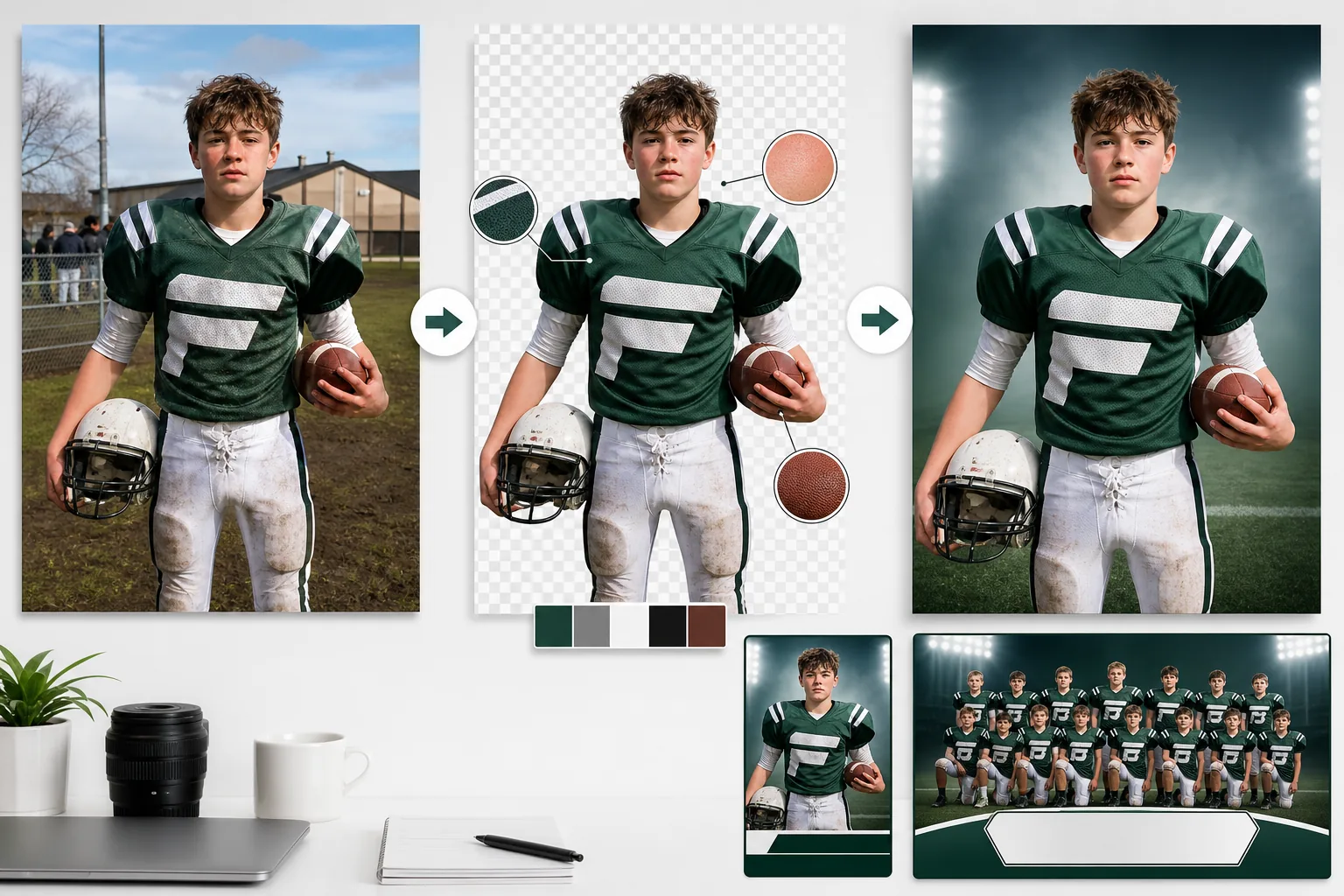
What this template does
Solves the common problem of team photography where background clutter, uneven field lighting, and rushed photo sessions produce images that look amateur on rosters and programs. Background Eraser isolates individual players or the full team from parking lots, gym bleachers, and muddy practice fields. AI Enhance corrects the exposure variations from outdoor shooting — half the team in sun, half in shadow — and normalizes uniform colors so every jersey appears the same vibrant shade of the team color. Jersey numbers, name plates, and team logos are sharpened for readability. The result is a set of professional, consistent roster photos that match the visual standard of collegiate and professional programs.
Template settings
| Background | Team color solid, gradient, stadium environment, or studio grey |
| Uniform enhancement | Color normalization to true team colors across all light conditions |
| Detail sharpening | Jersey numbers, name plates, and team logos enhanced for readability |
| Exposure normalization | Balance sun/shadow variations across group and individual shots |
| Crop options | Full body, three-quarter, or headshot crop for roster cards |
| Output resolution | 2400×3200px (3:4 portrait for roster pages and programs) |
How to use this template
Upload team or player photos
Upload individual player photos or full team group shots. Photos taken outdoors on fields, indoors in gyms, or even in parking lots before games all work. The template handles uneven outdoor lighting and mixed indoor/natural light situations.
Remove background and isolate
Background Eraser separates players from the environment. For group shots, the entire team is isolated as a unit. For individual photos, each player is cut out with edge detection that preserves helmet shapes, shoulder pad outlines, and equipment like bats, rackets, and sticks.
Enhance uniforms and details
AI Enhance normalizes jersey colors across all photos so they match the true team color regardless of whether the shot was taken in bright sunlight, shade, or under gym fluorescents. Jersey numbers and name plates are sharpened. Face exposure is balanced so no player appears underlit or washed out.
Export for roster and programs
Download individual player images for roster cards, the full team composite for program covers, and web-optimized versions for the team website. All images share the same background and enhancement settings for a cohesive visual identity across the entire roster.
Pro tips for best results
- ✓Photograph players in the same uniform configuration — jersey tucked or untucked, socks up or down, consistent equipment held the same way. The AI normalizes lighting and color but cannot standardize how equipment is worn.
- ✓For individual roster photos, have each player stand in the same spot with the same pose. Consistent body positioning combined with the template's consistent background and enhancement creates a professional roster page that looks like a single coordinated shoot.
- ✓Shoot during overcast conditions if possible. Bright sun creates harsh shadows under helmet brims that obscure faces. Overcast light is flat and even, giving the AI the most facial detail to work with when enhancing the final images.
Common questions
Can I process an entire team roster at once?
+
Yes. Upload all individual player photos in a batch and the template applies the same background, color normalization, and enhancement to each one. The result is a visually consistent set ready for roster pages, programs, and the team website.
Will helmet shadows on faces be fixed?
+
AI Enhance lifts shadow detail under helmet brims and hat visors. For moderate shadows, facial features are fully recovered. For very deep shadows where the eyes are completely dark, the enhancement improves visibility significantly but may not match the quality of a well-lit original.
Does this work for youth leagues and recreational teams?
+
Absolutely. The template is most valuable for youth leagues, recreational teams, and high school programs that do not have professional photography budgets. Any parent or volunteer with a smartphone can take the original photos and this template produces results comparable to professional sports photography services.
Give your team the professional roster they deserve
Upload player photos from any field or gym and get consistent, polished roster images ready for programs and websites.
Try it freeRelated templates
More business templates for your workflow.
Polish corporate team photos with consistent backgrounds, professional lighting correction, brand-appropriate color grading, and uniform image quality across the team.
Enhance gym and fitness photos with muscle definition enhancement, dynamic lighting correction, background cleanup, and high-contrast athletic color grading.
Enhance tattoo portfolio photos with ink color vibrancy, line detail sharpening, skin redness reduction, and clean backgrounds for artist portfolios and Instagram.
Create a polished resume headshot with background replacement, skin smoothing, and lighting correction. Ideal for CVs, job portals, and corporate directories.
Create professional band and musician promo photos with background replacement, dramatic lighting enhancement, and print-ready outputs for press kits and venue submissions.
Showcase nail art with macro-level detail enhancement, true gel and polish color accuracy, and clean hand positioning for Instagram portfolios and booking pages.