
Resume Headshot
Turn any casual photo into a hiring-ready headshot for resumes, LinkedIn profiles, and job application portals. This template removes distracting backgrounds, replaces them with a clean solid or gradient backdrop, applies natural skin retouching, and corrects uneven lighting so you look confident and approachable in every application.
Try this template freeBusiness template preview
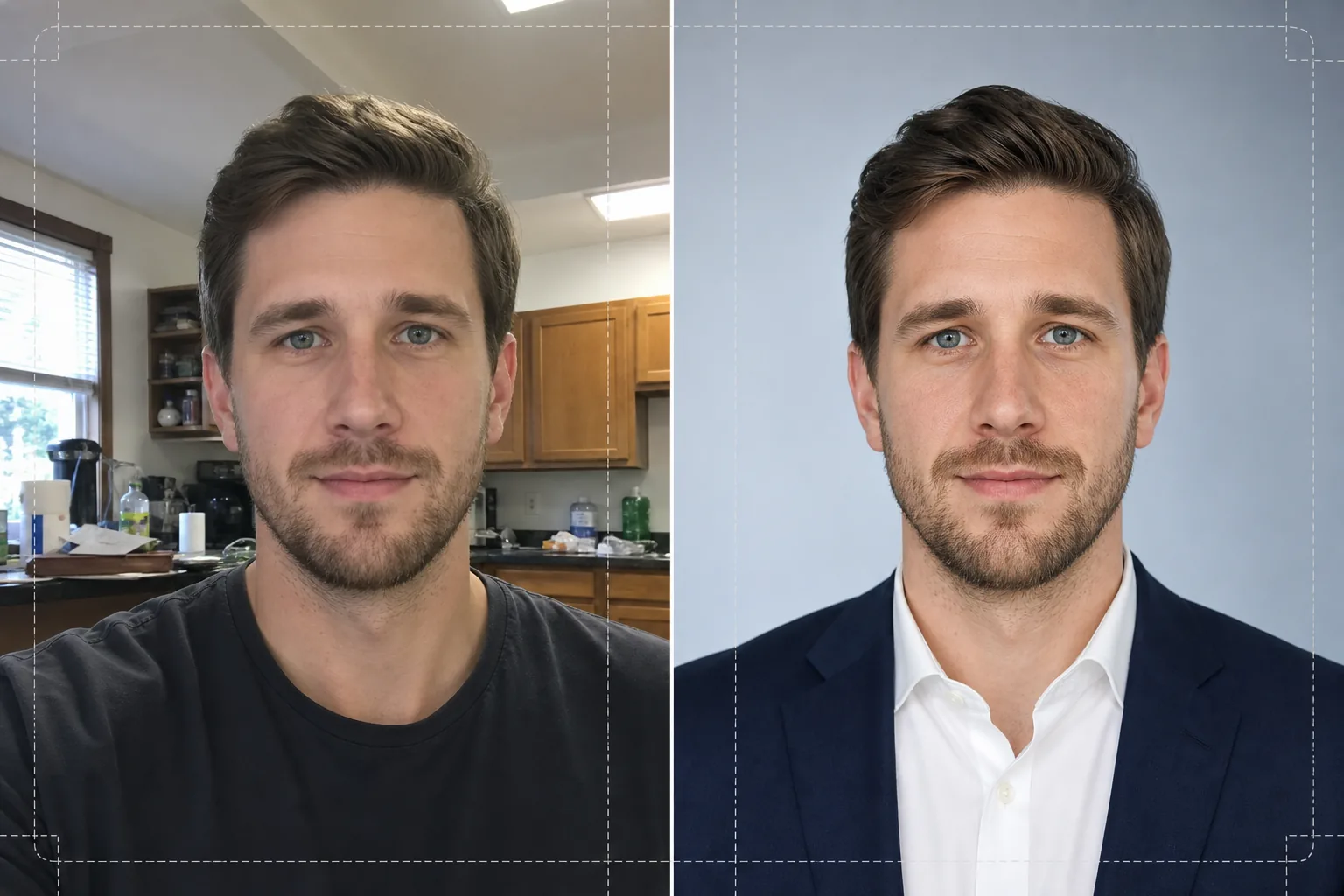
What this template does
Transforms selfies, phone snapshots, and informal portraits into polished headshots suitable for resumes and professional profiles. Background Eraser isolates your head and shoulders from any environment — kitchen, park, office cubicle — and replaces it with a solid white, light grey, or soft blue gradient background that matches corporate norms. AI Enhance then corrects exposure imbalances from overhead fluorescent lights or harsh window light, smooths skin texture while preserving natural pore detail, and sharpens the eyes so the viewer's attention is drawn to your face. The result is a consistently lit, distraction-free portrait that prints cleanly at 2x2 inches on a resume or displays crisply as a 400x400 avatar on job boards.
Template settings
| Background | Solid white, light grey (#F0F0F0), or soft blue gradient |
| Skin retouching | Natural smooth (reduces blemishes, preserves pore texture) |
| Lighting correction | Even front fill with subtle catchlight in eyes |
| Crop ratio | 3:4 portrait (standard resume headshot proportion) |
| Output resolution | 1200x1600px (prints at 300 DPI up to 4x5.3 inches) |
How to use this template
Upload your photo
Upload any photo where your face and shoulders are clearly visible. Selfies, webcam shots, and cropped group photos all work. The template handles images from any device and compensates for lens distortion common in front-facing phone cameras.
Remove and replace background
Background Eraser automatically detects your head and shoulders and removes everything behind you. Choose a solid white, neutral grey, or subtle blue gradient background. The edge detection preserves flyaway hairs and collar details for a natural cutout.
Enhance and retouch
AI Enhance balances the lighting across your face, reducing harsh shadows under the chin and nose. Skin retouching removes temporary blemishes and evens skin tone without creating a plastic look. Eye sharpening adds a subtle catchlight that makes the portrait feel engaged and alert.
Download and use
Export the finished headshot at 1200x1600px. The file is optimized for both print (resume inserts at 300 DPI) and digital (LinkedIn, Indeed, Glassdoor profile photos). JPEG and PNG formats are available — use PNG if you need the background to remain transparent for custom layouts.
Pro tips for best results
- ✓Use a photo where you are facing the camera with your shoulders slightly angled. A slight three-quarter turn adds dimension and looks more natural than a perfectly straight-on pose.
- ✓Avoid photos with heavy backlighting — standing in front of a bright window silhouettes your face and limits how much the AI can recover detail in shadow areas.
- ✓Wear a solid-colored top that contrasts with the background you plan to use. A white shirt on a white background merges at the shoulders and loses the outline of your form.
Common questions
Can I use a selfie taken with my phone?
+
Yes. The template corrects the slight barrel distortion from front-facing cameras that makes noses appear wider than reality. It also handles the narrower depth of field typical of phone cameras so your ears and shoulders remain sharp.
Will the retouching look obvious?
+
No. The skin retouching preserves natural pore texture and only removes temporary blemishes like spots and redness. The result looks like you on a good day under good lighting, not airbrushed.
What background color should I choose for a corporate resume?
+
Solid white is the safest choice for printed resumes. Light grey works well for on-screen profiles because it avoids the harsh contrast of pure white on a backlit display. Blue gradient is appropriate for tech and creative industries.
Land your next interview with a professional headshot
Upload any photo and get a polished, hiring-ready headshot for your resume, LinkedIn, and job portals in seconds.
Try it freeRelated templates
More business templates for your workflow.
Polish corporate team photos with consistent backgrounds, professional lighting correction, brand-appropriate color grading, and uniform image quality across the team.
Enhance gym and fitness photos with muscle definition enhancement, dynamic lighting correction, background cleanup, and high-contrast athletic color grading.
Enhance tattoo portfolio photos with ink color vibrancy, line detail sharpening, skin redness reduction, and clean backgrounds for artist portfolios and Instagram.
Create professional team and individual player photos with background replacement, jersey color enhancement, and stadium or studio backdrops for rosters and programs.
Create professional band and musician promo photos with background replacement, dramatic lighting enhancement, and print-ready outputs for press kits and venue submissions.
Showcase nail art with macro-level detail enhancement, true gel and polish color accuracy, and clean hand positioning for Instagram portfolios and booking pages.