
Sunglasses Product Photo
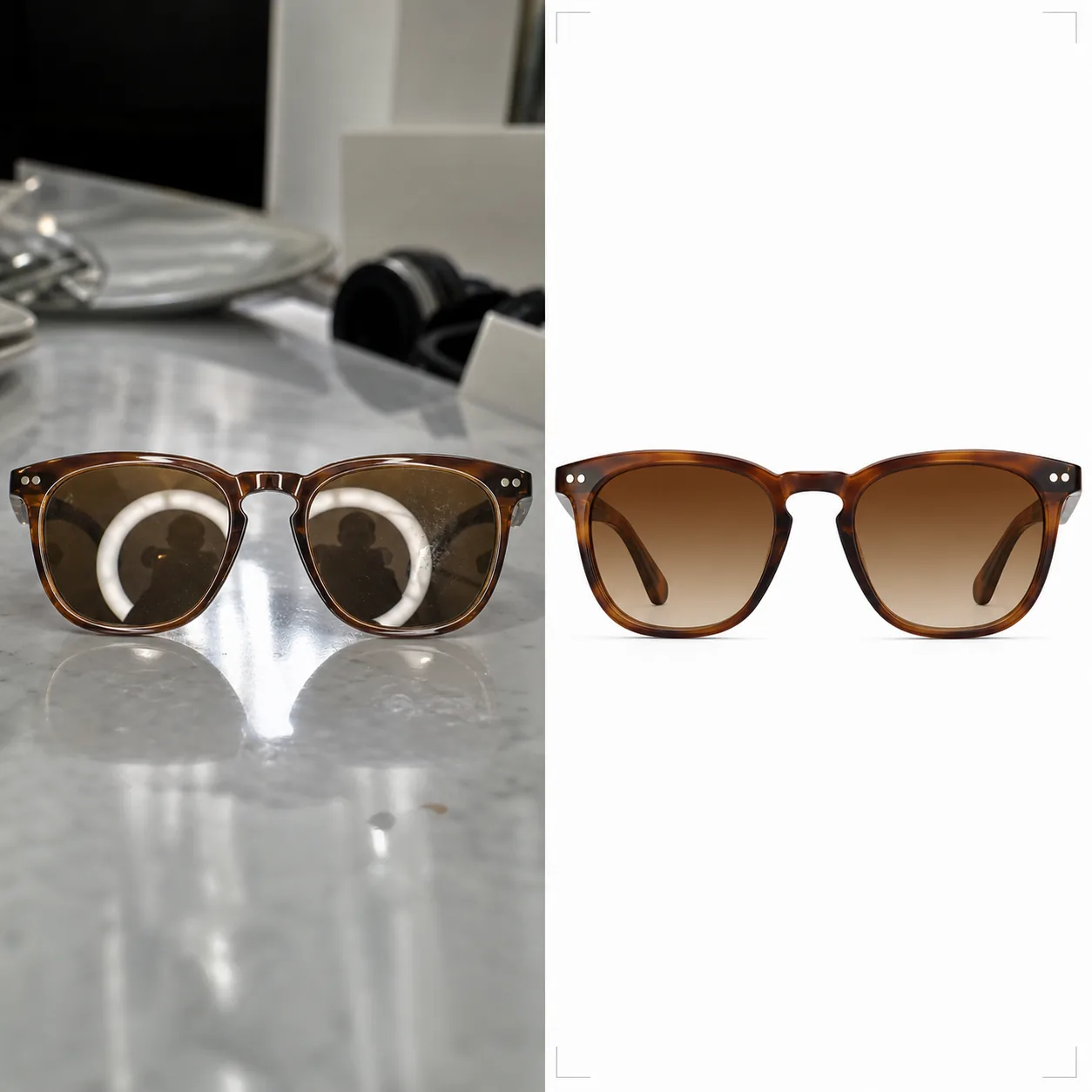
Produce e-commerce-ready sunglasses photography with clean backgrounds, accurate lens tint colors, and reflection-free surfaces. This template removes unwanted reflections from lenses and frames, replaces messy backgrounds with pure white or styled surfaces, and enhances material details so customers can clearly see frame textures, hinge construction, and lens gradient transitions.
Try this template freeE-commerce template preview
What this template does
Addresses the unique challenges of photographing eyewear for online retail. Sunglasses are among the hardest products to photograph because every curved surface reflects the studio, camera, and photographer. Background Eraser isolates the sunglasses from any surface and replaces the background with pure white (marketplace-compliant), neutral grey, or a styled surface like marble or wood. AI Enhance removes unwanted reflections from lenses and metal frames while preserving the intentional reflective quality that makes the product attractive. Lens tint colors are corrected to match the manufacturer's specifications so amber, green, grey, and gradient lenses display their true color on screen. Frame textures — acetate grain, metal brushing, titanium matte — are sharpened to give customers the confidence of an in-store inspection.
Template settings
| Background | Pure white (#FFFFFF), neutral grey, or styled surface (marble, wood, fabric) |
| Reflection removal | Remove studio, camera, and photographer reflections from lenses and frames |
| Lens tint correction | Match lens color to manufacturer specification (amber, grey, green, gradient) |
| Frame detail enhancement | Sharpen acetate grain, metal brushing, hinge hardware, and temple logo |
| Output resolution | 3000×3000px (1:1 square for marketplaces, or 4:3 for brand catalogs) |
How to use this template
Upload your sunglasses photo
Upload a product photo of the sunglasses — flat lay, angled, folded, or on a model face. The template handles all angles. For best lens tint accuracy, ensure the original photo was taken in neutral daylight or with 5500K studio lighting.
Clean background and reflections
Background Eraser isolates the sunglasses and replaces the background. Lens reflections showing the studio setup, ring light, or photographer are removed while preserving the natural specular highlights that convey the lens material's quality. Frame reflections on glossy acetate or polished metal are similarly cleaned.
Correct color and enhance detail
Lens tint is corrected to display the accurate color customers will see in person. AI Enhance sharpens the frame texture — the grain pattern in acetate, the brushed finish on titanium, the polished surface on stainless steel — so customers can evaluate build quality from the photo alone.
Export for listings
Download at 3000×3000px for Amazon, Shopify, and marketplace listings, or at 4:3 aspect ratio for brand catalog layouts. The white background version meets Amazon and Google Shopping requirements for main product images.
Pro tips for best results
- ✓Photograph sunglasses slightly open (arms angled at about 20 degrees) rather than fully folded or fully open. This angle shows the most frame detail — temples, hinges, and arm interior branding — in a single shot.
- ✓Place the sunglasses on a matte surface rather than a reflective one. Glass tables and glossy counters create double reflections that complicate lens cleanup. A piece of white foam board works perfectly as a shooting surface.
- ✓Shoot multiple angles: front-facing, three-quarter, side profile, and folded. The template processes each consistently, and marketplace listings with four or more angles convert significantly better than single-image listings.
E-commerce workflow
Product photo hub
Use this template with the full ecommerce product photo workflow for marketplace backgrounds, cleanup, compression, resizing, and listing-ready exports.
View ecommerce product photo workflowCommon questions
Will the lens tint look accurate on screen?
+
The template corrects lens tint to match the manufacturer's specified color under neutral daylight (D65 illuminant). For gradient lenses, the transition from dark to light is preserved with accurate positioning. Monitor calibration on the viewer's end is the remaining variable, but the file itself is color-accurate in sRGB.
Can I show sunglasses on a model's face?
+
Yes. When the template detects an on-face shot, it preserves the model's skin and facial features while cleaning only the lens reflections and enhancing the frame detail. Background replacement still works behind the model.
Does this work for prescription eyeglasses too?
+
Yes. Clear prescription lenses have the same reflection challenges as tinted sunglasses. The template removes reflections from clear lenses while preserving the lens edge visibility that shows customers the lens thickness and cut quality.
Show every frame at its sharpest and most accurate
Upload sunglasses photos and get reflection-free, color-accurate product images ready for marketplaces and brand catalogs.
Try it freeRelated templates
More e-commerce templates for your workflow.
Pure white background template for product photos. Amazon, Shopify, and marketplace-ready settings for clean, professional product images that convert.
Etsy-optimized listing photo template. Converts lifestyle shots to clean white backgrounds at 2000px, enhances handmade product details, and meets Etsy's image guidelines.
eBay-optimized listing photo template. White background for gallery images, condition documentation enhancement, and multi-angle layouts that meet eBay's image standards.
Professional jewelry photography template for rings, necklaces, and watches. Controls reflections, enhances gemstone sparkle, and delivers marketplace-ready images on clean backgrounds.
Professional furniture photo template for marketplace listings. Remove room clutter, show true dimensions, and present pieces on clean backgrounds or in styled room contexts.
Clean up clothing flat lay photos with wrinkle removal, lint cleanup, pure white backgrounds, and accurate fabric color. Ready for Shopify, Amazon, and boutique stores.