
Podcast Cover Art
Create professional podcast cover art that stands out in Apple Podcasts, Spotify, and Google Podcasts directories. This template isolates host portraits from any background, places them on branded backdrops, and outputs artwork at the exact specifications required by major podcast platforms — no graphic design software needed.
Try this template freeDesign template preview
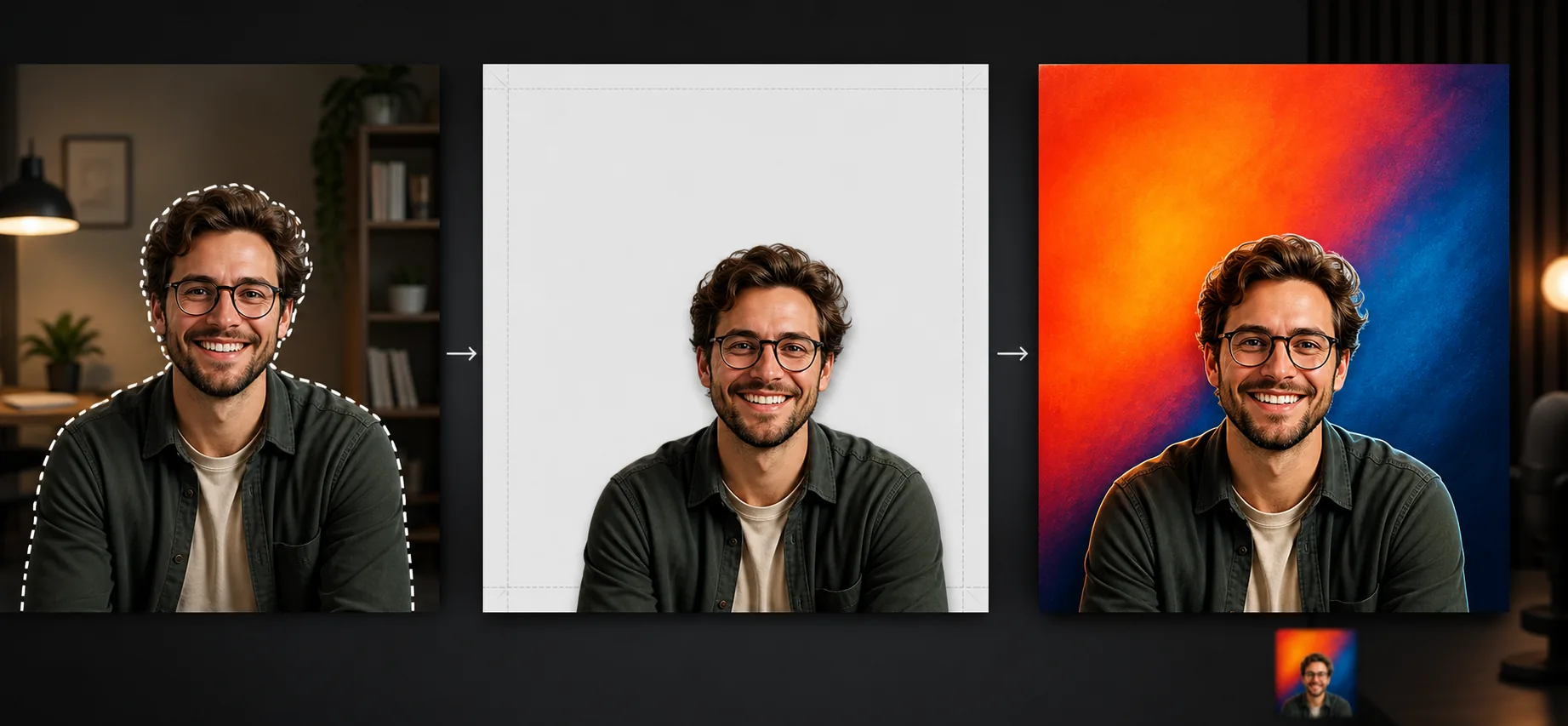
What this template does
Produces podcast cover artwork that meets the technical requirements of every major distribution platform while looking professional enough to compete with shows backed by major media companies. Background Eraser isolates your headshot or host group photo from any environment — home office, conference room, outdoor location — and places the portraits on solid color, gradient, or textured backgrounds that read well at both 3000×3000px full size and 55×55px thumbnail size. The layout is structured with the upper third reserved for the show title (where listeners' eyes go first in grid view) and the lower two thirds for the host portrait. Color vibrancy is tuned so the cover pops against the dark backgrounds used by Apple Podcasts and Spotify's browse interfaces.
Template settings
| Canvas size | 3000×3000px (1:1 square, Apple & Spotify compliant) |
| Background | Solid color, two-tone gradient, or subtle texture pattern |
| Portrait placement | Lower two-thirds of canvas with upper third clear for title text |
| Color vibrancy | Boosted saturation for visibility on dark platform backgrounds |
| Output format | JPEG (Apple requirement) and PNG (for further editing) |
| Color space | sRGB (required by Apple Podcasts and Spotify) |
How to use this template
Upload host photo
Upload a photo of the host or co-hosts. Headshots, upper body shots, and casual portraits all work. If you have multiple hosts, upload a group photo or individual photos and the template composites them side by side.
Remove background and position
Background Eraser isolates the host from the original environment. The portrait is positioned in the lower two thirds of the square canvas, leaving the upper third open for your show title. You can adjust the crop — tighter for a headshot emphasis, wider for upper body and hand gestures.
Apply background and branding
Choose a background color or gradient that matches your podcast brand. The template suggests high-contrast combinations that remain legible at small thumbnail sizes. Colors are rendered in sRGB and vibrancy is tuned to stand out on the dark backgrounds used by Apple Podcasts and Spotify.
Export platform-ready artwork
Download at 3000×3000px in JPEG format (Apple Podcasts requires JPEG) and PNG format (for adding title text in your preferred design tool). The file meets all platform specifications including minimum 1400×1400 and maximum 3000×3000 resolution, sRGB color space, and under 5MB file size.
Pro tips for best results
- ✓Test your cover at 55×55 pixels before finalizing. This is the thumbnail size most listeners see when browsing podcast directories on mobile. If the host face is not recognizable at this size, zoom in tighter on the portrait crop.
- ✓Use no more than two colors in your background. Complex patterns and multi-color gradients reduce at thumbnail size to visual noise that obscures the host portrait and makes text illegible.
- ✓Smile in your host photo. Podcast covers with smiling hosts consistently outperform serious or neutral expressions in browse-and-subscribe contexts because the smile conveys approachability and energy that matches the intimate nature of audio content.
Common questions
Does the template add title text to the cover?
+
The template produces the background and portrait layout but does not add text. This is intentional — podcast title typography needs to match your exact brand font and sizing preferences. The output includes a clear upper-third area where you add your title in any design tool or even in your podcast hosting platform's editor.
Can I create episode-specific artwork?
+
Yes. Use the same background and portrait layout for brand consistency, then swap in different background colors or guest portraits for each episode. This creates a recognizable visual series in podcast players that display per-episode artwork.
What are the platform technical requirements?
+
Apple Podcasts requires JPEG or PNG, 1400×1400 to 3000×3000 pixels, sRGB color space, 72 DPI minimum, under 512KB. Spotify requires square format, minimum 640×640. The template outputs at 3000×3000 in sRGB, meeting all major platforms' requirements with a single export.
Launch your podcast with artwork that gets clicks
Upload a host photo and get platform-compliant podcast cover art that stands out in Apple Podcasts and Spotify directories.
Try it freeRelated templates
More design templates for your workflow.
Create transparent PNG logos with clean edge refinement and multi-size export for web, print, social media, and app icons. Works on photos of printed logos and digital files.
Generate realistic book cover mockups with 3D perspective, shadow rendering, and lifestyle backgrounds for author marketing and publisher promotions.
Prepare digital art and photographs for large-format printing with AI upscaling, canvas expansion, color-accurate proofing, and print-ready file export.
Prepare photos for stock agency submission with trademark removal, model release compliance editing, technical quality checks, and agency-specific format requirements.