
Book Cover Mockup
Create photorealistic mockups of your book cover placed in lifestyle scenes, on shelves, or displayed as a standalone 3D render with natural shadows. This template takes your flat cover artwork and transforms it into promotional images for social media announcements, author websites, Amazon A+ content, and press kits — no 3D software required.
Try this template freeDesign template preview
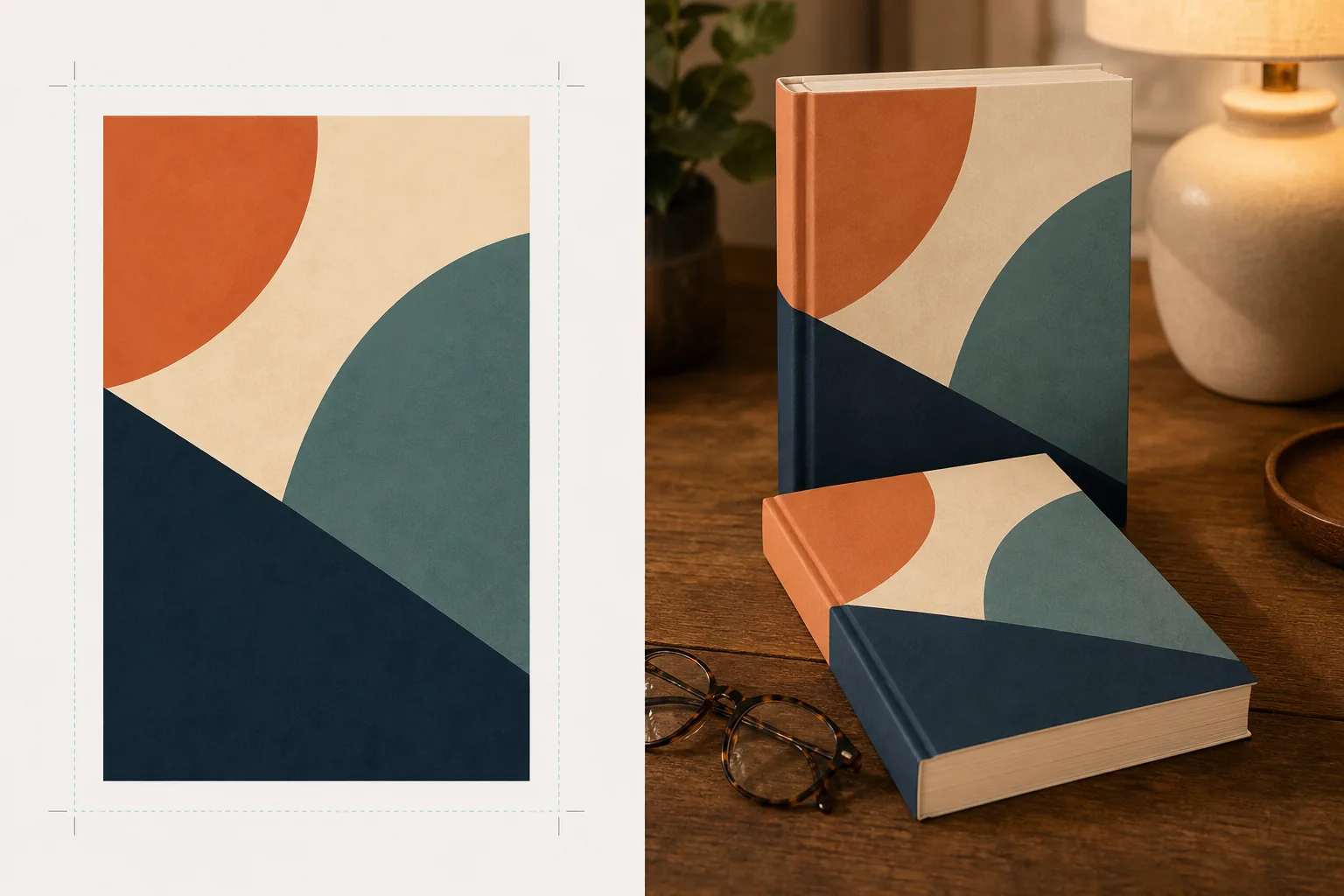
What this template does
Converts flat book cover designs into promotional mockup images that look like professional product photography. Upload your cover artwork as a flat JPEG or PNG and the template maps it onto a realistic book form with proper perspective, page thickness, and spine curvature. The mockup is then placed into lifestyle scenes — a coffee table with reading glasses, a bookstore shelf, a nightstand with warm lamplight — or rendered as a standalone product on a clean background with natural shadow. For series or multi-book promotions, multiple covers can be arranged in a row or stacked with consistent perspective. The lighting and shadow direction match the scene environment so the book looks physically present rather than composited.
Template settings
| Book format | Paperback, hardcover, or hardcover with dust jacket |
| Page count appearance | Thin (100pp), medium (250pp), thick (400pp+) — affects spine and page edge width |
| Scene type | Standalone with shadow, coffee table, bookshelf, nightstand, or hand-held |
| Perspective angle | Front-facing, three-quarter, or slight overhead tilt |
| Output resolution | 3000×3000px (1:1 social) or 2400×1600px (16:10 banner) |
How to use this template
Upload your cover artwork
Upload your book cover as a flat image — the front cover at minimum. For hardcover with dust jacket mockups, you can also upload the spine and back cover. The template accepts JPEGs, PNGs, and PDFs. Cover dimensions are detected automatically and the book proportions are scaled accordingly.
Select book format and scene
Choose between paperback, hardcover, or dust jacket formats. Select the page count range so the spine and page edge width match your actual book. Then pick a scene: standalone with shadow, lifestyle setting, or custom background color.
Adjust perspective and render
Choose the viewing angle — front-facing for thumbnail clarity, three-quarter for visual depth, or overhead tilt for flat-lay social posts. The template renders the mockup with appropriate lighting, page edge texture, and shadow direction matching the selected scene.
Download promotional images
Export in 1:1 for Instagram, 16:9 for Twitter/Facebook headers, or custom dimensions for your website hero section. Each export includes the book mockup with transparent background option so you can place it into your own custom layouts.
Pro tips for best results
- ✓Upload your cover at the highest resolution available. The 3D perspective transformation reduces apparent resolution on the receding face of the book, so starting with a high-resolution source ensures text on the spine and cover remains legible.
- ✓For Amazon A+ content, use the standalone mockup on white background. This gives the book a premium product photography feel that distinguishes it from the flat cover image already shown on the listing page.
- ✓Create a series spread by uploading all covers in a series. The template arranges them in a row with consistent perspective and spacing, which is far more visually impactful for series promotion than showing covers individually.
Common questions
Can I mockup an e-reader or tablet displaying my cover?
+
The template focuses on physical book mockups — paperback and hardcover formats. For e-reader or tablet display mockups, you would composite the flat cover onto a device photo separately.
Will the spine text be readable?
+
Yes, as long as the source cover file includes spine artwork. The template wraps the spine artwork around the book edge with perspective that matches the front cover angle. For thin books (under 150 pages), the spine is narrow and small text may become difficult to read at small display sizes.
Can I use this for audiobook or podcast promotion?
+
Yes. The square cover format used for audiobooks and podcasts can be rendered as a CD-case style mockup or as a standalone square with dimensional shadow, giving it a physical presence that flat cover art lacks.
Turn your cover art into stunning promotional images
Upload flat cover artwork and get photorealistic book mockups for social media, author websites, and marketing campaigns.
Try it freeRelated templates
More design templates for your workflow.
Create transparent PNG logos with clean edge refinement and multi-size export for web, print, social media, and app icons. Works on photos of printed logos and digital files.
Design podcast cover art that meets Apple Podcasts and Spotify specifications with background replacement, host portrait isolation, and typography-ready layouts.
Prepare digital art and photographs for large-format printing with AI upscaling, canvas expansion, color-accurate proofing, and print-ready file export.
Prepare photos for stock agency submission with trademark removal, model release compliance editing, technical quality checks, and agency-specific format requirements.