
Nonprofit Fundraiser Photo
Turn event snapshots and program documentation photos into compelling images for donor appeals, annual reports, and grant applications. This template corrects the challenging lighting of banquet halls, outdoor events, and program sites, removes visual clutter, and applies warm color grading that communicates the energy and impact of your organization's work.
Try this template freeBusiness template preview
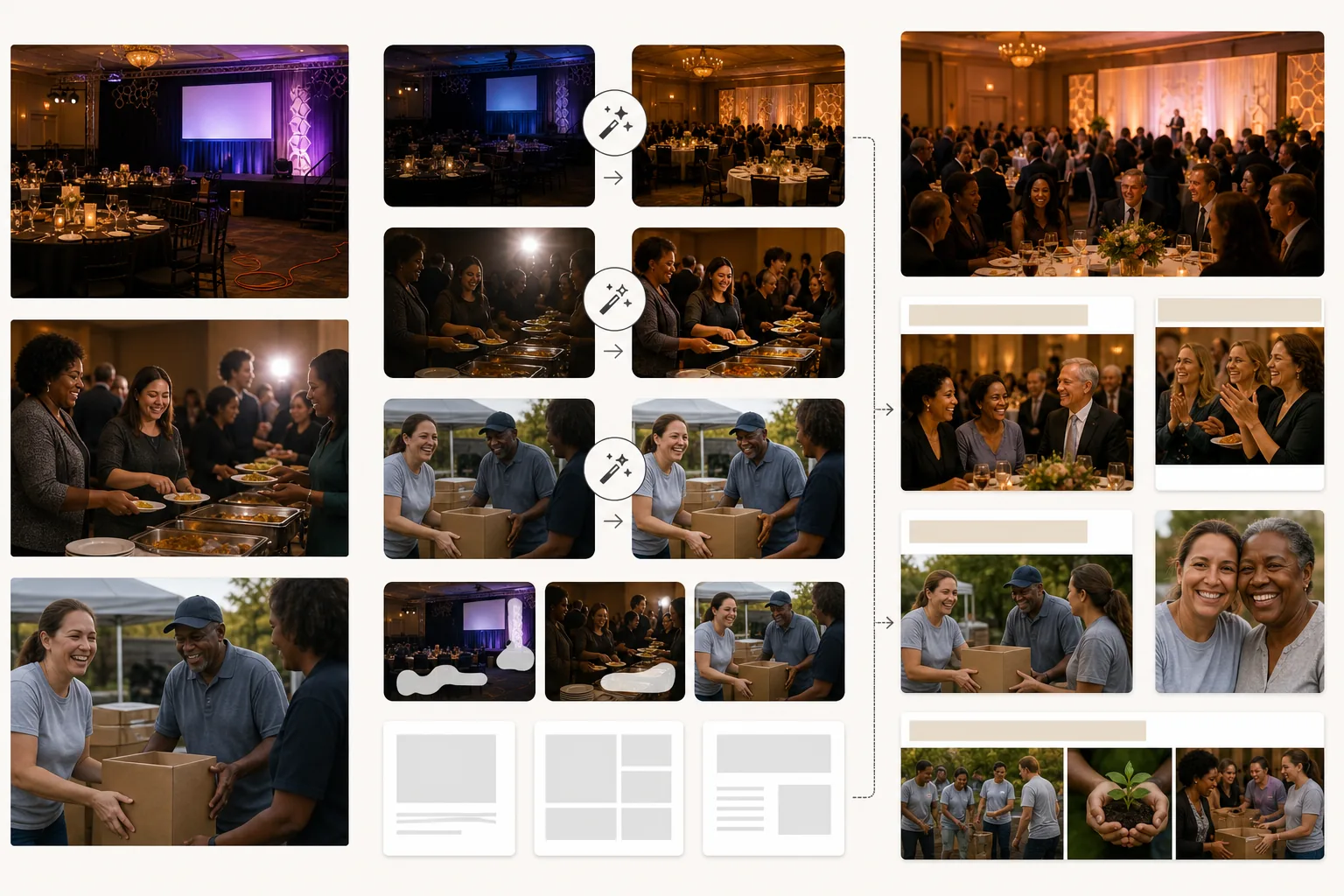
What this template does
Elevates the visual quality of nonprofit communications without requiring a professional photography budget. Most nonprofit photos are taken by volunteers or staff members using personal phones in challenging environments — dim banquet halls, busy outdoor events, crowded program sites. AI Enhance corrects underexposure, normalizes mixed lighting from chandeliers and stage spots and table candles, and recovers detail in faces that are lost to shadow or blown out by camera flash. Magic Eraser removes distractions that undermine the professional quality of fundraising materials — visible cables and extension cords at galas, trash and paper plates at outdoor events, construction equipment at build sites, and branded signage from corporate sponsors that should not appear in certain communications. The warm color grade conveys human connection and positive impact, which nonprofit communications research shows drives donor response.
Template settings
| Lighting correction | Banquet hall, outdoor event, and indoor program site presets |
| Flash correction | Reduce harsh flash hotspots and red-eye while preserving ambient warmth |
| Background cleanup | Remove cables, temporary signage, and event clutter |
| Color grade | Warm community (emphasizes human connection and positive energy) |
| Output resolution | 3000×2000px (3:2 for annual reports, newsletters, and web) |
How to use this template
Upload event or program photos
Upload photos from fundraising galas, volunteer events, program activities, community outreach, and any organizational activity. Phone photos, point-and-shoot snapshots, and DSLR images all work. The template handles the wide range of lighting conditions nonprofits encounter.
Correct lighting and exposure
AI Enhance brightens underexposed banquet hall and evening event photos, corrects the mixed color casts from chandeliers and stage lighting, and reduces harsh flash artifacts. Faces in the crowd that were too dark or too bright are balanced for a natural, warm appearance.
Remove distractions
Magic Eraser removes visual clutter that undermines the professional quality of your communications — extension cords, catering equipment, sponsor banners (when inappropriate), and event setup materials. The AI reconstructs the floor, walls, and background behind removed items.
Export for donor communications
Download at 3000×2000px for annual reports and grant applications, or at web-optimized sizes for email campaigns, social media, and the organization's website. The warm, professional quality signals to donors that their contributions fund well-managed programs.
Pro tips for best results
- ✓Capture moments of genuine interaction — a volunteer and participant laughing together, a donor shaking hands with a program leader, children engaged in an activity. These authentic connection moments are what donors respond to, and the AI enhancement makes them shine even when captured in dim, imperfect conditions.
- ✓Assign one person at each event to be the photographer. Even a staff member with a phone produces better results than relying on random snapshots, because intentional framing and timing capture the moments that tell your organization's story.
- ✓Process all photos from a single event with the same settings. Consistent lighting correction and color grading across a set of photos creates a cohesive visual story for the annual report or campaign page, rather than a disjointed collection of random snapshots.
Common questions
Can I remove sponsor logos from event photos?
+
Yes. Magic Eraser can remove branded banners, logo displays, and sponsor signage from event photos. This is useful when photos from a sponsored event are used in contexts where featuring that specific sponsor is inappropriate — such as grant applications to competing funders or general organizational marketing.
Does this work for outdoor build and volunteer events?
+
Yes. Outdoor volunteer events — habitat builds, park cleanups, community gardens — have their own challenges including harsh sun, mixed shade, and busy backgrounds with construction materials. The template corrects these conditions and removes distracting equipment and materials from the frame.
Can I use this for grant application photos?
+
Absolutely. Grant applications with professional-quality program photos demonstrate organizational competence and effective program implementation. The template produces images that meet the visual standard grantmakers expect from established organizations.
Show donors the impact of every dollar
Upload event and program photos and get polished images that strengthen donor appeals, annual reports, and grant applications.
Try it freeRelated templates
More business templates for your workflow.
Polish corporate team photos with consistent backgrounds, professional lighting correction, brand-appropriate color grading, and uniform image quality across the team.
Enhance gym and fitness photos with muscle definition enhancement, dynamic lighting correction, background cleanup, and high-contrast athletic color grading.
Enhance tattoo portfolio photos with ink color vibrancy, line detail sharpening, skin redness reduction, and clean backgrounds for artist portfolios and Instagram.
Create a polished resume headshot with background replacement, skin smoothing, and lighting correction. Ideal for CVs, job portals, and corporate directories.
Create professional team and individual player photos with background replacement, jersey color enhancement, and stadium or studio backdrops for rosters and programs.
Create professional band and musician promo photos with background replacement, dramatic lighting enhancement, and print-ready outputs for press kits and venue submissions.