
Medical Before & After
Produce clinically standardized before-and-after photographs for dermatology, plastic surgery, dental, and aesthetic medicine practices. This template normalizes lighting and color across comparison pairs, replaces inconsistent exam room backgrounds with clean clinical backdrops, and provides privacy-conscious cropping and redaction tools — giving your practice marketing images the consistency and professionalism that build patient trust.
Try this template freeBusiness template preview
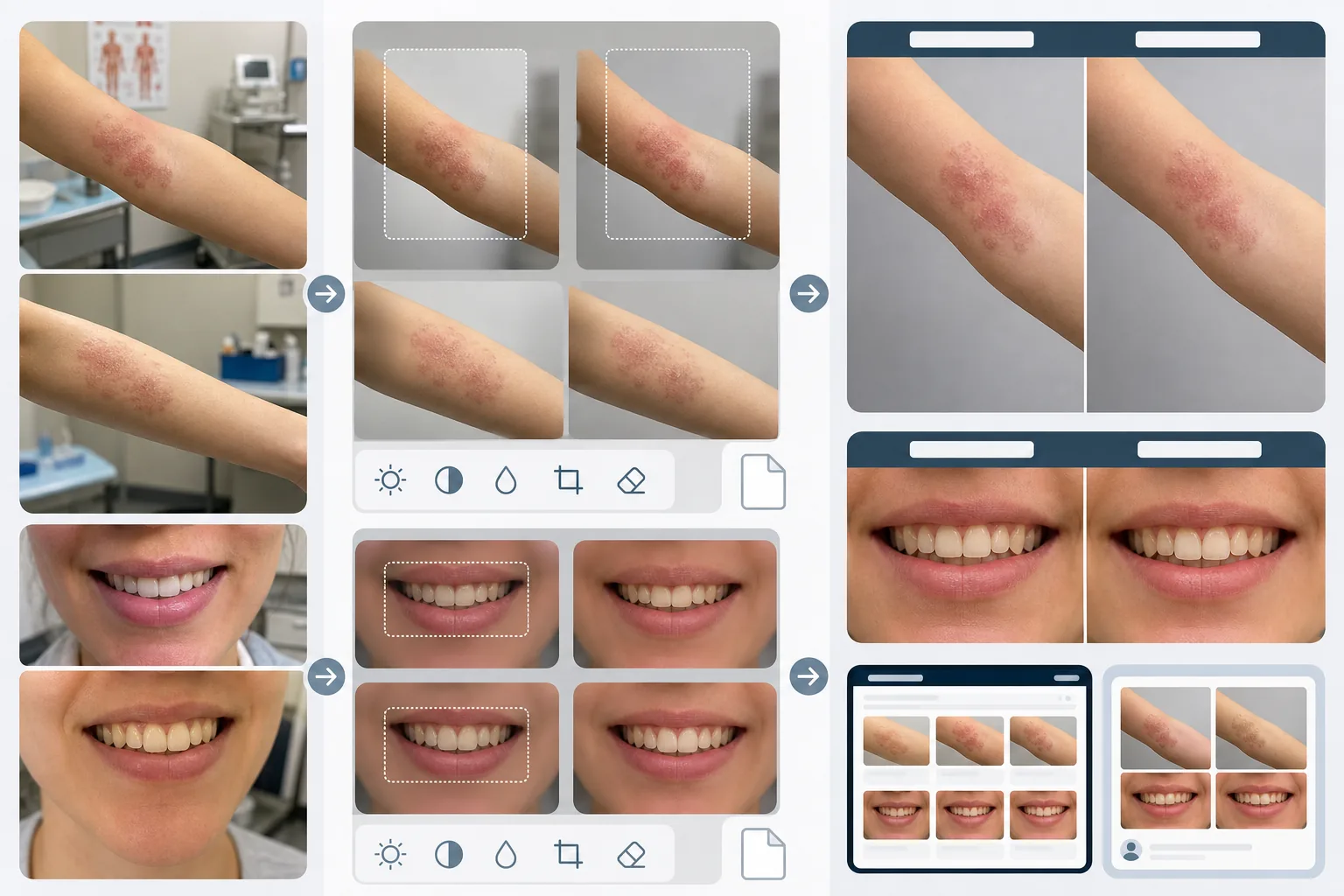
What this template does
Creates the visual consistency that makes medical before-and-after comparisons credible and compelling. The biggest problem with clinical photography is that before and after images are taken weeks or months apart in different lighting conditions, with different cameras, and sometimes in different rooms. AI Enhance normalizes the exposure, color temperature, and white balance across both images so that any visible difference is due to the procedure, not the photography. Magic Eraser removes exam room clutter — medical instruments on counters, charts on walls, equipment carts in the background — and replaces it with a neutral clinical backdrop. Privacy features include auto-detection and redaction of identifying marks, the ability to crop to specific body regions, and metadata stripping for patient data protection.
Template settings
| Lighting normalization | Match exposure, color temperature, and white balance across before/after pair |
| Background | Clinical neutral grey, clean white, or blue surgical drape |
| Privacy redaction | Auto-blur identifying features outside the treatment area |
| Scale consistency | Match framing and magnification between before and after images |
| Metadata stripping | Remove EXIF location, device, and timestamp data for HIPAA awareness |
| Output resolution | 2400×1600px per image (side-by-side composite at 4800×1600px) |
How to use this template
Upload before and after photos
Upload the before image and the corresponding after image. The template handles photos taken with clinical camera setups, smartphones, and point-and-shoot cameras. Upload them as a pair so the AI can match the normalization settings between both images.
Normalize lighting and framing
AI Enhance matches the exposure, color temperature, and white balance between the two images. If the framing differs — closer in one shot, wider in the other — the template adjusts the crop so the treatment area is at the same scale and position in both images for a fair visual comparison.
Clean background and apply privacy
Magic Eraser removes exam room clutter and replaces the background with a neutral clinical backdrop. Privacy redaction blurs or crops out identifying features outside the treatment area. EXIF metadata containing location, device information, and timestamps is stripped.
Export for practice marketing
Download individual images or a side-by-side composite with labeled 'Before' and 'After' headers. Outputs are sized for website galleries, consultation room displays, and social media. The consistent clinical presentation builds credibility with prospective patients browsing your results gallery.
Pro tips for best results
- ✓Establish a consistent photo station in your practice with fixed lighting and a neutral background. Even though the template can normalize different lighting conditions, starting from a consistent setup produces the most precise comparison and reduces the risk of normalization artifacts.
- ✓Use the same focal length and camera distance for before and after shots. The template adjusts framing differences, but perspective distortion from different lens-to-subject distances can subtly change how facial features or body contours appear, which can undermine the credibility of the comparison.
- ✓Always get written patient consent for before-and-after photography and its intended use before processing the images. The template provides privacy features but does not replace the legal requirement for informed consent.
Common questions
Is this HIPAA compliant?
+
The template provides privacy-conscious features — metadata stripping, identifying feature redaction, and treatment-area cropping — that support HIPAA compliance. However, HIPAA compliance is an organizational responsibility. The template is a tool, not a compliance program. Consult your compliance officer about your practice's specific requirements.
Can I process dental before-and-after photos?
+
Yes. The template handles intraoral photos, smile close-ups, and full-face dental photography. Lighting normalization is particularly valuable for dental photos where the before image is often taken under exam room light while the after is taken with a ring flash.
Will skin texture differences be preserved accurately?
+
Yes. The normalization adjusts lighting and color without smoothing skin texture. This is critical — skin texture improvements from dermatological procedures must be visible in the comparison. The template intentionally does not apply skin retouching to medical before-and-after images.
Build patient trust with consistent clinical photography
Upload before-and-after photos and get standardized, privacy-conscious comparison images for your practice marketing.
Try it freeRelated templates
More business templates for your workflow.
Polish corporate team photos with consistent backgrounds, professional lighting correction, brand-appropriate color grading, and uniform image quality across the team.
Enhance gym and fitness photos with muscle definition enhancement, dynamic lighting correction, background cleanup, and high-contrast athletic color grading.
Enhance tattoo portfolio photos with ink color vibrancy, line detail sharpening, skin redness reduction, and clean backgrounds for artist portfolios and Instagram.
Create a polished resume headshot with background replacement, skin smoothing, and lighting correction. Ideal for CVs, job portals, and corporate directories.
Create professional team and individual player photos with background replacement, jersey color enhancement, and stadium or studio backdrops for rosters and programs.
Create professional band and musician promo photos with background replacement, dramatic lighting enhancement, and print-ready outputs for press kits and venue submissions.