
Handbag Product Photo
Create luxury-grade product photos for handbags, purses, wallets, and leather goods. This template isolates the bag from any surface, replaces the background with a clean studio or lifestyle setting, enhances leather grain and stitching detail, and sharpens hardware elements like zippers, clasps, and buckles so customers can evaluate craftsmanship from every angle.
Try this template freeE-commerce template preview
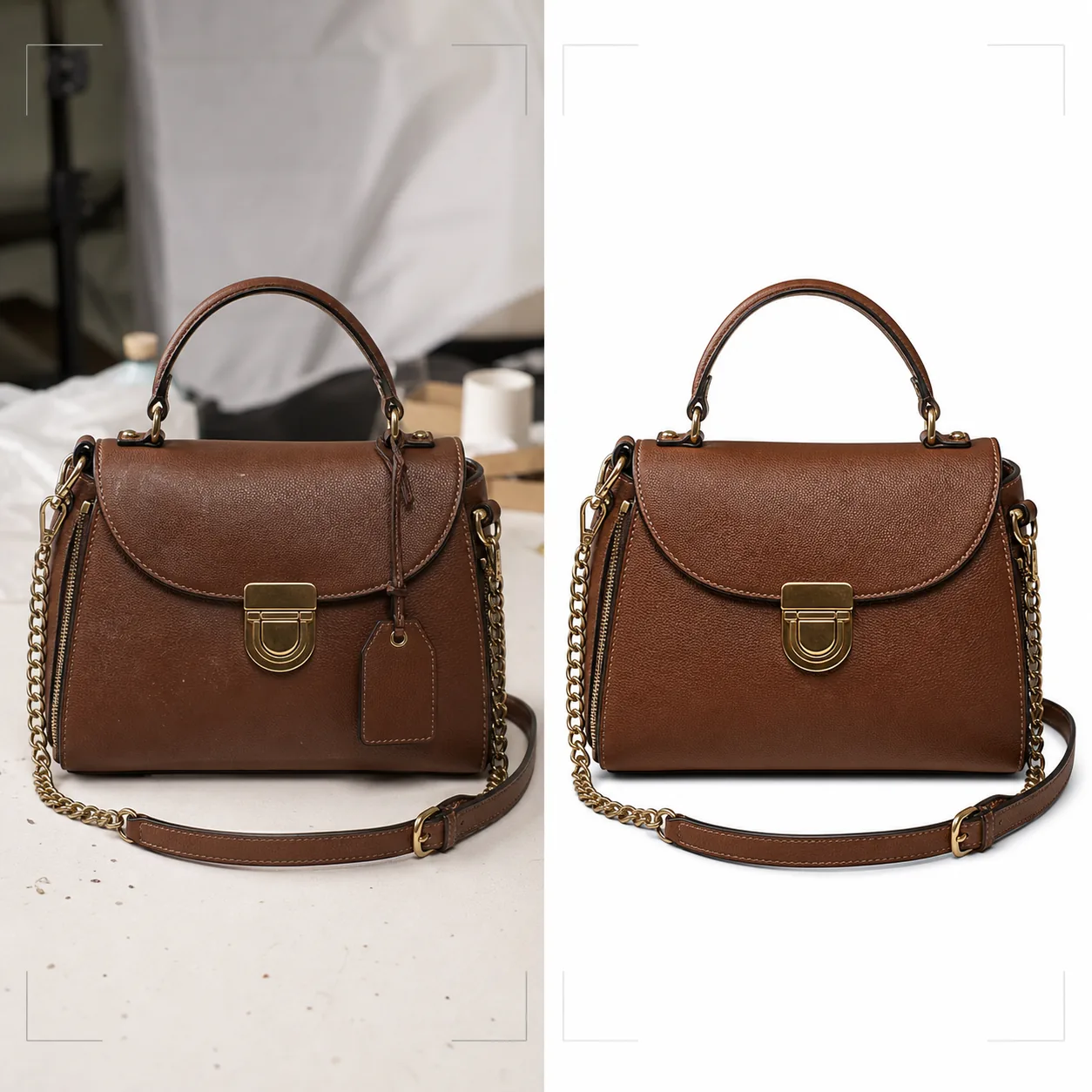
What this template does
Delivers the visual standard that luxury and mid-range handbag brands require for online retail. Background Eraser isolates the bag from tabletops, shooting surfaces, and studio clutter, replacing the environment with pure white for marketplace compliance or styled backdrops that match brand aesthetics. Magic Eraser removes dust particles, fingerprints on hardware, and price tags that were missed during the shoot. AI enhancement brings out the leather grain, canvas weave, or fabric texture that communicates quality, while hardware elements — zippers, clasps, chain straps, and logo plaques — are sharpened so customers can inspect the finishing quality as if they were holding the bag in a boutique.
Template settings
| Background | Pure white, cream, or styled surface (marble, linen, wooden shelf) |
| Leather enhancement | Grain texture sharpening with natural sheen preservation |
| Hardware detail | Sharpen zippers, clasps, buckles, and metal logo plaques |
| Dust and fingerprint removal | Auto-detect and remove surface particles and smudges on hardware |
| Shadow style | Natural drop shadow or reflection shadow on white background |
| Output resolution | 3000×3000px (1:1 for marketplaces) or 2400×3200px (3:4 for brand sites) |
How to use this template
Upload your handbag photo
Upload a product photo of the handbag — straight-on, angled to show depth, or flat lay with the bag open. Include shots from multiple angles for a complete listing. The template handles photos from phone cameras, studio setups, and DSLR rigs.
Clean background and remove imperfections
Background Eraser separates the handbag from the shooting surface with edge detection that preserves soft leather edges, dangling straps, and chain details. Magic Eraser removes dust specks on the leather, fingerprint smudges on polished hardware, and any price tags or security sensors still attached.
Enhance materials and hardware
Leather texture is sharpened to reveal grain patterns and stitching. Hardware elements are enhanced for clarity — customers can see whether zippers are YKK, whether clasps are solid brass or plated, and whether stitching is even and tight. Color correction ensures the leather appears in its true dye color.
Export for e-commerce
Download at 3000×3000px for Amazon, eBay, and Poshmark, or at custom aspect ratios for your brand website. The pure white background version meets marketplace image requirements. Lifestyle backdrop versions work for social media and email campaigns.
Pro tips for best results
- ✓Stuff the handbag with tissue paper before photographing to give it its intended shape and structure. An empty bag collapses and folds in ways that make it look less premium than it is in person.
- ✓Photograph hardware close-ups separately. While the template enhances hardware in full-bag shots, a dedicated close-up of the clasp, zipper pull, and logo plaque gives customers the detail inspection experience they get in a physical store.
- ✓Wipe hardware with a microfiber cloth before shooting. The template removes fingerprints digitally, but heavy smudging on polished gold or silver hardware can reduce the clarity of the underlying metal finish even after AI cleanup.
E-commerce workflow
Product photo hub
Use this template with the full ecommerce product photo workflow for marketplace backgrounds, cleanup, compression, resizing, and listing-ready exports.
View ecommerce product photo workflowCommon questions
Can this handle bags made from canvas or nylon?
+
Yes. The template detects the material type and adjusts the texture enhancement accordingly. Canvas weave and nylon ripstop textures are sharpened differently from leather grain to highlight each material's characteristic qualities.
Will the chain strap detail be preserved during background removal?
+
Yes. The edge detection is calibrated for fine metallic details like chain links, thin leather straps, and dangling zipper pulls. These elements are preserved with clean edges against the new background.
Can I add a reflection shadow on white background?
+
Yes. The template offers both a natural drop shadow (as if the bag is sitting on a white surface lit from above) and a reflection shadow (a mirrored fade beneath the bag) commonly used in luxury product photography.
Present every bag with boutique-level detail
Upload handbag photos and get luxury-grade product images with enhanced leather texture, sharp hardware, and clean backgrounds.
Try it freeRelated templates
More e-commerce templates for your workflow.
Pure white background template for product photos. Amazon, Shopify, and marketplace-ready settings for clean, professional product images that convert.
Etsy-optimized listing photo template. Converts lifestyle shots to clean white backgrounds at 2000px, enhances handmade product details, and meets Etsy's image guidelines.
eBay-optimized listing photo template. White background for gallery images, condition documentation enhancement, and multi-angle layouts that meet eBay's image standards.
Professional jewelry photography template for rings, necklaces, and watches. Controls reflections, enhances gemstone sparkle, and delivers marketplace-ready images on clean backgrounds.
Professional furniture photo template for marketplace listings. Remove room clutter, show true dimensions, and present pieces on clean backgrounds or in styled room contexts.
Clean up clothing flat lay photos with wrinkle removal, lint cleanup, pure white backgrounds, and accurate fabric color. Ready for Shopify, Amazon, and boutique stores.