
Electronics Product Photo
Present consumer electronics with showroom-quality clarity. This template removes fingerprints and smudges from screens and glossy surfaces, sharpens port and button details, enhances screen displays for visible UI elements, and outputs clean product images ready for marketplace listings and brand pages.
Try this template freeE-commerce template preview
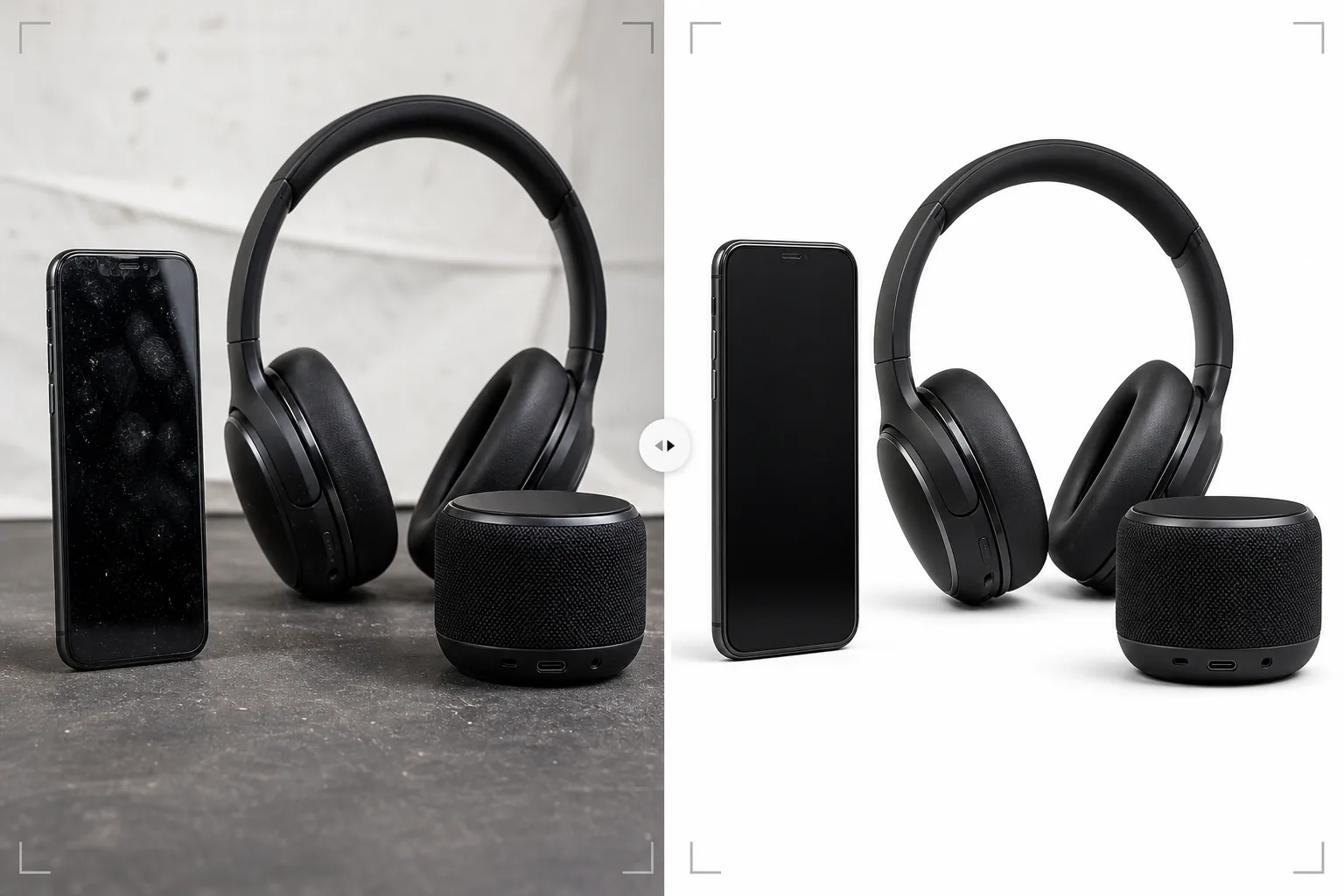
What this template does
Handles the specific photography challenges of consumer electronics — smartphones, laptops, tablets, headphones, speakers, and accessories — where reflective surfaces, intricate ports, and screen displays require specialized processing. Glossy screens and metal housings collect fingerprints instantly during product handling, and Magic Eraser removes these along with dust particles and surface micro-scratches that appear at high magnification. AI Enhance sharpens fine details like USB port interiors, button textures, speaker grille patterns, and branding text that buyers examine closely when evaluating build quality. Background Eraser isolates products with clean edges around complex shapes including antennas, ports, and cable openings.
Template settings
| Surface cleanup | Remove fingerprints, dust, and micro-scratches from screens and chassis |
| Detail sharpening | Port, button, speaker grille, and branding text enhancement |
| Screen display | Brighten and sharpen on-screen UI (or replace with clean screenshot) |
| Background | Pure white (#FFFFFF) or gradient for premium positioning |
| Output dimensions | 2500 × 2500 px (high-resolution zoom for buyer inspection) |
| Metal finish | Enhance anodized aluminum, brushed steel, and matte plastic textures |
How to use this template
Upload your electronics photo
Upload product photos of the device — front, back, side, and detail views of ports and buttons. The template handles smartphones, laptops, tablets, headphones, speakers, smartwatches, and accessories. Include at least one angle showing the screen powered on if the device has a display.
Surface cleaning and fingerprint removal
Magic Eraser removes fingerprints, smudges, and dust from screens, metal chassis, and glossy plastic surfaces. Minor scratches and scuffs from handling sample units are also removed. The AI preserves intentional surface features like brushed metal grain and matte textures.
Detail and screen enhancement
AI Enhance sharpens port openings, button edges, speaker grille patterns, and brand text. If the device has a screen, the display is brightened and sharpened so on-screen UI elements are visible and attractive. Screen glare from studio lighting is reduced while maintaining the display's active appearance.
Export for marketplace or brand site
Download at 2500 × 2500 px for marketplace listings with full zoom capability, or at custom dimensions for brand websites and marketing materials. Background options include pure white for marketplaces and gradient or dark backgrounds for premium brand positioning.
Pro tips for best results
- ✓Wear cotton gloves when handling the product for photography. Fingerprints on electronics are the most common retouching issue, and while the template removes them effectively, a fingerprint-free source photo preserves more original surface texture in the final image.
- ✓Photograph screens with a real UI displayed rather than a blank or off screen. An active screen shows buyers what the device looks like in use. The template sharpens and brightens the display content while reducing studio lighting glare on the screen surface.
- ✓Include a photo specifically showing the port layout — USB, headphone jack, card slot, charging port. These detail shots are among the most viewed images in electronics listings, and the template sharpens port interiors to show connector detail clearly.
- ✓For headphones and speakers, include an angle that clearly shows the driver or grille detail. The template enhances mesh and grille textures to convey build quality and acoustic design sophistication.
E-commerce workflow
Product photo hub
Use this template with the full ecommerce product photo workflow for marketplace backgrounds, cleanup, compression, resizing, and listing-ready exports.
View ecommerce product photo workflowCommon questions
Can this handle glossy black electronics?
+
Glossy black surfaces (like piano-black smartphones and laptop bezels) are challenging because they reflect everything. The template removes fingerprints and reduces environmental reflections, but some reflection is maintained to convey the glossy surface quality. For best results, photograph glossy black products in a controlled environment with minimal ambient reflection sources.
What about products with LED indicators?
+
LED status lights, RGB lighting on peripherals, and screen displays are preserved and enhanced. The template recognizes illuminated elements and sharpens them while maintaining their glow effect against the product surface.
Can I add a screenshot to a blank screen?
+
The template optimizes photos with existing screen content but does not composite new screenshots onto blank screens. For screen replacement compositing, photograph the device with the screen on and the template will enhance the displayed content.
Electronics that look as good online as they do in hand
Upload product photos and get fingerprint-free, detail-sharp images ready for marketplace listings and brand product pages.
Try it freeRelated templates
More e-commerce templates for your workflow.
Pure white background template for product photos. Amazon, Shopify, and marketplace-ready settings for clean, professional product images that convert.
Etsy-optimized listing photo template. Converts lifestyle shots to clean white backgrounds at 2000px, enhances handmade product details, and meets Etsy's image guidelines.
eBay-optimized listing photo template. White background for gallery images, condition documentation enhancement, and multi-angle layouts that meet eBay's image standards.
Professional jewelry photography template for rings, necklaces, and watches. Controls reflections, enhances gemstone sparkle, and delivers marketplace-ready images on clean backgrounds.
Professional furniture photo template for marketplace listings. Remove room clutter, show true dimensions, and present pieces on clean backgrounds or in styled room contexts.
Clean up clothing flat lay photos with wrinkle removal, lint cleanup, pure white backgrounds, and accurate fabric color. Ready for Shopify, Amazon, and boutique stores.