
No License, No Install — Erase in the Browser
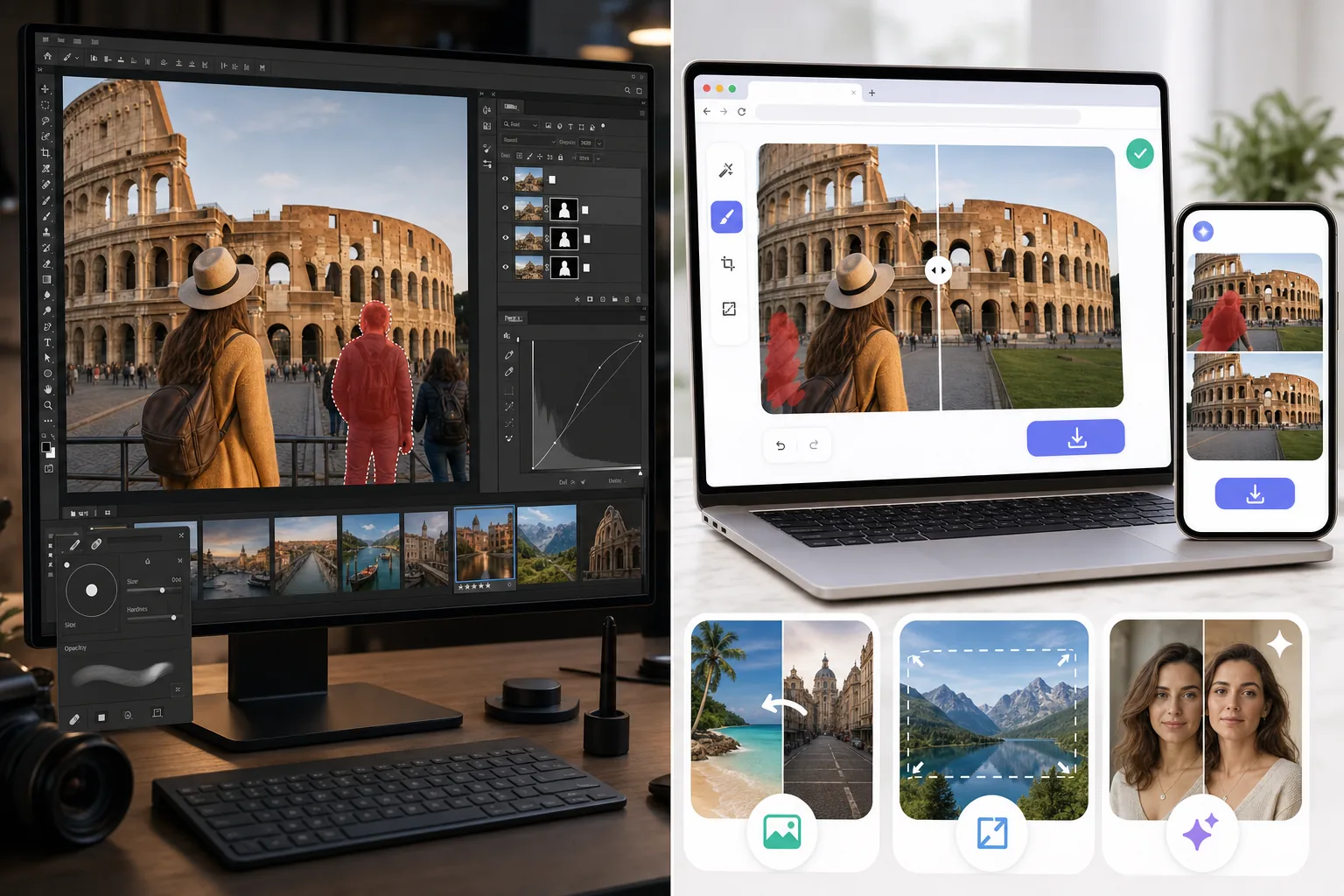
Affinity Photo is an excellent, fully-featured pro editor you buy once and install on the desktop — layers, masks, RAW develop, frequency-separation retouch, the works. But you have to purchase the license and download the app before you can touch a photo. Magic Eraser is the instant alternative: open any browser, brush over what you want gone, erase, download — free to start, no license, no install, on web, iOS, and Android. Affinity is still the better pick for deep manual retouching; this is the no-setup shortcut for quick cleanup.
Last updated
Try Magic Eraser freeComparison rows are editorial summaries from the latest page review, not a guarantee of current pricing, limits, watermark policy, batch support, speed, or platform availability.
Overview
Magic Eraser is an AI-first photo editor focused on speed: Magic Eraser brush for distraction removal, Background Eraser for background swaps, AI Fill for generative fill and outpainting, AI Enhance for sharpening / denoising / upscaling, AI Filter for color grading. The full feature set runs on web, iOS, and Android with a free tier on every platform and a $29.99/year Premium tier. Each tool is a single canvas action — no layer panel, no manual masking, no tool palette of 80+ icons. The product is built for users who want the edit done, not for users who want to compose the edit.
Affinity Photo is a professional raster editor positioned as the Photoshop alternative — full-featured layer-based editing with adjustment layers, masks, blend modes, lens corrections, RAW develop in the Develop Persona, frequency separation retouch, panorama stitching, HDR merge, focus stack, and over 100 file format support. The license is a one-time $69.99 desktop purchase (Windows, macOS, iPad) plus optional iPad version at $18.49 — no subscription. The product targets photographers and designers comfortable with a Photoshop-style interface who want owned-software rather than ongoing Adobe Creative Cloud rent.
Feature Comparison
Magic Eraser is an AI-first photo editor focused on speed: Magic Eraser brush for distraction removal, Background Eraser for background swaps, AI Fill for generative fill and outpainting, AI Enhance for sharpening / denoising / upscaling, AI Filter for color grading. The full feature set runs on web, iOS, and Android with a free tier on every platform and a $29.99/year Premium tier. Each tool is a single canvas action — no layer panel, no manual masking, no tool palette of 80+ icons. The product is built for users who want the edit done, not for users who want to compose the edit.
Affinity Photo is a professional raster editor positioned as the Photoshop alternative — full-featured layer-based editing with adjustment layers, masks, blend modes, lens corrections, RAW develop in the Develop Persona, frequency separation retouch, panorama stitching, HDR merge, focus stack, and over 100 file format support. The license is a one-time $69.99 desktop purchase (Windows, macOS, iPad) plus optional iPad version at $18.49 — no subscription. The product targets photographers and designers comfortable with a Photoshop-style interface who want owned-software rather than ongoing Adobe Creative Cloud rent.
| Feature | Magic Eraser | Affinity Photo |
|---|---|---|
| Object / distraction removal | One-click Magic Eraser brush | Inpainting Brush + Healing Brush (manual) |
| Background removal / swap | One-click Background Eraser | Manual selection + masking |
| Generative AI fill | Yes — AI Fill with text prompts | No (Inpainting only, no AI generation) |
| AI sharpening / denoising / upscaling | AI Enhance, single action | Manual via filters (no AI upscale) |
| Color grading / filters | AI Filter presets + adjust | Adjustment layers + LUT support |
| Layer-based editing | No — single-canvas AI actions | Yes — full layer panel |
| RAW development | Not the primary use case | Yes — Develop Persona |
| Lens corrections / panorama / HDR merge | No | Yes — built-in |
| Mobile (iOS / Android) | Yes — full feature set on both | iPad only (no Android) |
| Web app (no install) | Yes | No — desktop install required |
| File formats | JPEG, PNG, WebP, HEIC | 100+ including PSD, RAW, TIFF |
| Pricing | Free + $29.99/year Premium | $69.99 one-time desktop + $18.49 iPad |
| Best workflow shape | Phone-to-publish in seconds | Layer-based composite work |
| Typical user | Everyone editing photos | Designers / pro photographers |
Feature rows summarize visible product positioning and should be rechecked against official product pages before purchase, migration, or compliance decisions.
- Last content review May 16, 2026
- Affinity Photo source: official product site (https://affinity.serif.com/photo/)
- Magic Eraser source: https://magiceraser.live/en/product/magic-eraser
- Pricing, feature availability, platform support, and limits can change; recheck official sources before relying on a buying decision.
Pricing Comparison
| Plan | Magic Eraser | Affinity Photo |
|---|---|---|
| Free tier | Free — limited edits | Trial available |
| Monthly | $9.99/mo | N/A — one-time $69.99 |
| Annual | $4.99/mo (billed yearly) | N/A — one-time purchase |
Prices as of May 2026. Check each provider for current rates.
Pricing rows are snapshots from review time. Free tiers, subscriptions, trials, export limits, and regional availability can change without notice.
- Last content review May 16, 2026
- Affinity Photo source: official product site (https://affinity.serif.com/photo/)
- Magic Eraser source: https://magiceraser.live/en/product/magic-eraser
- Pricing, feature availability, platform support, and limits can change; recheck official sources before relying on a buying decision.
Why Choose Magic Eraser
AI-first cleanup that doesn't require Photoshop-level skill
Affinity Photo's Inpainting Brush and Healing Brush are excellent tools, but they require operator skill — selecting the right source area, blending the heal across multiple passes, switching to clone stamp for harder cases. The learning curve to use them at a professional level is real. Magic Eraser's brush is one stroke and one tap — the AI handles source selection, blending, and background reconstruction in a single action. For users who want the result without learning the technique, the gap is significant.
Generative AI fill and outpainting that Affinity doesn't have at all
Affinity Photo does not include generative AI features. The Inpainting Brush is content-aware fill (sampling existing pixels), not generative — it cannot generate content that wasn't already in the photo. Magic Eraser's AI Fill generates new content with text prompts ("warm wood texture matching the foreground," "sunset sky above the existing horizon") and outpaints landscape photos to vertical or square aspect ratios. For workflows that need new content rather than just cleaner existing content, Magic Eraser is the only tool of the two.
Runs on web, iOS, and Android — Affinity is desktop and iPad only
Affinity Photo runs on Windows, macOS, and iPad. There is no Android version, no web app, and the iPad version is a separate $18.49 license. Magic Eraser runs on all three mobile platforms (iOS, Android, web), with full feature parity across them. For users who edit photos primarily on Android phones, or in the browser without installing software, Affinity is not an option; Magic Eraser is the only tool in this comparison that fits the platform.
Free tier covers real work — no purchase needed to evaluate
Affinity Photo offers a 30-day free trial; after that, the $69.99 one-time license is required to keep using the software. Magic Eraser's free tier exports unwatermarked images with daily usage limits, indefinitely. For users editing 5-15 photos a week — typical small-business and casual-creator volume — the free tier is enough to do real work without paying, and the $29.99/year Premium tier is less than half of Affinity's one-time cost in the first year (and the gap grows over time as Affinity occasionally releases paid major-version upgrades).
Single-action workflows that finish the edit in 30-90 seconds
An Affinity Photo workflow to remove a tourist from a landmark photo: open Photo Persona, switch to Inpainting Brush, paint the area, evaluate the result, switch to Healing Brush for edges, repeat, possibly switch to Clone Stamp for stubborn patches. 5-15 minutes per photo. A Magic Eraser workflow for the same task: open photo, brush over the tourist, tap Apply, done. 30-60 seconds. For users processing 20-50 photos in a session (vacation recap, product catalog, real-estate listing), the speed difference compounds into hours saved per session.
Frequently Asked Questions
Is Affinity Photo a true Photoshop alternative?
+
Yes, for most photographer and designer workflows. Affinity Photo supports layers, adjustment layers, masks, blend modes, RAW development (Develop Persona), frequency separation retouch, panorama stitching, HDR merge, focus stacking, and 100+ file formats including PSD round-trip. Workflows that work in Photoshop generally work in Affinity Photo with minor menu-location adjustments. The main gaps are some advanced typography features, Smart Object linked behavior across documents, and the Photoshop-plugin ecosystem (some third-party plugins don't have Affinity versions). For 90%+ of photo editing tasks, Affinity is a complete drop-in replacement at a fraction of the cost.
Why pick Magic Eraser if Affinity Photo is more powerful?
+
Affinity Photo is more powerful in the same way a manual transmission is more controllable than an automatic — that power requires operator skill to access. For users who already know Photoshop or are willing to invest 20-40 hours learning Affinity's interface, the depth is real and valuable. For users who want a tourist removed from a vacation photo in 30 seconds without learning what a layer mask is, Magic Eraser does that work without the learning curve. The right tool depends on whether you want a power tool to wield or an AI assistant to delegate to.
Can Magic Eraser open PSD or RAW files?
+
Not directly. Magic Eraser accepts JPEG, PNG, WebP, and HEIC inputs — the formats phones and most digital cameras produce. For RAW files (.CR3, .NEF, .ARW, .DNG) you'd need to develop the RAW in Lightroom, Capture One, or Affinity Photo first, then export JPEG or HEIC for Magic Eraser editing. For PSD files with multiple layers, flatten to JPEG/PNG before importing. For users whose workflow is RAW-first, Magic Eraser slots in as the second-stage cleanup-and-edit pass after RAW development; for users whose source files are already JPEG or HEIC, no conversion is needed.
Does Affinity Photo do AI sharpening or upscaling like Magic Eraser?
+
Affinity Photo does not include AI upscaling. Sharpening is available via the Unsharp Mask and Clarity filters but these are manual frequency-domain adjustments, not AI-based detail recovery. For AI upscaling specifically (recovering print-resolution detail from low-resolution source photos), Affinity users typically run Topaz Photo AI or similar as a separate quality-recovery step. Magic Eraser's AI Enhance includes sharpening, denoising, and upscaling in a single action, designed for the common case of phone photos that need quality recovery without a separate dedicated utility.
What's the lifetime cost of each option?
+
Affinity Photo 2 desktop is a $69.99 one-time license that includes free updates within the 2.x major version. Major version upgrades (Affinity 1 to Affinity 2) have historically required a paid upgrade roughly every 4-6 years. Lifetime cost estimate: $70-140 over 5 years depending on major upgrades. Magic Eraser Premium is $29.99/year — $150 over 5 years. The cost gap is real but smaller than it appears once you factor in major version upgrades, and the price models target different audiences: Affinity targets users who prefer owned-software economics; Magic Eraser targets users who prefer SaaS economics and want cross-platform mobile included.
Can I use both tools together?
+
Yes, and many users do. A common hybrid workflow: Affinity Photo for layer-based composite work, RAW development, and complex retouch where pixel-level control matters; Magic Eraser for cleanup passes (distraction removal, background swap), AI generative fill, and the mobile editing leg of the workflow. The two tools cover different parts of the photo editing space — Affinity for the manual-control work, Magic Eraser for the AI-speed work. For users with a serious photo practice, running both costs $29.99/year + $69.99 one-time = under $100 in year one, less than half of a single Adobe Creative Cloud Photography Plan annual cost.
Which has a better mobile experience?
+
Affinity Photo on iPad is well-regarded — a near-desktop-class editor on tablet — but there is no iPhone or Android version. Magic Eraser has full-feature parity across iPhone, Android, iPad, Android tablet, and web. For users whose primary photo editing happens on a phone (the dominant pattern in 2026), Magic Eraser is the only option of the two. For users editing on iPad specifically, both are viable; Affinity Photo iPad gives more manual control, Magic Eraser gives more AI speed.
Want AI-driven editing without the Photoshop learning curve?
Magic Eraser handles the common photo-editing tasks — distraction removal, background swaps, generative fill, color grading, and quality recovery — in single-action workflows that finish in 30-90 seconds per photo. Web, iOS, and Android with a free tier on every platform.
Try Magic Eraser freeRelated use cases
See how professionals use these tools in real-world workflows.
Listing photos cluttered with personal items, parked cars, or construction equipment can turn buyers away. Magic Eraser uses AI to clean up your property photos instantly — no Photoshop skills required.
Product listings need clear images before shoppers can judge the item. Magic Eraser helps sellers remove messy backgrounds, table edges, labels, props, glare, and other distractions so each product photo is easier to review before publishing.
Photobombers ruining your travel pics? Messy backgrounds killing your selfie game? Stop wasting hours in Photoshop. Magic Eraser removes distractions, cleans up cluttered shots, and expands your photos to fit any platform format — all in one tap.
Related guides
Explore more guides and editorial content related to this workflow.
Learn how to use Magic Eraser to remove objects, people, text, and distractions from photos with cleaner AI editing results.
Learn how to remove people from photos using AI in seconds. Step-by-step guide for travel photos, real estate shots, and product images.
Step-by-step guide to removing watermarks from your own photos using AI. Learn when it is appropriate, the best techniques, and how Magic Eraser handles it.
Other comparisons
See how Magic Eraser compares to other photo editing tools.
We tested and compared the top AI photo editing tools so you don't have to. From object removal to background replacement, see which editor delivers the best results for your workflow.
Adobe Photoshop is powerful, but most people only use a fraction of its features. Magic Eraser delivers the photo cleanup tools you actually need — object removal, background removal, AI enhancement, and generative fill — in a simpler interface that works on web and mobile with no subscription required to start.
Tried to remove an object or background and hit a Pro paywall in Canva, Adobe Express/Photoshop, or Fotor? Magic Eraser does the same job — object removal, background removal, watermark cleanup, and enhancement — for free. No subscription, and no watermark stamped on your download.
If you searched for magic-eraser.io and landed here, note that these are two separate, unaffiliated products with similar names. Magic Eraser at magiceraser.live offers limited free photo cleanup, watermark-free exports, 100+ task-specific removal tools, and iOS and Android apps. Try it as your alternative and decide which fits your workflow.
Pixelcut is a strong AI editor built around e-commerce product photography — and its object-removal feature is even called "Magic Eraser," which is where a lot of the confusion starts. If you're shopping for a Pixelcut alternative, Magic Eraser (at magiceraser.live) is a separate, general-purpose tool: erase objects, people, text, and backgrounds on any kind of photo, with a genuinely free tier that adds no watermark and asks for. Rated 4.9 from over 559,700 users, on web, iOS, and Android.
Adobe Express is built template-first — you start from a design, and the object/background erase tools live a few menus deep inside the content-creation suite. When you just need something gone from a photo, that's friction. Magic Eraser opens straight to the canvas: upload, brush over what you want removed, erase, download. A faster alternative when the job is photo cleanup, not designing a post.