
Natürliche Hautretusche
Verbessern Sie Porträts ohne den Plastik-Look. Diese Vorlage entfernt vorübergehende Unreinheiten, gleicht den Hautton aus und glättet Beleuchtungsunregelmäßigkeiten, während sie bewusst die Poren, feinen Linien und die natürliche Textur erhält, die Haut echt wirken lassen. Das Ergebnis ist ein Porträt, auf dem die Person an ihrem besten Tag von ihrer besten Seite aussieht – und nicht wie eine KI-generierte Schaufensterpuppe.
Diese Vorlage kostenlos testenPortrait template preview
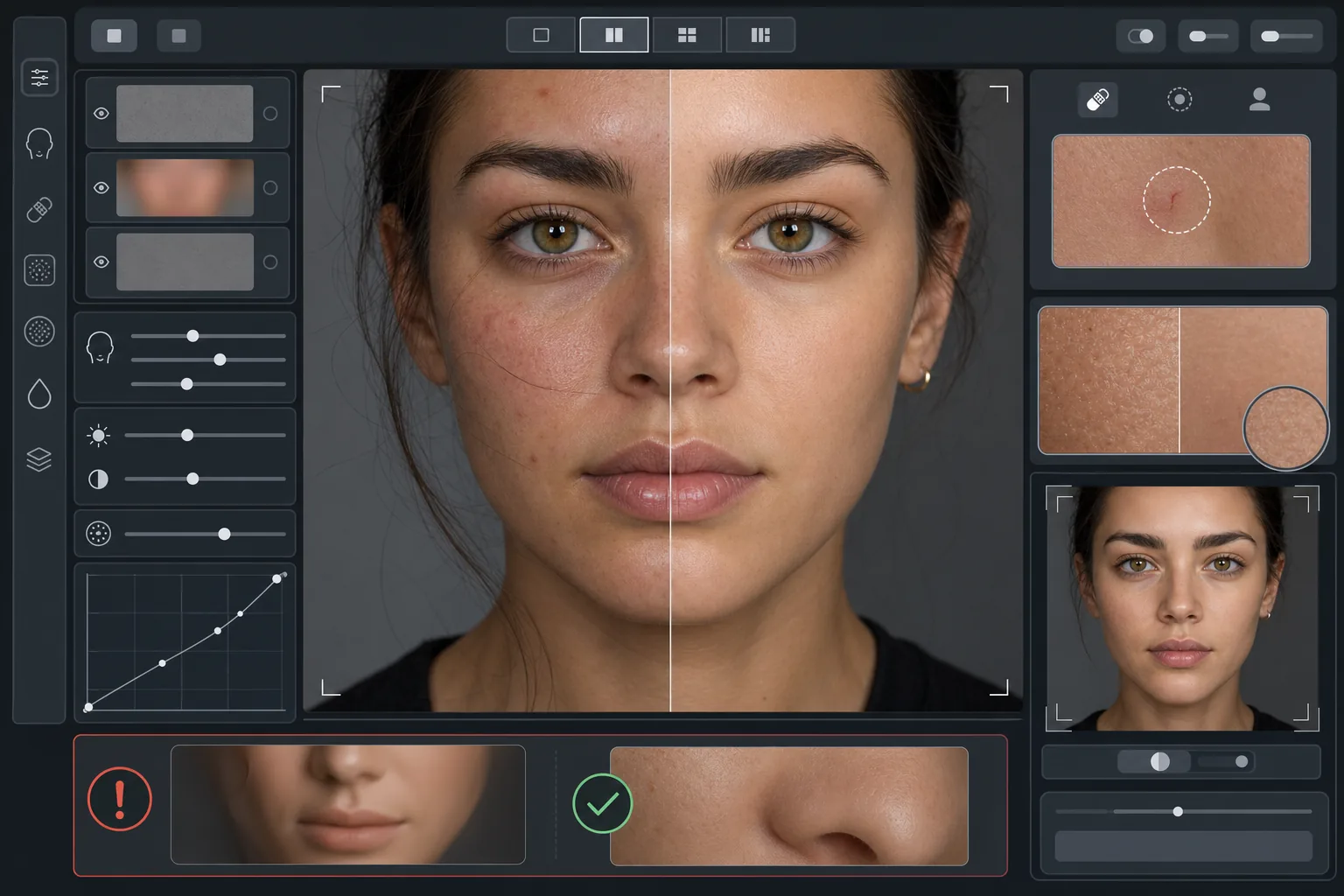
Was diese Vorlage macht
Wendet eine frequenzbewusste Hautretusche an, die Textur und Hautton voneinander trennt. AI Enhance entfernt vorübergehende Unreinheiten (Pickel, Rötungen, Augenringe) und bewahrt zugleich die feine Hauttextur – Poren, Flaum und natürliche Schwankungen –, die das Auge als echt wahrnimmt. Magic Eraser übernimmt die gezielte Punktentfernung dort, wo die KI-Verbesserung zu großflächig wäre, etwa um einen einzelnen Kratzer oder einen Insektenstich zu entfernen, ohne die umliegende Haut zu beeinträchtigen. Das Gesamtergebnis ist eine gleichmäßige, gesund wirkende Haut, die den Zoom-Test besteht.
Vorlageneinstellungen
| Retuscheintensität | Natürlich – zielt auf Unreinheiten und Rötungen ab, bewahrt die Textur |
| Porenerhalt | Vollständig – bewahrt die gesamte natürliche Hauttextur auf Pixelebene |
| Tonausgleich | Moderat – reduziert Flecken und Rötungen, ohne Farbschwankungen einzuebnen |
| Korrektur der Augenpartie | Subtil – hellt Augenringe auf, ohne natürliche Schatten zu beseitigen |
| Beleuchtungsglättung | Füllt harte Schatten und reduziert Lichtflecken durch direktes Blitzlicht |
| Ausgabeauflösung | Entspricht dem Original (bewahrt alle Details für Zuschnitt und Zoom) |
So verwenden Sie diese Vorlage
Porträtfoto hochladen
Verwenden Sie ein gut ausgeleuchtetes Porträt, bei dem das Gesicht scharf fokussiert ist. Die Vorlage funktioniert am besten, wenn die natürliche Hauttextur im Original sichtbar ist – weichgezeichnete oder stark komprimierte Bilder bieten der KI weniger Textur zum Erhalten.
Natürliche Retusche anwenden
AI Enhance erkennt vorübergehende Unreinheiten, ungleichmäßige Rötungen und Tonunregelmäßigkeiten und korrigiert sie, während die darunterliegende Hauttextur vollständig intakt bleibt. Poren, feine Linien und natürliche Farbschwankungen bleiben sichtbar – nur die Unreinheiten ändern sich.
Bestimmte Stellen punktuell korrigieren
Verwenden Sie Magic Eraser für alle verbleibenden einzelnen Stellen, die Sie entfernen möchten – einen abheilenden Kratzer, einen vorübergehenden Ausschlag oder ein verirrtes Haar im Gesicht. Jede Entfernung fügt sich nahtlos in die umliegende natürliche Hauttextur ein.
Bei voller Vergrößerung prüfen und exportieren
Zoomen Sie auf 100 %, um sicherzustellen, dass die Hauttextur intakt ist – die Poren sollten sichtbar und natürlich sein. Wirkt ein Bereich zu glatt, verringern Sie die Retuscheintensität und verarbeiten Sie das Bild erneut. Exportieren Sie in voller Auflösung, um die natürlichen Details zu bewahren.
Profitipps für beste Ergebnisse
- ✓Beginnen Sie mit der niedrigsten Retuscheintensität und erhöhen Sie sie nur bei Bedarf – es ist einfacher, Glättung hinzuzufügen, als eine bereits wegverarbeitete Textur wiederherzustellen.
- ✓Bei Personen mit Akne oder Rosazea entfernt die Vorlage einzelne Unreinheiten, ohne den darunterliegenden Hautton zu verändern – das Ergebnis wirkt wie ein Tag mit reiner Haut, nicht wie eine andere Person.
- ✓Vermeiden Sie es, diese Vorlage mit Beauty-Filtern der Handykamera zu kombinieren – die integrierte Glättung vieler Handykameras reduziert bereits die Textur, und eine doppelte Verarbeitung erzeugt genau den Plastik-Look, den diese Vorlage vermeiden soll.
- ✓Fotografieren Sie nach Möglichkeit im RAW-Format und konvertieren Sie vor dem Hochladen in JPEG – RAW erfasst mehr Daten zur Hauttextur, die die KI bei der Retusche bewahren kann.
Häufige Fragen
Wie unterscheidet sich das von Beauty-Filtern, die die Haut glätten?
+
Beauty-Filter wenden eine gleichmäßige Unschärfe an, die Poren, feine Linien und natürliche Textur auslöscht – und so den unverkennbaren Plastik-Look erzeugt. Diese Vorlage nutzt eine frequenzbewusste Verarbeitung, die Textur und Hautton trennt, Unreinheiten aus der Tonebene entfernt und die Texturebene unberührt lässt. Das Ergebnis sieht aus wie echte Haut, nicht wie eine gerenderte Oberfläche.
Verändert dies die Form der Gesichtszüge?
+
Nein. Die Vorlage beeinflusst nur das Erscheinungsbild der Hautoberfläche – Hautton, Unreinheiten und gleichmäßige Beleuchtung. Sie formt niemals Nase, Kiefer, Augen oder eine andere Gesichtsstruktur um. Die Person sieht genau wie sie selbst aus, nur mit klarerer und gleichmäßiger ausgeleuchteter Haut.
Kann ich das für professionelle Bewerbungsfotos und Portfolioarbeiten verwenden?
+
Ja. Der natürliche Retuschestandard erfüllt die professionellen Erwartungen an Business-Porträts, Schauspielerportfolios, Dating-Profile und soziale Medien, bei denen Authentizität zählt. Die Person wird persönlich genauso aussehen wie auf dem Foto – und genau darum geht es bei natürlicher Retusche.
Bessere Haut, immer noch Sie
Laden Sie ein Porträt hoch und erhalten Sie in Sekunden eine natürliche, texturerhaltende Hautretusche. Kein Plastik-Look, keine unheimliche Glättung – nur Sie an Ihrem besten Tag.
Kostenlos testenRelated templates
More portrait templates for your workflow.
Altersgerechte Retuschiervorlage für Schulporträts. Natürliche Fleckenentfernung, konsistente Hintergründe und Jahrbuch-Standardausgabe mit Stapelverarbeitung für ganze Klassen.
Vorlage für ein Haustierporträt in Studioqualität. Behandelt Fellkanten, entfernt Leinen und Hundeführer, ersetzt Hintergründe und schärft die Augen für Hunde, Katzen und andere Tiere.
Verschönern Sie Neugeborenen- und Babyfotos mit sanften, warmen Tönen, sanfter Hautglättung, Entfernung von Requisiten und Ablenkungen und druckfertigen Größen für Ankündigungen und Wandkunst.
Retuschieren Sie Schwangerschaftsfotos mit sanfter Hautglättung, sanfter Beleuchtung, Hintergrundvereinfachung und warmer Farbabstufung für einen zeitlosen Schwangerschaftsporträt-Look.
Räumen Sie Familienporträts auf, indem Sie Hintergrundablenkungen entfernen, ungleichmäßige Belichtung korrigieren, die Haut auf natürliche Weise glätten und sicherstellen, dass alle im gleichen Bild optimal aussehen.