
Retusche von Schulporträts
Geben Sie jedem Schüler ein Porträt, mit dem er sich wohlfühlt, und bewahren Sie dabei einen natürlichen, altersgerechten Look. Diese Vorlage bewältigt die häufigen Probleme der Schulfotografie — vorübergehende Hautunreinheiten, ungleichmäßiges Licht im Verlauf einer Sitzung und uneinheitliche Hintergründe — und erzeugt jahrbuchtaugliche Bilder mit gleichmäßiger, professioneller Qualität für jeden Schüler einer Klasse.
Diese Vorlage kostenlos testenPortrait template preview
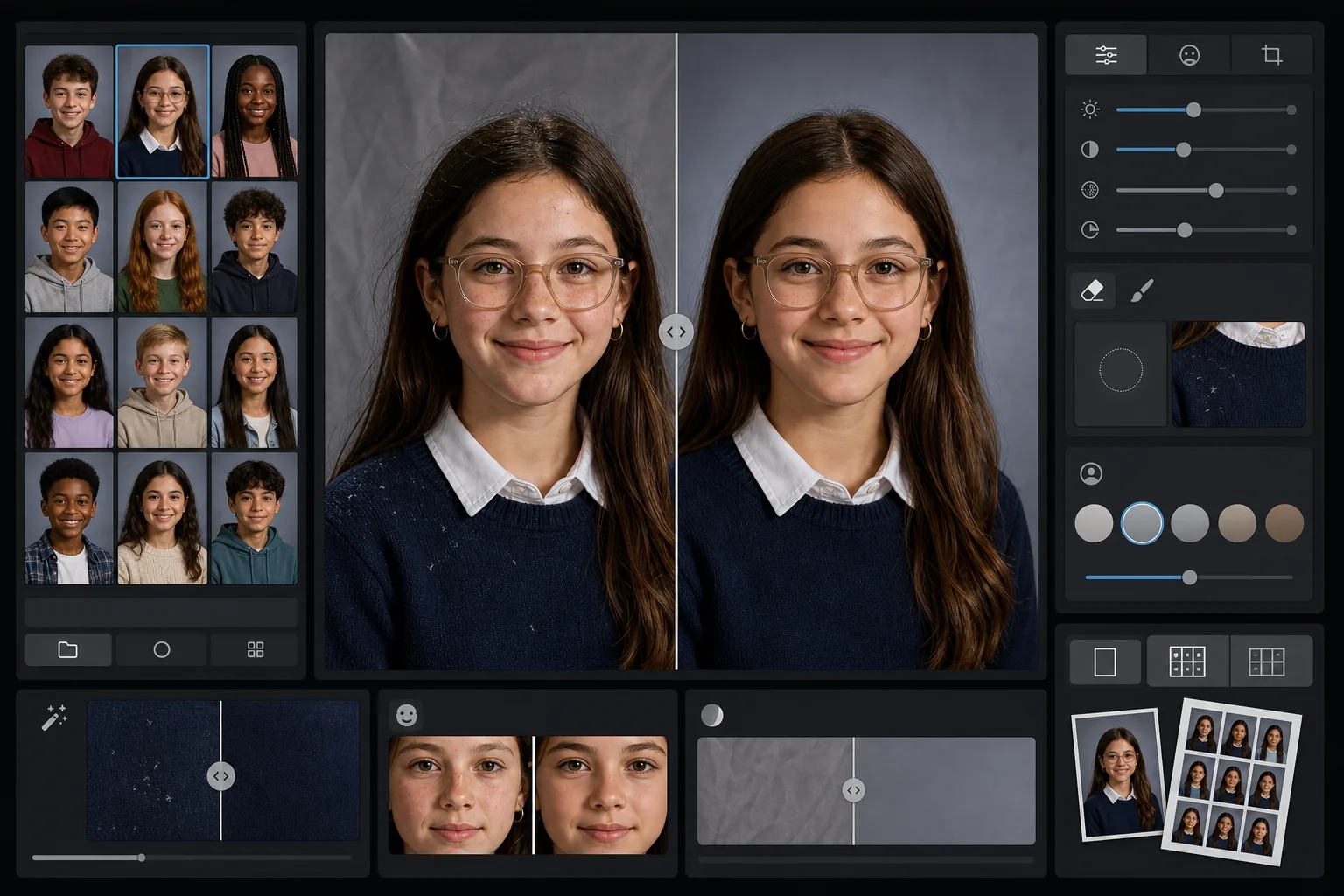
Was diese Vorlage leistet
Wendet auf Schulporträts eine sanfte, altersgerechte Retusche an, die vorübergehende Hautunreinheiten glättet und zugleich das natürliche Erscheinungsbild jedes Schülers bewahrt. AI Enhance korrigiert die ungleichmäßige Belichtung und die Farbverschiebungen, die entstehen, wenn man im Verlauf einer Sitzung Dutzende Schüler unter demselben Lichtaufbau fotografiert. Magic Eraser entfernt verirrte Haare auf der Kleidung, schiefe Kragenkanten und Falten im Hintergrund auf mobilen Hintergründen.
Vorlageneinstellungen
| Retuschestufe | Leicht — entfernt nur vorübergehende Hautunreinheiten, bewahrt Sommersprossen und natürliche Merkmale |
| Ausgabegröße | 1200×1500px (Standardporträt 4:5, 300 DPI in Brieftaschengröße) |
| Hintergrundnormalisierung | Gleicht den Hintergrundton über alle Bilder eines Stapels hinweg ab |
| Belichtungskorrektur | Automatisch — gleicht Lichtschwankungen im Verlauf einer Aufnahmesitzung aus |
| Farbkonsistenz | Einheitlicher Weißabgleich über alle bearbeiteten Porträts |
| Bereinigung verirrter Details | Entfernt fliegende Haare auf den Schultern, Fusseln und Hintergrundfalten |
So verwenden Sie diese Vorlage
Klassenporträts hochladen
Laden Sie ein einzelnes Porträt oder einen ganzen Klassenstapel hoch. Die Vorlage verarbeitet einzelne Bilder ebenso wie Gruppen und wendet auf alle Fotos denselben Retuschestandard an, für eine einheitliche Jahrbuchseite.
Altersgerechte Retusche anwenden
AI Enhance glättet sanft vorübergehende Hautunreinheiten wie einen Pickel oder einen Kratzer, sodass jeder Schüler wie er selbst aussieht. Sommersprossen, Muttermale, Zahnspangen und Brillen bleiben immer erhalten — das Ziel ist eine gepflegte Version ihres echten Aussehens.
Belichtung und Hintergrund normalisieren
Die Lichtverhältnisse ändern sich im Verlauf einer Porträtsitzung, da der Aufbau driftet. Die Vorlage korrigiert Belichtung und Weißabgleich, sodass jeder Schüler gleichmäßig ausgeleuchtet erscheint, und der Hintergrundton stimmt über den gesamten Stapel hinweg überein.
Bereinigen und exportieren
Magic Eraser entfernt kleine Störelemente — eine Fussel auf einem dunklen Pullover, ein verirrtes Haar auf der Stirn, eine Falte im mobilen Hintergrund. Exportieren Sie in jahrbuchüblicher Auflösung für den Druck oder als JPEG mit geringerer Auflösung für die Online-Galerie der Schule.
Profi-Tipps für beste Ergebnisse
- ✓Verarbeiten Sie den gesamten Klassenstapel gemeinsam statt einzeln — die Vorlage nutzt die Gruppe, um eine einheitliche Belichtung und Farbe über alle Porträts hinweg zu kalibrieren.
- ✓Bei Schülern mit Brille sollte das Originalfoto so aufgenommen sein, dass der Schüler das Kinn leicht senkt, um Spiegelungen zu verringern — die KI-Verbesserung funktioniert am besten, wenn die Augen hinter den Gläsern sichtbar sind.
- ✓Führen Sie einen Teststapel von 5 bis 10 Porträts durch, bevor Sie eine ganze Schule verarbeiten, um zu bestätigen, dass die Retuschestufe den Vorgaben Ihres Jahrbuchkomitees entspricht.
- ✓Bewahren Sie die unretuschierten Originaldateien neben den bearbeiteten Versionen auf — manche Eltern bevorzugen das völlig unbearbeitete Foto für den persönlichen Gebrauch.
Häufige Fragen
Ist die Retusche für Kinder und Jugendliche geeignet?
+
Ja. Die Vorlage ist speziell für Motive im Schulalter konzipiert. Sie entfernt nur vorübergehende Hautunreinheiten wie einen Pickel am Fototag — sie formt niemals Gesichtszüge um, verändert den Hautton nicht und wendet keine Glättung an, wie sie bei der Beauty-Retusche für Erwachsene üblich ist. Jeder Schüler sieht aus wie er selbst.
Kann ich eine ganze Klasse oder Schule auf einmal verarbeiten?
+
Ja. Laden Sie bis zu Hunderte von Porträts in einem einzigen Stapel hoch. Die Vorlage wendet identische Retuschestandards an und normalisiert Belichtung, Farbe und Hintergrundkonsistenz über jedes Bild hinweg, sodass die Jahrbuchseite einheitlich wirkt.
Entfernt dies Zahnspangen, Brillen oder Hörgeräte?
+
Nein. Die Vorlage ist darauf ausgelegt, alle dauerhaften und halbdauerhaften Merkmale zu bewahren, darunter Zahnspangen, Brillen, Hörgeräte und medizinische Hilfsmittel. Sie behandelt nur vorübergehende Oberflächenunreinheiten und störende Umgebungselemente wie Fusseln und Hintergrundfalten.
Liefern Sie jahrbuchtaugliche Porträts in Minuten
Laden Sie Schulporträts einzeln oder klassenweise hoch und erhalten Sie einheitliche, natürlich retuschierte Bilder, die druckfertig sind. Jeder Schüler sieht bestmöglich aus.
Kostenlos testenRelated templates
More portrait templates for your workflow.
Vorlage für ein Haustierporträt in Studioqualität. Behandelt Fellkanten, entfernt Leinen und Hundeführer, ersetzt Hintergründe und schärft die Augen für Hunde, Katzen und andere Tiere.
Natürliche Hautretuschierschablone, die Hautunreinheiten entfernt und gleichzeitig Poren und Textur erhält. Gleichmäßige Beleuchtung, kein Plastik-Look – nur bessere Haut vor der Kamera.
Verschönern Sie Neugeborenen- und Babyfotos mit sanften, warmen Tönen, sanfter Hautglättung, Entfernung von Requisiten und Ablenkungen und druckfertigen Größen für Ankündigungen und Wandkunst.
Retuschieren Sie Schwangerschaftsfotos mit sanfter Hautglättung, sanfter Beleuchtung, Hintergrundvereinfachung und warmer Farbabstufung für einen zeitlosen Schwangerschaftsporträt-Look.
Räumen Sie Familienporträts auf, indem Sie Hintergrundablenkungen entfernen, ungleichmäßige Belichtung korrigieren, die Haut auf natürliche Weise glätten und sicherstellen, dass alle im gleichen Bild optimal aussehen.