
Sanftes Leuchten für Baby & Neugeborene
Verleihen Sie Neugeborenen- und Babyfotos die weiche, warme, ätherische Qualität einer professionellen Studioaufnahme. Diese Vorlage fügt eine sanfte Wärme hinzu, glättet die Haut behutsam und passend für die Säuglingsfotografie, entfernt ablenkende Requisiten und Unordnung im Hintergrund und richtet die Ausgabe für Geburtsanzeigen, Wandbilder und das Teilen in sozialen Netzwerken aus.
Diese Vorlage kostenlos testenPortrait template preview
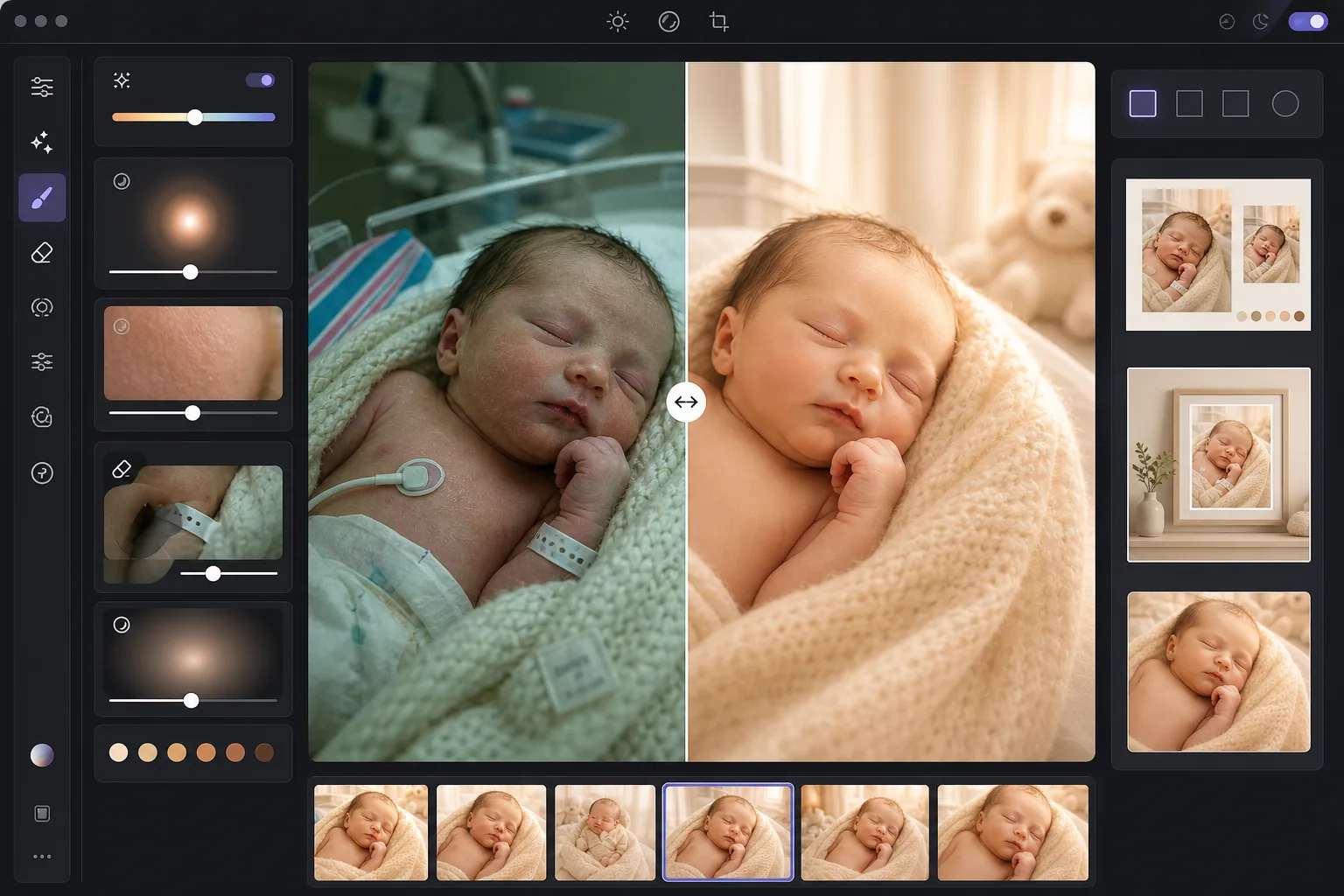
Was diese Vorlage leistet
Verwandelt unbearbeitete Neugeborenen- und Babyfotos — ob mit dem Smartphone im Krankenhaus oder bei einer Fotosession zu Hause aufgenommen — in die weichen, leuchtenden Bilder, die Eltern in Ehren halten. AI Enhance fügt einen sanften warmen Ton hinzu, der die Haut des Neugeborenen schmeichelt, hellt Schatten auf, ohne die weiche Stimmung zu verlieren, und verleiht ein dezentes leuchtendes Strahlen, das das Bild in Wärme hüllt. Die Hautglättung ist eigens für Säuglinge abgestimmt — sie gleicht die fleckige Rötung aus, die bei Neugeborenenhaut häufig ist, und bewahrt zugleich den feinen Flaum, der Babyfotos echt wirken lässt. Magic Eraser entfernt Krankenhausarmbänder, Infusionsschläuche, Monitorkabel, Windelränder, Schnullerclips und Unordnung im Hintergrund des Kinderzimmers.
Vorlageneinstellungen
| Warmth | +10 Wärme mit goldener Mittelton-Verschiebung (auf Neugeborenenhaut optimiert) |
| Soft glow | Leuchtendes Aufblühen der Lichter (Radius 40px, Deckkraft 25%) |
| Skin smoothing | Auf Säuglinge abgestimmt (verringert Fleckigkeit, bewahrt den Flaum) |
| Shadow lift | +0,5 EV in den Schatten mit weichem Übergang (keine harte Wiederherstellung) |
| Vignette | Sanfte warme Vignette (lenkt den Blick zur Mitte, 15% Randabdunklung) |
So verwenden Sie diese Vorlage
Baby- oder Neugeborenenfotos hochladen
Laden Sie Fotos von Neugeborenen, Säuglingen oder Kleinkindern hoch, die im Krankenhaus, zu Hause oder im Studio aufgenommen wurden. Die Vorlage passt sich verschiedenen Lichtsituationen an — grellem Krankenhaus-Neonlicht, weichem Fensterlicht im Kinderzimmer oder gemischtem Licht zu Hause. Sowohl Smartphone- als auch professionelle Kamerabilder werden unterstützt.
Wärme und sanftes Leuchten anwenden
AI Enhance fügt den Mitteltönen einen warmen goldenen Ton und den Lichtern ein weiches Leuchten hinzu und erzeugt so die träumerische, ätherische Qualität, die man mit professioneller Neugeborenenfotografie verbindet. Die Schattenbereiche werden behutsam aufgehellt, um Details in eingewickelten Decken und dunklem Haar sichtbar zu machen, ohne einen flachen, überbearbeiteten Eindruck zu erzeugen.
Haut glätten und Störendes entfernen
Die Säuglings-Hautglättung gleicht die fleckige Rötung und trockene Schuppung aus, die bei Neugeborenenhaut häufig sind, und bewahrt dabei feines Haar und die natürliche Hauttextur. Magic Eraser entfernt Krankenhausarmbänder, Monitorkabel, aus Tüchern hervorlugende Windelränder, Etiketten an Decken sowie Gegenstände im Hintergrund wie Wäschekörbe oder Steckdosen.
Für Drucke und Anzeigen exportieren
Laden Sie in mehreren Größen herunter: 5x7 und 4x6 für Geburtsanzeigenkarten, 8x10 und 11x14 für gerahmte Wandbilder und 1080x1080 quadratisch für Geburtsanzeigen auf Instagram. Alle Ausgaben erfolgen mit 300 DPI für einen scharfen Druck auf Fotopapier oder Karton.
Profi-Tipps für beste Ergebnisse
- ✓Das beste Licht für Neugeborenenfotos ist weiches, indirektes Fensterlicht aus einer Richtung. Wenn Sie zu Hause fotografieren, platzieren Sie das Baby am Vormittag oder am späten Nachmittag in der Nähe eines großen Fensters mit durchscheinenden Gardinen. Die Vorlage hebt dieses natürliche Licht wunderschön hervor, während grelles direktes Sonnenlicht Schatten erzeugt, die sie mühsamer korrigieren muss.
- ✓Bei Krankenhausfotos mit Neonlicht von der Decke entfernt die Vorlage den grünen Farbstich und wärmt das Bild deutlich auf. Die harten Schatten der Deckenneonröhren bleiben jedoch als leicht aufgehellte dunkle Bereiche unter Kinn und Nase sichtbar. Eine Pflegekraft zu bitten, das Deckenlicht auszuschalten, und stattdessen Fensterlicht oder eine weiche Lampe zu nutzen, ergibt einen deutlich besseren Ausgangspunkt.
- ✓Beim Entfernen von Krankenhausarmbändern positionieren Sie das Band so, dass es auf der sichtbaren Oberfläche des Handgelenks liegt, statt herumgewickelt und teilweise verdeckt zu sein. Ein vollständig sichtbares Band lässt sich von der KI sauberer entfernen als eines, das hinter Hautfalten verschwindet.
- ✓Bei posierten Neugeborenenfotos mit Tüchern und Requisiten bewahrt die Vorlage die Textur von Strickdecken, geflochtenen Körben und Fellüberwürfen und glättet nur die Haut des Babys. Bearbeiten Sie zuerst ein Testbild, um zu bestätigen, dass die Tuchtextur erhalten bleibt, bevor Sie die gesamte Session im Stapel verarbeiten.
Häufige Fragen
Ist die Hautglättung für Neugeborenenfotos unbedenklich?
+
Die Hautglättung ist eigens auf Säuglingshaut abgestimmt. Sie verringert die fleckigen roten Stellen, Storchenbisse und trockene Schuppung, die in den ersten Wochen häufig sind, ohne den feinen Flaum (Lanugo), die Augenbrauendetails und die winzigen Wimpern zu entfernen, die Neugeborenenfotos echt wirken lassen. Das Ergebnis sieht aus wie gesunde, ebenmäßige Haut und nicht wie eine retuschierte Puppe.
Kann das Smartphone-Krankenhausfotos verbessern?
+
Ja, und das ist einer der häufigsten Anwendungsfälle. Krankenhauszimmer haben grelles Neonlicht, das die Haut des Neugeborenen grünlich wirken lässt und unvorteilhafte Schatten von der Decke erzeugt. Die Vorlage korrigiert den Farbstich, mildert die Schatten, wärmt den Gesamtton auf und entfernt sichtbare medizinische Geräte, sodass aus einem klinisch wirkenden Smartphone-Foto ein warmes, intimes Porträt wird.
Welche Druckgrößen unterstützt die Ausgabe?
+
Die Vorlage gibt mit 300 DPI aus, was je nach Auflösung des Originalbildes scharfe Drucke in 5x7, 8x10, 11x14 und 16x20 Zoll ermöglicht. Ein gewöhnliches 12-Megapixel-Smartphone-Foto kann scharfe Drucke bis 11x14 Zoll liefern. Höher aufgelöste Kamerabilder unterstützen 16x20 und größer.
Verwandeln Sie kostbare Momente in zeitlose Porträts
Laden Sie Neugeborenen- und Babyfotos hoch und erhalten Sie weiche, warme, professionell gestaltete Bilder, bereit für Geburtsanzeigen, Wandbilder und das Teilen in sozialen Netzwerken.
Kostenlos testenRelated templates
More portrait templates for your workflow.
Altersgerechte Retuschiervorlage für Schulporträts. Natürliche Fleckenentfernung, konsistente Hintergründe und Jahrbuch-Standardausgabe mit Stapelverarbeitung für ganze Klassen.
Vorlage für ein Haustierporträt in Studioqualität. Behandelt Fellkanten, entfernt Leinen und Hundeführer, ersetzt Hintergründe und schärft die Augen für Hunde, Katzen und andere Tiere.
Natürliche Hautretuschierschablone, die Hautunreinheiten entfernt und gleichzeitig Poren und Textur erhält. Gleichmäßige Beleuchtung, kein Plastik-Look – nur bessere Haut vor der Kamera.
Retuschieren Sie Schwangerschaftsfotos mit sanfter Hautglättung, sanfter Beleuchtung, Hintergrundvereinfachung und warmer Farbabstufung für einen zeitlosen Schwangerschaftsporträt-Look.
Räumen Sie Familienporträts auf, indem Sie Hintergrundablenkungen entfernen, ungleichmäßige Belichtung korrigieren, die Haut auf natürliche Weise glätten und sicherstellen, dass alle im gleichen Bild optimal aussehen.