
Schwangerschaftsfoto-Retusche
Erstellen Sie zeitlose Schwangerschaftsporträts mit einer sanften Retusche, die die Schönheit der Schwangerschaft feiert. Diese Vorlage glättet die Haut behutsam und bewahrt dabei die natürliche Textur, fügt einen warmen, leuchtenden Schimmer hinzu, vereinfacht Hintergründe, um den Fokus auf die werdende Mutter zu legen, und betont den Faltenwurf der Stoffe sowie die Bauchkonturen durch subtile Lichtmodellierung.
Diese Vorlage kostenlos testenPortrait template preview
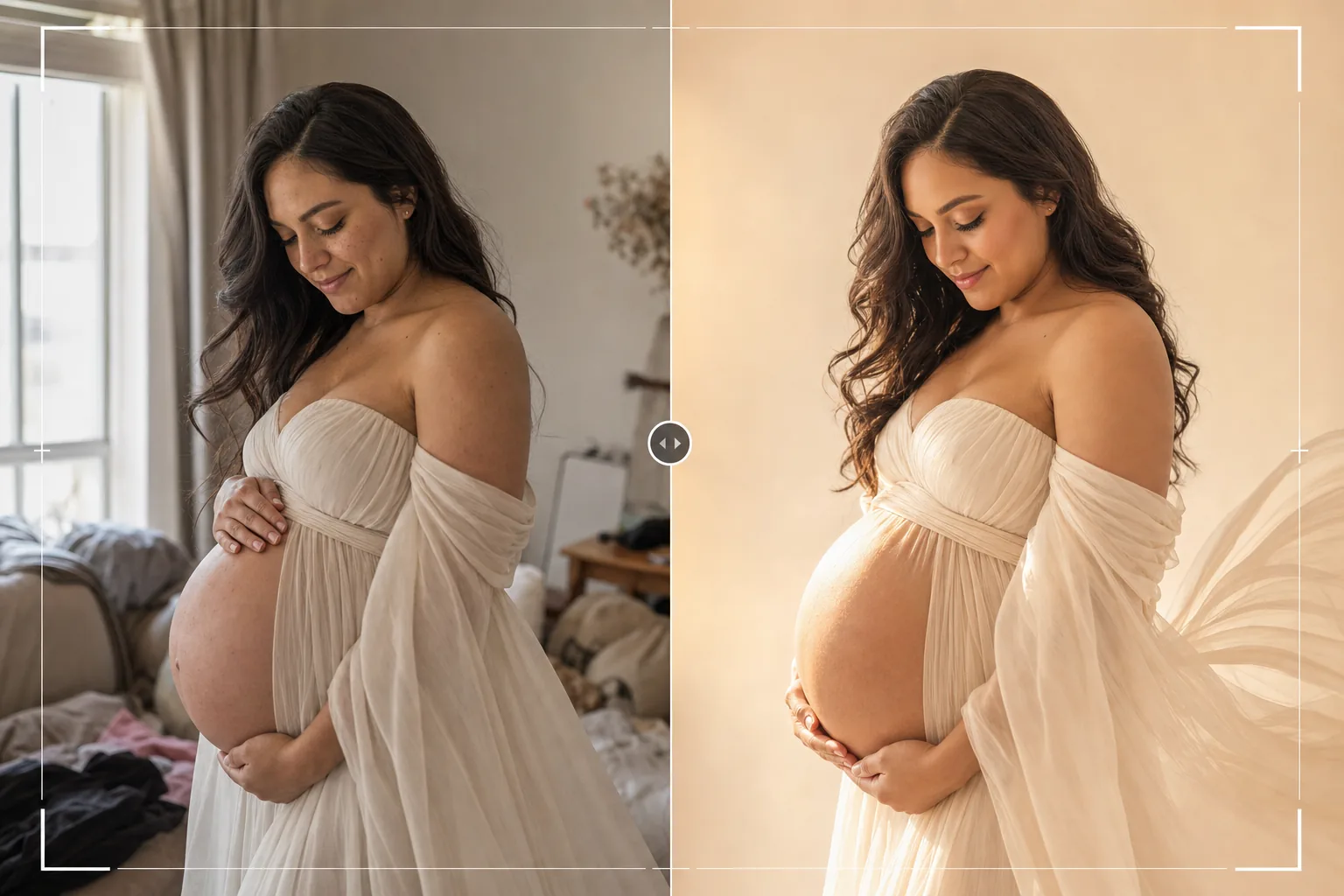
Was diese Vorlage macht
Wendet eine professionelle Schwangerschaftsporträt-Retusche an, die der in der Schwangerschaftsfotografie beliebten weichen, leuchtenden Ästhetik folgt. Die Haut wird sanft geglättet, um Dehnungsstreifen und Unreinheiten zu reduzieren, während das natürliche Strahlen der Schwangerschaft erhalten bleibt – das Ergebnis vermeidet den plastischen, überretuschierten Look. AI Enhance fügt ein weiches, warmes Aufhelllicht hinzu, das sich um die Bauchkontur legt und den Faltenwurf von Umstandskleidern und Tüchern hervorhebt. Magic Eraser entfernt störende Elemente im Hintergrund – Möbel, Unordnung, andere Personen – und schafft so eine klare, zeitlose Komposition, die sich ganz auf die werdende Mutter konzentriert.
Vorlageneinstellungen
| Hautglättung | Sanfte Frequenztrennung (bewahrt Textur, reduziert Spuren) |
| Schimmereffekt | Warmes, leuchtendes Hüllicht auf den Lichtern der Haut |
| Farbabstufung | Warme Erdtöne (goldene Haut, gedämpfter Hintergrund) |
| Hintergrund | Vereinfachen und weichzeichnen (sanftes Verwischen) oder durch neutralen Ton ersetzen |
| Ausgabeauflösung | 5000px lange Kante (druckfertig bei 300 DPI bis 16×12) |
So verwenden Sie diese Vorlage
Laden Sie Ihr Schwangerschaftsfoto hoch
Laden Sie ein Schwangerschaftsporträt hoch – eine professionelle Studioaufnahme, eine Outdoor-Session zur goldenen Stunde oder ein Setup zu Hause mit Fensterlicht. Die Vorlage funktioniert am besten mit Fotos, die zwischen der 30. und 38. Woche aufgenommen wurden, wenn der Bauch ausgeprägt ist. Sowohl posierte Studioporträts als auch spontane Lifestyle-Momente werden unterstützt.
Haut- und Schimmerverbesserung
AI Enhance wendet mit einem Frequenztrennungs-Ansatz eine sanfte Hautglättung an, die Dehnungsstreifen, Venen und vorübergehende Unreinheiten reduziert, während die natürliche Hauttextur sichtbar bleibt. Ein warmer Schimmer wird den Lichtern der Haut hinzugefügt und erzeugt den leuchtenden, strahlenden Look, der mit professioneller Schwangerschaftsfotografie verbunden ist.
Hintergrundvereinfachung
Magic Eraser entfernt störende Elemente aus dem Hintergrund – Möbel, Unordnung, Steckdosen und andere Personen. Der Hintergrund wird weichgezeichnet und entsättigt, um eine Trennung zwischen Motiv und Umgebung zu schaffen und die gesamte Aufmerksamkeit auf die Mutter zu lenken.
Export für Druck und Alben
Laden Sie mit 5000px langer Kante herunter für große Abzüge, Doppelseiten in Schwangerschaftsalben oder Wandkunst fürs Kinderzimmer. Die warme Erdton-Farbabstufung druckt sich sowohl auf glänzendem als auch auf mattem Fotopapier wunderschön und harmoniert mit neutralen Farbschemata des Kinderzimmers.
Profi-Tipps für beste Ergebnisse
- ✓Das Licht der goldenen Stunde (die Stunde vor Sonnenuntergang) schafft den schmeichelhaftesten Ausgangspunkt für Schwangerschaftsporträts. Seitliches Licht aus einem niedrigen Sonnenwinkel modelliert die Bauchkontur auf natürliche Weise und erzeugt den warmen Schimmer, den die Vorlage verstärkt, anstatt ihn künstlich zu erzeugen.
- ✓Fließende Stoffe – Chiffon, Seidentücher und lange Kleider – wirken nach der Verbesserung deutlich schöner, weil die Vorlage die Stofftextur schärft und das auf Falten und Faltenwurf treffende Licht betont. Eng anliegende Kleidung funktioniert ebenfalls, profitiert aber nicht so stark von der Stofftextur-Verbesserung.
- ✓Nehmen Sie neben den direkten Porträts auch Silhouettenaufnahmen in Ihre Session auf. Die Vorlage verarbeitet gegenlichtbeleuchtete Silhouetten, indem sie das Konturlicht um das Bauchprofil verstärkt und den Körper zugleich als eindrucksvolle dunkle Form vor einem hellen Hintergrund belässt.
- ✓Bei Schwangerschaftsfotos mit Partner oder Familie positionieren Sie die werdende Mutter als visuellen Mittelpunkt, mit Partnern und Geschwistern leicht dahinter oder seitlich. Diese natürliche Tiefenstaffelung hilft der Vorlage, die Mutter zu betonen und auf sie zu fokussieren, während die Familienmitglieder scharf bleiben.
Häufige Fragen
Wie stark wird die Haut geglättet?
+
Die Glättung ist so kalibriert, dass sie natürlich aussieht – sie reduziert das Erscheinungsbild von Dehnungsstreifen, Venen und Unreinheiten um etwa 60–70%, während sichtbare Hauttextur, Poren und das natürliche Schwangerschaftsstrahlen erhalten bleiben. Das Ergebnis sieht aus wie schöne Haut, nicht wie mit der Airbrush bearbeitete Haut.
Kann damit ein mit dem Smartphone aufgenommenes Schwangerschaftsfoto verbessert werden?
+
Ja. Smartphone-Fotos, die in der Nähe eines Fensters oder im Freien aufgenommen wurden, liefern hervorragende Ergebnisse. Die Vorlage korrigiert das für Smartphone-Kameras typische flache Licht, indem sie eine gerichtete Wärme hinzufügt, die eine professionelle Studiobeleuchtung auf Bauch und Gesicht simuliert.
Ist das für alle Körpertypen geeignet?
+
Die Vorlage verbessert Beleuchtung und Hautqualität, ohne Körperform oder Proportionen zu verändern. Es wird kein Schlankmachen, Umformen oder Verändern des Körpers angewendet. Das Ziel ist es, jede werdende Mutter strahlend so aussehen zu lassen, wie sie ist.
Feiern Sie die Schwangerschaft mit Porträts, die strahlen
Laden Sie Ihre Schwangerschaftsfotos hoch und erhalten Sie sanft retuschierte, leuchtende Porträts mit weicher Haut, warmen Tönen und klaren Hintergründen.
Kostenlos testenRelated templates
More portrait templates for your workflow.
Altersgerechte Retuschiervorlage für Schulporträts. Natürliche Fleckenentfernung, konsistente Hintergründe und Jahrbuch-Standardausgabe mit Stapelverarbeitung für ganze Klassen.
Vorlage für ein Haustierporträt in Studioqualität. Behandelt Fellkanten, entfernt Leinen und Hundeführer, ersetzt Hintergründe und schärft die Augen für Hunde, Katzen und andere Tiere.
Natürliche Hautretuschierschablone, die Hautunreinheiten entfernt und gleichzeitig Poren und Textur erhält. Gleichmäßige Beleuchtung, kein Plastik-Look – nur bessere Haut vor der Kamera.
Verschönern Sie Neugeborenen- und Babyfotos mit sanften, warmen Tönen, sanfter Hautglättung, Entfernung von Requisiten und Ablenkungen und druckfertigen Größen für Ankündigungen und Wandkunst.
Räumen Sie Familienporträts auf, indem Sie Hintergrundablenkungen entfernen, ungleichmäßige Belichtung korrigieren, die Haut auf natürliche Weise glätten und sicherstellen, dass alle im gleichen Bild optimal aussehen.